Managing dozens of browser profiles doesn’t have to mean repetitive clicking, endless typing, or constant context switching. The Antidetect Browser Synchronizer is a powerful feature designed to mirror actions from a single primary window to multiple secondary windows simultaneously.
Key Takeaways: Why Use a Synchronizer?
- Efficiency: Control 10, 50, or 100+ windows from one "Primary" profile.
- Security: Avoid detection with "Human-like" typing delays.
- Accuracy: Eliminate manual data entry errors with bulk text injection.
What is an Antidetect Browser Synchronizer?
An antidetect browser synchronizer is a specialized tool that allows users to control multiple isolated browser profiles from a single master window. It replicates every mouse movement, keyboard stroke, click, and scroll across all connected windows in real-time.
By using MostLogin’s synchronizer, you maintain digital fingerprint isolation for each account while performing bulk operations as if you were only using one browser. This is essential for dramatically reducing your daily workload.
Top 4 Ways a Synchronizer Improves Your Workflow
1. Eliminates Repetitive Manual Work
Instead of manually typing URLs into dozens of windows, the synchronizer opens them all with one click. The Tabs Panel allows you to sync, close, or refresh tabs across all synced profiles instantly, ensuring every window stays on the same page.
2. Error-Free Bulk Text Input
MostLogin’s Text Management module offers three intelligent ways to input data:
- Unified Text: Broadcasts identical content (logins, search queries) to all syncing windows.
- Random Number: Injects unique numeric values—perfect for unique IDs.
- Personalized Text: Maps specific strings (like unique passwords) to specific profiles.
- Random Text: Automatically generates random strings mixing letters, numbers, and special characters with an optional capitalized first letter. With this module, you no longer need to manually create unique passwords for every account.
3. Human-like Automation (Anti-Detection)
To stay under the radar of platforms like Facebook, Amazon, or Google, MostLogin includes Human-like Typing settings. It adds randomized delays between keystrokes and clicks to mimic real user behavior, preventing server-side flags.
4. Professional Window Arrangement
No more messy desktops. Use the Window Arrangement tool to tile or overlap windows in a clean grid. You can also unify window sizes to match the primary window for pixel-perfect synchronization.
Real-World Use Cases for Multi-Account Syncing
| Scenario | How the Synchronizer Helps |
| Social Media | Publish content to 50+ accounts simultaneously. |
| E-commerce | Update inventory and pricing across multiple storefronts at once. |
| Affiliate Marketing | Test ad campaigns across various locations and profiles. |
| Crypto/Airdrops | Connect wallets and submit forms in bulk across dozens of profiles. |
How to Use MostLogin’s Synchronizer: Step-by-Step
Step 1: Launch Browser Profiles
Sign in to MostLogin desktop client. Open at least two browser profiles that you want to work with.
Tips: If you are synching profiles with various kernels (aka, MostChrome), the synchronization may not work as well as with the same kernel. We recommend using profiles with the same MostChrome version to ensure a smoother synchronization experience.
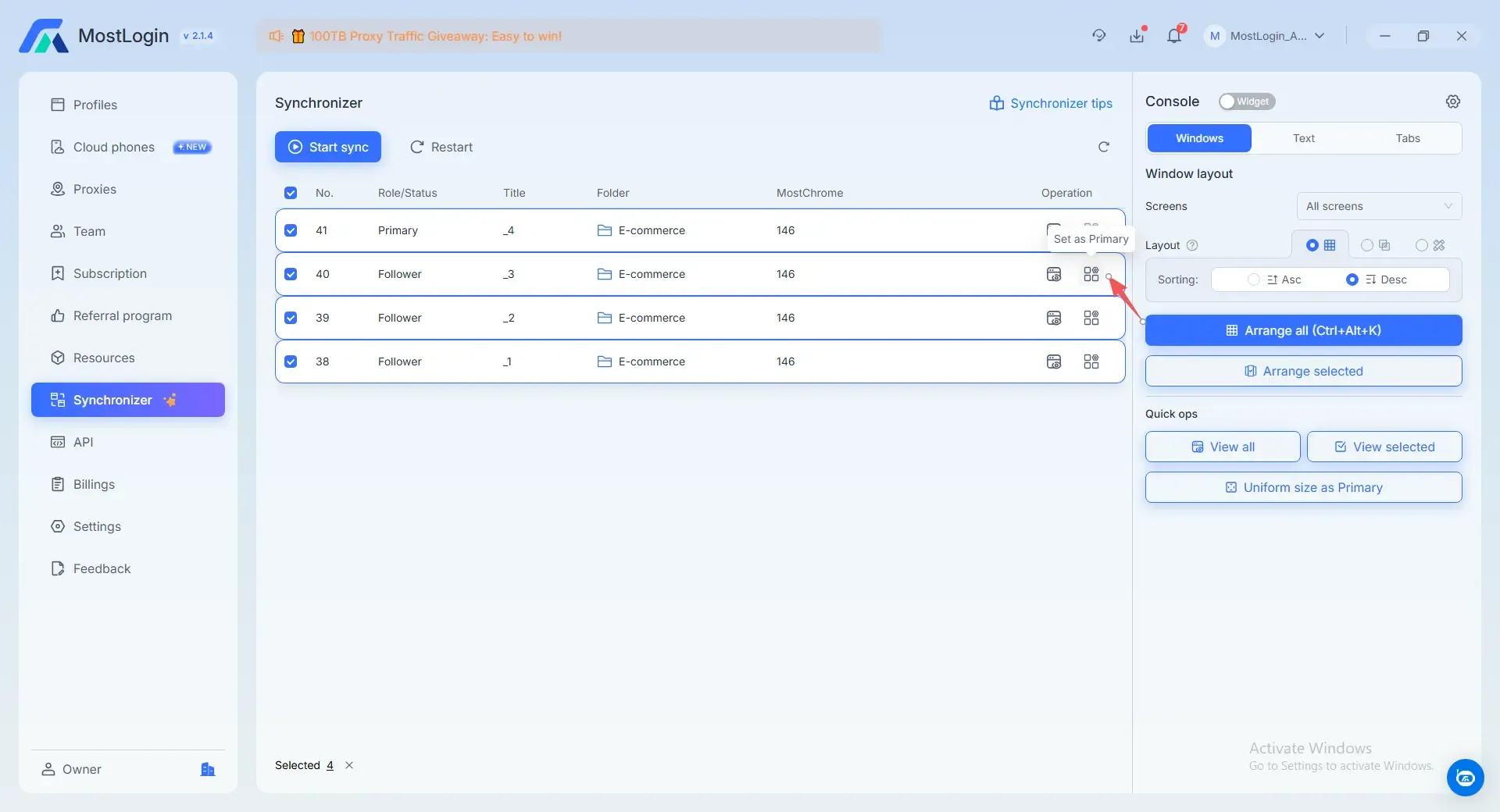
Step 2: Set a Primary Window
Navigate to the Synchronizer tab and you will see all the profiles you open. Before you start syncing, you need to select a primary which profiles will lead the movement. You can use the default Primary or select as you want.
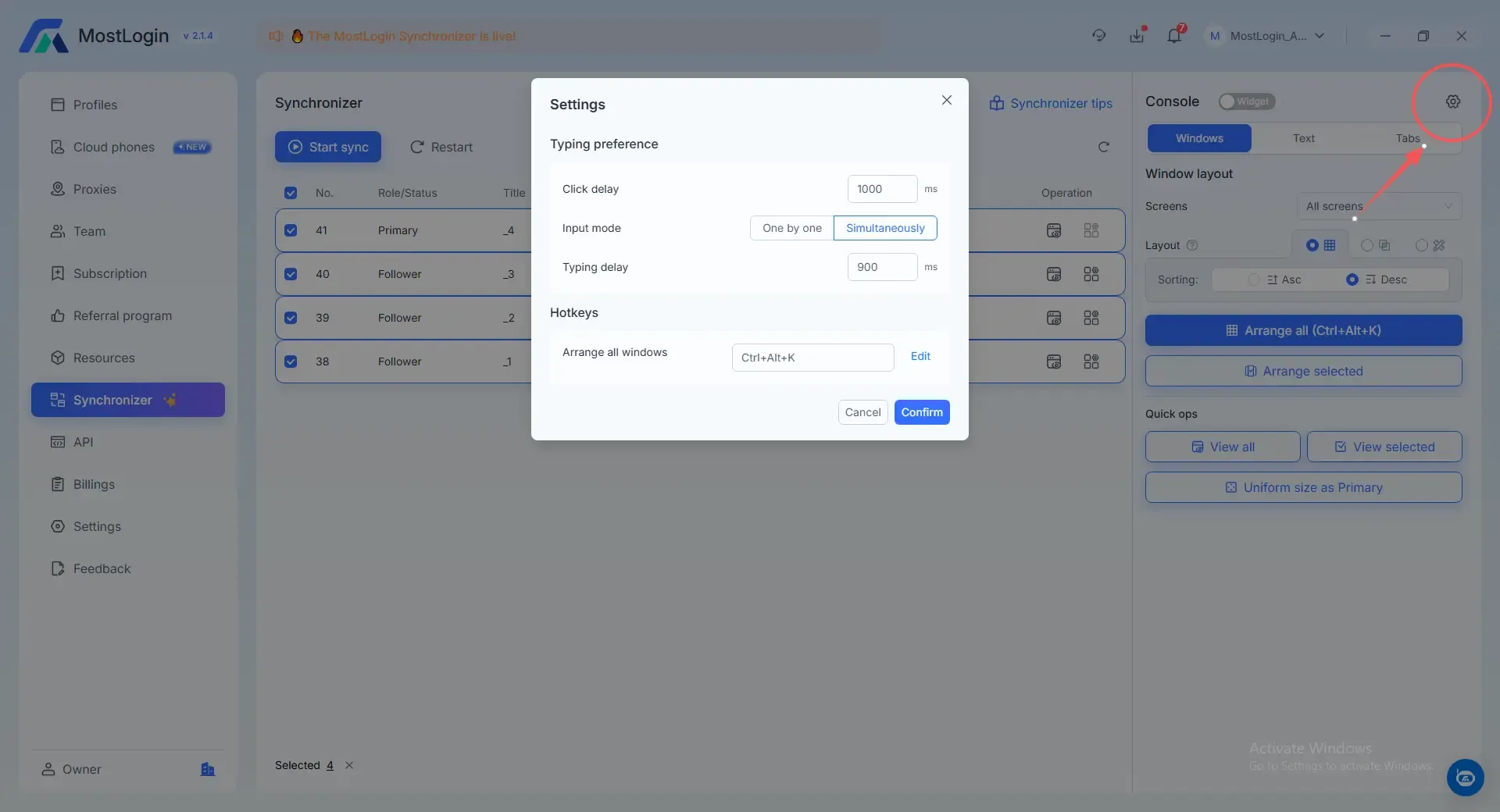
Step 3: Configure Human-like Typing
Click the Gear Icon to set a typing delay (50–100ms recommended) and click delay. Choose between Simultaneous mode for speed or One by One for maximum stealth.
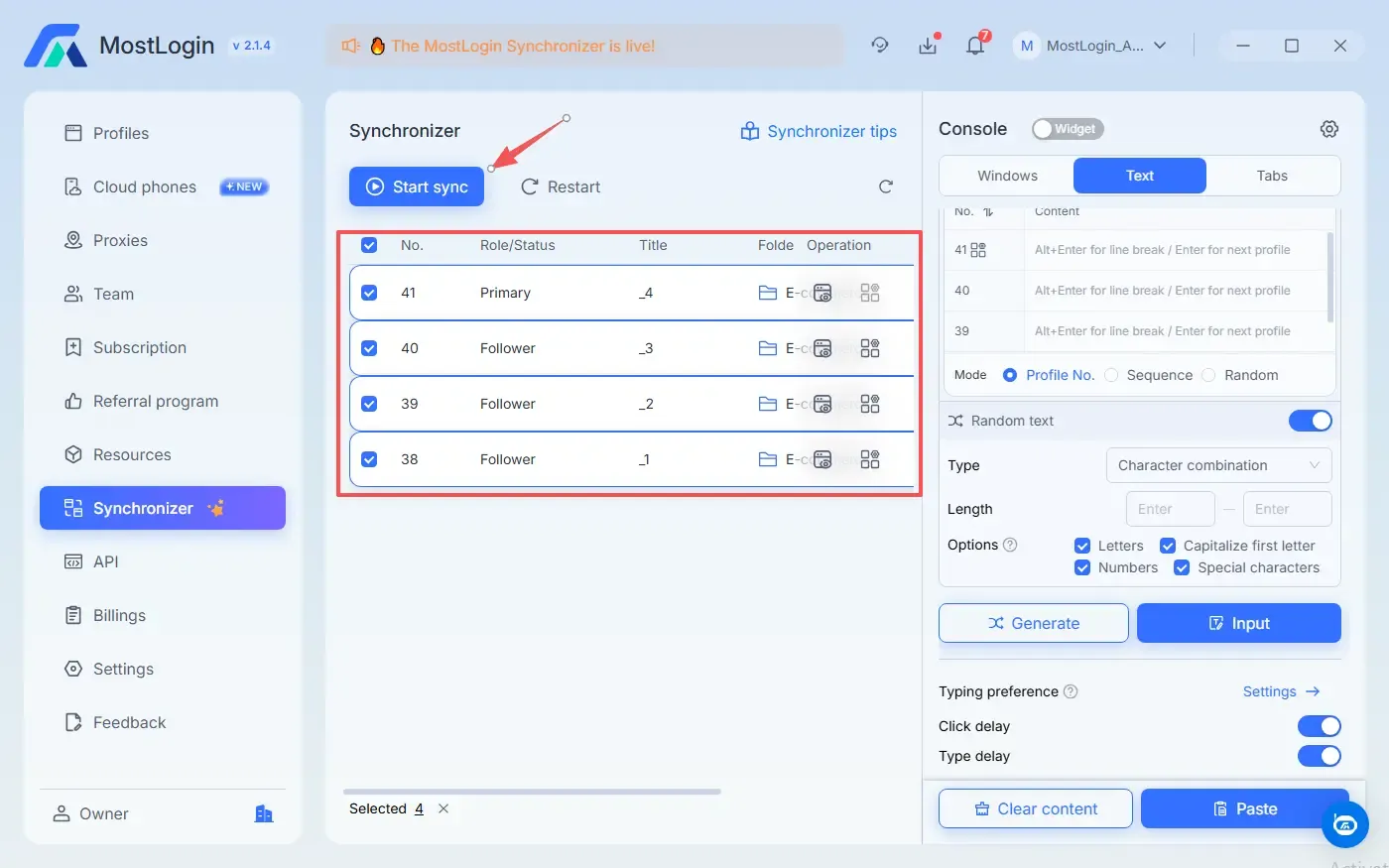
Step 4: Start the Synchronizer
Click the Start sync button in the upper left.
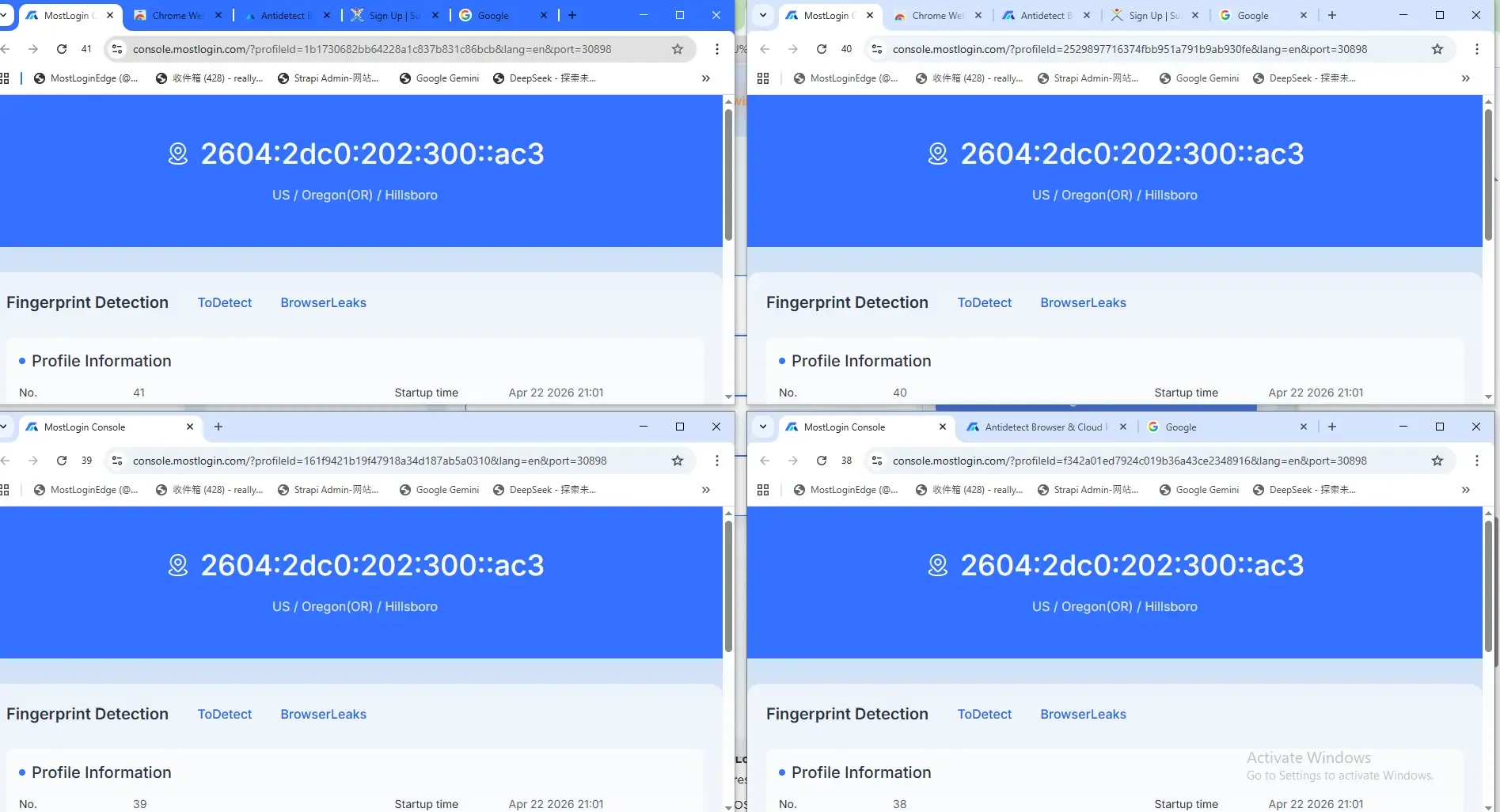
Step 5: Execute Actions
Any action taken in the Master window—scrolling, clicking, or typing—is now mirrored across all secondary windows.
Some pro tips
- Open a website on all profiles at the same time: use Open Links function under Tabs. Type your destinate URL in the text box and click Open. You will see all the profile windows open the same webpage.
- Activate the Synchronizer Widget: You can detach the widget and minimize the client to use it more conveniently.
- Quick Ops: Easily view all open profile windows, filter for selected windows, or instantly match the size of all profiles to the Primary window.
- Select Display Screen: Choose between a specific monitor or a multi-screen setup via the Screens dropdown under the Windows tab to better organize your workspace.
For detailed instructions and expert tips, visit our Help Center. Need further assistance? Our support team is ready to help in our Telegram and WhatsApp groups.
Why Choose MostLogin?
API & Automation: Advanced users can use the Local API to integrate with Playwright, Puppeteer or Selenium.
Team Collaboration: Share profiles and synced workflows with teammates using granular permission controls.
Frequently Asked Questions (FAQ)
Is the synchronizer available on macOS?
The synchronization function currently works on Windows, with a macOS version in active development.
Can I sync Chrome extension pop-ups?
Yes! MostLogin supports the synchronization of extension pop-ups and cross-screen operations.
Does the synchronizer work with proxies?
Absolutely. Each browser window remains isolated with its own assigned HTTP(S) or SOCKS5 proxy, even while being controlled by the synchronizer.
How many profiles can I sync at once?
MostLogin is built to handle thousands of profiles. While the software has no strict limit, the actual synchronization speed and performance will depend on your device’s hardware capabilities and internet connection.
Final Thoughts
An antidetect browser synchronizer is the ultimate "force multiplier" for digital professionals. By combining MostLogin’s fingerprint protection with real-time action mirroring, you can scale your business without scaling your workload.