As anti-fraud systems and the algorithm of each platform becomes more intelligent, simply changing your IP address or browser fingerprint is sometimes not enough. Platforms today analyze behavior, not just your digital environment.
That’s exactly why the MostLogin desktop client has introduced a powerful new feature: Human-Like Typing.
In this article, we’ll explain what Human-Like Typing is, why it matters for your account longevity, and how you can start using it to strengthen your anti-detect strategy.
What Is Human-Like Typing?
Human-Like Typing is a behavioral simulation feature designed to make automated or assisted typing actions look and feel like they are performed by a real person.
Instead of "pasting" text instantly or typing at a perfectly constant speed, Human-Like Typing reproduces the subtle "imperfections" of human interaction. This includes:
● Variable Typing Speed: Fluctuating speeds based on character complexity.
● Natural Delays: Hesitation before starting to type.
In short, it replaces machine-perfect input with human-imperfect behavior. This is critical because modern platforms don’t just see what you type—they analyze how you type.
Why Do You Need Human-Like Typing?
If you’ve ever experienced accounts getting flagged despite using clean fingerprints or high-quality proxies, the culprit was likely behavioral fingerprinting.
The Problem With “Perfect” Typing
Traditional automation tools often trigger red flags because they usually have below problems:
1. Fill complex forms in 0.1 seconds.
2. Type with identical millisecond-precision speed every time.
3. Skip the natural pauses a human takes when thinking or looking at a keyboard.
To platforms like Google, Meta, TikTok, Amazon, or Shopee, this looks unnatural—because it is.
How Human-Like Typing Solves This
By mimicking real user input patterns, MostLogin reduces behavioral anomalies. If you care about account longevity, not just short-term access, Human-Like Typing is no longer optional—it’s essential.
Strengthening Your Anti-Detect Browser Strategy
Anti-detect browsers traditionally focus on environment isolation, such as:
● Browser fingerprints (Canvas, WebGL, WebRTC)
● Cookies and local storage
● Timezones, languages, and OS parameters
MostLogin already excels at these technical layers. Furthermore, Human-Like Typing adds the missing behavioral layer.
From "Who You Are" to "How You Act"
Platforms now ask dynamic questions: How fast does this user type? Do they pause naturally? Does their behavior stay consistent across sessions?
With Human-Like Typing enabled, MostLogin ensures that:
● Your behavior matches your hardware fingerprint.
● Each profile acts like a distinct, real individual.
● Automated workflows blend seamlessly into normal user traffic.
Real-World Use Cases
This feature is a game-changer for several industries:
● Multi-Account Management: Manage hundreds of profiles without cross-linking behavior.
● E-commerce Operations: Safely operate on Amazon, Shopee, and eBay.
● Social Media Warming: Naturally grow TikTok or Facebook accounts.
● Account farming: Equip your accounts with authentic user behaviors across every platform.
How to Use Human-Like Typing in MostLogin
Getting started is simple. There is no scripting or complicated setup required.
Step 1: Update MostLogin
Ensure you are running the latest version of the MostLogin desktop application to access the new behavioral settings. You can download the latest version here.
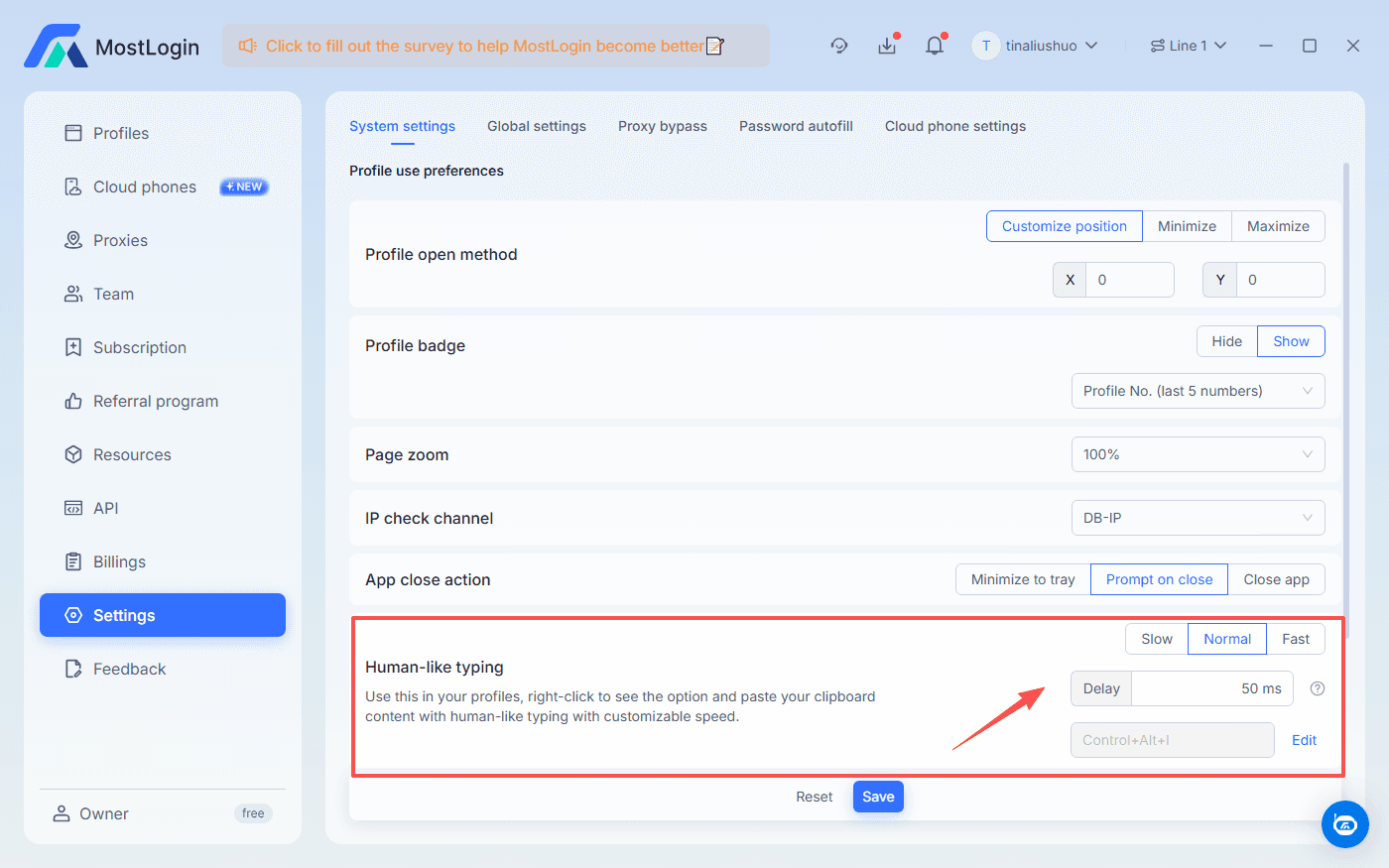
Step 2: Set the Parameters in Settings
Open Desktop Client and Navigate to Settings. In this part you could adjust how you want the Human-Like Typing behaves with speed mode, delay time, and create/edit a shortcut key. Don't forget to save the settings before you leave this section.
Step 3: Work Naturally
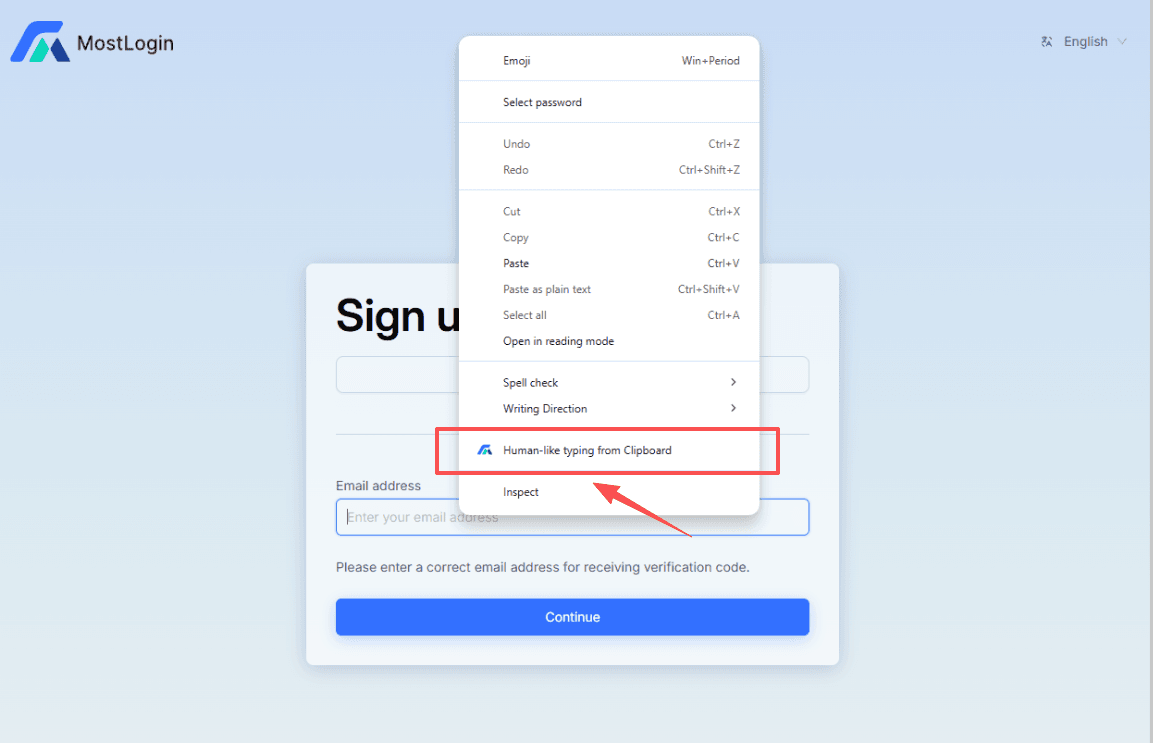
Copy the content you want to past in browser. Open text box on any of the profile, and right click. You will see the Human-like typing from Clipboard option. Select it by a single click and then it will type just as you set up. Once enabled, your manual typing will feel natural, and any assisted input will behave like real human interaction. No extra effort is required on your part.
The Future of Anti-Detect: Behavioral Stability
Detection systems are moving away from static fingerprints toward dynamic analysis. By adding Human-Like Typing, MostLogin helps you stay ahead of these trends and build stable, long-lasting operations.
This feature isn’t just about "tricking" a system; it’s about matching reality. That is exactly what a next-generation anti-detect browser should do.
Final Thoughts
If you are serious about account safety and scalability, you need tools that act human. Sign up to MostLogin and login to desktop client today to experience the difference that behavioral simulation makes.