Join MostLogin 100TB Proxy Traffic Giveaway. New Users Can Unlock Another 10GB.

Learn morearrowRight

A Beginner-Friendly Guide to the Best Antidetect Browser for Multi-Account Management

authorBryan
author2026.06.26
book0 minutes read
A beginner looking for the best antidetect browser needs more than just a fancy tool name – you need a clear, safe, and affordable way to run multiple accounts without constant bans or technical headaches. This guide walks you through that, step by step, using a beginner-friendly workflow built around MostLogin anti-detect browser.
 

Why Beginners Struggle With Multi-Account Work


Running multiple accounts on platforms like Facebook, TikTok, Shopee, or Amazon sounds simple until you face real problems: sudden bans, constant phone or email verifications, or one ban spreading to all of your “related” accounts. These issues usually come from using the same IP address, browser fingerprint, and device environment for everything.
 
A normal browser plus a random proxy often cannot solve this. Platforms can still connect your accounts using advanced fingerprinting methods such as Canvas, WebGL, WebRTC, audio fingerprint, fonts, timezone, and language. The result is that several accounts you thought were “separate” actually look like one suspicious user.
 
An antidetect browser is built specifically to break this pattern. It gives every account its own isolated browser environment with a unique fingerprint, so platforms see them as different devices. For beginners, a tool like MostLogin combines this fingerprint browser with an integrated cloud phone (Android in the cloud), so you can handle both web and mobile accounts in one place while keeping the workflow simple and cost-effective.
 

What Is an Antidetect Browser and How Does It Work?


An antidetect browser is a special browser that lets you create many independent “profiles,” each behaving like a separate physical device. Each profile has its own cookies, cache, IP address, browser fingerprint, and sometimes even virtual hardware parameters. When you log into different accounts from different profiles, platforms have a much harder time linking them together.
 
Core elements of this fingerprint include:
  • Browser fingerprint: Canvas, WebGL, audio, fonts, plugins, WebRTC, user agent, screen size, OS type, timezone, language, and more.
  • IP address: Assigned through proxies (datacenter, residential, or mobile). Each profile uses its own IP.
  • Environment isolation: One profile does not share cookies or storage with another, so cross-contamination is minimized.
 
This is particularly important for e‑commerce sellers, social media agencies, affiliate marketers, SEO professionals, and Web3 users who must safely manage many identities. A strong candidate for the best antidetect browser provides deep fingerprint control while keeping the interface understandable for beginners, which is exactly where MostLogin focuses its design.
 

Why Proxies Matter and How to Set Up Proxy in Anti-Detect Browser


The golden rule for using an antidetect browser is simple: 1 profile = 1 account = 1 IP proxy. If you reuse the same proxy across too many important accounts, you increase the risk that one ban will pull the others down with it.
 
Common proxy types you will see:
  • Datacenter proxies: Hosted in data centers, fast and cheap, but sometimes easier for platforms to recognize as non-residential.
  • Residential proxies: Use IP addresses from real home internet connections, more trustworthy but usually more expensive.
  • Mobile / 4G / 5G proxies: Use mobile carrier networks; often considered high quality for social apps and harder to block, but cost more per GB or per IP.
 
For beginners, the right choice depends on your use case:
  • Social media and marketplace accounts (Facebook, TikTok, Shopee, Lazada, etc.) often work best with residential or mobile proxies.
  • Web scraping, SEO checks, or bulk data collection can use cheaper datacenter proxies if the platform allows.
The best antidetect browser should support HTTP, SOCKS5, residential, and mobile IP proxies and make them easy to configure on a per-profile basis. tools like MostLogin let you plug in almost any proxy provider using standard host, port, and authentication fields, so you can control costs by picking the right proxy type while using a free browser core.
 

Why Many “Best Antidetect Browser” Tools Still Fail Beginners


Even after paying for a “top” antidetect browser, many beginners still run into problems:
  • The interface is packed with technical fields that look intimidating: too many fingerprint sliders, advanced headers, obscure network options.
  • Some tools charge per profile or per device, making it expensive to test and learn.
  • Certain products claim strong fingerprint protection but run on outdated cores or do not cover all key fingerprint surfaces, increasing the risk of hidden correlation.
  • They only support desktop, with no integrated mobile or Android environment, so you still have to buy extra phones or use emulators.
 
A truly beginner-friendly best antidetect browser must solve these issues by providing:
  • Simple, opinionated defaults that “just work” for most users.
  • Transparent, affordable pricing that scales from solo users to teams.
  • Coverage for both web-based and mobile app-based accounts, ideally in one ecosystem.
This is the gap MostLogin aims to fill: a powerful engine wrapped in a workflow that a new user can understand within a single session.
 

Why MostLogin Is a Strong “Best Antidetect Browser” Candidate for Beginners


MostLogin positions itself as a free, professional-grade antidetect browser with integrated cloud phone, making it attractive for both beginners and advanced teams.
 
Key advantages:
  • Free anti-detect browser with 10 profiles: You can create thousands of isolated browser profiles without paying a seat fee during the Pioneer program, which is ideal when you are testing your strategy or just starting a side project. Users can also enjoy 10 free profiles to use forever.
  • Realistic fingerprints: Built on Chromium kernels, MostLogin simulates realistic device and browser environments instead of random noise. That helps reduce suspicion from platforms that check for abnormal fingerprints.
  • Full proxy support: MostLogin supports HTTP, SOCKS5, residential, and mobile IP proxies per profile, with easy configuration and tagging options for teams.
  • Cloud Phone integration: A native “Cloud Phone” function gives you real Android devices in the cloud to run mobile apps using the same account strategy as your browser profiles, without having to buy stacks of physical phones.
If you want to explore the tool, you can visit the MostLogin anti-detect browser homepage at MostLogin official site.
 

Step-by-Step: How to Get Started With the Best Antidetect Browser (MostLogin)


Create Your Account and Install the App


To get started, go to the official MostLogin website and sign up for a free account. After registration, download the desktop client for Windows or macOS, run the installer, and log in with your credentials.
 
Once inside, you will see:
  • A sidebar with folders and profile management.
  • A main list showing existing browser profiles.
  • Buttons for creating profiles quickly.
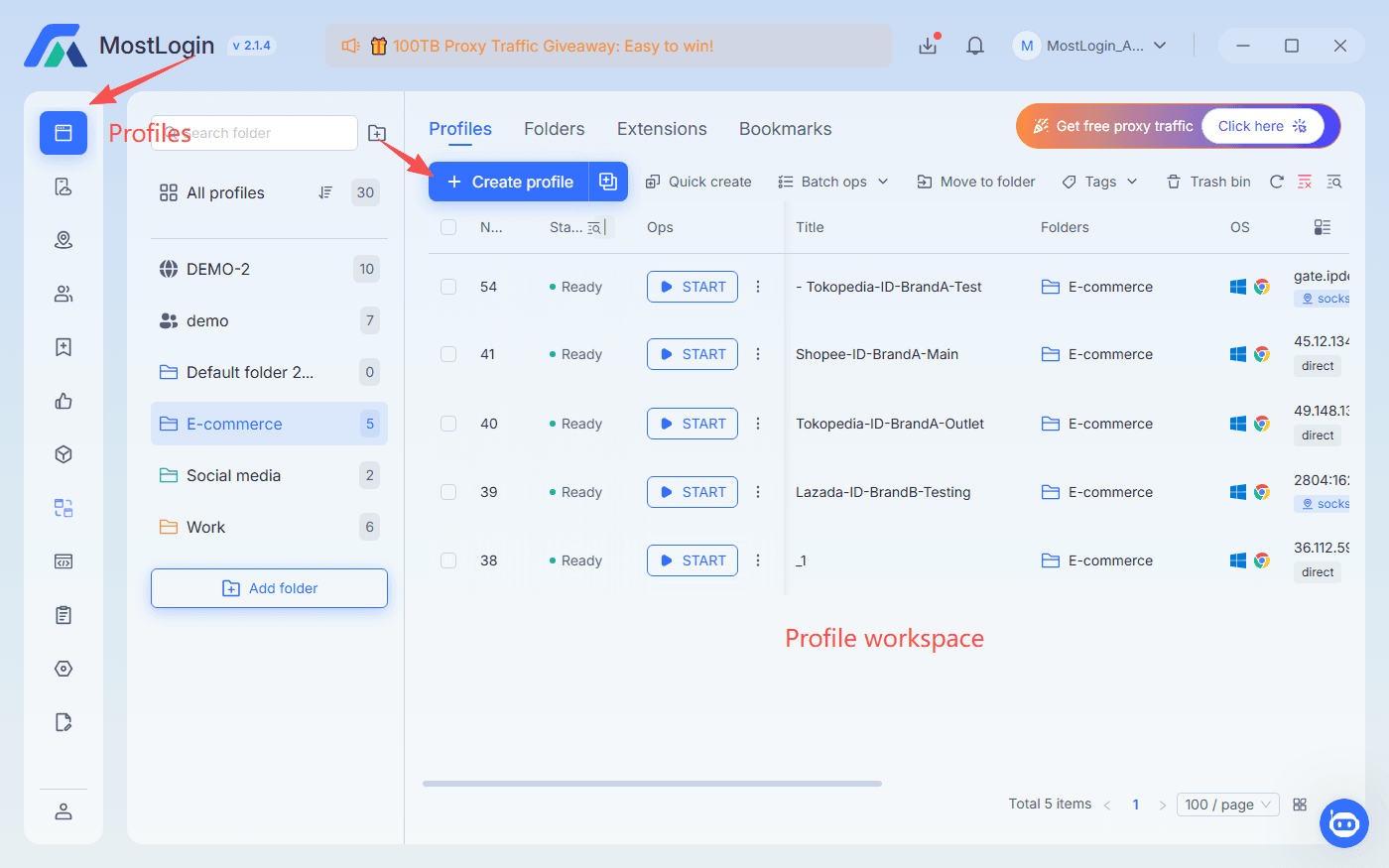
 
If you are ready to install, you can use the anchor Download MostLogin antidetect browser via the download page:
how to set up proxy in anti-detect browser


Create Your First Browser Profile


Next, create a new profile. You can use either a “Quick Create” function or a more detailed “Create profile” dialog depending on how much control you want.
 
Basic recommendations for your first profile:
  • Browser core: Update to the latest kernal and use Chromium-based core for maximum compatibility with most websites.
  • Language and timezone: Match these to your target country or the country of your proxy to keep the fingerprint consistent.
  • Operating system: Pick a realistic OS (e.g., Windows for a desktop-style user).
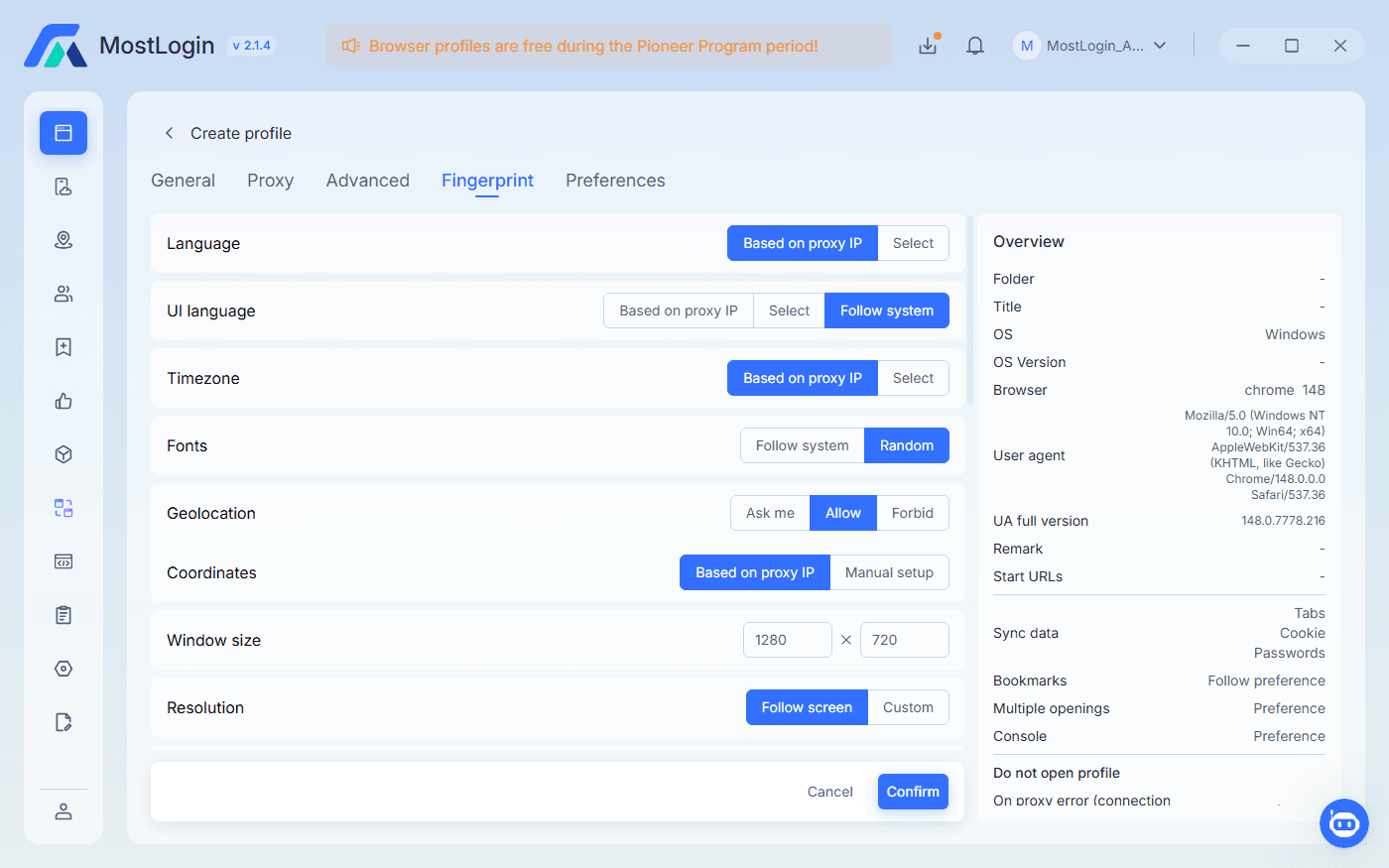
MostLogin will automatically generate a fingerprint for you, so there is no need to tweak every parameter. For beginners, it is usually safer to accept recommended defaults rather than trying to randomize everything manually.
how to set up proxy in anti-detect browser

How to Set Up Proxy in Anti-Detect Browser Profiles


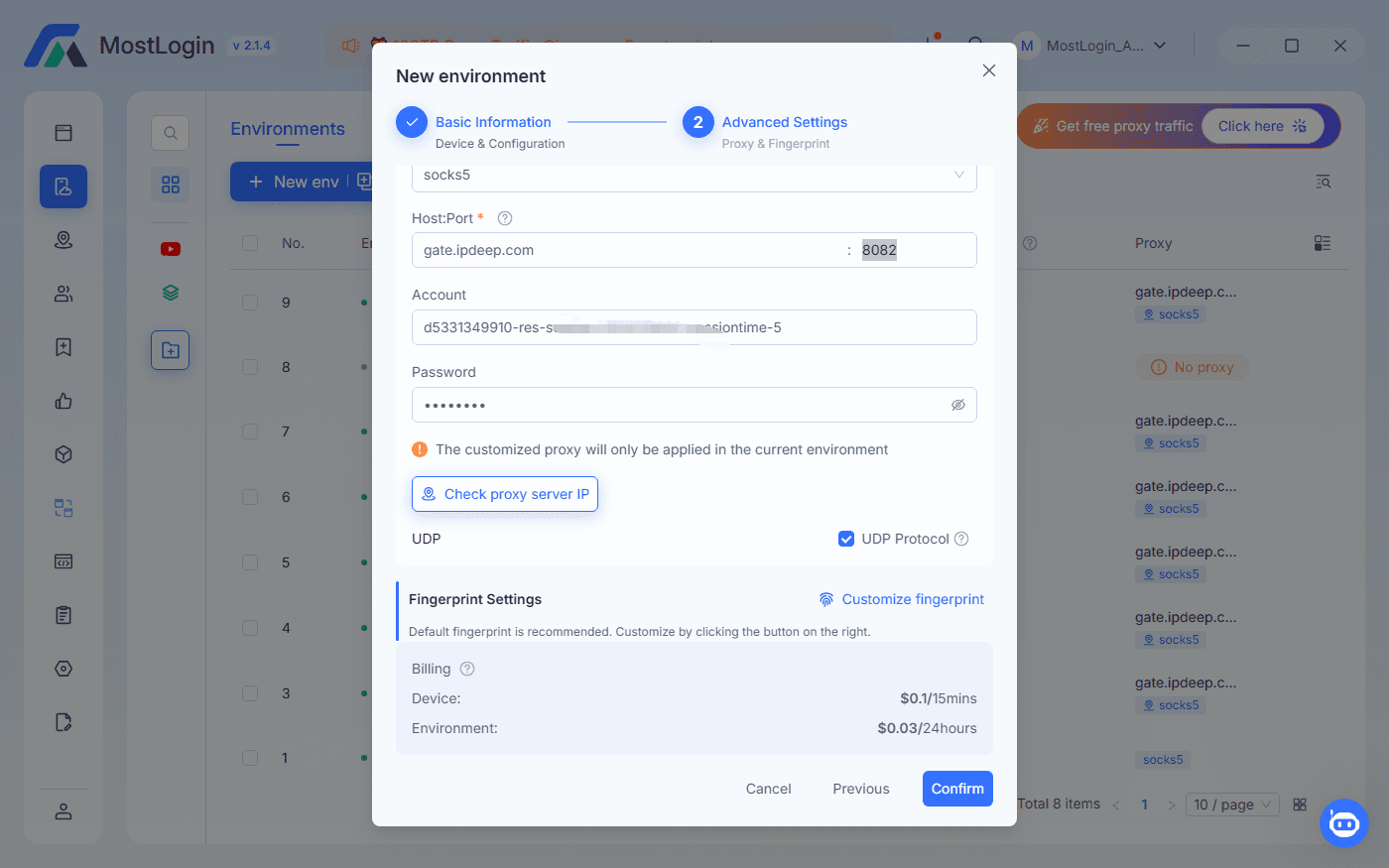
Inside the profile settings, find the proxy configuration section. You will normally see fields such as:
  • Protocol (HTTP/HTTPS or SOCKS5)
  • Host (IP or domain of your proxy server)
  • Port
  • Username and password (if your proxy requires authentication)
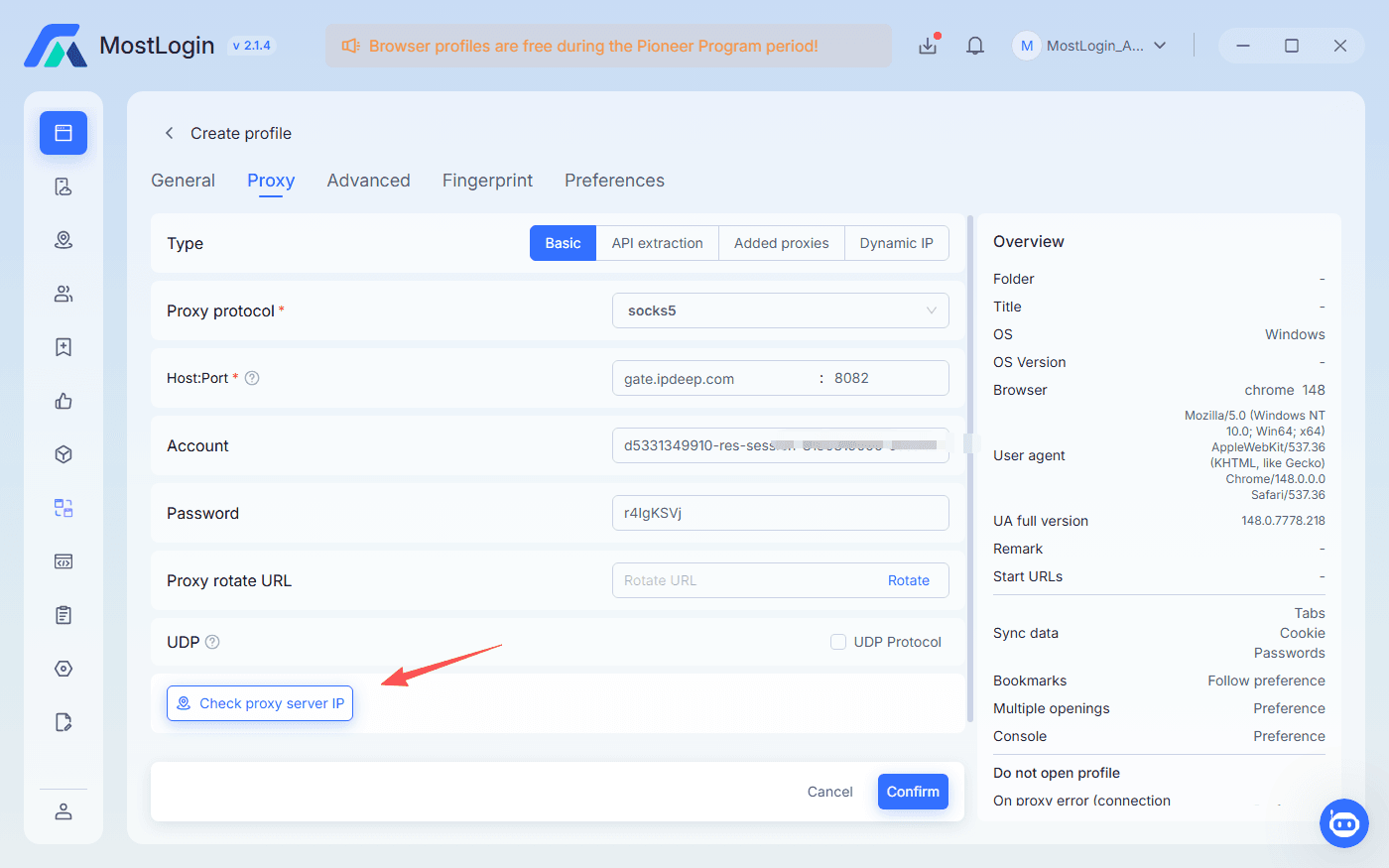
 
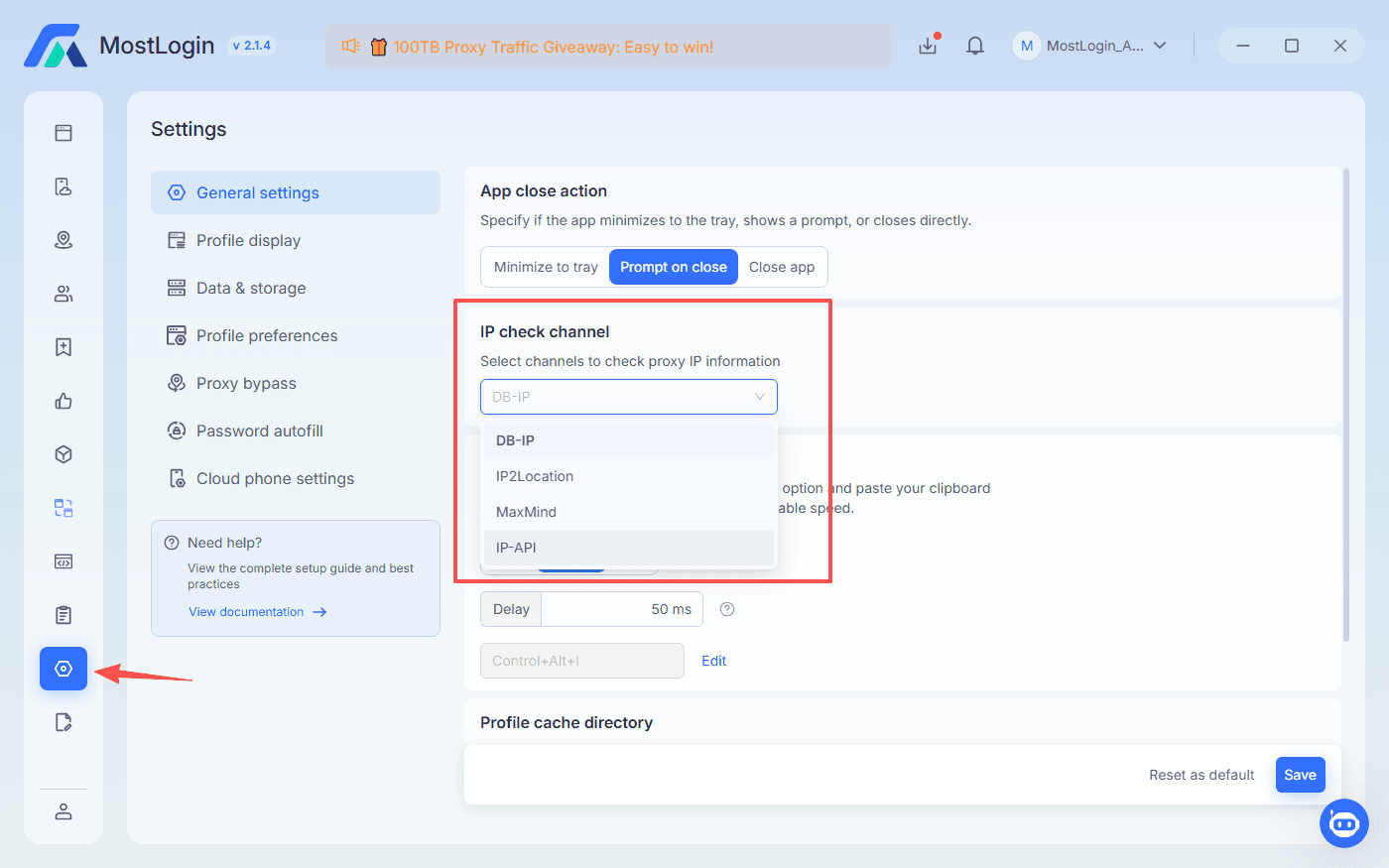
Enter the details from your proxy provider and save the configuration. Then, test your proxy by checking proxy server IP. You can choose the IP check vendor in Settings --> General settings --> IP check channel.
how to set up proxy in anti-detect browser
 
how to set up proxy in anti-detect browser
Practical tips:
  • Use one dedicated proxy for each important account.
  • Avoid free public proxies, which are often abused and blacklisted.
  • Label your proxies in a way that connects them to the country or platform they belong to (for example, “US‑TikTok‑Resi‑01”).


Open and Operate Your Profile Safely


With the proxy configured, launch the profile and log into your target platform. Act like a real user:
  • Complete your profile gradually instead of filling everything in seconds.
  • Avoid mass-creating or mass-logging into accounts from the same IP in a short time.
  • Do not log into one account from different profiles or IPs unless you know exactly why you are doing it.
For organization, you can use a naming convention like “FB‑US‑Resi‑Account01” for both the profile name and an external spreadsheet. This helps you avoid mixing up accounts and proxies as you scale.
 

Extending to Mobile: Use Cloud Phone With MostLogin Client


Many platforms are shifting their focus to mobile apps. If you only rely on desktop browsers, you may hit limits or see more security checks. That is where Cloud Phone comes in.
 
Cloud Phone in MostLogin is a real Android device running on a remote server that you control from your computer. Each cloud phone instance has:
  • Its own Android version and device model.
  • Its own network environment, and you can bind dedicated IP to it.
  • Its own app installations, data, and configuration.
 

Quick Cloud Phone Setup Workflow
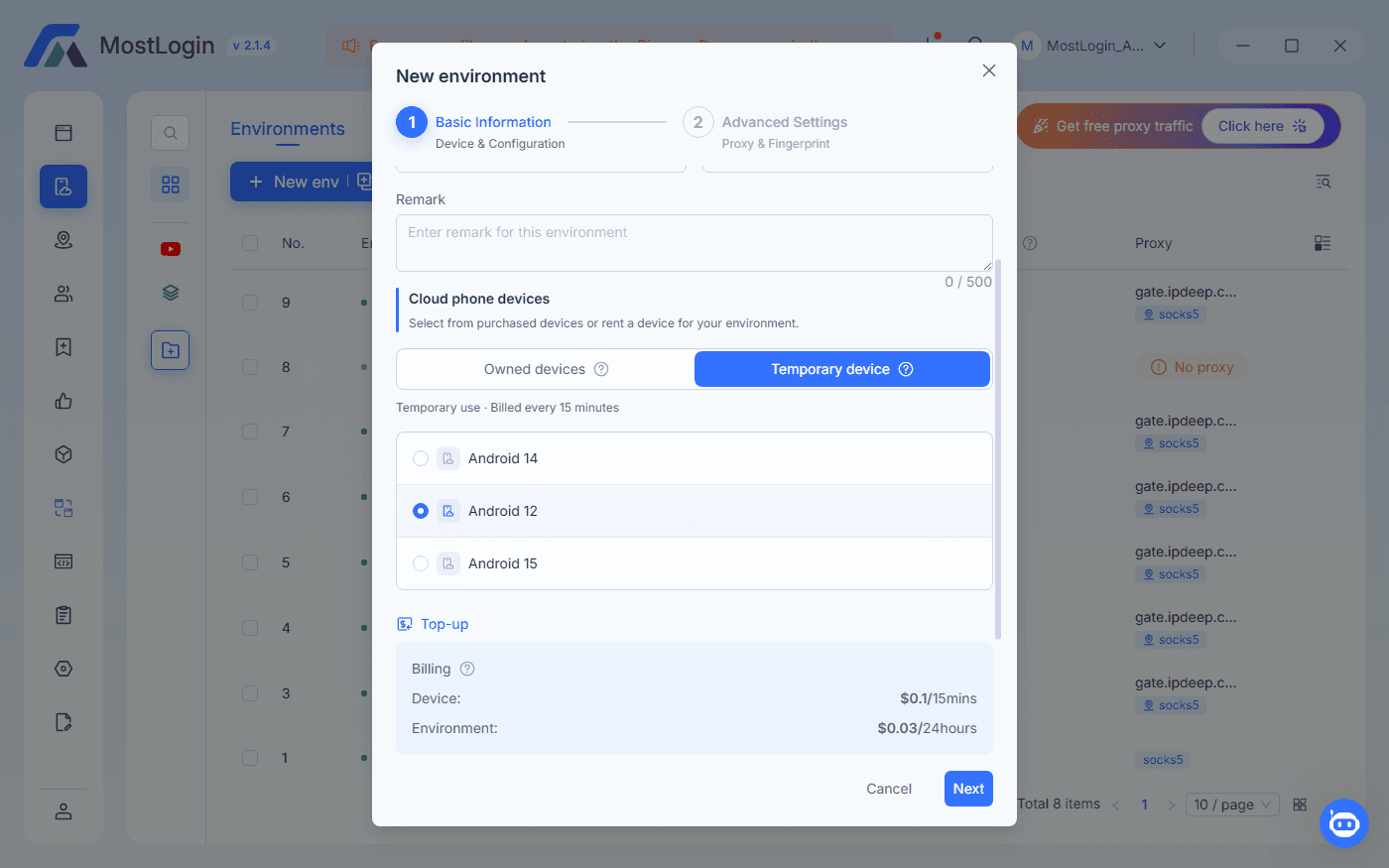
 

To set up a Cloud Phone in MostLogin:
1. Choose a cloud phone model that matches your need in the target market.
how to set up proxy in anti-detect browser
2. Assign or configure a suitable proxy for the cloud phone, similar to how you configure proxies in browser profiles.
how to set up proxy in anti-detect browser
3. Start the device and wait for the Android environment to boot.
4. Install and open your target apps (TikTok, Instagram, Shopee, WhatsApp, etc.).
5. Log into one account per cloud phone environment to maintain isolation.
6. This way, you can mirror your browser-based strategy on mobile with proper fingerprint and IP isolation.
 

Cost-Performance Angle


Instead of buying stacks of physical smartphones, you pay only for the cloud phones you actually run. When a cloud phone is shut down, you stop incurring runtime costs. This model allows you to:
  • Combine a free fingerprint browser for desktop accounts with a small number of rented cloud phones for critical mobile apps.
  • Scale your mobile fleet up or down depending on campaign needs and budget.
To explore this feature in more detail, you can use the anchor MostLogin Cloud Phone here: MostLogin Cloud Phone.
 

Best Practices for Safe, Cost-Effective Multi-Account Management


Technical Hygiene


Staying safe is not just about good tools; it is about good habits. Even with the right proxy setup, poor operational hygiene can still lead to bans:
  • Maintain a strict 1:1:1 mapping between profile, proxy, and account.
  • Use stable, reputable proxy providers; avoid constant IP switching unless the platform tolerates it.
  • Align your fingerprint basics—timezone, language, OS—to the region of your proxy to reduce suspicious inconsistencies.
 

Operational Hygiene


How you behave inside each account matters as much as the technical setup:
  • Warm up new accounts slowly: start with normal browsing and basic actions before heavy operations.
  • Avoid copy‑pasting identical text and actions across dozens of accounts in seconds.
  • Keep a simple spreadsheet or use the platform’s tagging system to track which proxy, profile, and login belong together.
 

Budget and ROI Mindset


Think of tools as investments, not just costs. For beginners:
  • Start with a few high-quality proxies plus a free antidetect browser and maybe one or two cloud phones.
  • Only scale up once you see stable performance and real results (sales, leads, traffic, etc.).
  • This is exactly where MostLogin’s pricing structure helps, because the browser itself is free during the Pioneer Program and you only pay for cloud phones and proxy usage, which keeps the initial barrier low.
 

FAQ: Best Antidetect Browser and Proxies for Beginners


1. Do I really need an antidetect browser for multi-account management?

If you run just one or two accounts casually, a normal browser might be enough. But once you manage multiple accounts for business, an antidetect browser dramatically reduces the risk of mass bans and cross-account correlation.


2. Can I use the same proxy for several accounts in the same antidetect browser?

Technically you can, but it is not recommended for important accounts. Sharing one proxy increases the chance that platforms see several accounts behind the same IP and link them together.


3. What is the safest proxy type for mobile-first social media accounts?

High-quality residential or mobile proxies are generally considered the safest choices for social media and marketplace accounts because they look more like real user connections.


4. Will an antidetect browser guarantee that my accounts never get banned?

No tool can provide a 100% guarantee. An antidetect browser reduces technical risk, but bans can still happen due to content, behavior, or platform policy changes.


5. Is MostLogin really free? What do I pay for?

MostLogin’s antidetect browser is free to use for a large number of profiles during the Pioneer program period. You pay for additional resources such as Cloud Phone usage or external proxies you connect, which lets you control your total budget.


6. How many profiles can a beginner realistically manage at the same time?

That depends on your workflow, but many beginners find that 5–20 profiles is a manageable range at the start. Understanding how to set up proxy in anti-detect browser for each of these profiles ensures they stay technically isolated and safer in daily use. You can scale higher once you develop stable routines for content, support, and tracking.


7. Can I automate accounts in an antidetect browser?

Yes. Many antidetect browsers, including MostLogin, offer APIs and compatibility with tools like Selenium or Puppeteer so you can build safe automation workflows if you need them.


8. Is a cloud phone necessary if I only use web versions of platforms?

If your work is fully web-based, you can operate with just the antidetect browser. Cloud phones become valuable when you must manage app-only features, mobile-first platforms, or messaging apps that require a true Android environment.


Final Thoughts: Make the Stack Simple, Not Scary

 

The best antidetect browser for beginners is not the one with the most complicated control panel or the highest price tag. It is the one that lets you safely run multiple accounts, understand what you are doing, and control your costs as you grow. By combining isolated browser profiles, properly configured proxies, and optional cloud phones, you can turn what used to be a complex technical stack into a straightforward workflow.
 
MostLogin’s free browser, integrated Android cloud phone, and flexible proxy support make it a strong option if you are just starting out with multi-account management and want a practical balance of safety, simplicity, and cost-performance.
MostLogin

Run multiple accounts without bans and blocks

Sign up for FREE

Contents

Recommended reads

message
down
A Beginner-Friendly Guide to the Best Antidetect Browser for Multi-Account Management-MostLogin