Running multiple authorized business accounts can create account-linking risk when unrelated profiles repeatedly share the same browser fingerprint, cookies, local storage, IP address, and device environment. Platforms can assess these signals alongside account behavior. When several accounts appear connected through one browser and network identity, a review, verification request, or restriction affecting one account may increase scrutiny across the group.
MostLogin works as a multi-account management browser that separates account environments into persistent browser Profiles. Each Profile can retain its own fingerprint configuration, cookies, local storage, session data, and proxy settings, helping teams reduce unintended technical overlap between legitimate business accounts.
Why Is MostLogin an Affordable Anonymous Browser?
There are many anonymous browsers on the market. Entry-level plans commonly cost around $9 per month and are designed for individual operators or small teams managing about 10 browser Profiles. More advanced plans that include larger Profile capacity, team collaboration, or higher concurrency can cost $24, $49, $89, or more per month.
MostLogin offers a lower entry barrier while providing scalable Profile capacity and the full set of tools teams need to operate those Profiles. From fingerprint configuration and proxy binding to Profile sharing, role permissions, Local API, and MCP-enabled AI workflows, the platform gives multi-account teams one system for building and managing account environments.
Start With a Small Profile Setup
MostLogin’s Starter plan includes five browser Profiles, allowing operators to test a real workflow before expanding: create an environment, review its fingerprint, bind a proxy, log in to an authorized account, and establish a repeatable routine. This is useful for sellers, affiliate operators, and social media teams that want to validate their environment-management process with core accounts first.
Rather than rebuilding the workflow later, teams can keep the same Profile naming rules, proxy records, and access procedures as they add more accounts. This makes the initial setup practical for pilot projects while leaving room for larger operations.
Expand Profile Capacity at a Lower Entry Cost
MostLogin’s Plus plan supports 20–500 Profiles and starts from $2.10 per month on the displayed 12-month billing option. Its Pro plan supports 600–10,000 Profiles from $49 per month, while Enterprise supports 10,100–100,000+ Profiles from $385 per month under the displayed annual billing option.
This gives cross-border sellers a lower-cost starting point for separating store, customer-service, advertising, and regional content environments. As more accounts, clients, or markets are added, teams can expand Profile capacity while continuing to use the same fingerprint settings, proxy records, collaboration permissions, and automation workflow—one reason MostLogin is a cost-effective anonymous browser for long-term multi-account operations.
Keep Core Account-Management Tools in One Workflow
MostLogin’s published plans include cross-device data sync, batch Profile management, API access, MCP, Profile sharing, role-based permissions, and shared team bookmarks and extensions. Higher plans also expand concurrent use, recovery options, global access controls, and Local API rate limits.
This gives teams a unified workflow for building account environments, assigning proxies, sharing approved Profiles, and coordinating recurring work. Teams can review available MostLogin pricing plans when matching Profile capacity to their current account environments and planned operations.
Core Features for Daily Account Operations
Persistent Browser Profiles
A MostLogin Profile functions as an isolated account container. It can store its own cookies, cache, LocalStorage, session history, fingerprint settings, and proxy configuration, rather than leaving these elements in a shared browser environment.
This separation helps prevent unrelated accounts from carrying the same browser storage and network settings. For routine work, map one persistent Profile to one long-term business identity or to an appropriately related account group with clear internal ownership.
Fingerprint Isolation
A browser fingerprint can include the operating system, User Agent, screen resolution, language, timezone, Canvas, WebGL, WebRTC, fonts, hardware details, and audio characteristics. MostLogin can generate a Profile fingerprint and supports configuration of these environment attributes.
With browser fingerprint isolation, each Profile can maintain a consistent device environment rather than forcing multiple accounts to share a single technical identity. Once a Profile is set up, avoid repeatedly changing core settings unless there is a documented operational reason.
Profile-Level Proxy Binding
MostLogin supports HTTP, HTTPS, and SOCKS5 proxies, which can be assigned and tested at the Profile level before use.
Binding a proxy to its Profile supports a clear account–Profile–proxy record. For legitimate account operations, use stable network resources that align reasonably with the account’s market, and document any proxy changes instead of frequently switching locations without a business reason.
Team Collaboration and Profile Sharing
Published MostLogin plans include Profile sharing, role-based permissions, cross-device synchronization, and shared team bookmarks and extensions.
These capabilities let approved team members work inside the appropriate environment instead of copying browser folders or sending account settings through chat messages. They also make account handoffs, access removal, and project ownership more controlled.
API, MCP, and AI Agent Workflows
MostLogin provides Local API support for technical teams and MCP support for connecting its local service with compatible AI tools. After connection, an AI Agent can discover supported MostLogin tools and help with Profile-related tasks through natural-language instructions.
Teams can use AI Agent multi-account workflows for supported no-code tasks such as listing Profiles under a tag, checking statuses, finding missing proxy assignments, or launching a specified environment. Sensitive actions involving permissions, payment information, recovery methods, or security settings should still require human review.
How to Set Up MostLogin for Multi-Account Work
Step 1: Create an Account–Profile–Proxy Map
Before creating Profiles, record the platform, account purpose, operating market, Profile name, proxy details, primary owner, backup owner, and recent login notes. Use a consistent format such as
Platform-Market-Role-Number to keep environments easy to identify.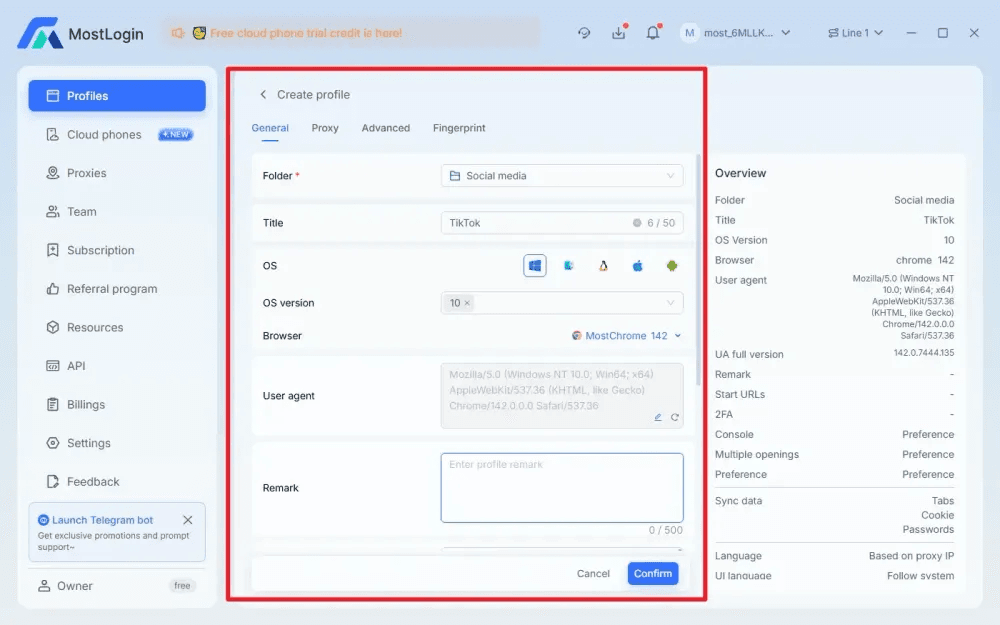
Step 2: Create a Dedicated Profile
In the MostLogin desktop client, select New Browser, choose Chromium or Firefox, name the Profile, and apply tags for the client, region, platform, or project. Use a separate Profile for each long-term business identity to avoid cookie, session, and fingerprint overlap.
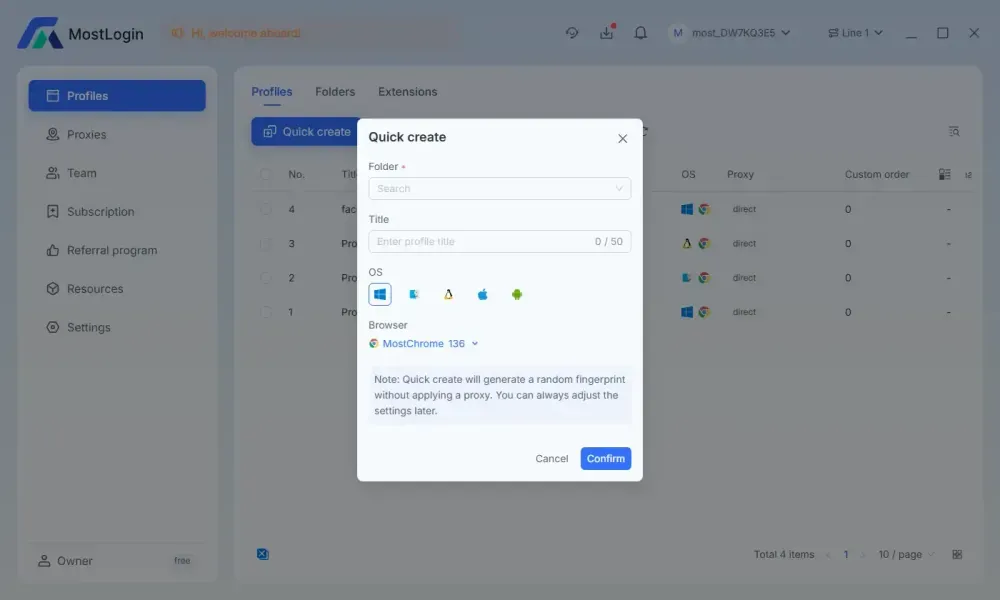
Step 3: Apply a Stable Fingerprint
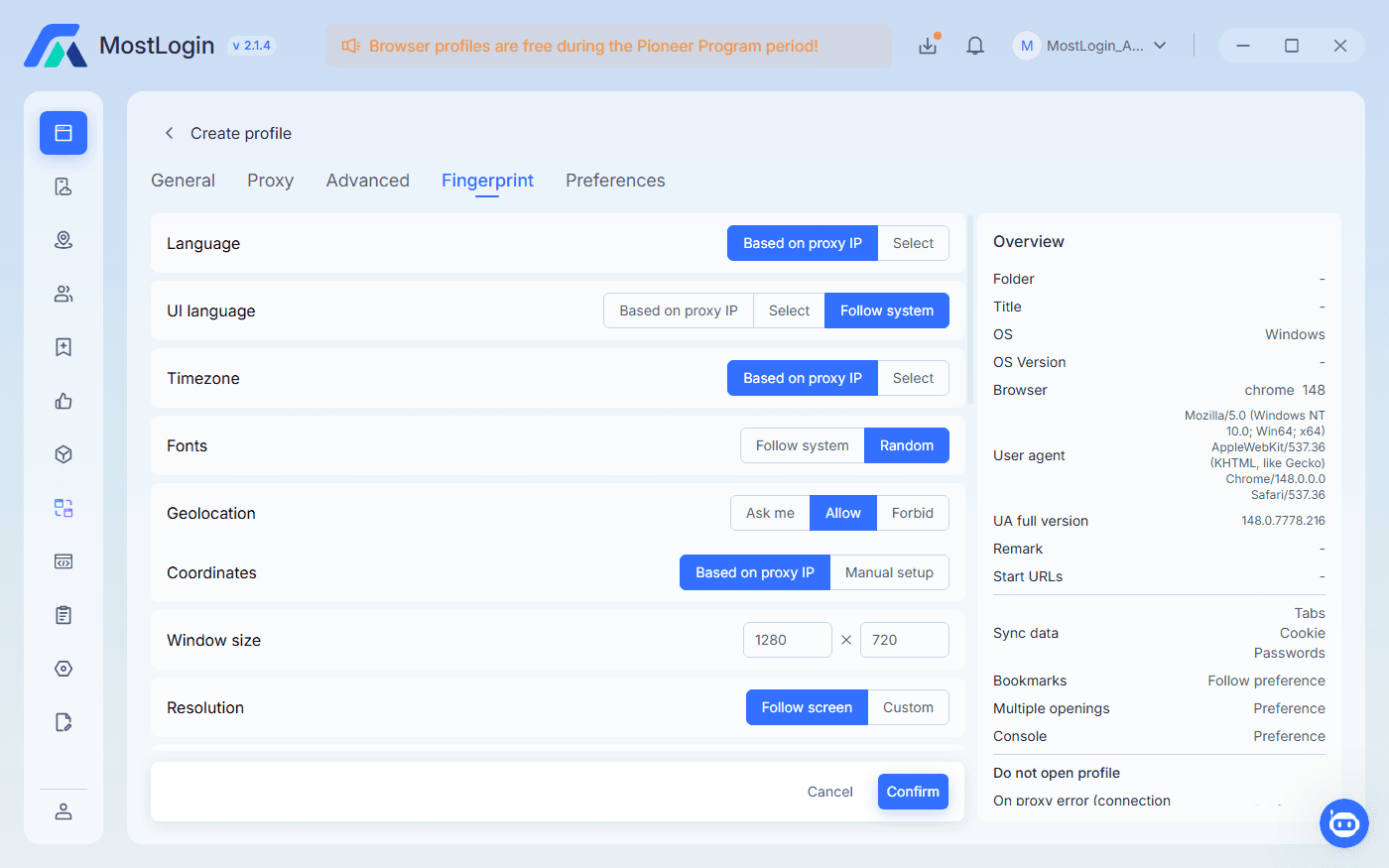
Start with the generated fingerprint, then confirm that the language, timezone, User Agent, screen settings, and operating system are reasonable for the authorized account’s legitimate market. Avoid resetting Canvas, WebGL, WebRTC, or other major fingerprint elements each time the account is opened.
Step 4: Bind and Test the Proxy
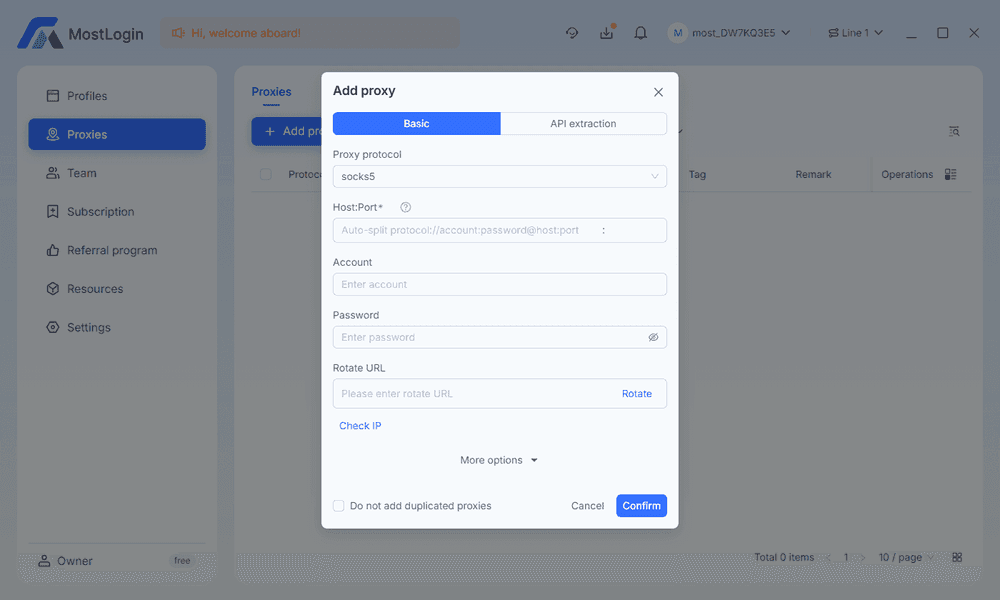
In Network Settings, add an HTTP, HTTPS, or SOCKS5 proxy, test the connection, and save it to the assigned Profile. Record the provider, region, expiration date, and replacement history in the account inventory.
Step 5: Log In and Follow a Stable Routine
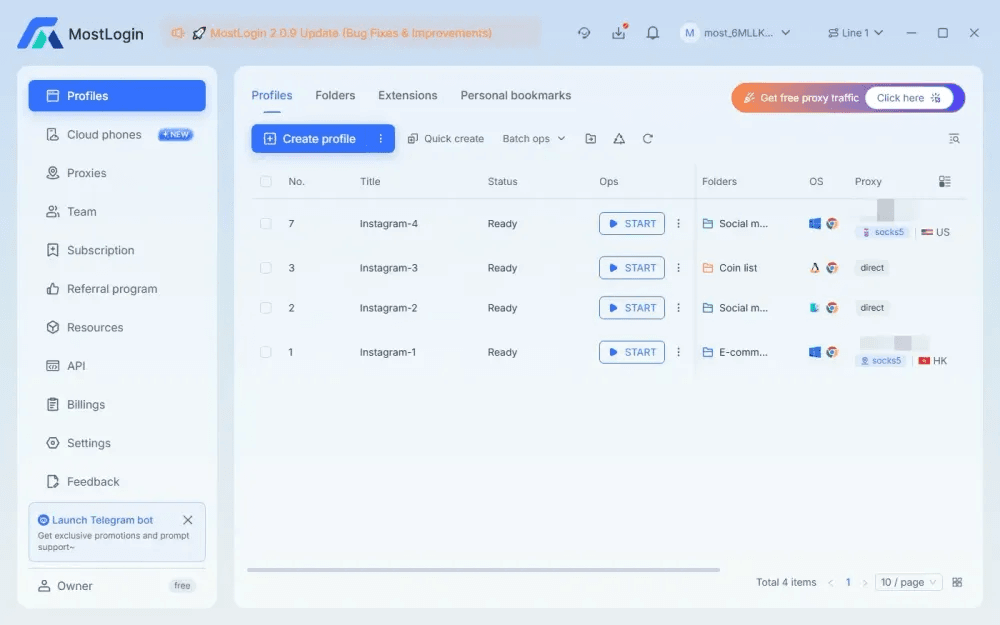
Log in only from the assigned Profile, complete permitted security checks, and assign a primary and backup owner. Review Profile permissions, proxy validity, and account status regularly; avoid unexplained location changes, excessive bulk logins, and undocumented environment changes.
Common Mistakes That Increase Linking Risk
Reusing One Profile for Unrelated Accounts
Shared cookies, LocalStorage, cache, and login sessions create direct technical overlap. Use one persistent Profile per long-term business identity whenever possible.
Changing Fingerprints Too Often
Frequent changes to User Agent, timezone, resolution, Canvas, or WebGL can create an inconsistent environment history. Establish the Profile correctly, then preserve its core configuration.
Sharing One Proxy Without a Plan
Unrelated accounts repeatedly using the same IP can become easier to associate. Maintain a clear account–Profile–proxy mapping and avoid random network switching.
Bulk Login Activity and Sudden Account Changes
Mass logins, sudden password resets, payment updates, or profile edits can lead to extra verification. Make changes in a planned sequence and keep an internal record of sensitive actions.
Letting AI Agents Make Sensitive Changes Without Review
AI Agents can assist with supported Profile checks and routine actions, but they should not independently control payment details, recovery methods, permissions, or similar high-impact settings. Begin with read-only prompts and non-critical Profiles.
Conclusion
Choosing an affordable anonymous browser is ultimately about finding a setup that fits the way your team actually works—whether you are managing a few store accounts, client campaigns, or a growing set of regional Profiles. MostLogin gives you a practical place to start, so you can test your workflow, refine your environment rules, and expand when needed. Download the MostLogin anonymous browser to set up your first Profile.