In today's highly competitive digital advertising landscape, Facebook ad account stability has become one of the core competencies for every media buying team. Many teams have faced issues such as:
- New accounts being banned immediately
- One account ban triggering a chain reaction across the entire group
- Ad restrictions despite avoiding all policy-violating content
The root cause behind these issues often lies in the "environmental relationships" between accounts. This article provides practical and systematic solutions for ad teams, focusing on anti-ban strategies, anti-association tactics, and best practices for account grouping.
1. How Does Facebook Detect Relationships Between Accounts?
Facebook's monitoring system is extremely strict, especially when advertisers manage or create multiple accounts. The platform uses several layers of data to detect associations, including:
- Browser fingerprinting: Canvas, WebGL, fonts, screen resolution, etc.
- Login environment: IP address, DNS, ISP, operating system details
- Behavioral patterns: Mouse movements, form input habits, navigation sequences
- Cookies & local storage: Shared browsers/devices leave overlapping traces
- Internal behavioral modeling: Account activity, payment methods, asset structure
Once Facebook suspects mass account creation, identity spoofing, or cross-account access, account bans or ad restrictions are likely to follow.
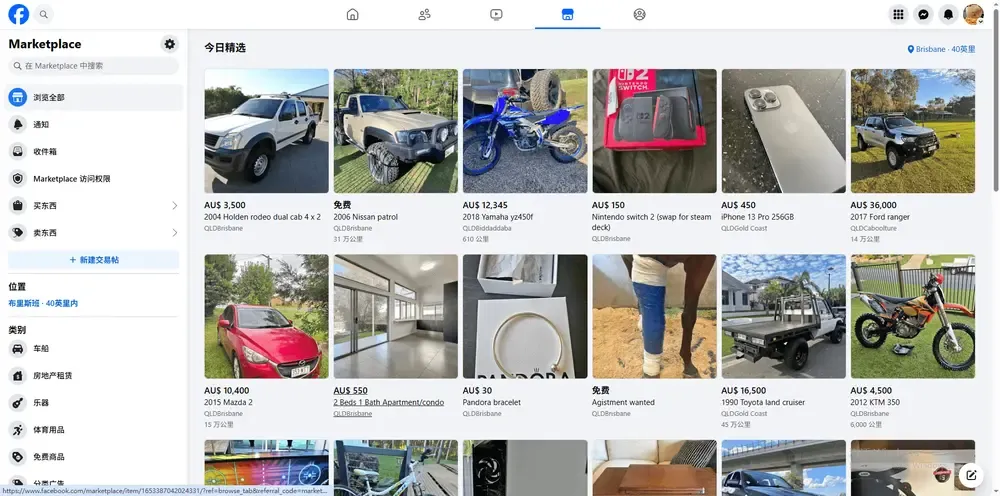
2. Core Anti-Ban Strategy: Environment-Level Isolation
Common Misconception
Many teams try to avoid bans by switching browsers, using incognito mode, or applying VPNs/proxies. However, these methods don't provide true isolation or device-level masking.
The Right Approach: Use a Fingerprint Browser + Unique Environment Configuration
We recommend tools like MostLogin, a professional anti-detect browser. This tool creates a fully isolated environment for each Facebook account, offering features such as:
- Separate cookies, storage, and cache for each account
- Randomized/custom browser fingerprints to avoid device overlap
- Dedicated proxy configuration for each browser profile, simulating a unique IP/geolocation
- A unified dashboard to efficiently manage multiple environments
3. Strategi Pengelompokan Multi-Akun: Manajemen Akun yang Ilmiah
Untuk tim yang mengoperasikan puluhan bahkan ratusan akun, pengelompokan dan struktur izin sangat penting untuk mengurangi risiko dan meningkatkan efisiensi.
1. Kelompokkan Berdasarkan Tujuan Bisnis
- Berdasarkan merek: Tetapkan grup akun dedikasi untuk setiap merek/proyek
- Berdasarkan wilayah: Infrastruktur lokal untuk setiap pasar (misal: pool IP, zona waktu)
- Berdasarkan tujuan: Pisahkan akun uji dari akun berfokus pada konversi
2. Tetapkan Lingkungan Dedikasi untuk Setiap Grup
- Gunakan konfigurasi sidik jari yang berbeda (OS, ukuran layar, font, dll.)
- Pool proxy dan pengaturan DNS yang terisolasi
- Manajer Bisnis (BM) dan jalur pembayaran yang terpisah untuk setiap grup
3. Kelola Akses & Izin
- Tetapkan operator hanya untuk wadah akun spesifik
- Hindari login bersama atau akses tim-wide ke lingkungan yang sama
- Gunakan alat kolaborasi tim (seperti sistem kontrol akses MostLogin) untuk pelacakan log dan riwayat audit
3. Multi-Account Grouping Strategy: Scientific Account Management
For teams operating dozens or even hundreds of accounts, grouping and permission structures are essential to reduce risk and improve efficiency.
1). Group by Business Purpose
By brand: Assign dedicated account groups for each brand/project
By region: Localized infrastructure for each market (e.g., IP pools, time zones)
By purpose: Separate testing accounts from conversion-focused accounts
2). Set Up a Dedicated Environment for Each Group
Use distinct fingerprint configurations (OS, screen size, fonts, etc.)
Isolated proxy pools and DNS settings
Separate Business Manager (BM) accounts and payment channels for each group
3). Manage Access & Permissions
Assign operators only to specific account containers
Avoid shared logins or team-wide access to the same environment
Use team collaboration tools (such as MostLogin's access control system) for log tracking and audit history
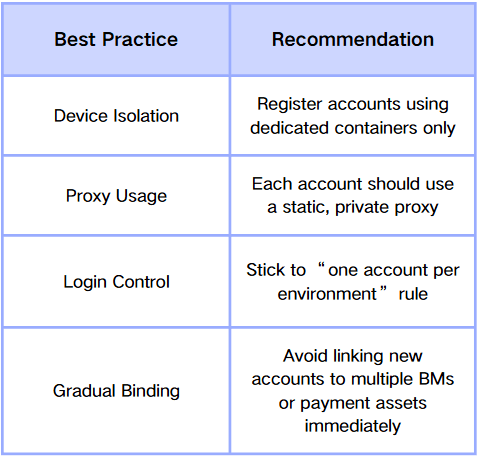
4. Practical Anti-Association Techniques
The following tactics have been proven to significantly reduce the risk of account bans:
5. How Does MostLogin Empower Ad Teams?
MostLogin is more than just a browser—it's an integrated environment emulation and access control platform designed specifically for multi-account management. Key benefits include:
- Mass creation of isolated browser containers
- Customizable browser fingerprints and proxy settings
- Cloud-based profile synchronization and secure account backups
- Role-based access control and team collaboration features
- Efficient tools such as cookie import, profile tagging, batch launch, and detailed logs
With MostLogin, ad teams can achieve both security and operational scalability, enabling stable, policy-compliant account growth.

Conclusion: Competitive Advantage Comes from Security & Systematization
In an increasingly strict policy environment, advertising success no longer depends solely on creativity and bidding strategy, but also on solid infrastructure. Key capabilities now include anti-association, ban prevention, account isolation, and team-based permission control.
By leveraging tools like MostLogin, you not only protect your existing assets but also build a scalable, repeatable account management system—making your ad operations more resilient and competitive.
Explore MostLogin and unlock a new era of safe ad operations >>
MostLogin Anti-Detection Browser helps users solve high-frequency challenges such as multi-account operations, environment isolation, and account risk control. If you'd like this blog in HTML, Markdown, or a short-form social media version—just let us know!
For operational questions, please refer to the Support Document.