Web3 airdrop participation often involves researching projects, connecting wallets, completing on-chain or social tasks, and tracking eligibility over time. An anti-detect browser can help organize these workflows by keeping browser profiles, cookies, wallet sessions, and proxy settings separated.
However, an anti-detect browser cannot guarantee airdrop eligibility, prevent Sybil classification, or override a project’s terms and anti-abuse rules. Always participate responsibly, protect your wallets, and follow each project’s rules.
In this guide, we compare five anti-detect browsers for legitimate Web3 airdrop research and multi-wallet workflow management. MostLogin is our first choice for scalable profile management and automation, while BitBrowser ranks second for accessible multi-profile and bulk-operation tools.
What to Look for in an Anti-Detect Browser for Web3 Airdrops
Before selecting an anti-detect browser, evaluate the features that affect browser organization, workflow efficiency, and wallet safety.
- Stable browser fingerprints: Each profile should keep consistent device parameters, including user agent, language, timezone, WebGL, Canvas, WebRTC, fonts, and hardware settings.
- Profile isolation: Cookies, local storage, connected wallets, and browser sessions should remain separate between profiles.
- Proxy support: Per-profile proxy configuration, connection checks, and leak prevention help create more consistent browser environments.
- Wallet safety: Use a clear one-wallet-per-profile workflow, never store seed phrases in browser notes, and carefully review every signing request.
- Bulk operations: Profile creation, proxy assignment, tags, folders, imports, exports, and controlled automation can save time at scale.
- Team access: Teams may need profile permissions, member assignment, and activity visibility.
Remember: airdrops are never guaranteed. Projects may assess wallet history, on-chain behavior, regional restrictions, interaction quality, and anti-abuse signals when deciding eligibility.
1. MostLogin — Best Overall for Scalable Web3 Workflows
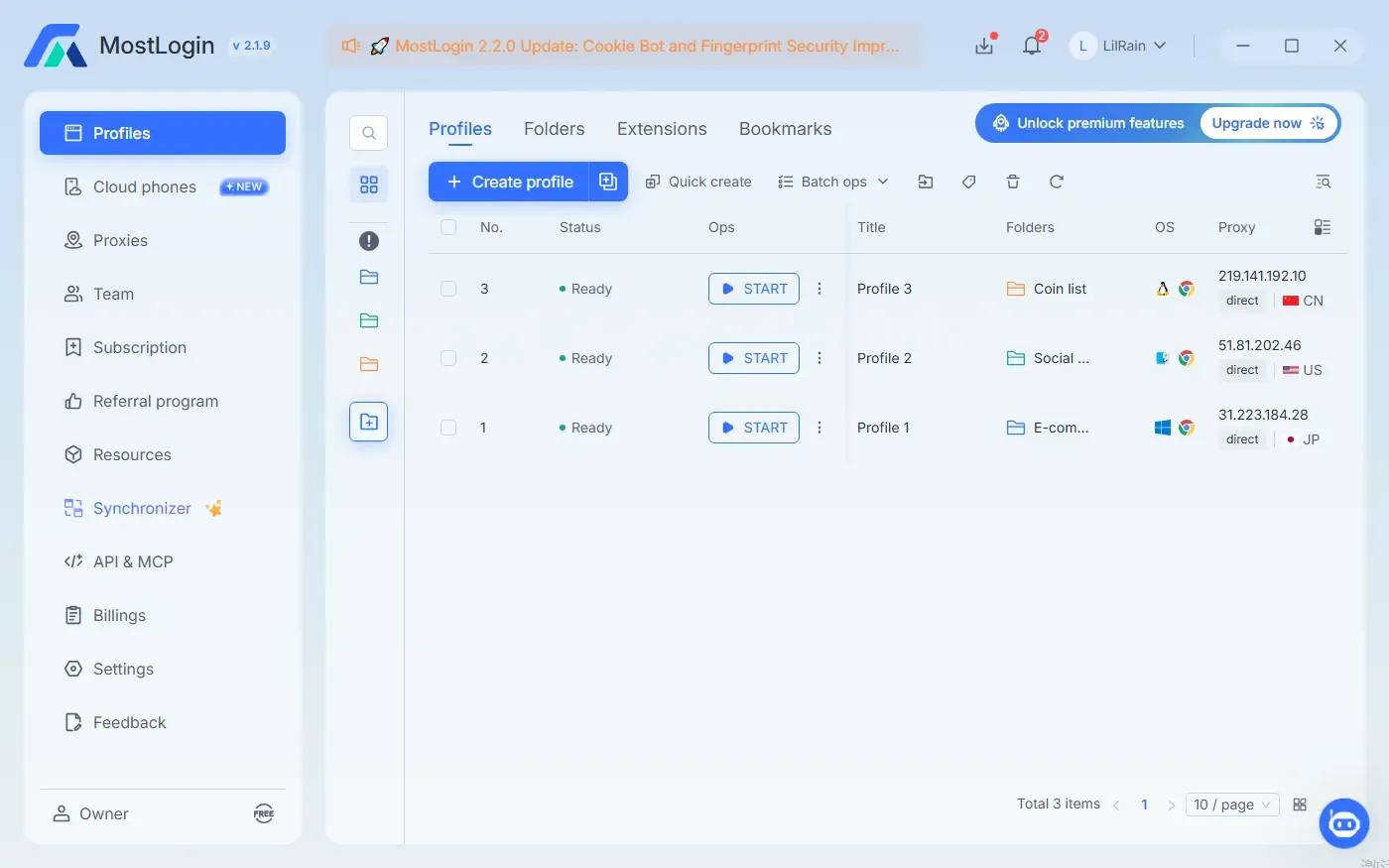
MostLogin is our top choice for Web3 users who need more than a few isolated browser sessions. It combines anti-detect browser profiles with bulk operations, proxy management, team features, script execution, and local API integrations.
MostLogin supports profile-level browser environment settings and can help users maintain isolated parameters such as user agent, Canvas, WebGL, WebRTC, timezone, language, and hardware-related characteristics. This makes it useful for organizing separate Web3 research and wallet workflows.
Why MostLogin Ranks First
- Create isolated browser profiles for separate wallet workflows, campaign research, and Web3 projects.
- Maintain stable profile settings instead of constantly switching browser and device characteristics.
- Use mass profile creation, bulk editing, and batch proxy updates for large-scale operations.
- Run repeatable browser tasks with automated script execution.
- Connect custom workflows through a local API that supports Selenium, Playwright, and Puppeteer. Support MCP with AI agent integration.
- Organize team access with structured profile management and collaboration features.
- Use browser and cloud-phone environments when mobile-oriented testing is required.
Best For
- Web3 airdrop research teams and agencies.
- Users managing multiple campaign workspaces.
- Technical users who need browser automation or API-based workflows.
- Teams that need efficient bulk profile and proxy management.
Recommended MostLogin Workflow
Create one stable profile for each legitimate campaign workspace or wallet environment. Assign the appropriate network configuration, connect only the intended wallet, document relevant activity, and regularly review token approvals. Profile isolation improves workflow organization, but it does not replace compliant participation or wallet security practices.
Try MostLogin for organized and scalable Web3 browser profile management.
2. BitBrowser — Best for Accessible Multi-Profile Management
BitBrowser is a practical choice for users who want an anti-detect browser focused on multi-profile operations, browser fingerprint configuration, proxy assignment, and basic automation. It is often used for managing isolated browser environments across multiple online workflows.
Why BitBrowser Ranks Second
- Create separate browser profiles with distinct fingerprints and stored session data.
- Configure proxy settings for individual browser environments.
- Use batch profile import and export tools.
- Manage cookies, proxies, and fingerprint settings across multiple profiles.
- Use RPA features and local API tools for repeatable browser actions.
- Support team workflows with sub-accounts and collaborative management options.
Best For
- Individual Web3 users who need a straightforward multi-profile browser.
- Users who prefer to start with a smaller profile-management setup.
- Teams that need batch profile, cookie, and proxy administration.
- Users interested in basic RPA and window synchronization tools.
Considerations
BitBrowser can be suitable for functional multi-profile workflows, but users should test its profile-management experience, browser-kernel updates, API capabilities, support quality, and current plan limits before scaling up. Always verify current pricing and feature limits directly through BitBrowser’s official website.
3. GoLogin — Best for Broad Platform Support
GoLogin is a widely known anti-detect browser for users who want browser profile management, proxy support, remote access, and collaboration features. It can be a suitable option for users looking for a balance between profile isolation and a more established ecosystem.
Why GoLogin Can Work for Web3 Workflows
- Organize browser profiles by campaign, wallet type, chain, or account owner.
- Keep cookies, sessions, and browsing data separated across profiles.
- Assign proxy settings at the profile level.
- Support shared access for small remote teams.
- Use cloud-based profile access across different devices.
Best For
- Users who prioritize a mature browser-profile platform.
- Remote teams that need shared workspace access.
- Users managing a moderate number of organized browser profiles.
Before choosing GoLogin, compare its current fingerprint configuration, proxy compatibility, automation support, profile limits, and pricing against your expected workflow volume.
4. AdsPower — Best for Operations-Heavy Teams
AdsPower is designed around browser-profile management, team permissions, proxy configuration, and automation-oriented operations. It is often considered by larger teams that manage many browser environments and want more structured administrative controls.
Why AdsPower Can Work for Web3 Workflows
- Create and categorize a large number of isolated browser profiles.
- Assign proxy and profile settings in bulk.
- Set permissions and profile-access rules for team members.
- Use synchronization and automation tools for repetitive browser tasks.
- Build operational processes around profiles, tasks, and staff assignments.
Best For
- Web3 marketing agencies and larger community teams.
- Operations teams with repeatable browser-based workflows.
- Users who need more administrative control as profile volume increases.
Because AdsPower includes broader team and automation features, it may take more time to configure than a simple profile-management tool. Start with clear naming rules, documented processes, limited wallet permissions, and a small test workspace before expanding.
5. Dolphin Anty — Best for Simple Profile Organization
Dolphin Anty is another option for users who need browser profile isolation, proxy configuration, and basic team-oriented account management without building an advanced technical workflow.
Why Dolphin Anty Can Work for Web3 Workflows
- Separate browser sessions for individual projects, research tasks, or wallet environments.
- Store and manage profile-level cookies and browser settings.
- Connect different proxies to different profiles.
- Use tags, folders, and team-sharing tools to organize projects.
- Start with basic browser-profile management before moving to more advanced automation.
Best For
- Solo users with a small number of legitimate browser workspaces.
- Beginners who want an organized profile-management workflow.
- Teams that value simple organization over highly customized automation.
If you need extensive bulk operations, advanced API integrations, or high-volume team controls, compare Dolphin Anty closely with MostLogin, BitBrowser, and other enterprise-focused alternatives.
Feature Comparison: Best Anti-Detect Browsers for Web3 Airdrops
| Browser | Best Use Case | Profile & Fingerprint Control | Proxy & Bulk Tools | Automation | Team Workflows |
|---|---|---|---|---|---|
| MostLogin | Scalable Web3 operations | Strong profile-level browser environment configuration | Mass profile creation, bulk editing, batch proxy updates | Scripts plus Selenium, Playwright, and Puppeteer API support | Collaboration, profile controls, and operational management |
| BitBrowser | Accessible multi-profile management | Custom browser profiles with configurable parameters | Batch profile, cookie, proxy, and fingerprint management | RPA and local API options | Sub-accounts and collaborative operations |
| GoLogin | Broad remote profile access | Isolated browser profiles and fingerprint configuration | Profile-level proxy configuration | Options vary by plan | Suitable for remote collaboration |
| AdsPower | High-volume team operations | Profile isolation and browser environment settings | Strong batch-operation workflows | Synchronization and automation tools | Detailed team permissions |
| Dolphin Anty | Simple organized workflows | Separated browser-profile environments | Profile proxy configuration and organization tools | Options vary by plan | Basic team sharing and profile organization |
Which Anti-Detect Browser Should You Choose?
Choose MostLogin if you need browser-profile isolation combined with bulk operational tools, proxy management, script execution, local API integrations, and team-ready workflows. It is especially suitable for Web3 research teams and users who manage many organized browser environments.
Choose BitBrowser if you want a more accessible anti-detect browser with multi-profile support, proxy configuration, batch management, and RPA capabilities. It can be a suitable choice for individual users and smaller teams that want to start with an organized workflow.
No matter which tool you choose, keep every wallet environment consistent, inspect every transaction and signature request, revoke unnecessary token approvals, and never share your seed phrase or private key.
Frequently Asked Questions
Can an anti-detect browser guarantee Web3 airdrop eligibility?
No. Eligibility is determined by each project and may depend on wallet activity, on-chain behavior, regional requirements, user quality, and anti-abuse checks. An anti-detect browser helps organize browser environments but cannot guarantee rewards.
Why use separate browser profiles for Web3 wallets?
Separate profiles help keep wallet sessions, cookies, browser storage, connected sites, and proxy configurations organized. This can reduce accidental cross-login issues and make campaign research easier to manage.
Is MostLogin suitable for Web3 teams?
Yes. MostLogin supports profile isolation, proxy management, mass profile creation, bulk editing, automated script execution, team workflows, and local API connections for Selenium, Playwright, and Puppeteer.
Is BitBrowser suitable for beginners?
BitBrowser can be suitable for users who want to begin with multi-profile browser management, proxy configuration, and batch-operation tools. Review its current feature limits and pricing before selecting a plan.
Start Organizing Your Web3 Browser Workflows With MostLogin
MostLogin helps teams and individual users create isolated browser profiles, manage proxy configurations, organize browser operations at scale, and build customized automation workflows.
Explore MostLogin and build a more organized Web3 browser workflow.