Managing a few authorized business accounts is usually simple. Managing 50, 500, or several thousand means coordinating isolated sessions, proxies, team access, repeated browser work, and—more often now—mobile applications. That is where the choice between MostLogin and GoLogin begins to affect both daily workload and total cost.
MostLogin and GoLogin are both great anti-detect browsers designed for overlapping but different audiences. MostLogin is our preferred choice for cost-conscious teams that want high profile counts, flexible proxy administration, MCP-connected external AI agents, and technically controllable Android cloud phones. GoLogin is a strong choice for professionals who prioritize its mature Orbita workflow, bundled proxy traffic, cloud browser access, native AI Assistant, and integrated Cloud Android experience.
The clearest pricing difference appears at the browser entry point. MostLogin lists five free profiles and paid plans from 20 profiles at $3 per month. GoLogin lists three free profiles and Professional from $49 per month. Price alone does not settle the comparison, however: GoLogin includes 2 GB of residential proxy traffic on paid plans, while MostLogin provides more flexible third-party proxy controls and separate on-demand mobile billing.
Quick answer: There is no universal winner. MostLogin offers better value for cost-sensitive, high-volume, bring-your-own-proxy, external-agent, and mixed browser/mobile workflows. GoLogin is better aligned with users who want a polished Orbita ecosystem, included proxy traffic, remote cloud-browser sessions, a built-in AI Assistant, or continuously used Cloud Android capacity.
Why use an antidetect browser for multi-account management?
A standard browser is designed around one person's connected browsing history. Cookies, local storage, saved logins, extensions, language, timezone, and other device signals can become mixed when an operator repeatedly switches between unrelated client, store, advertising, or testing accounts.
An antidetect browser places each account in a separate profile. The profile keeps its own cookies, local storage, login state, proxy, extensions, and reported device characteristics. This reduces operational mistakes such as opening the wrong client account, using an inconsistent network location, or overwriting another operator's session.
Isolation is only the foundation. At larger volumes, the product also needs to answer four practical questions:
- Can the team create, find, edit, and launch profiles in batches?
- Can proxy, timezone, language, and geolocation settings remain coherent?
- Can approved team members receive only the access they need?
- Can desktop browser and mobile-app workflows be managed without assembling several disconnected tools?
Which target audience does each product serve?
MostLogin and GoLogin should not be evaluated as if they were built for exactly the same buyer. Their core browser-profile capabilities overlap, but their pricing, automation approach, proxy model, and mobile tooling appeal to different operating styles.
MostLogin's target audience
MostLogin is best suited to cost-conscious operators, growing agencies, and larger profile fleets that already use specialist proxy providers. It is also a strong fit for technical or AI-enabled teams that want to connect Codex, Claude Code, Cursor, or another compatible agent through MCP instead of relying on one vendor-provided assistant.
Its cloud-phone model is particularly relevant to teams operating authorized workflows across mobile-first applications. ADB/root access, Google Play, APK installation, REST API, scripts, batch controls, and on-demand billing make MostLogin attractive when mobile work is technical, variable, or needs to scale beside desktop browser profiles.
GoLogin's target audience
GoLogin is best suited to solo professionals, established agencies, and developers who value a mature Orbita profile environment, cloud-synchronized sessions, bundled residential proxy traffic, and access through local or remote browser infrastructure. Its detailed documentation and broad action toolbar suit experienced operators who want many controls readily available.
GoLogin also targets users who prefer a native AI Assistant and an integrated vendor ecosystem. Its flat Cloud Android offer can be attractive to teams that use remote Android devices continuously and prefer predictable subscription billing over usage-based rental.
| Audience or workflow | Better-aligned product | Reason |
|---|---|---|
| Budget-conscious from solo user to big team | MostLogin | Five free profiles and a much lower published paid browser entry price |
| High-volume profile operation using third-party proxies | MostLogin | Large profile tiers plus proxy tags, permissions, extraction, rotation, and duplicate controls |
| Team connecting its own AI agent | MostLogin | Local MCP is designed for compatible external agents |
| Technical mobile-app automation | MostLogin | Documented ADB/root, REST API, scripts, APK, and batch operations |
| User wanting bundled proxy traffic | GoLogin | Paid plans include 2 GB of residential proxy traffic monthly |
| User wanting a native, guided AI assistant | GoLogin | AI Assistant is packaged inside GoLogin's product ecosystem |
| Developer needing remote headful browser sessions | GoLogin | Cloud Browser API supports persistent sessions, live view, and remote connectivity |
| Continuously used manual Cloud Android device | GoLogin | Its advertised flat-price model may be more predictable; checkout terms should be confirmed |
Which features matter most when choosing between MostLogin and GoLogin?
The best antidetect browser is not necessarily the product with the longest settings list. It is the one that keeps environments consistent, reduces repetitive work, supports the required devices, and remains affordable at the team's actual scale.
Profile isolation and fingerprint consistency
Both products create isolated browser environments with separate cookies, storage, proxies, and fingerprints. The important question is how safely and efficiently those settings can be maintained.
MostLogin organizes profile creation into General, Proxy, Advanced, Fingerprint, and Preferences. Its documentation covers operating-system signals, start URLs, synchronization, language, timezone, geolocation, fonts, WebGL metadata, hardware concurrency, device information, SSL cipher suites, and launch arguments. It also provides pre-launch safeguards that can stop a profile when the proxy fails, the proxy country changes, or synchronization does not complete. See MostLogin's profile creation guide and profile safeguards.
GoLogin's Orbita profiles support Windows 10, Windows 11, Mac Intel, Mac ARM, Linux, and Android fingerprints. Its advanced editor covers user agent, resolution, language, fonts, media devices, Canvas, Client Rects, Audio Context, WebGL, WebRTC, custom DNS, launch arguments, history, passwords, and active-session locking. GoLogin recommends keeping generated defaults unless the operator understands the consistency implications. See GoLogin profile settings and advanced fingerprint settings.
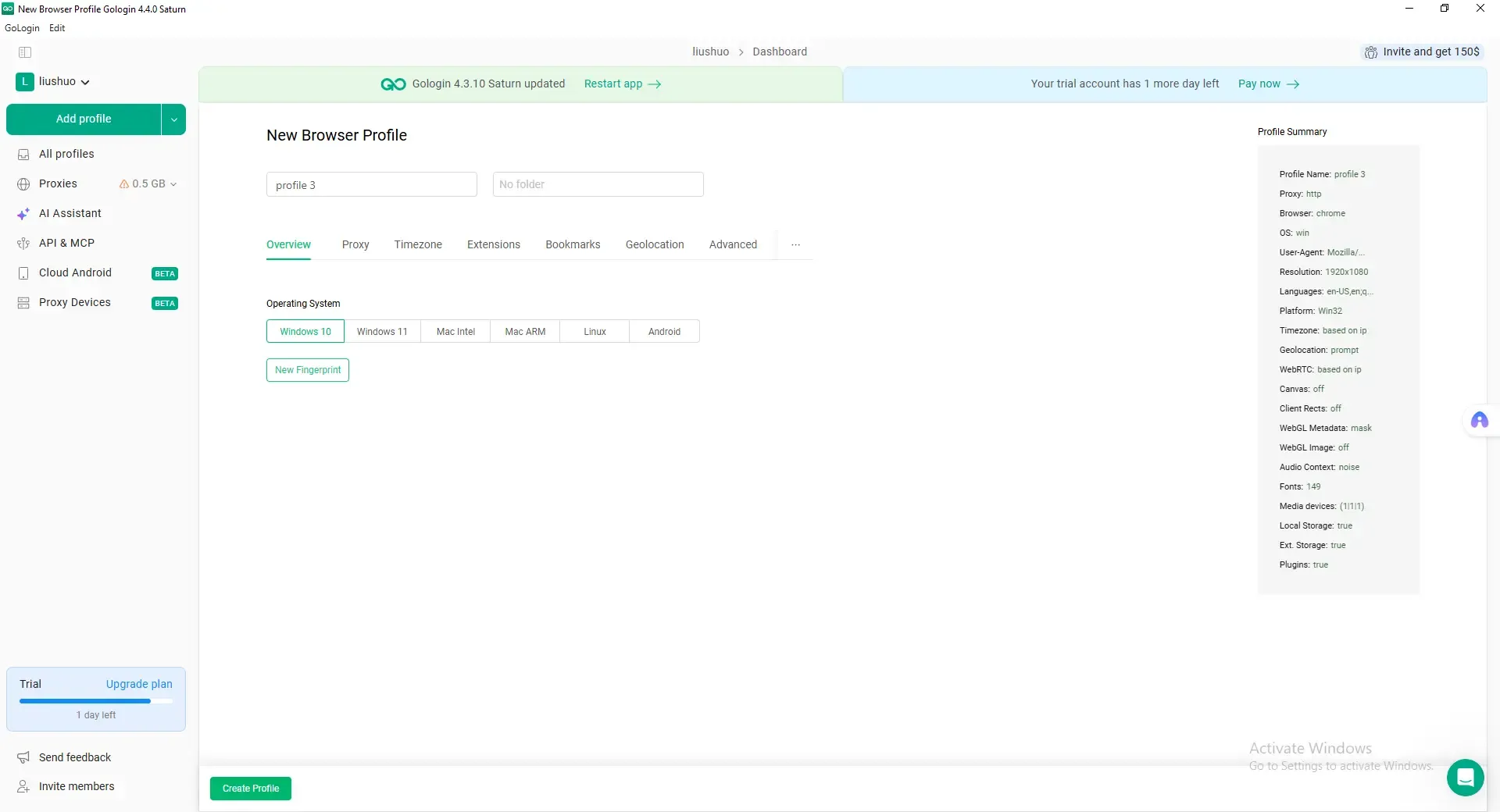
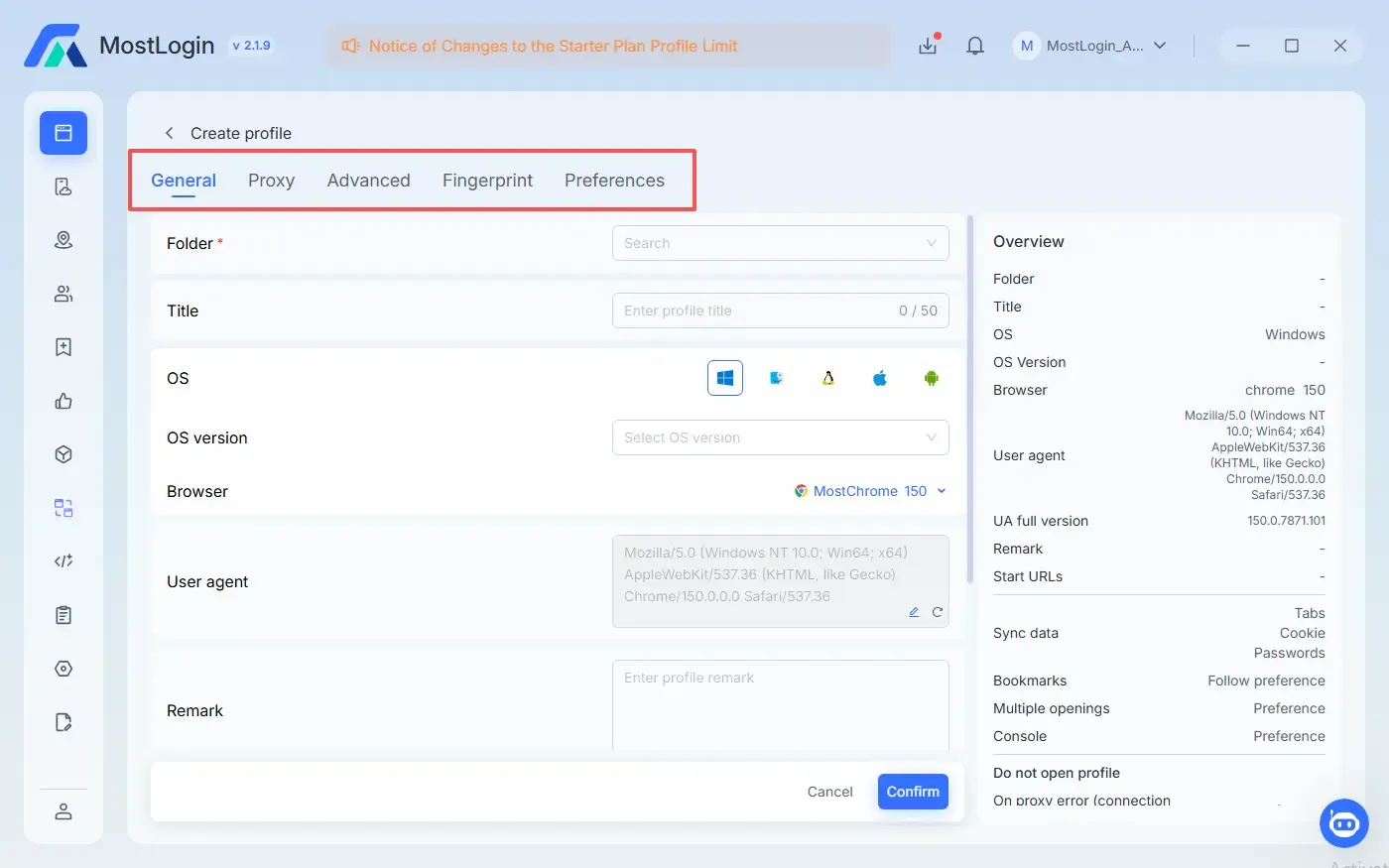
The screenshots show interface structure, not comparative detection resistance. Both products provide the core controls expected from this category; stable settings and responsible operating procedures matter more than repeatedly changing advanced values.
Proxy management and network consistency
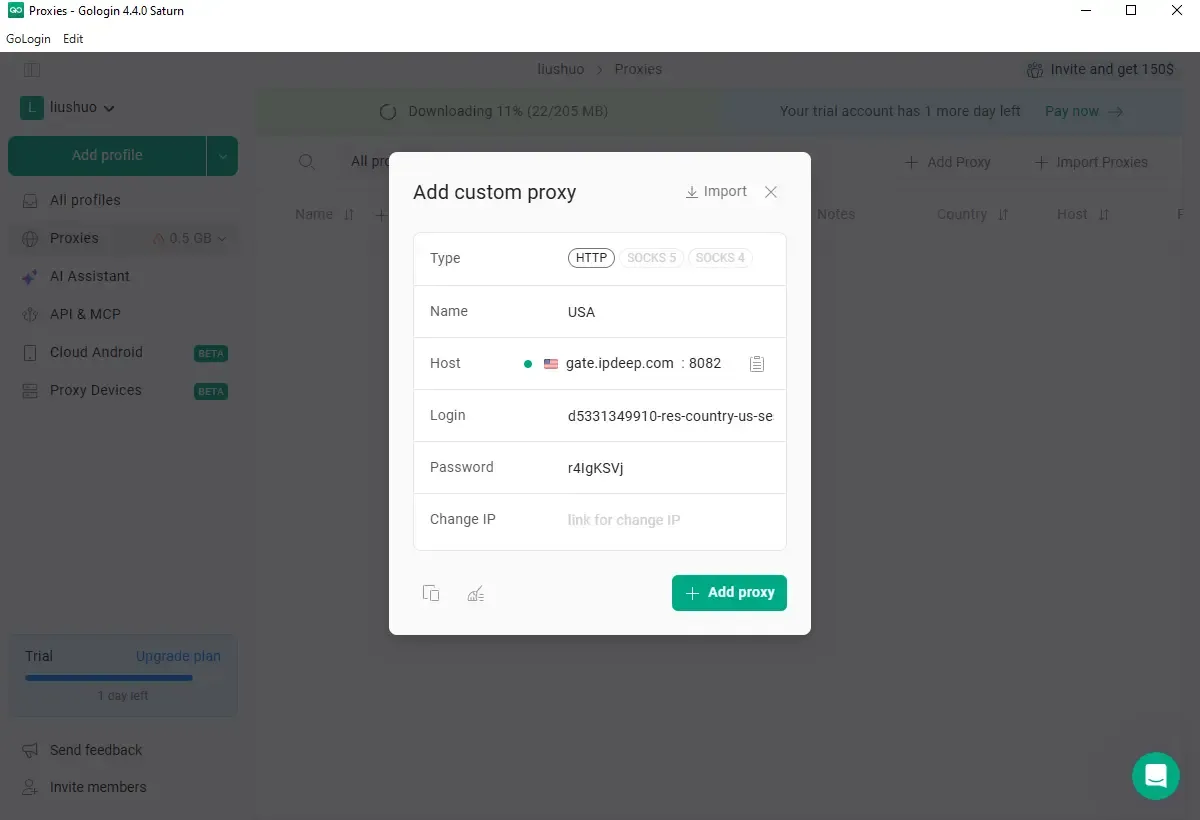
GoLogin supports built-in and third-party HTTP/HTTPS or SOCKS5 proxies, bulk import, connection testing, and automatic timezone or geolocation alignment. Its paid plans include 2 GB of GoLogin residential proxy traffic per month. This is convenient for teams that prefer one vendor and light included usage.
MostLogin treats proxies as an operational inventory. The interface supports batch actions, IP checks, tags, access levels, remarks, dynamic-IP configurations, a provider hub, rotation URLs, API extraction, and duplicate-proxy controls. Proxies can be configured during profile creation, reducing the need for a separate cleanup pass. MostLogin paid users can claim more than 10GB free proxy from client in Free proxy giveaway tab.
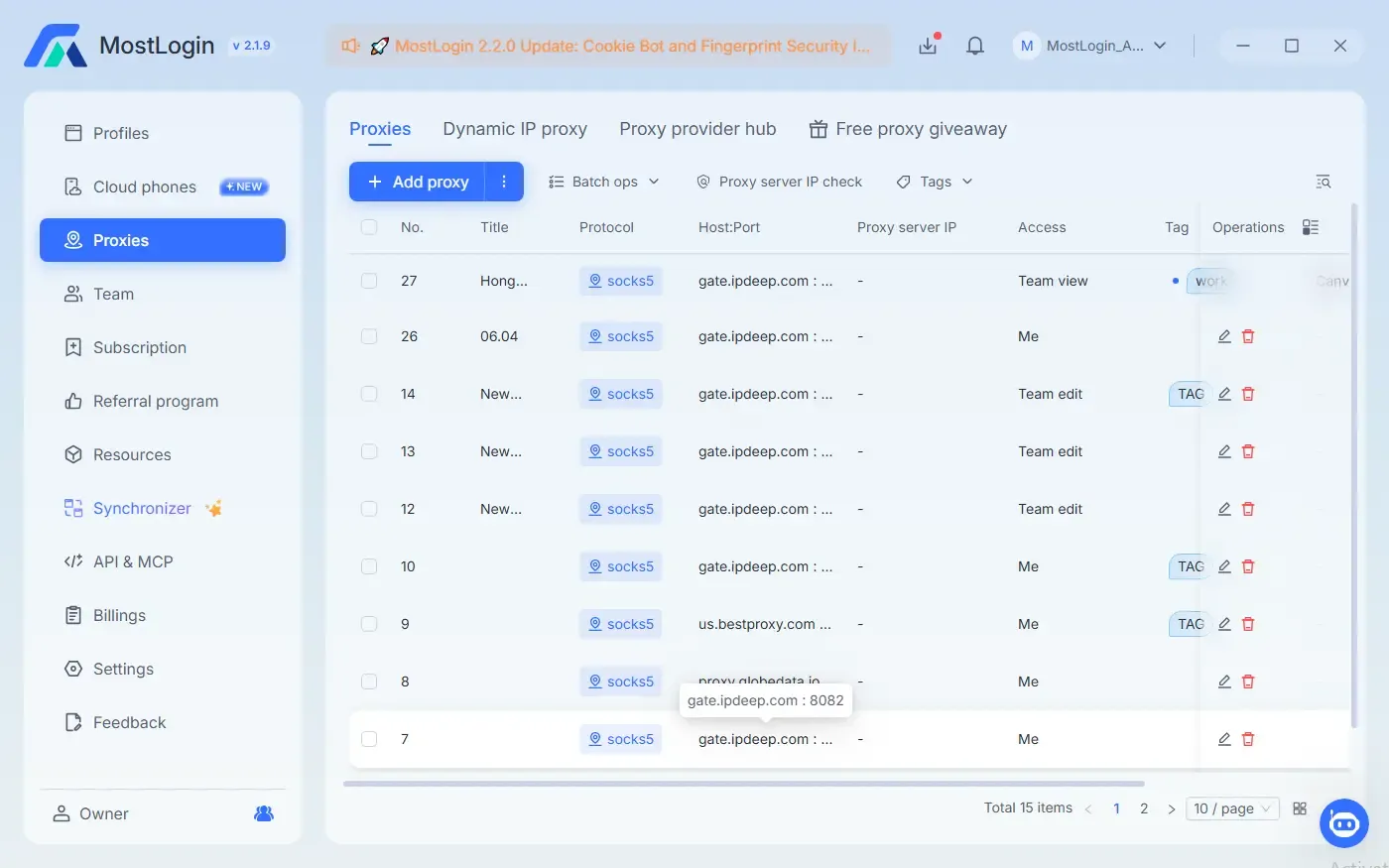
GoLogin is more convenient when its included traffic covers the job. MostLogin is better suited to teams that bring their own proxy providers and need stronger tagging, access, rotation, extraction, and duplicate-check workflows.
Bulk work, AI agents, and automation
Creating isolated profiles one by one is manageable at small scale. Repeating the same process across dozens or hundreds of profiles is not. Useful products need batch creation and editing, clear folder organization, and an automation path that matches the team's technical ability.
MostLogin supports quick creation, batch creation and import, batch proxy editing, folder organization, transfer, export, and synchronization. Its local MCP service can connect with compatible external agents such as Codex, Claude Code, Cursor, or OpenCode. After connection, the agent can discover the tools exposed by the installed MostLogin version and request supported profile, proxy, fingerprint, session, or cookie operations through natural language. See MostLogin MCP documentation.
GoLogin exposes a broad bulk-action toolbar and provides REST API, cloud-browser automation, and a native AI Assistant. The Assistant accepts plain-language instructions, can work with existing profiles, and can create or operate profiles through GoLogin's cloud environment. See the GoLogin AI Assistant and Cloud Browser for AI Agents.
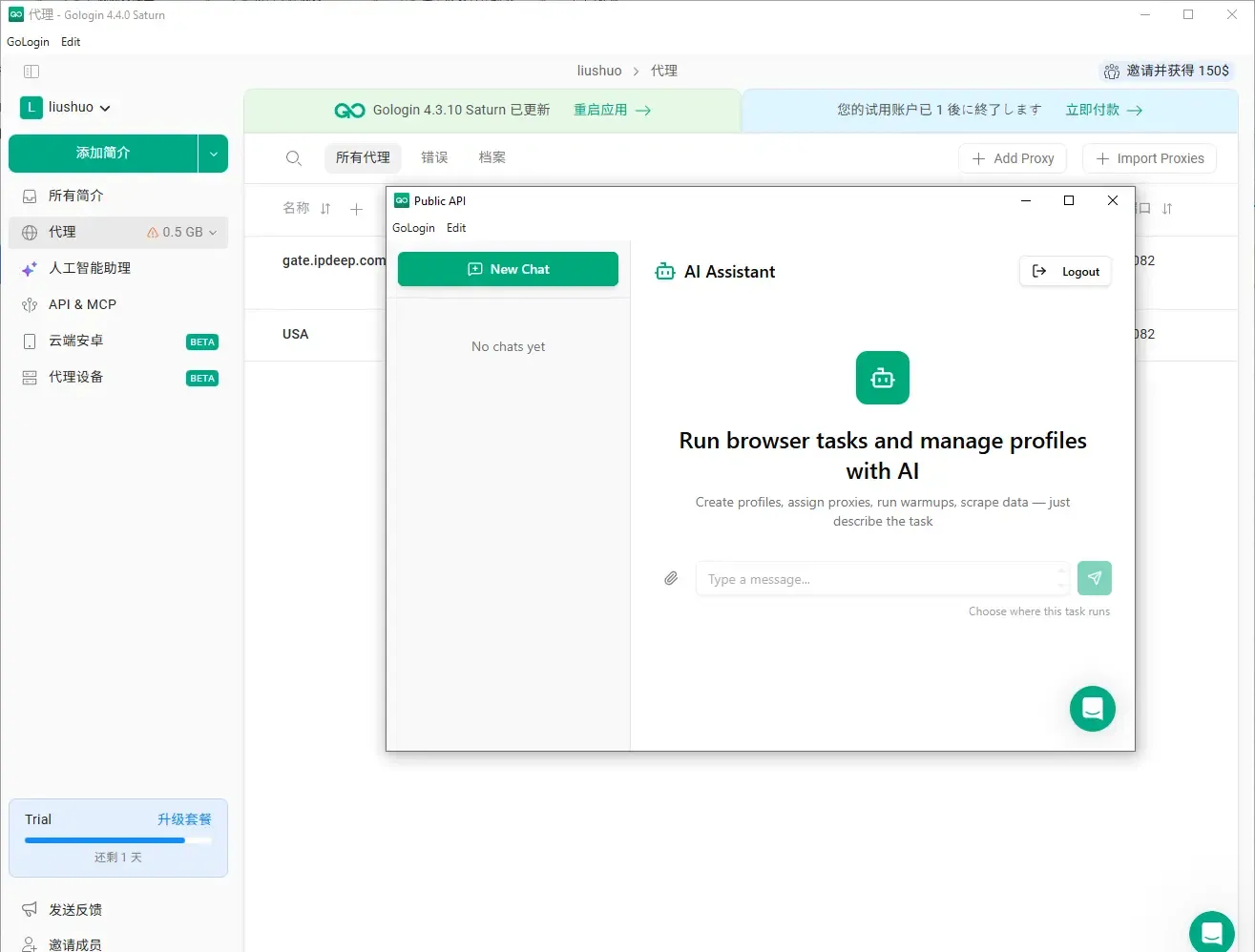
MostLogin is the stronger fit when a team wants to choose its own MCP-compatible agent and use natural language as an orchestration layer. GoLogin is compelling when the team wants a vendor-provided assistant or remote Playwright/Puppeteer sessions. Deterministic scripts remain preferable when every step, retry, and log must behave identically at high volume.
Team access, mobile support, and total cost
Teams should compare access rules, not only profile limits. MostLogin lists profile sharing, role-based permissions, team bookmarks and extensions, cross-device synchronization, and folder assignment. GoLogin supports individual profile sharing plus folder and workspace roles; its official documentation says team members and workspaces begin at Business, although Professional users can share a limited number of individual profiles.
Mobile support is now a major part of both products. A browser profile that reports an Android fingerprint is not the same as a cloud phone: the first changes the browser identity seen by a website, while the second runs Android apps on a remote device.
MostLogin's cloud-phone documentation lists more than 600 carrier configurations, Google Play, APK installation, ADB and root permissions, REST API access, custom scripts, team controls, and batch operations. The service can be purchased by monthly device subscription or rented on demand.
GoLogin's Cloud Android page advertises remote Android devices beside desktop profiles, integrated residential or mobile IPs, and flat pricing from $9 per month. The same page marks API and AI automation for Cloud Android as coming soon. This makes MostLogin stronger for current technical control and variable usage, while GoLogin's flat offer may suit a manually operated device that stays active continuously.
What are the differences between MostLogin and GoLogin?
The largest differences become visible after the first profiles are created. MostLogin emphasizes cost-efficient scale, third-party proxy administration, external-agent MCP, and technically controllable cloud phones. GoLogin emphasizes its mature Orbita profile workflow, integrated proxy traffic, cloud browser, native AI Assistant, and broad access across desktop, web, and Android products.
MostLogin
MostLogin combines browser profiles, folders, proxies, team features, synchronization, API/MCP, and cloud phones in a compact desktop interface. The navigation keeps browser and mobile environments separate but accessible from the same client, which is practical for teams that alternate between websites and mobile-first applications.
Its main advantage is operational flexibility. Browser plans begin at a low profile count and can scale to large volumes. Proxy-heavy teams can retain their preferred network vendors. MCP lets the team connect compatible external AI agents, while the cloud-phone product offers documented ADB/root and API control for mobile automation.
MostLogin is best for
- budget-conscious solo users, growing agencies, and high-volume profile operations;
- teams that already use third-party proxy providers and need stronger proxy administration;
- organizations that want to connect their preferred MCP-compatible AI agent;
- mobile-first workflows requiring ADB/root, APIs, scripts, or batch cloud-phone control;
- operators with variable mobile demand who benefit from on-demand billing.
MostLogin pros
- Five browser profiles on the free plan
- Paid browser profiles starting at $3 per month for 20 profiles
- Central proxy inventory with tags, permissions, rotation URLs, API extraction, dynamic proxies, and duplicate checks
- MCP support for compatible external AI agents
- Cloud phones with ADB/root, Google Play, APK installation, REST API, scripts, and batch operations
- Subscription and on-demand mobile billing
- Compact folder-oriented interface for mixed browser and mobile work
MostLogin cons
- Mobile devices and environments are billed separately from browser profiles
- Visual RPA workflows are listed as coming soon on the current pricing page
- Public evidence reviewed here does not establish comparative performance or detection resistance
MostLogin pricing
The free Starter plan includes five browser profiles. Plus begins at 20 profiles for $3 per month, or a displayed annual monthly equivalent of $2.10. Pro begins at 600 profiles for $70 monthly or $49 on the displayed annual rate. Cloud phones cost $25 per device monthly or $0.10 per 15 minutes on demand, capped at $1.60 per day, plus a $0.02–$0.03 daily environment charge. Check MostLogin pricing immediately before publishing or purchasing.
GoLogin
GoLogin creates isolated Orbita profiles with separate fingerprints, sessions, and proxies. Profile data synchronizes to the cloud, and users can operate through supported desktop systems, a web app, and GoLogin's Android products. Its profile editor and bulk-action surface are mature and thoroughly documented.
GoLogin's key advantage is packaged convenience. Paid plans include 2 GB of residential proxy traffic. Its cloud browser supports remote persistent sessions and live view, while the native AI Assistant provides a guided automation experience without requiring the user to select an external MCP client.
GoLogin is best for
- professionals who value the mature Orbita profile editor and detailed documentation;
- users who want residential proxy traffic included with the browser subscription;
- developers or distributed teams that need remote cloud-browser sessions and live view;
- non-technical users who prefer a native AI Assistant over configuring an external agent;
- teams expecting continuous manual Cloud Android use under a flat billing model.
GoLogin pros
- Mature Orbita fingerprint editor and detailed public documentation
- Two gigabytes of residential proxy traffic included monthly on paid plans
- Local, web, and cloud browser access
- Native AI Assistant plus REST API and cloud-browser automation
- Clear profile, folder, workspace, and sharing options
- Cloud Android integrated beside desktop profiles
- Broad selected-profile action toolbar
GoLogin cons
- Only three profiles on the free plan
- Higher published entry price for browser subscriptions
- Team-member seats and workspaces begin at Business
- Free plan excludes API, cloud launches, team members, and bulk profile creation
- Cloud Android API and AI automation are marked as coming soon on the reviewed product page
- Its general subscription documentation and Cloud Android page use different entry-price framing, so checkout terms require confirmation
GoLogin pricing
The Forever Free plan includes three profiles. Professional starts at $49 per month or $24 per month billed annually, with 10, 50, and 100-profile options. Business starts at $99 monthly or $49 per month billed annually for 300 or 500 profiles. Enterprise lists 1,000 profiles at $199 monthly or $99 per month billed annually. Paid plans include 2 GB of residential proxy traffic. Check the GoLogin pricing documentation for current terms.
MostLogin vs GoLogin comparison
| Area | MostLogin | GoLogin |
|---|---|---|
| Free browser plan | 5 profiles | 3 profiles |
| Lowest published paid browser tier | 20 profiles from $3/month; displayed annual rate $2.10/month | Professional from $49/month; annual rate from $24/month |
| Mid-volume example | 600 profiles from $70 monthly or $49 on displayed annual rate | 300 or 500 profiles from $99 monthly or $49 annually |
| Fingerprint controls | General, Proxy, Advanced, Fingerprint, and Preferences with launch safeguards | Mature Orbita controls across OS, Canvas, WebGL, fonts, media, WebRTC, DNS, and more |
| Proxy management | Third-party proxy inventory, tags, permissions, IP checks, dynamic proxies, rotation URL, API extraction, duplicate controls | Built-in and third-party proxies, bulk import, testing, and 2 GB monthly residential traffic on paid plans |
| Batch profile work | Quick/batch creation and import, bulk edits, folders, transfer, export, synchronization | Broad selected-profile toolbar, bulk tools, folders, cloning, sharing, transfer, export, and automation |
| AI workflow | Local MCP for compatible external agents; Local API | Native AI Assistant, REST API, API/MCP navigation, and cloud-browser automation |
| Cloud browser | Profiles run locally through MostLogin's browser client | Remote persistent cloud-browser sessions and live view are a documented strength |
| Mobile environment | Cloud phones with 600+ carriers, ADB/root, Google Play, APK, REST API, scripts, and batch operations | Cloud Android beside desktop profiles; flat offer from $9/month; API/AI automation marked coming soon |
| Team features | Sharing, roles, folders, team bookmarks/extensions, and multi-open controls | Profile sharing; team members and workspaces on Business and above |
| UI style | Compact blue interface with browser, proxy, automation, and cloud-phone modules | Spacious green-accented interface with detailed tabs and a wide action toolbar |
| Best fit | Cost-conscious teams combining browser and technically controlled mobile work | Users prioritizing Orbita, included proxy traffic, cloud browser, and native AI assistance |
Pricing and capabilities were checked against official vendor pages on August 27, 2026. Taxes, promotions, legacy plans, seats, proxy traffic, cloud-device capacity, and usage can change the total.
Why MostLogin is our preferred choice for cost-effective browser and mobile operations
MostLogin is not the best fit for every buyer. For teams whose priorities are bundled proxy traffic, the Orbita ecosystem, cloud-browser infrastructure, or a native AI Assistant, GoLogin may be the more coherent choice. Our recommendation favors MostLogin specifically for buyers who need cost-efficient profile scale, third-party proxy flexibility, external-agent MCP, and technically controllable mobile environments.
The browser-price difference is immediate. MostLogin offers five free profiles and begins paid service at 20 profiles for $3 monthly. GoLogin offers three free profiles and lists its Professional tier from $49 monthly. At the referenced mid-volume points, MostLogin lists 600 profiles for $70 monthly, while GoLogin lists up to 500 Business profiles for $99 monthly. GoLogin's included proxy traffic adds real value, but it does not eliminate the entry-price gap for teams that already use their own proxy providers.
MostLogin's advantage becomes clearer when browser and mobile work overlap. The same product includes a dedicated cloud-phone module with documented ADB/root permissions, Google Play and APK support, REST API, scripts, carrier configuration, and batch operations. On-demand billing lets a team pay for mobile capacity when it is needed instead of maintaining every device continuously.
MCP adds another operational layer. A compatible external agent can discover supported MostLogin tools and coordinate profile or proxy tasks from a natural-language request. GoLogin also supports AI-assisted workflows, but MostLogin is preferable for teams that want to choose their agent and connect browser administration to a broader AI toolchain.
MostLogin is the stronger choice for users who:
- manage many browser profiles while controlling subscription cost;
- already buy proxies from specialized providers;
- need proxy tags, access levels, rotation, API extraction, or duplicate-IP checks;
- want Codex, Claude Code, Cursor, or another compatible agent to coordinate supported operations;
- manage mobile-first applications that require cloud phones, ADB/root, scripts, or APIs;
- prefer on-demand mobile billing for irregular workloads;
- need one workspace for browser profiles, cloud phones, proxies, folders, and team access.
GoLogin can be the better functional and economic decision if its included proxy traffic, cloud-browser hours, native assistant, and flat Cloud Android package replace services the team would otherwise buy separately. The recommendation should be confirmed with a representative monthly cost model, not the headline rate alone.
What mistakes should you avoid when choosing or using an antidetect browser?
The most common mistakes come from comparing marketing checkboxes instead of recreating the actual daily workflow.
- Choosing only by fingerprint count: More adjustable parameters do not automatically create a better environment. Browser updates, internal consistency, proxy quality, and stable sessions matter more than changing every advanced value.
- Looking only at the profile limit: A plan may include hundreds of profiles but still charge separately for seats, proxy traffic, cloud launches, devices, or automation. Calculate total cost from all required resources.
- Treating an Android browser fingerprint as a cloud phone: A mobile browser identity cannot replace an Android device when the workflow requires an app, Google Play, APK installation, ADB, or device-level automation.
- Using the same proxy or location pattern everywhere: Each authorized account should use a network and configuration appropriate to its legitimate business context. Avoid unnecessary IP changes.
- Automating an untested process: Begin with one or two non-critical profiles. Ask an AI agent to show its plan before write actions, keep logs, and verify outcomes before increasing volume.
- Publishing credentials in screenshots: Proxy usernames, passwords, API tokens, and MCP authorization values should be redacted and rotated if exposed.
- Migrating every important account at once: Test cookies, extensions, proxies, session persistence, and team permissions on a small group before moving the rest.
- Assuming any tool prevents bans: Antidetect software cannot override platform policy, identity review, payment checks, behavior analysis, or account history.
The best choice is the product that fits the account volume, mobile requirements, team structure, automation model, and operating budget—not the product with the largest feature list.
Frequently asked questions about MostLogin vs GoLogin
Is MostLogin or GoLogin better for managing hundreds of accounts?
MostLogin is our preferred option for hundreds of accounts because its published browser pricing scales from 600 profiles at a lower monthly entry point than GoLogin's 500-profile Business tier. It also combines batch profile work, proxy administration, folders, team access, MCP, and cloud phones. GoLogin remains strong when included proxy traffic, cloud sessions, or its workspace model are more important than headline profile cost.
Which is easier for beginners, MostLogin or GoLogin?
Ease of use depends on the beginner's intended workflow. MostLogin's compact module-based interface suits users who want clear separation among Profiles, Cloud phones, Proxies, Team, Synchronizer, and API & MCP. GoLogin's spacious interface and detailed documentation may suit beginners who prefer guided product documentation and an integrated AI Assistant, although its editor exposes more controls at once. Test both free plans using the same non-critical workflow.
Is MostLogin cheaper than GoLogin?
At the browser-plan entry points reviewed on August 27, 2026, yes. MostLogin lists five free profiles and 20 paid profiles from $3 monthly. GoLogin lists three free profiles and Professional from $49 monthly. GoLogin includes 2 GB of residential proxy traffic on paid plans, and its Cloud Android offer may be attractive for continuous use, so total cost can differ from subscription price alone.
Do MostLogin and GoLogin include proxies?
Both support third-party proxies. GoLogin additionally includes 2 GB of residential proxy traffic per month on paid plans. MostLogin provides a more detailed third-party proxy inventory with access levels, tags, rotation URLs, API extraction, dynamic-IP options, IP checking, and duplicate controls. Choose based on expected traffic and administration needs.
Do both products support AI automation?
Yes. MostLogin exposes a local MCP service to compatible external AI agents and also provides Local API access. GoLogin offers a native AI Assistant, REST API, and cloud-browser API. MostLogin is preferable for bring-your-own-agent workflows; GoLogin is preferable when a packaged assistant and remote browser infrastructure are the priority.
Do both products have cloud phones?
Yes. MostLogin offers Cloud phones, while GoLogin offers Cloud Android. MostLogin documents ADB/root, Google Play, APK installation, REST API, scripts, batch operations, and both subscription and on-demand billing. GoLogin advertises a flat Cloud Android offer from $9 monthly, but its reviewed page marks API and AI automation for Cloud Android as coming soon.
Can I migrate GoLogin profiles to MostLogin?
Yes. A migration may require profile data, cookies, proxies, extensions, and settings to be exported, imported, or configured again. Start with a few non-critical profiles, confirm that sessions and extensions work as expected, and verify team permissions before moving important accounts. Do not assume every fingerprint parameter transfers one-to-one between different browser engines.
Can an antidetect browser prevent account bans?
No. These tools can isolate browser or mobile environments and help maintain technical consistency, but platforms also evaluate network reputation, account history, behavior, identity checks, payments, content, and compliance. Use only authorized accounts and follow the relevant platform rules and local law.
Conclusion
MostLogin and GoLogin both provide isolated browser profiles, configurable fingerprints, proxies, team workflows, APIs, AI-assisted automation, and Android-oriented products. They are not interchangeable: each serves a different priority set.
GoLogin is the better-aligned choice for users who value Orbita, bundled residential proxy traffic, cloud browser sessions, a native AI Assistant, and flat-priced Cloud Android capacity. Its mature interface and documentation make it especially suitable for teams already invested in its cloud ecosystem.
Create a MostLogin account and verify current browser, device, environment, and network pricing at checkout.
Disclosure and methodology
This comparison is published by MostLogin and therefore has a commercial interest in the outcome. To reduce bias, it links to both vendors' official pricing, help, and product pages; identifies circumstances where GoLogin is stronger; separates documented capabilities from interpretation; and timestamps pricing claims.
The article structure was informed by the editorial sequence used in DICloak's DICloak vs GoLogin comparison: category context, buying criteria, individual product summaries with pros/cons/pricing, a comparison table, preferred-choice rationale, common mistakes, FAQs, and conclusion. No wording or product judgments were copied from that article.
UI findings are based on original desktop-client screenshots supplied by the publisher in August 2026. They show GoLogin 4.4.0 Saturn and MostLogin 2.1.9/2.2.0 interface notices. The screenshots support observations about visible navigation, forms, and batch actions; they do not establish comparative speed, uptime, detection resistance, or account outcomes.
Feature and pricing claims were checked on August 27, 2026 against MostLogin pricing, MostLogin help documentation, GoLogin pricing documentation, and GoLogin support documentation. GoLogin's general pricing documentation and Cloud Android campaign page use different entry-price framing, so readers should confirm checkout terms. Plans and features can change after publication.