Why Running Multiple TikTok Shop Stores Feels Riskier in 2026
If you still operate five, ten, or more TikTok Shop stores in 2026, you have probably noticed that bans and verification prompts arrive faster than before. A few years ago, your main challenge was simply “how to log in to multiple accounts on one device”; now the real question is “how to run multi-account marketing without looking like one risky operator behind them all.”
Many sellers face sudden mass bans or sharp drops in visibility across several stores, with no obvious content violation. In practice, the issue is often that your browser environments, fingerprint patterns, and overall matrix behavior are being picked up by TikTok’s fingerprint antidetect browser detection systems as strongly connected. For teams that rely heavily on multi-account setups, adopting a structured antidetect environment like MostLogin Antidetect Browser & Cloud Phone helps align operations with these detection realities.
Why Traditional Multi-Login Tricks Have Stopped Working
Incognito mode no longer protects you
A common habit is to open TikTok Shop in incognito mode for different stores and assume that “cleared cookies = safe.” In the current detection landscape, this is almost meaningless.
Incognito only resets cookies and some local storage. It does not change:
- Canvas and WebGL rendering characteristics
- Font sets and screen resolution
- User Agent, plugins, and other browser fingerprint attributes
From TikTok’s perspective, your stores still run on the same device and the same fingerprint; the cookie changes are just superficial. This makes account linking easy and mass actions more likely.
Only using VPNs is not enough
Another pattern is “one browser, many stores, just switch VPN IPs.” While VPNs do change your visible IP, they do not alter:
- Device fingerprint signals
- Consistent behavior patterns across accounts
- The fact that IPs jump in unrealistic ways
TikTok’s systems now combine IP, fingerprint, and behavioral signals. Rotating IPs with no true environment separation simply looks like one operator moving a group of accounts around different networks.
Physical devices don’t scale
Buying a separate laptop or phone for each store used to be considered the “safe” route. That approach is increasingly impractical:
- Hardware cost grows quickly as you add more stores
- Mapping accounts to devices becomes hard to track
- Large-scale automation and batch management remain almost impossible
As your TikTok Shop matrix expands and crosses borders, you need something more efficient than pure hardware scaling.
How Fingerprint Antidetect Browser Detection Works on TikTok Shop
Mirroring what happened on other social platforms, TikTok Shop has shifted from “is this single account real?” toward “how many of these accounts belong to the same operator?” and incorporated advanced fingerprint antidetect browser detection techniques.
Rather than relying on one signal, the system looks at combinations of:
- Browser fingerprints: Canvas/WebGL output, fonts, resolution, User Agent, plugin sets, and more.
- Device consistency: OS, hardware hints, WebRTC network information, and whether multiple accounts appear tied to one device.
- Behavior similarity: Login times, click patterns, dwell times, and paths that resemble scripts instead of human usage.
- IP and timing patterns: Shared IPs over time, fast switching between remote locations, and IP geography versus store markets.
When several stores repeatedly share the same fingerprint, IP history, and behavioral patterns, TikTok’s models gain enough confidence to mark them as related and apply restrictions or bans.
Why Fingerprint Antidetect Browser Detection Targets Multi-Store Setups
From TikTok Shop’s perspective, one store with a slightly unusual fingerprint may just look like a single atypical device, but an entire matrix of stores sharing that environment is a stronger signal of coordinated activity. Fingerprint antidetect browser detection therefore focuses on patterns: identical Canvas/WebGL outputs, identical fonts and resolutions, shared IP histories, and synchronized login behavior across many accounts.
For multi-store sellers, this means the risk is not only about “one suspicious login.” It is about repeatedly using the same manipulated environment for many stores, which can make all of them more vulnerable to flags, additional verification, or bans. Building truly separate environments is what reduces the chance that these detection models group your TikTok Shop accounts together.
What You Really Need to Safely Run Multiple TikTok Shop Stores
In this environment, “being able to log in” is not the goal. Sustainable multi-store operations depend on three technical foundations.
Independent browser environments per store
Every store should have its own browser environment, including:
- Fully isolated cookies
- Separate LocalStorage and SessionStorage
- Independent cache and browsing history
From TikTok’s point of view, each store should look like it runs on its own browser instance, not just another tab.
Realistic and stable fingerprints
For each store, the fingerprint profile should:
- Cover key fields like Canvas/WebGL, fonts, resolution, and User Agent
- Use realistic, coherent combinations that resemble actual devices, not random mixes
- Remain stable over time, with no frequent, drastic fingerprint changes
Realistic and stable fingerprints reduce the likelihood that detection systems will flag your environment as manipulated or abnormal.
Long-term, logical proxy identities
For network setup, each store should:
- Use a dedicated proxy IP, rather than sharing a single exit with many accounts
- Match IP country with the store’s target market (e.g., MY store with MY IP)
- Maintain a relatively stable IP pattern, changing only when necessary
This type of network behavior more closely reflects genuine merchants and aligns better with platform risk expectations.
A Practical Way to Safely Operate Multiple TikTok Shop Stores
The practical way to combine these requirements is to use a high-quality anti-detect / fingerprint browser, configure one profile per store, and bind proxies and fingerprints carefully. MostLogin is an example of such a platform designed for multi-account and e-commerce cases.
To see how fingerprint spoofing, proxy assignment, and cookie isolation work in a single toolkit, you can review the capabilities described under Antidetect Browser features for multi-accounting.
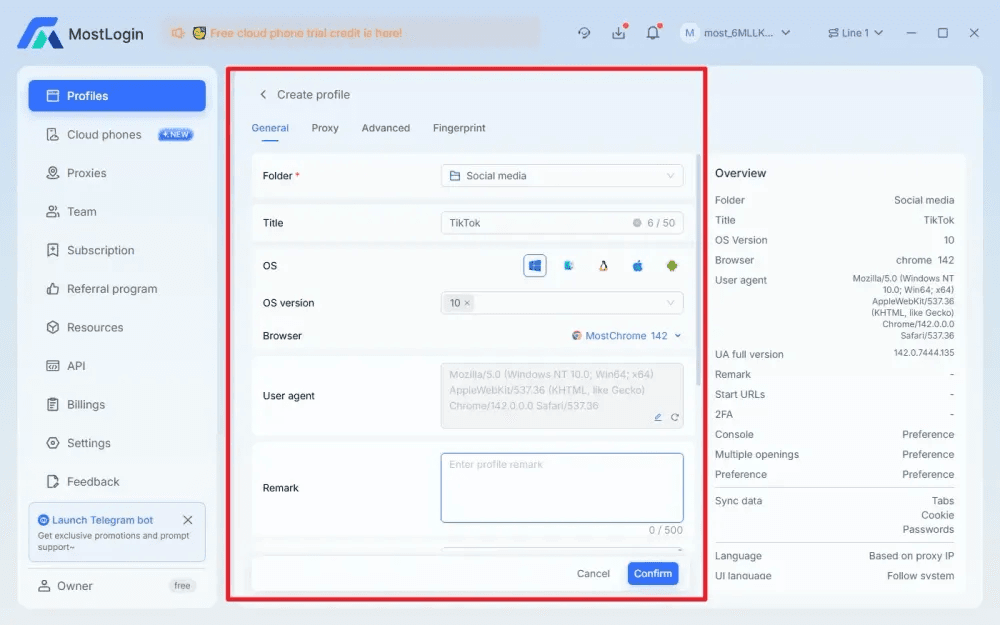
Building independent environments with MostLogin
MostLogin Antidetect Browser lets you create separate browser profiles for each store and fine-tune their environments and fingerprints.
For each TikTok Shop store profile, you can configure:
- OS type and version (e.g., Windows 10/11)
- Browser engine and version
- User Agent, resolution, and font sets
- Canvas/WebGL fingerprint strategy
- UI language and region settings
- WebRTC behavior (exposing only proxy IP where appropriate)
Assigning each store to its own persistent profile and using that same profile over time makes it much harder for TikTok to link stores at the device level.
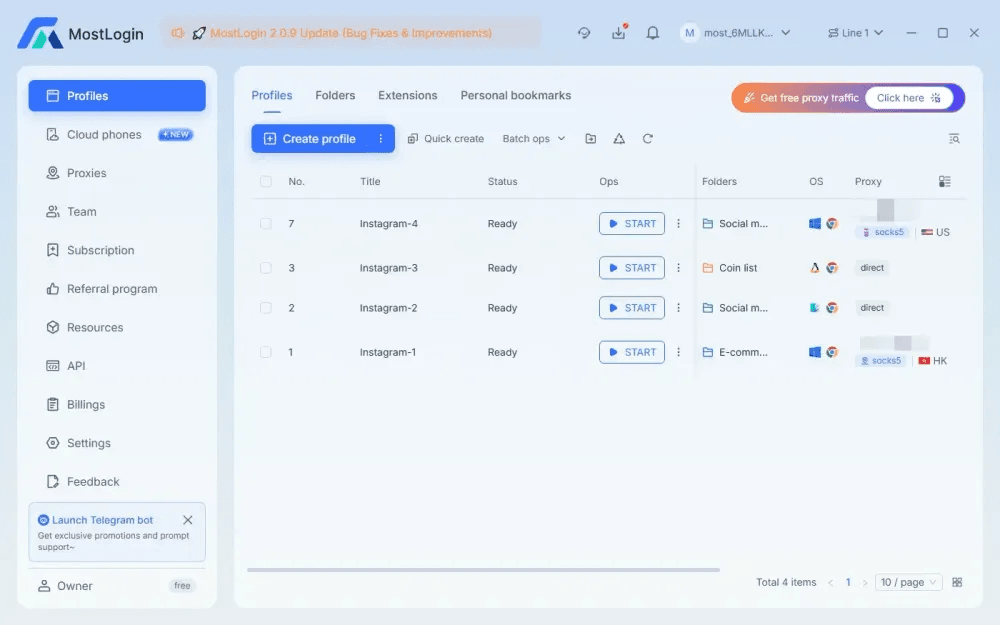
Assigning dedicated proxies and region settings
MostLogin also allows you to bind a specific HTTP or Socks5 proxy, time zone, and language to each profile.
For TikTok Shop multi-store operations, you can:
- Bind each store to a proxy in the same country as the store’s market (MY, TH, PH, etc.)
- Align time zone and interface language with that region
- Avoid constant proxy hopping and instead keep a stable, logical network history
This setup makes each store look like it’s operating from a consistent, local environment rather than a single machine jumping around the map.
How MostLogin Helps TikTok Shop Sellers in Practice
Following the structure of the Instagram article you referenced, here are the key practical benefits of using MostLogin for TikTok Shop multi-store management.
Lower risk of bans and forced verifications
By giving each store a realistic, stable fingerprint and its own isolated environment, MostLogin helps reduce bans and step-up verifications triggered by environment anomalies. Stores appear as consistent business identities rather than short-lived, heavily manipulated setups.
Prevent account linking between stores
With separate Canvas/WebGL outputs, font sets, resolutions, User Agents, cookies, and local storage per profile, it becomes much harder for TikTok to treat multiple stores as running on the same device. This lowers the chance of batch enforcement actions against your entire matrix.
Support for matrix operations and teams
MostLogin is designed to manage many profiles on one machine and supports team collaboration and role-based access.
- Each profile can represent a store or a group of stores
- Team members get access to the profiles they need
- Configuration and proxy setups are visible from one dashboard
This is useful for agencies and cross-border teams that operate large TikTok Shop matrices.
Better foundation for long-term trust and growth
Stable fingerprints and coherent network behavior help platforms treat your stores as ongoing business entities. With MostLogin’s profile-based design, each TikTok Shop store can grow on top of a consistent environment, which supports long-term trust and performance.
Region-specific environments via proxies
By binding per-store proxies and matching language and time zone, MostLogin lets you approximate realistic regional user environments for each store. This is particularly useful for cross-border sellers who manage inventories and marketing across several TikTok Shop countries.
When you need to compare plan options and estimate the cost of scaling profiles and cloud phones, checking the current Antidetect Browser & Cloud Phone pricing helps align budget with growth.
Conclusion: Turning Multi-Store Risk into Structured Environments
TikTok Shop’s fingerprint antidetect browser detection is a fixed part of its risk controls and focuses on shared environments and behaviors rather than only isolated actions. In this context, safe multi-store operations depend on giving each store a distinct, coherent environment, not just more logins on the same machine.
With an anti-detect browser like MostLogin providing per-store fingerprint profiles, proxies, and cookie isolation, you can move from improvised multi-login tricks to a more structured and predictable setup. As your TikTok Shop matrix grows on top of these designed environments, each new store becomes another planned profile within a controlled system rather than another unmanaged risk.
If later you want to expand this article with concrete configuration examples for specific TikTok Shop regions, you can build focused sections for markets like Malaysia or Thailand based on the same principles, alongside your broader antidetect strategy with MostLogin Antidetect Browser & Cloud Phone.