Multi-account teams increasingly rely on automation to handle repetitive tasks like logins, checks, report exports, and simple maintenance across dozens of profiles. Running these flows in a regular browser with basic scripts, however, can expose shared fingerprints and IPs, turning helpful automation into a source of bans. This is where anti detect browser rpa setups come in: they attach automation to isolated profiles and proxy mappings rather than to a single shared environment.
In this article, we compare how AdsPower, BeastBrowser, and MostLogin’s anti‑detect browser and cloud‑phone stack approach anti detect browser RPA for multi-account work. The goal is not to pick a universal winner, but to clarify which automation style fits different teams and risk profiles, so you can choose tools that complement your existing workflows.
How We Compare Anti Detect Browser RPA Setups
Automation Styles: No-Code vs API-Driven
Anti detect browser rpa can take two main forms. Some browsers focus on no-code RPA, where users record and replay actions in a visual interface, while others focus on API-driven automation, where scripts or external RPA platforms control profiles through code. No-code RPA lowers the entry barrier for non-technical operators, but complex logic and safety controls can become harder to maintain as workflows grow. API-driven automation requires more technical skill, yet integrates more cleanly with existing CI/CD pipelines, schedulers, and monitoring tools.
Multi-Account Isolation and Fingerprints
Automation only becomes safer when it runs on top of proper identity isolation. Anti detect browsers create profiles with distinct fingerprint parameters and isolated cookies and local storage. A strong anti detect browser rpa setup ensures that each automated profile maps to one clear identity and proxy strategy, reducing the chance that scripts operate many accounts from the same fingerprint and IP combination.
Safety, Team Control, and Cost
Beyond fingerprints, we look at whether each browser offers role-based workspaces, per-profile logs, and reasonable control over automation cadence. These features matter when multiple people and scripts touch the same account farm. We also consider cost-performance: some tools bundle advanced no-code RPA and team features at higher prices, while others aim to provide solid isolation and API-level automation with more accessible entry plans.
AdsPower: No-Code RPA for Non-Technical Multi-Account Users
AdsPower is widely known in cross-border e‑commerce and affiliate communities as a fingerprint browser with built-in, no-code RPA. It lets users record and replay browser actions across multiple profiles, giving operators who do not write code a way to automate repetitive flows.
From an automation perspective, AdsPower focuses on visual, click-based RPA. Users can build workflows by capturing actions and then schedule these sequences to run across selected profiles, which suits small sellers and solopreneurs. On the isolation front, AdsPower offers profile-based environments with separate cookies and proxy settings, but the safety of an anti detect browser rpa strategy still depends heavily on how profiles, proxies, and routines are configured.
BeastBrowser: RPA and Team Workspaces in One Package
BeastBrowser positions itself as an anti detect browser for multi-accounting with RPA automation and team workspaces built into one platform. It aims to serve users who want profile isolation, automation tools, and collaboration capabilities without stitching together several services.
BeastBrowser provides ways to script or schedule actions across profiles, combining RPA flows with profile management. Isolation-wise, it offers fingerprint profiles with unique settings and proxy management, but the strength of any anti detect browser rpa setup still depends on following “one account = one environment” principles and avoiding environment reuse across unrelated clusters.
MostLogin: API-Driven Anti Detect Browser RPA with Cloud Phones
MostLogin approaches anti detect browser rpa from an identity-first and API-centric perspective. It combines an anti detect browser for desktop profiles with cloud phones based on real Android devices under a unified account and team layer.
MostLogin emphasizes API-driven control rather than large no-code RPA editors. Its Local API and REST API endpoints allow scripts, Selenium, Puppeteer, and external RPA platforms to operate within specific profiles instead of generic sessions, making it easier to embed automation into existing schedulers and monitoring tools. Profiles provide isolated cookies and detailed fingerprint tuning, with proxies bound per profile to keep network and fingerprint strategies aligned.
Beyond the desktop browser, MostLogin’s cloud phones extend anti detect browser rpa principles into mobile app environments such as TikTok Shop and marketplace apps. Workspaces, profile tags, member invitations, and per-profile access controls give managers a way to assign identities and automation flows to specific roles without sharing raw passwords. Its pricing and programs aim to offer solid cost-performance for agencies, sellers, and media teams.
Readers can explore MostLogin automation and workflow optimization and review MostLogin pricing plans to match capabilities with budget.
Quick Comparison: Anti Detect Browser RPA Features
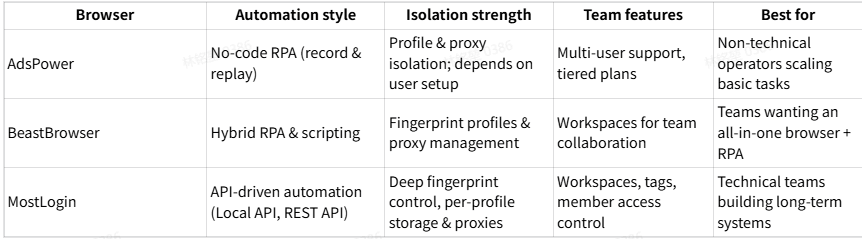
| Browser | Automation style | Isolation strength | Team features | Best for |
| AdsPower | No-code RPA (record & replay) | Profile & proxy isolation; depends on user setup | Multi-user support, tiered plans | Non-technical operators scaling basic tasks |
| BeastBrowser | Hybrid RPA & scripting | Fingerprint profiles & proxy management | Workspaces for team collaboration | Teams wanting an all-in-one browser + RPA |
| MostLogin | API-driven automation (Local API, REST API) | Deep fingerprint control, per-profile storage & proxies | Workspaces, tags, member access control | Technical teams building long-term systems |
Summary
Anti detect browser rpa provides a safer foundation for multi-account automation when it runs on isolated profiles and well-designed proxy strategies. AdsPower’s no-code RPA is better suited to non-technical users who want to scale routine tasks, BeastBrowser offers an integrated platform for profile management and automation, and MostLogin focuses on identity-first profiles, API-driven control, and cloud phones for both web and mobile environments.