Running several cross‑border stores should grow your revenue, not your risk. When every marketplace restricts one account per device or IP, a multi-account browser for multi-store management becomes the backbone of safe, scalable operations.
This guide explains how multi‑account browsers work, what you actually need for multi‑store e‑commerce, and how to choose a tool that keeps both bans and software costs under control.
Why multi-store Management Breaks in a Normal Browser
If you sell on Amazon, Shopee, Lazada, TikTok Shop, eBay, or similar platforms, you hit the same wall very quickly:
- One browser and one IP cannot safely host multiple “independent” seller accounts.
- Incognito windows and extra Chrome profiles still share important fingerprint signals.
- Buying piles of phones or laptops becomes expensive, messy, and hard to coordinate for a team.
Modern anti‑fraud systems do not just check IP. They analyze:
- Browser fingerprints (Canvas, WebGL, fonts, user agent).
- Device behavior and time zone settings.
- WebRTC and audio output patterns.
So even if you change IP, accounts can still be linked. That is why serious multi-store management almost always ends up adopting a multi-account browser instead of just proxies and incognito tabs.
A specialized multi‑account browser solves the core problem by giving each store its own isolated browser profile that behaves like a separate real device.
What Is a multi-account Browser, Exactly?
A multi-account browser is a professional anti‑detect browser designed to let you run many independent “virtual devices” from a single machine. Each device lives as a profile inside the app.
Every profile has:
- A unique browser fingerprint (user agent, Canvas, WebGL, fonts, language, time zone, WebRTC settings).
- Its own cookies, cache, and local storage.
- A dedicated proxy or IP address.
When you launch a profile, websites see it as a distinct user environment. You can switch between 5, 50, or 500 profiles without leaking data between them, which is exactly what you need in a multi-store management by multi-account browser scenarios.
A multi-account browser such as MostLogin is built around this principle: it gives cross‑border sellers and marketing teams a way to safely manage many accounts from one interface, instead of juggling devices and risky logins. You can see this focus clearly from the feature highlights and use cases on the MostLogin official website.
Core Features You Actually Need for multi-store Management
Not every anti‑detect or multi‑account tool is a good fit for multi‑store e‑commerce. Focus on features that directly impact store survival, day‑to‑day workflow, and cost.
Non‑negotiable essentials
- True session isolation Each account must live in its own profile with separate cookies, local storage, and cache. That way, one store’s login, 2FA, and activity history never touch another store.
- Realistic, stable fingerprints The tool should generate natural‑looking Canvas, WebGL, audio, font, and WebRTC patterns for every profile. Sloppy or overly random fingerprints can stand out just as much as using the same device everywhere.
- Reliable proxy integration You need to attach region‑appropriate proxies to each profile, ideally from residential or high‑quality datacenter providers. Good tools make it simple to configure.
- Lightweight performance without VMs For many sellers, virtual machines are overkill. A well‑built multi-account browser runs many profiles smoothly on normal hardware, without the complexity of managing full OS images.
Multi‑store‑specific power features
For serious cross‑border operations, a multi-account browser for multi-store management should also give you:
- Mass profile creation from templates (e.g., “US desktop”, “EU mobile‑like”).
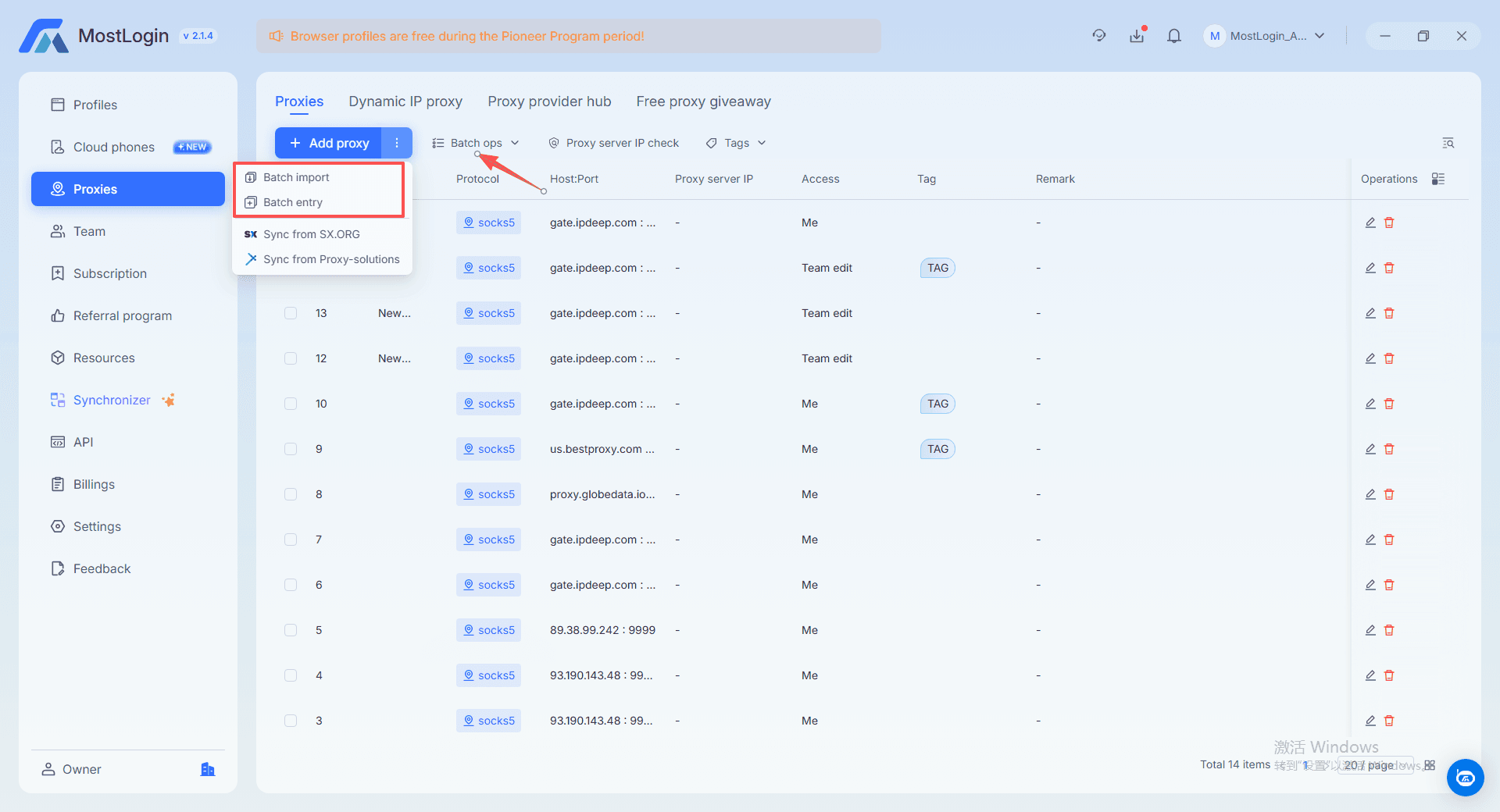
- Batch proxy updates when you change providers or rotate ranges.
- Team collaboration with seats, roles, and operation logs.
- Automation hooks (local/REST APIs, Selenium/Puppeteer support) for repetitive flows.
MostLogin’s feature set is built around these exact needs: profile templates, bulk operation, team collaboration, and automation for professional multi‑account setups. You can review the full capabilities of the MostLogin multi-account browser and its advanced anti‑detect browser features, including fingerprinting, team management, and automation designed for multi‑store sellers.
How a multi-account Browser Supports the Whole Store Lifecycle
For cross‑border sellers, a multi‑account browser adds value at every stage—from launching new shops to operating a full portfolio.
Launching and warming new stores
When creating new stores:
- Generate a dedicated profile for each marketplace account.
- Assign a properly tuned fingerprint and a local IP.
- Warm the store gradually, keeping its behavior consistent inside that profile.
If one experiment fails or an account is flagged, the damage is contained. Other stores remain untouched because they live in isolated environments.
Daily operations across many platforms
Once stores are running, a multi-account browser makes daily work smoother:
- Open each store’s profile like a separate browser window.
- Handle orders, messages, ads, and product updates without mixing logins.
- Keep sensitive actions (price changes, coupon tests) scoped to specific profiles.
With MostLogin, switching between profiles feels similar to switching tabs in a normal browser, but each tab is backed by a fully isolated fingerprint and storage space. This helps you run hundreds of store sessions from one multi-account browser for multi-store management workspace without confusion.
Growing from solo operator to team
As your business grows:
- You invite VAs, media buyers, or regional managers into your workspace.
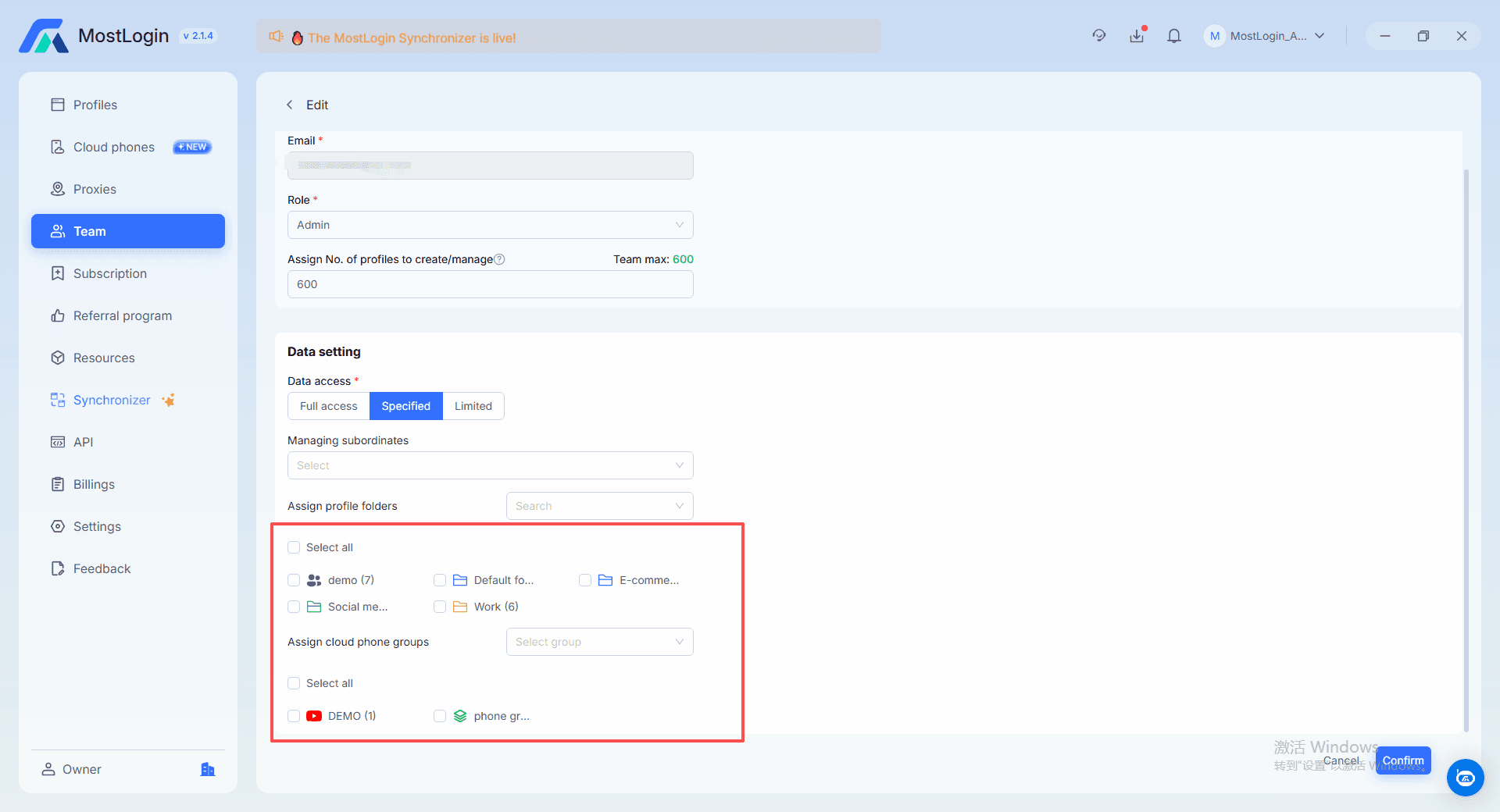
- You share only the store profiles they need, not your entire account stack.
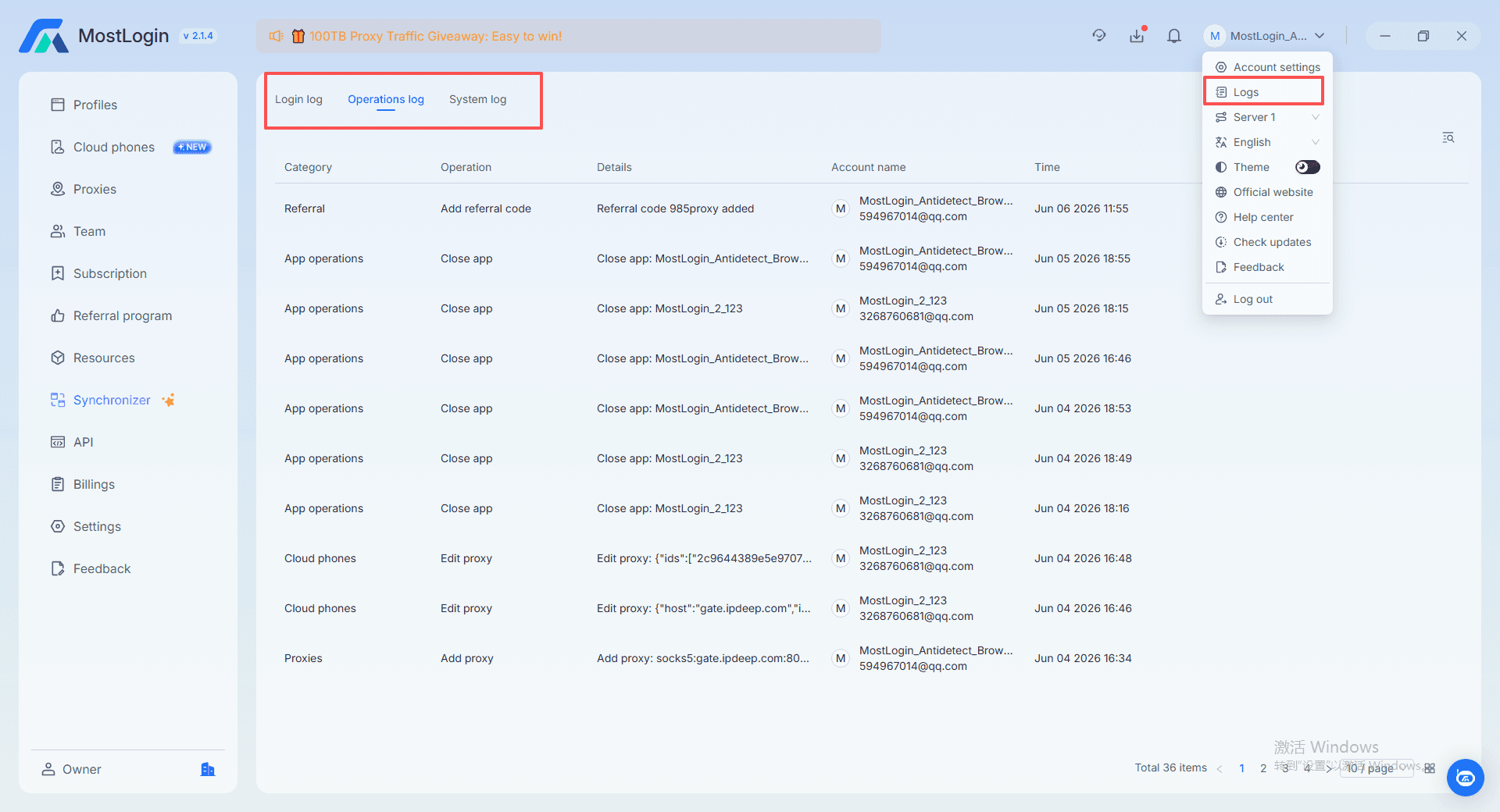
- You audit usage through operation logs when something goes wrong.
This is the difference between chaotic password sharing and structured multi‑store management. MostLogin’s collaboration features are designed to give both flexibility and control as you add people to your operation. For more advanced workflows, the multi‑accounting and automation guides available from the site provide deeper examples of team‑based setups.
Choosing the Right multi-account browser for multi-store management
Identity isolation
When you compare different tools side by side, a few key factors make it clear which one is the right multi-account browser for multi-store management for your business. First, consider identity isolation. MostLogin provides separate fingerprints and storage for each browser profile so every store runs as if it were on a different device. Many well‑known anti‑detect browsers also offer strong isolation, but their configuration can be more complex and is often tied to higher‑priced plans. A normal browser plus proxies is cheaper, but because fingerprints are still shared, it carries the highest risk.
Multi‑store workflow design
Next, look at whether the tool is truly designed around multi‑store workflows. MostLogin focuses on e‑commerce, social media, affiliate marketing, and SEO scenarios, with built‑in batch profile creation, batch proxy management, and team collaboration features that match what sellers actually do every day. Larger brand tools often target a broader audience of agencies and enterprises, which means they can feel heavier or less direct for smaller teams.
Team and automation capabilities
Then, evaluate team and automation capabilities. MostLogin supports multiple seats, role‑based permissions, shared profiles, operation logs, and both local and REST APIs that integrate with Selenium or Puppeteer. Many high‑end anti‑detect browsers also offer strong automation features, but they usually require more technical setup to unlock their full value. Standard browsers barely provide any of this multi‑account or team‑oriented functionality.
Performance and hardware requirements
Finally, weigh performance and hardware requirements. MostLogin uses an optimized engine to run many profiles on a regular computer, without needing additional virtual machines or extra devices. Some older or heavier tools consume more resources at high concurrency, raising the bar for hardware and network conditions.
Putting it all together
When all these factors are considered together, most cross‑border sellers in a competitive, price‑sensitive environment find that a balanced tool like MostLogin—strong protection, efficient workflows, and reasonable pricing—comes closer to their idea of the best antidetect browser than simply picking the most expensive option on the market.
A Simple Workflow: Using MostLogin as Your multi-account Browser
Here is a concrete flow you can apply when adopting a multi-account browser for multi-store management like MostLogin.
Step 1: Map your store groups
- List all your stores by platform and region.
- Group them (e.g., “Amazon US cluster”, “Lazada SEA cluster”, “TikTok Shop EU accounts”).
Step 2: Set up the tool
- Create an account on the MostLogin official website.
- Download the client for your OS and create your workspace.
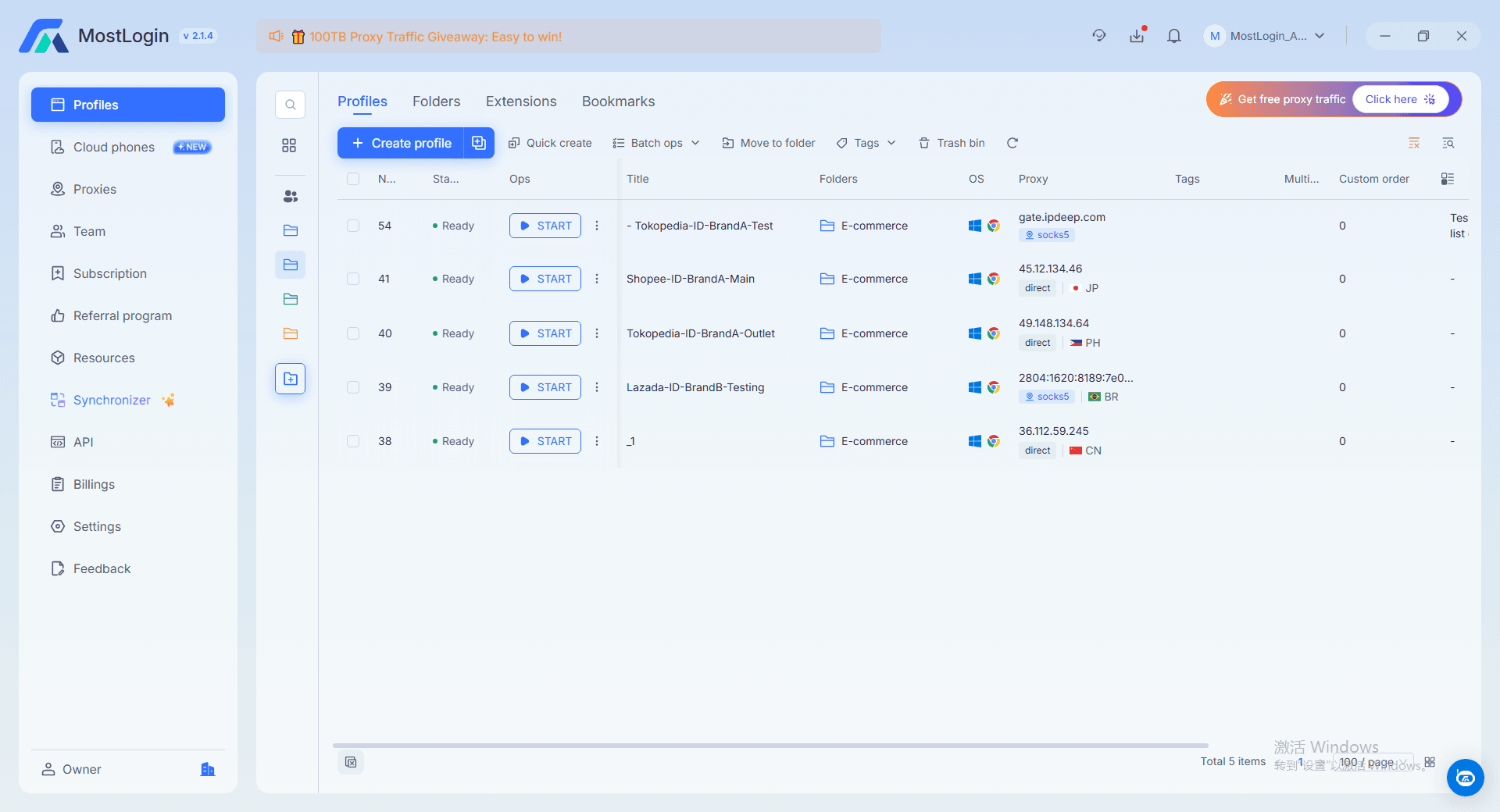
Step 3: Generate browser profiles
- For each store, create a profile with the right region, language, and device type.
- Use profile templates and mass creation to save time.
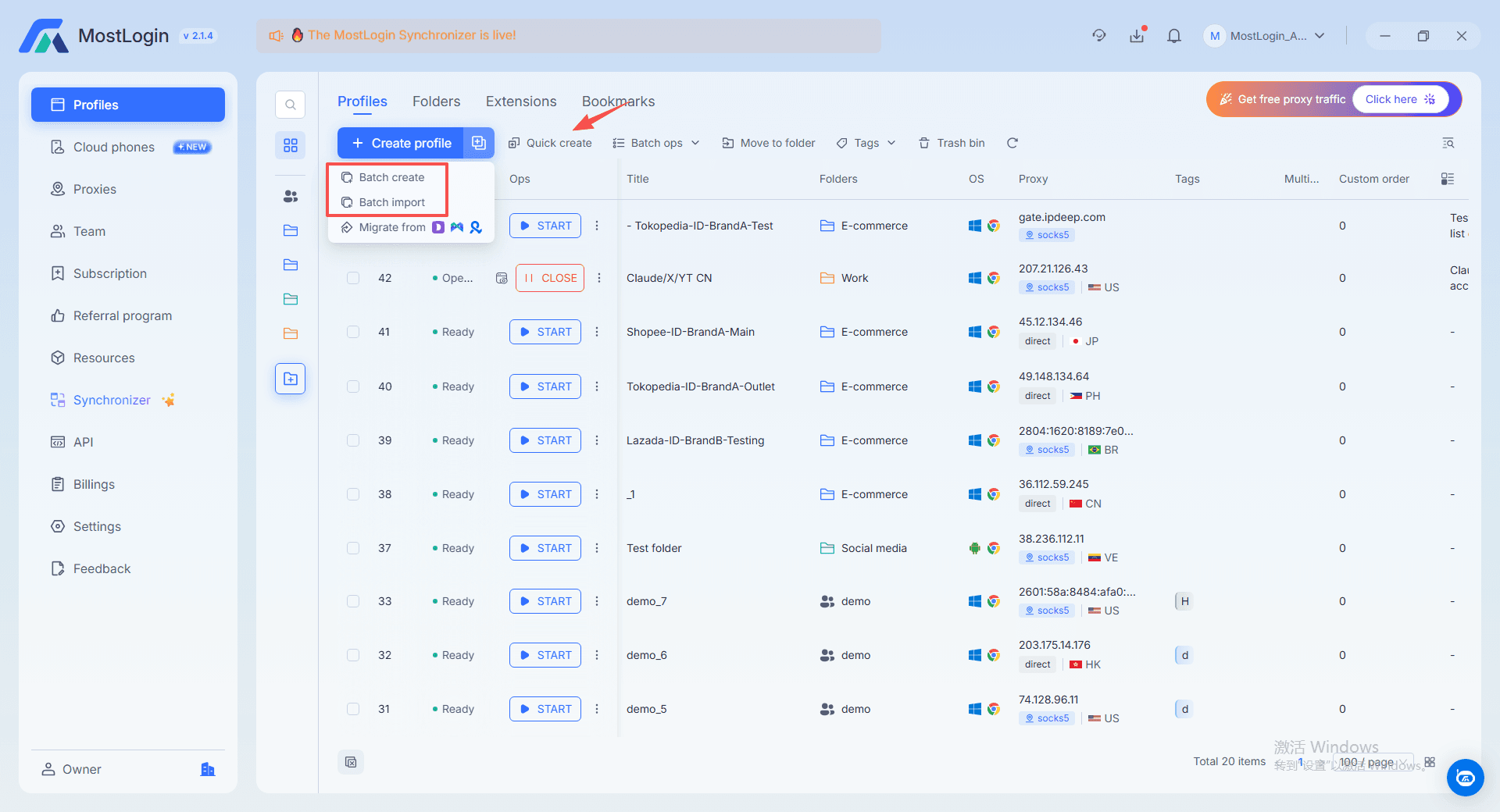
Step 4: Attach proxies and IPs
- Bind a unique proxy to each profile, matching the store’s market.
- Use batch proxy editing for large groups when switching providers.
Step 5: Assign profiles to operators
- Share profiles with VAs or teammates, giving them only the access they need.
- Use operation logs to review who handled which store and when.
Step 6: Add automation where it makes sense
- Use MostLogin’s API support to automate repetitive actions (logins, status checks, screenshots).
- Connect scripts or external tools once your process is stable.
These automation and integration options are described in detail in the multi‑accounting API guides accessible via the navigation on the MostLogin website.
Cost, Risk, and ROI: Evaluating a multi-account Browser
In a red‑ocean industry, you will see many tools claiming to be the “best”. For cross‑border multi‑store sellers, a more useful way to compare options is to look at three dimensions:
- Cost per successful, stable store A slightly higher subscription can be cheaper overall if it sharply reduces bans and account rebuilding time.
- Time saved per operator If a multi-account browser for multi-store management centralizes profiles, proxies, and logs, your team spends more time selling and less time troubleshooting sessions.
- Risk control as you scale Collaboration features and clear logs reduce human mistakes—wrong logins, reused devices, or mixed accounts—which are common sources of platform penalties.
MostLogin is designed to hit that balance: professional‑grade identity protection and collaboration for multi‑account operations, but with usability and pricing that make sense for sellers who are still in the growth phase.
FAQs About multi-store Management and multi-account Browsers
Q1: Why isn’t a normal browser with proxies enough?
Because proxies only change your IP. Platforms still see your browser fingerprint—Canvas, WebGL, fonts, and more—so they can connect accounts even when IPs differ. A multi-account browser controls both IP and fingerprint per profile, which is what multi‑store setups need.
Q2: Will using a multi-account browser get my accounts banned?
The tool itself does not trigger bans; how you use it matters. A multi-account browser for multi-store management like MostLogin is built to reduce correlation signals, but you still need sensible behavior: realistic activity, gradual warming, and clean proxies.
Q3: Is a multi-account browser difficult for non‑technical staff?
MostLogin is designed so that non‑technical operators can: select a template, create a profile, attach a proxy, and start working as if they were using a normal browser. Advanced fingerprint controls and automation are available, but not mandatory on day one.
Q4: Can I manage both stores and social accounts in the same tool?
Yes. Many teams use one multi-account browser to handle marketplace stores, brand social accounts, and even ad accounts. Separate profiles keep each identity isolated while still giving you a single control panel.
Q5: How does team collaboration work in practice?
You invite teammates to your workspace, create roles, and share specific profiles with them. They log in through those profiles while you keep central control over who can access which accounts and review activity later through logs.
Q6: Is a multi-account browser like MostLogin only for big agencies?
No. While agencies benefit from these tools, they are just as useful for solo sellers and small teams who want to scale from a couple of stores to dozens without buying hardware stacks. MostLogin in particular is positioned to support both early‑stage and advanced users.
Conclusion and Next Steps
Running cross‑border stores in a red‑ocean market means every decision about tools affects both risk and profit. A well‑chosen multi-account browser for multi-store management gives you a safer way to grow: each account runs in its own isolated environment, your team works from one structured workspace, and you spend less time fighting logins and more time building sales.
Instead of overpaying for a heavy enterprise stack or risking bans with basic proxies and incognito tabs, it makes sense to start with a solution designed specifically for multi‑account sellers who care about cost and stability. If you are ready to see how this works in practice, you can visit the MostLogin official website to create an account, explore the MostLogin multi-account browser interface, and test how it fits your own multi‑store workflow.