An antidetect browser isolates the browser layer. The network layer, the IP behind every session, is what actually keeps your accounts apart or ties them together. This guide covers what Astro proxy infrastructure is, why it fits browser-based multi-accounting, and how to connect Astro to MostLogin step by step.
When you run more than a handful of accounts on marketplaces, ad platforms or social networks, the profile that gets flagged is rarely the one that did something wrong. It is the one whose network footprint gave the whole operation away. A perfect fingerprint still sits on an IP address, and if several profiles share that address, platforms read them as one operator running many accounts.
What Astro proxy infrastructure is
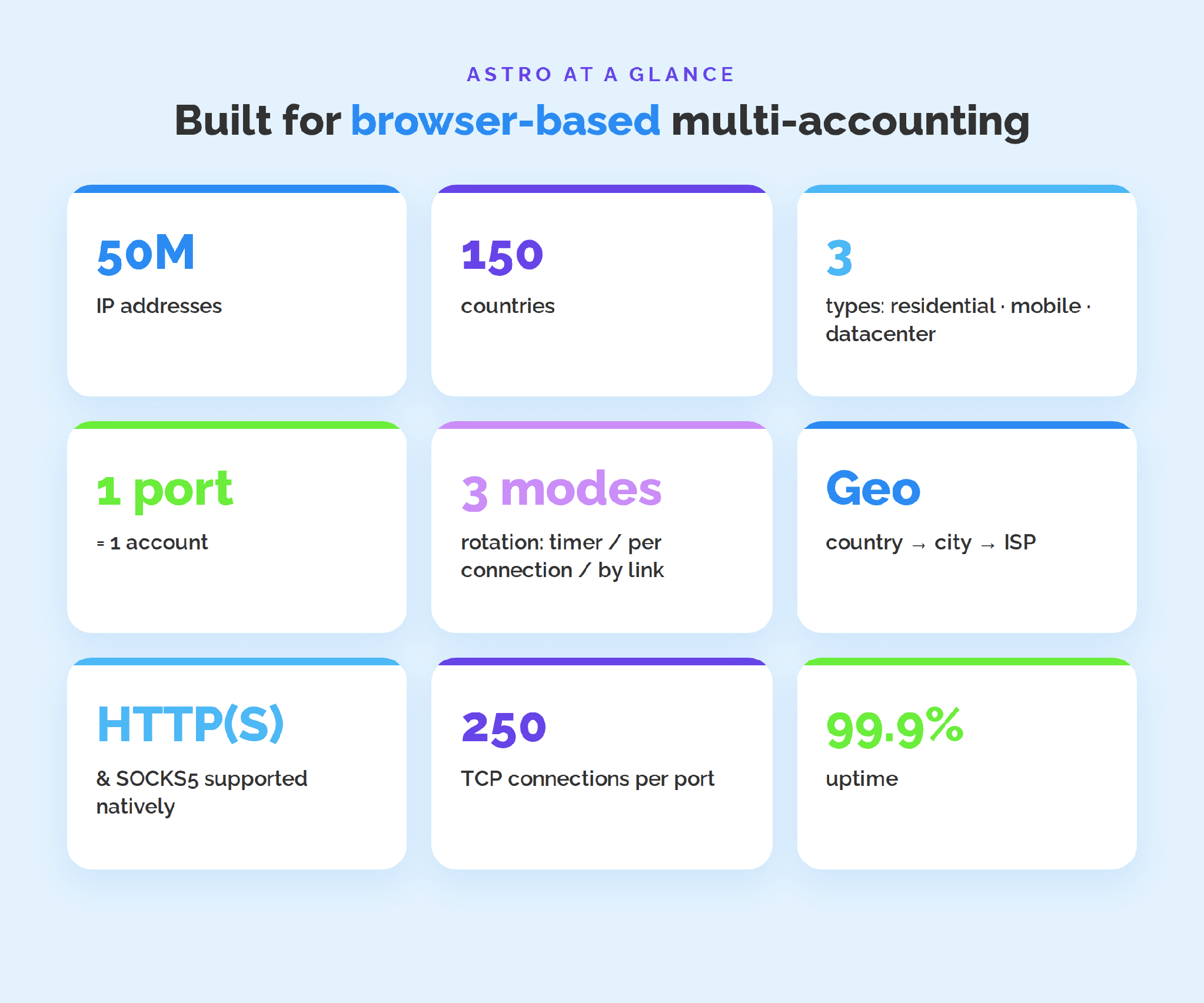
Astro is a proxy infrastructure built around ethically sourced IPs. The pool holds 50 million IP addresses across 150 countries, verified at the source under KYC and AML policies. It covers three proxy types under one infrastructure: residential, mobile and datacenter.
- Residential IPs come from real home internet providers, so platforms read them as ordinary user traffic.
- Mobile IPs run through 4G/5G carriers and carry high trust on social platforms.
- Datacenter IPs are cost-effective options for high-volume technical tasks.
Everything runs over HTTP(S) and SOCKS5, with up to 250 concurrent TCP connections per port and 99.9% uptime.
Test Astro inside your MostLogin profiles
New to Astro? Contact support for a $3 trial credit and test residential or mobile proxies before you commit. Get started with Astro →
Why the proxy layer decides multi-account safety
Platforms link accounts through shared signals, and the IP address is the most basic one. When several profiles log in from the same IP, they are treated as one coordinated network, and a restriction on one can reach the rest. Two things keep profiles separate at the network layer:
- A separate port per account, so no two profiles share the same connection.
- A consistent geo per account, so one profile keeps one region instead of jumping between countries.
Residential and mobile IPs matter here because datacenter ranges are easy to classify as server infrastructure, which raises risk signals on ad platforms and social networks.
Astro's advantages for browser-based multi-accounting
A few things make Astro a practical fit inside an antidetect browser:
- Controlled IP rotation. All Astro IPs are dynamic, and you choose how they rotate: on a timer (from 1 minute), a new IP on every new connection, or manually by link, also available via API.
- Granular geo-targeting. Select down to country, city and ISP, so each profile's location matches the account it runs.
- Protocol flexibility. HTTP(S) and SOCKS5 are supported natively, so Astro drops into any antidetect browser that accepts standard proxy input.
- Scale and stability. 50M IPs across 150 countries, up to 250 TCP connections per port and 99.9% uptime keep large profile sets running.
The three layers of a stable multi-account setup
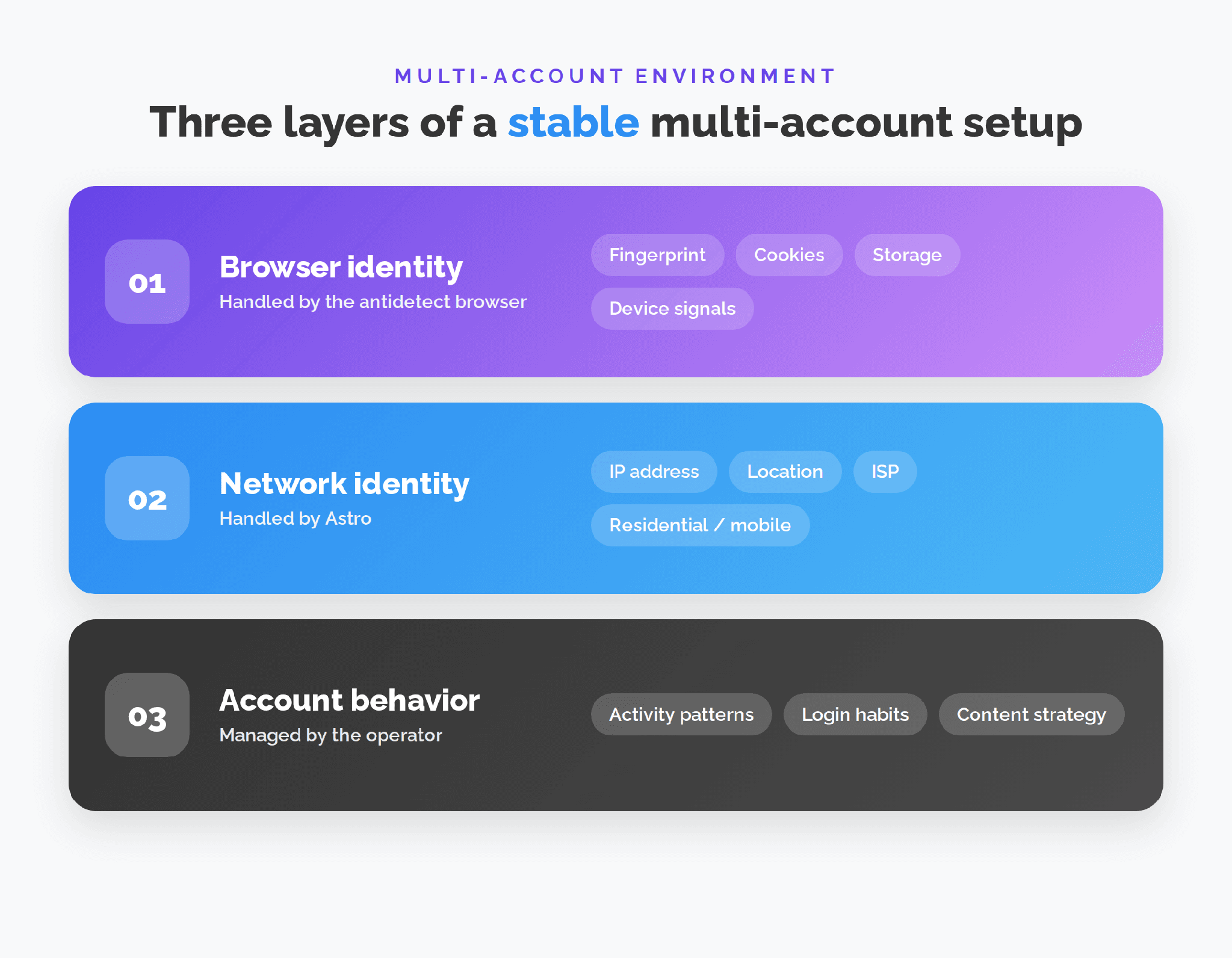
A believable account environment is built from three layers that have to agree:
- Browser identity – fingerprint, cookies, storage and device signals. This is the antidetect browser's job.
- Network identity – IP address, location, ISP and network type. This is Astro's job.
- Account behavior – activity patterns, login habits and content strategy. This stays with the operator.
A fingerprint alone does not create a full environment. Pair a unique browser profile with an Astro port, and each account looks like a separate user on a separate connection.
Where MostLogin fits
MostLogin is a Chromium-based antidetect browser that gives each account an isolated profile, with a separate fingerprint, cookies and storage, so platforms see unrelated users rather than one operator running many accounts. It supports HTTP, HTTPS and SOCKS proxies per profile, which is exactly where Astro slots in: MostLogin handles the browser identity, Astro handles the network identity.
Step by step: connecting Astro to MostLogin
It takes about two minutes to get an Astro IP running inside a MostLogin profile. Make sure the MostLogin desktop client is installed and you are signed in.
Step 1. Get your Astro credentials
Log in at astroproxy.com, choose your proxy type (residential, mobile or datacenter) and top up. Your host, port, login and password appear in the dashboard.
Step 2. Create a profile and open its Proxy tab
In MostLogin, create a new profile or open an existing one, then switch to the Proxy tab. Bind one profile to one account (1 account = 1 port).
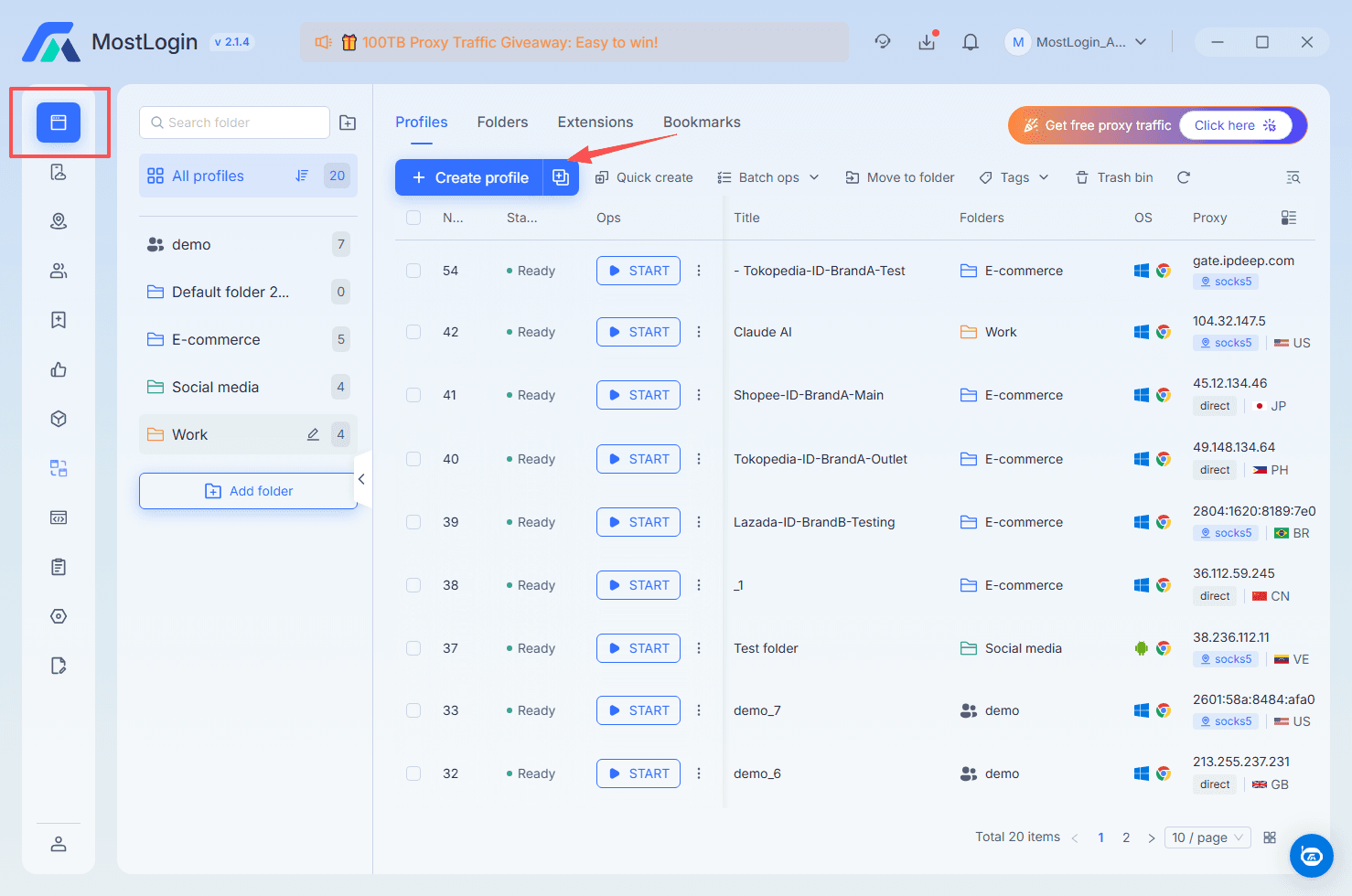
MostLogin profiles: bind one profile to one account (1 account = 1 port).
Step 3. Enter the Astro proxy details
Set the protocol to HTTP or SOCKS5 (Astro supports both natively), then paste host:port, account and password into the matching fields.
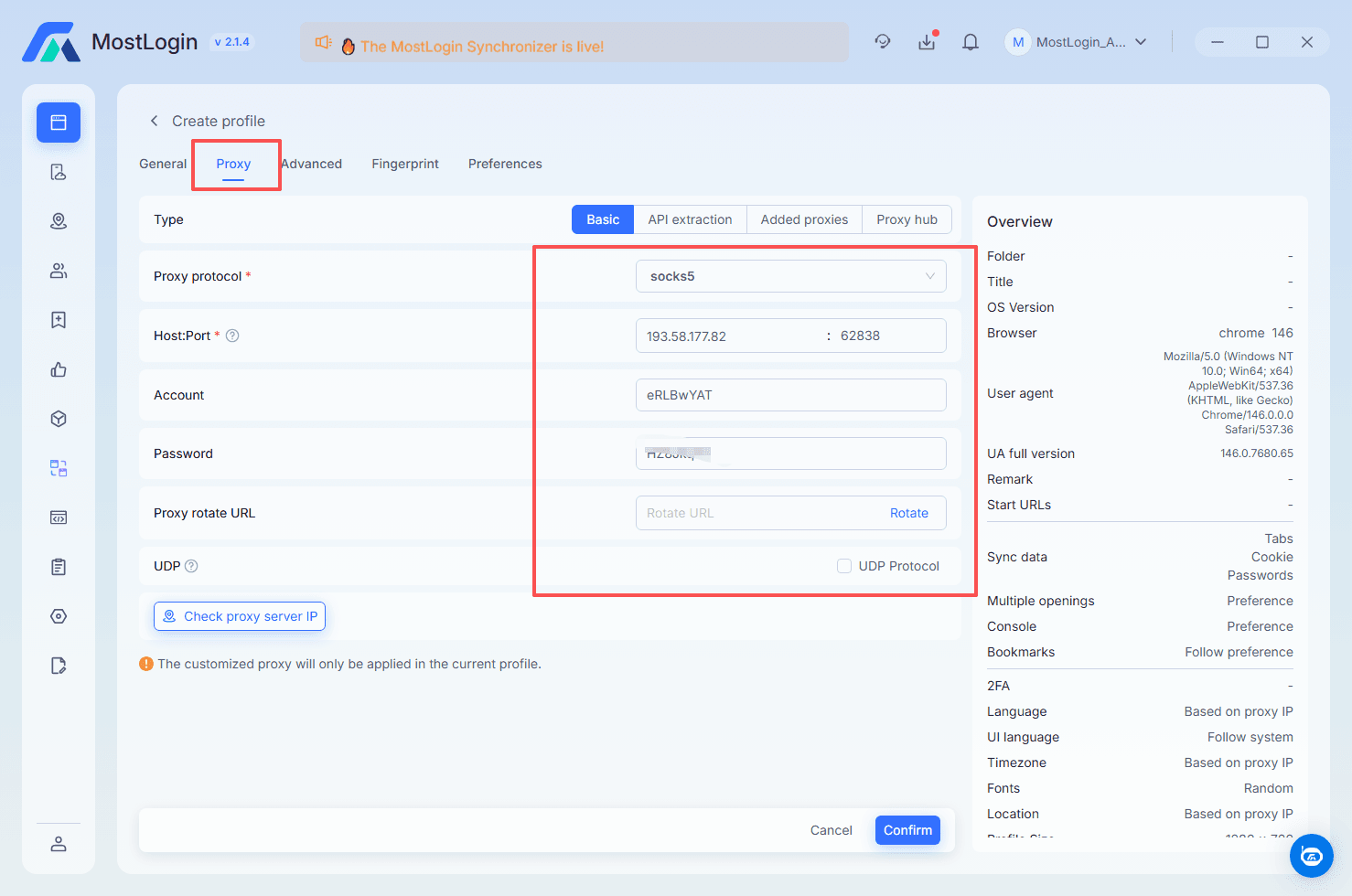
Astro connects over HTTP(S) and SOCKS5, so it maps straight onto MostLogin's proxy fields.
Step 4. Test and launch
Click Check proxy server IP. MostLogin pings the Astro proxy and returns its IP, country, city and ISP. When the check passes, click Confirm, and the profile opens in a fully isolated window that works only through your Astro IP.
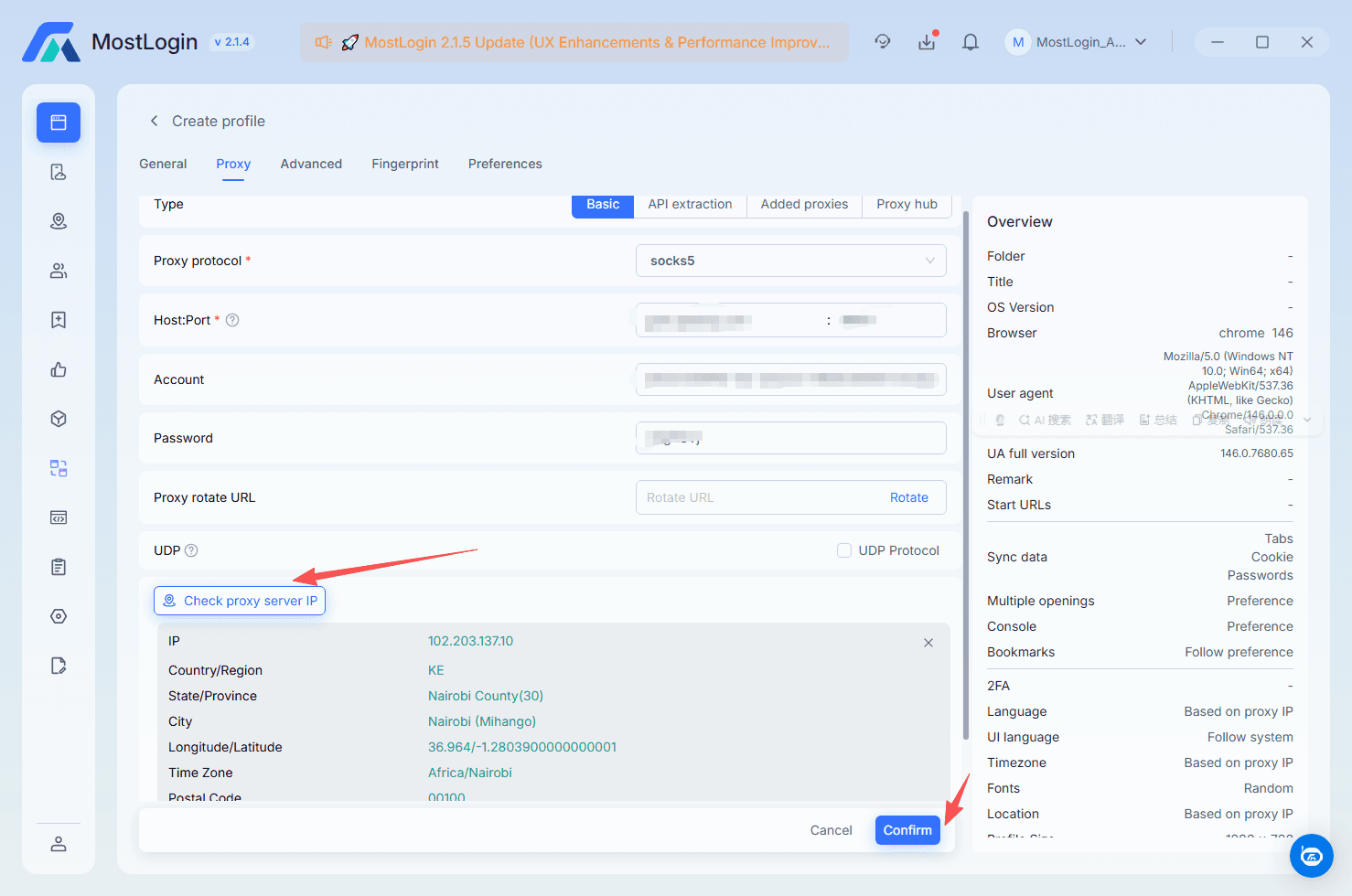
The check confirms the exact IP, country, city and ISP behind the profile.
Best practices for Astro + MostLogin
- One account = one profile = one port. Never share an IP across profiles.
- Match geo to the account. Keep country, city and, where it matters, ISP consistent with the account's history.
- Control your IP rotation. Set the mode per port: on a timer, on every new connection, or manually by link or API.
- Warm up new profiles. Start with light activity and let each account settle before scaling.
MostLogin isolates the browser. Astro runs every profile through a port with a dynamic residential or mobile IP, controlled rotation and geo-targeting down to the ISP. Together they let agencies, media buyers and e-commerce teams scale profiles without tying them together.