In today's world where short-video users are so active, Snapchat has become an important tool for many people to share their lives and communicate with others through its own ephemeral messaging and strong privacy-related mechanisms. However, precisely because of its privacy design, downloading or saving Snapchat videos often triggers a notification to the other party, which annoys many users.
Today, we are going to show you how to save Snapchat videos without triggering notifications!
1. Why Does Downloading Snapchat Videos Notify the Other Party?
Snapchat's core competitiveness lies in privacy protection. Whether it's taking screenshots, screen recording, or directly downloading videos, the system will actively detect these actions and send a notification message to the other party. The main reasons include:
Client Behavior Monitoring: Snapchat will monitor system-level behaviors such as screenshots and screen recording in real time.
Server Synchronization Mechanism: Once an abnormal operation is detected, the server will record it and synchronize the information to the video publisher.
Privacy Compliance Requirements: Snapchat is required to clearly inform users when their content is saved or copied to avoid disputes.
Therefore, it is almost impossible to save videos silently through conventional methods.
2. How to Download Snapchat Videos Without Notifying the Other Party?
Although Snapchat's mechanisms are relatively strict, there are still some methods we can use to avoid triggering notifications:
1. Cast the Screen to Another Device for Recording
We can use some screen casting software to mirror the Snapchat app screen from our mobile phone to a computer device, and then record the screen on the computer. This way, we can avoid triggering notifications.
2. Screenshot by Logging in on Multiple Devices Simultaneously
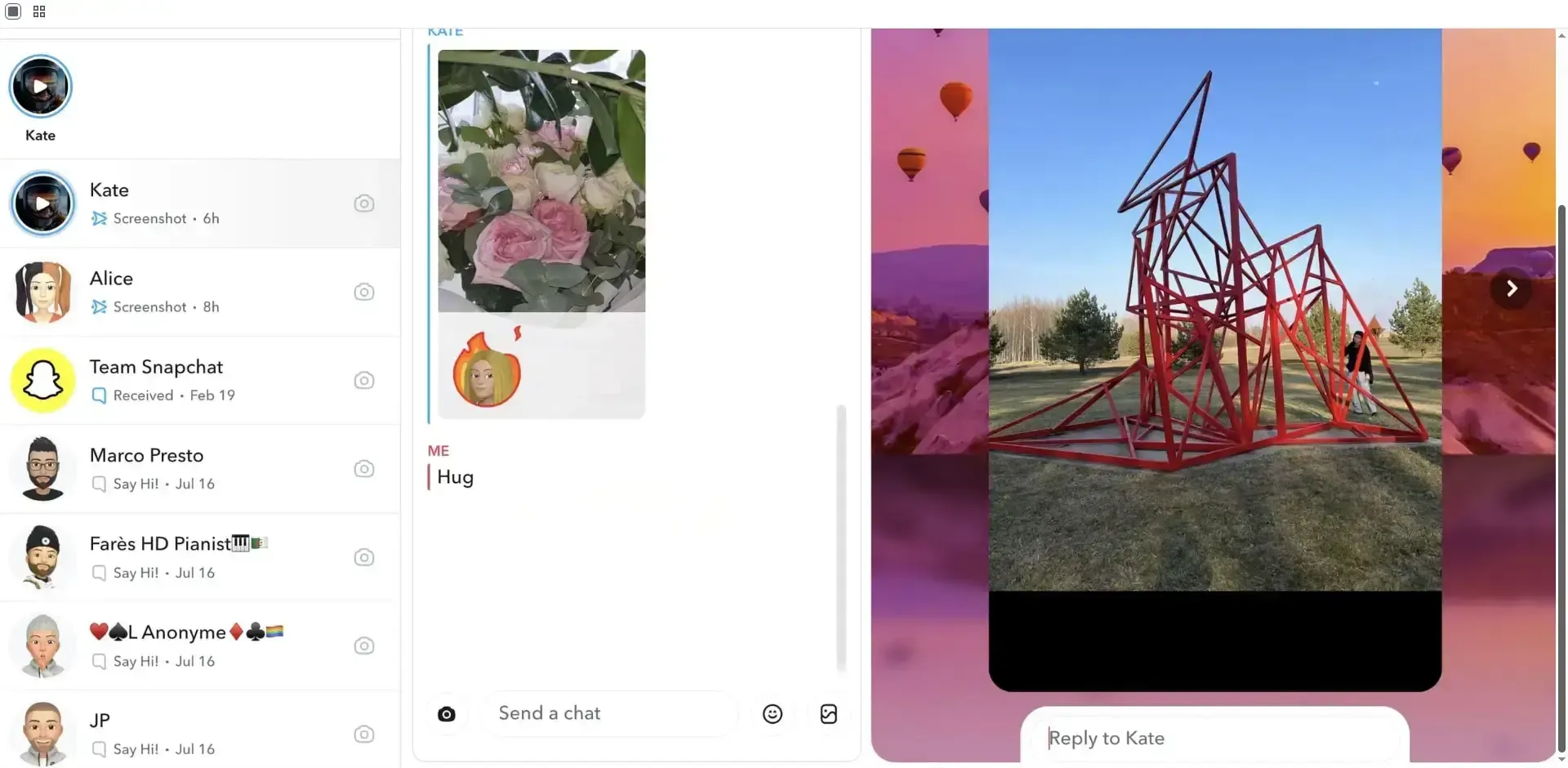
This is a new method. First, find the content you want to save on your mobile phone, then log in to Snapchat Web on your computer, and take a full-screen screenshot using the system's built-in screenshot tool. Note that you must take a full-screen screenshot to avoid problems. In addition, the Command+Shift+4 shortcut on Mac OS can be detected, so you need to use other tools.
Snapchat Web often has many bugs. For example, the windowed mode could previously be recorded without being detected (the fix time is unknown). Therefore, this method is still recommended for saving content.
3. Record with Another Mobile Phone
We can also use another mobile phone to record by turning on the camera's recording function. This method is the simplest and problem-free, but it is relatively cumbersome overall, and the recorded content may not be very clear.
3. Why Does Downloading Snapchat Videos Lead to Account Bans?
Officially Prohibited Behavior: The official policy is to respect user privacy. Therefore, if your frequent downloading activities are detected, your account is likely to be flagged and banned by the official.
Owning Multiple Accounts: Many people own more than one account. If this is detected, it is easy for other or all accounts to be banned together.
Excessively Frequent Operations: Performing a certain operation frequently within a short period of time, such as liking or sharing more than a certain number of times, will be identified as bot-like behavior.
Abnormal Detection by the System: Having multiple accounts, as mentioned above, is one of the situations. Currently, Snapchat uses user information fingerprinting to determine whether a single user owns multiple accounts. If detected, the accounts will be marked as abnormal and result in bans.
4. How to Download Snapchat Videos Safely and Efficiently?
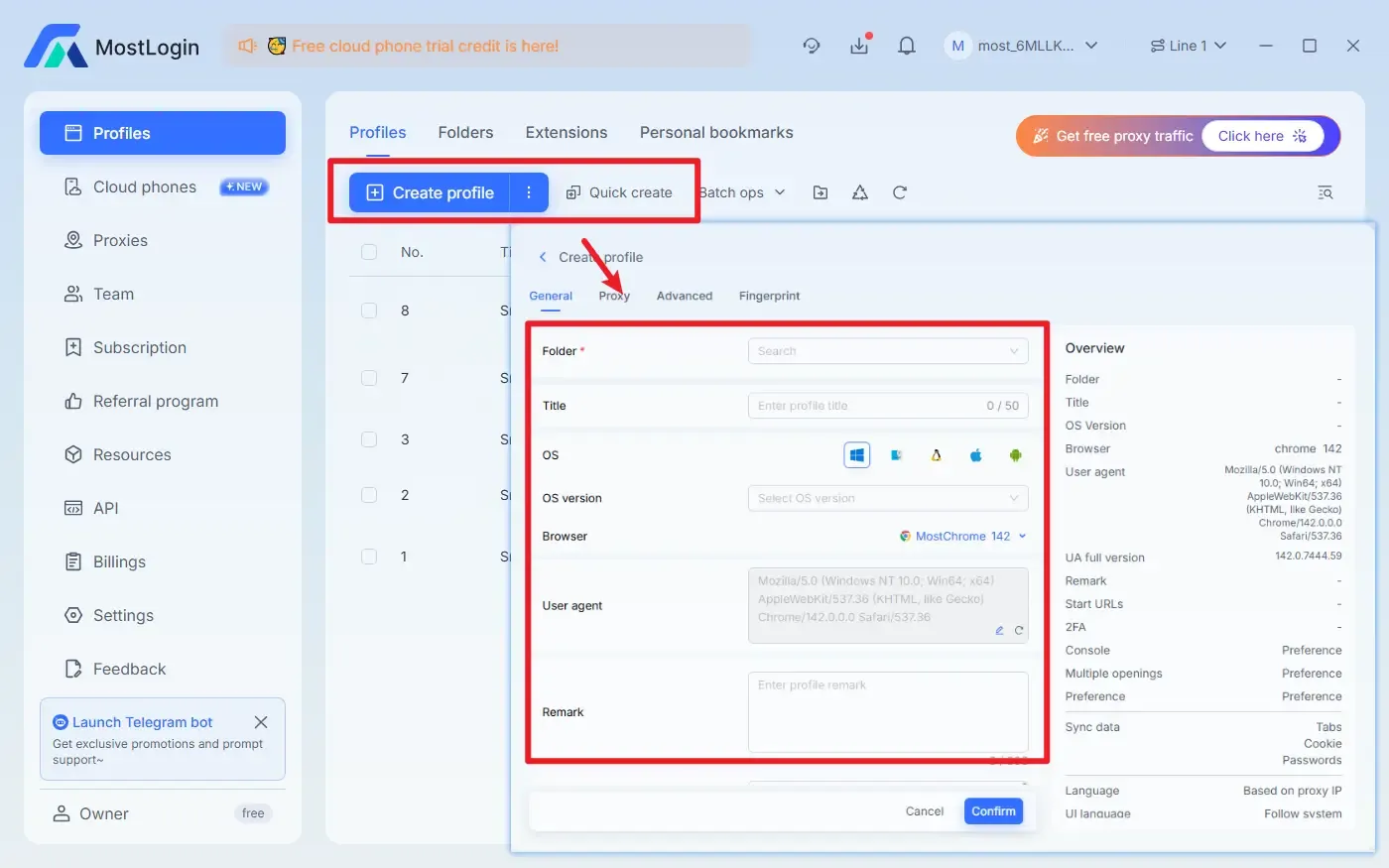
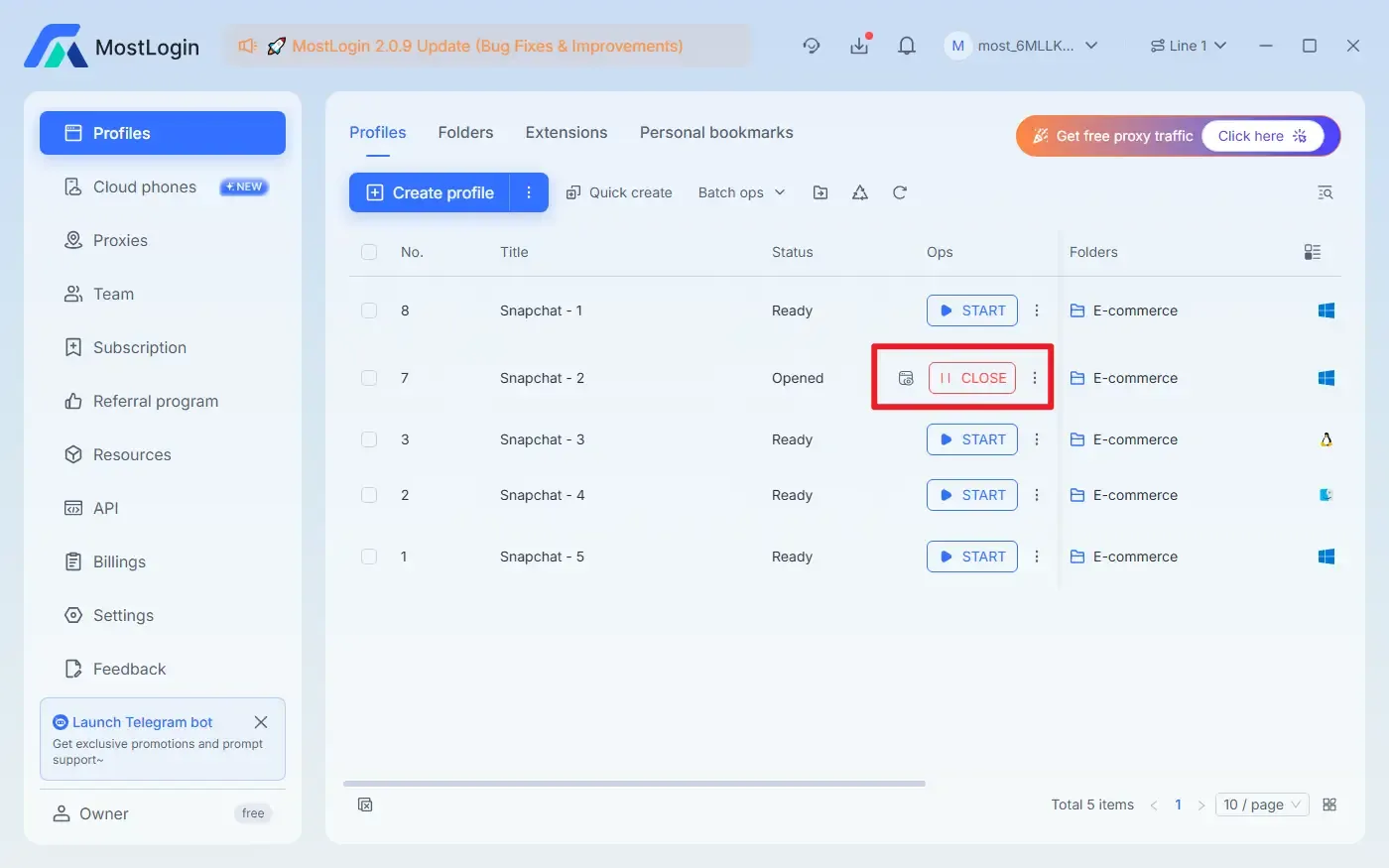
We recommend using the MostLogin Anti-Detection Browser for the "screenshot by logging in on multiple devices simultaneously" method. This software can help us set up a brand-new environment and IP address. Combined with its independent window design, it is not only difficult for the official to detect account abnormalities, but also hard to identify screenshot operations.
The specific steps are as follows:
Create a MostLogin environment (or use the quick creation feature)
Open the corresponding new environment window
Log in to Snapchat and take screenshots
5. Advantages of Using MostLogin
Compared with taking screenshots using ordinary browsers, MostLogin has the following advantages:
Independent Browser Fingerprint: Each environment is a brand-new device, avoiding the risk of account association.
Higher Privacy Isolation: Cookies, cache, and fingerprints are completely isolated.
Secure Multi-Account Management: Suitable for users who need to manage multiple Snapchat accounts.
Stable and Efficient: Reduce verification and account banning issues caused by environmental abnormalities.
Windowed Design: Facilitate the use of recording or screenshot software to capture content from a single window.
Conclusion
Essentially, Snapchat's notification mechanism is designed to protect user privacy. However, if we save content for the purpose of protecting ourselves or through legal means, there is no problem. We should as far as possible obtain the other party's permission before saving. The MostLogin Anti-Detection Browser can help us protect account security and improve the convenience of related operations.
Frequently Asked Questions
Is It Legal to Screenshot Snapchat?
Laws regarding private content vary by region, so be sure to ensure that your actions comply with local regulations.
How to Remove Screenshot Notifications on Snapchat?
Currently, there is no way to disable Snapchat's screenshot notification feature. This is a built-in privacy protection measure to safeguard users.
Will Snapchat Notify You When You Screenshot the Home Screen?
Snapchat will not notify users when you take a screenshot of the app's home screen. Notifications are only triggered when you screenshot or record Snaps, chats, or Stories.
The Best Anti-Detection Browser - MostLogin
The MostLogin anti-detection browser tool helps users solve high-frequency problems such as multi-account management, environment isolation, and account risk control.
For operation questions, please refer to the Official Help Documentation