Running multiple e‑commerce stores is one of the fastest ways to grow revenue, but it also increases operational risk. Platforms such as Amazon, Shopee, and Lazada actively look for technical and behavioral links between accounts, and once those associations are detected, multiple stores can be reviewed or suspended together. Sellers who want stable, long‑term growth need a more reliable way to separate store identities instead of relying on ad‑hoc multi‑login habits.
What Is a Multi Store Management Antidetect browser?
Separate browser profiles for each store
A multi store management Antidetect browser is a specialized browser that creates multiple isolated profiles, and each profile behaves like an independent device. Every profile can have its own cookies, cache, browser fingerprint, and network settings, so platforms see distinct operating environments rather than multiple tabs from the same computer. This profile‑level isolation is the foundation for safer multi store operations.
In a standard browser, tabs usually share same device information and often the same IP context, which makes connection patterns easier for platforms to detect. A Antidetect browser changes that by letting each store maintain its own technical identity over time, which is exactly what multi-store sellers need when they scale to several or dozens of accounts.
Why fingerprint control matters
Modern platforms no longer rely only on passwords or cookies when reviewing account connections. They can also evaluate browser fingerprints, which may include details such as operating system, timezone, language, WebGL, Canvas, WebRTC, and audio behavior. If several stores consistently appear to come from nearly identical environments, that can increase association risk, even when login details are different.
MostLogin allows users to customize and stabilize these profile parameters, which helps each store look like a separate and realistic environment rather than a clone. MostLogin antidetect browser supports Chromium‑based profiles optimized for multi‑account operations and integrates fingerprint control with workspace and proxy management in one place.
Why Multi Store Sellers Need It
The real risk of account association
Many sellers start by logging into multiple stores from one browser or one computer without strong separation and assume that as long as credentials differ, everything is safe. That approach may seem convenient in the short term, but once a platform detects technical overlap, one problem account can put other connected stores at risk during reviews or policy enforcement. For sellers operating across countries, brands, or marketplaces, an unexpected wave of bans can instantly damage cash flow and inventory rotation.
A multi store management Antidetect browser reduces that exposure by isolating stores at the browser level. When every important store has its own profile, cookies, proxy, and fingerprint, the operating pattern looks more stable and less correlated, making it harder for platforms to build a clear link between stores.
Why MostLogin fits this use case
MostLogin is built specifically for multi account management scenarios in e‑commerce, digital marketing, and other account‑heavy industries. Its feature set includes multi-accounting management, team collaboration, extension integration, API automation, browser synchronizer, which makes it suitable for solo sellers, agencies, and in‑house growth teams. Instead of combining several disconnected tools, you can centralize store environments, team permissions, and IP strategy in a single system.
If you want to move away from fragile multi‑login setups, starting with a structured environment in MostLogin is one of the fastest ways to upgrade your protection and workflow.
Step 1 – Map Stores and Risk Levels
Build a clear inventory first
Before you create any profiles, it is important to map all stores by platform, region, brand, and business value. A seller might have a main Amazon US store, a Germany store, a Shopee Indonesia flagship account, and a few test stores for expansion into new markets. Without this map, profile creation often becomes inconsistent, and it becomes harder to see which stores deserve the strictest protection.
Prioritize the stores that matter most
Not all stores should be treated the same way. Core revenue stores need the highest level of separation and the cleanest infrastructure, while test stores can sometimes operate under more flexible rules. This kind of planning helps you decide which stores need the best proxies, the most stable fingerprints, and the strictest operator access controls so you do not waste resources where they are not needed.
Step 2 – Create a Clean Profile Structure
Use a consistent naming system
Once the store map is ready, each store should be assigned to one or more dedicated profiles in MostLogin. A clear naming structure makes daily operations easier and reduces the chance that team members open the wrong store in the wrong environment, which could accidentally connect accounts.
One practical format is:
- Platform-Country-Brand-Role, such as Amazon-US-MainStore-OPS or Shopee-ID-Flagship-MKT.
This approach keeps the profile list readable as the number of stores grows and makes it easier to onboard new team members into a well‑organized environment. Tags can also be used to group profiles by marketplace, region, brand, or operator team, which further simplifies filtering and handovers.
Organize access with workspaces
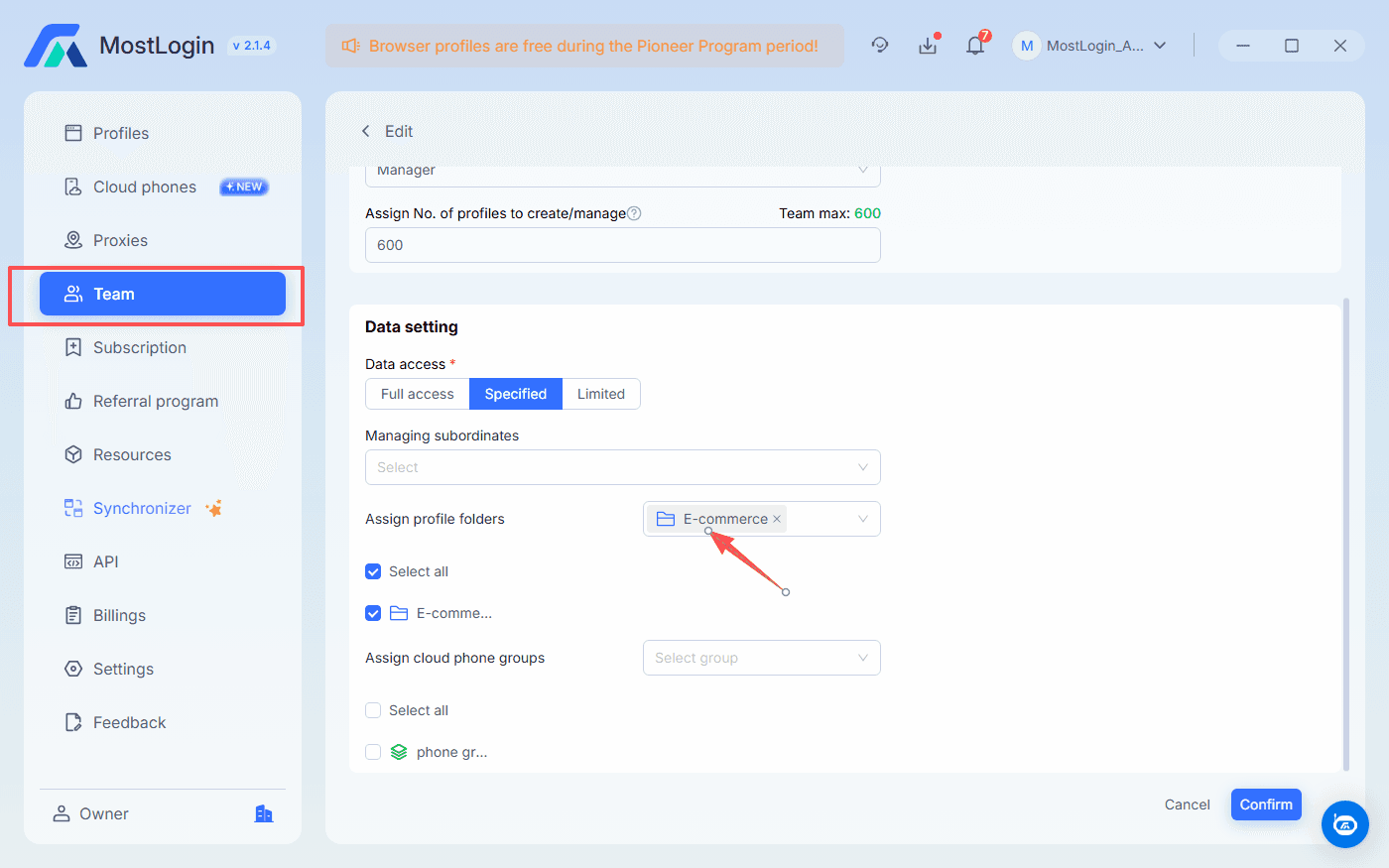
MostLogin supports workspaces with a premium folder, tag and team collaboration system, which are very useful when stores are managed by different teams, agencies, or business units. European marketplace stores can be grouped separately from Southeast Asia stores in profile folders, while access permissions can be assigned only to the operators who actually need them. Sellers can also add tags to each profile to make some stand out. This lowers the chance of internal mistakes, reduces the risk of unauthorized access, and improves auditability as the operation scales.
Step 3 – Build Realistic Fingerprint Profiles
Match each profile to a believable environment
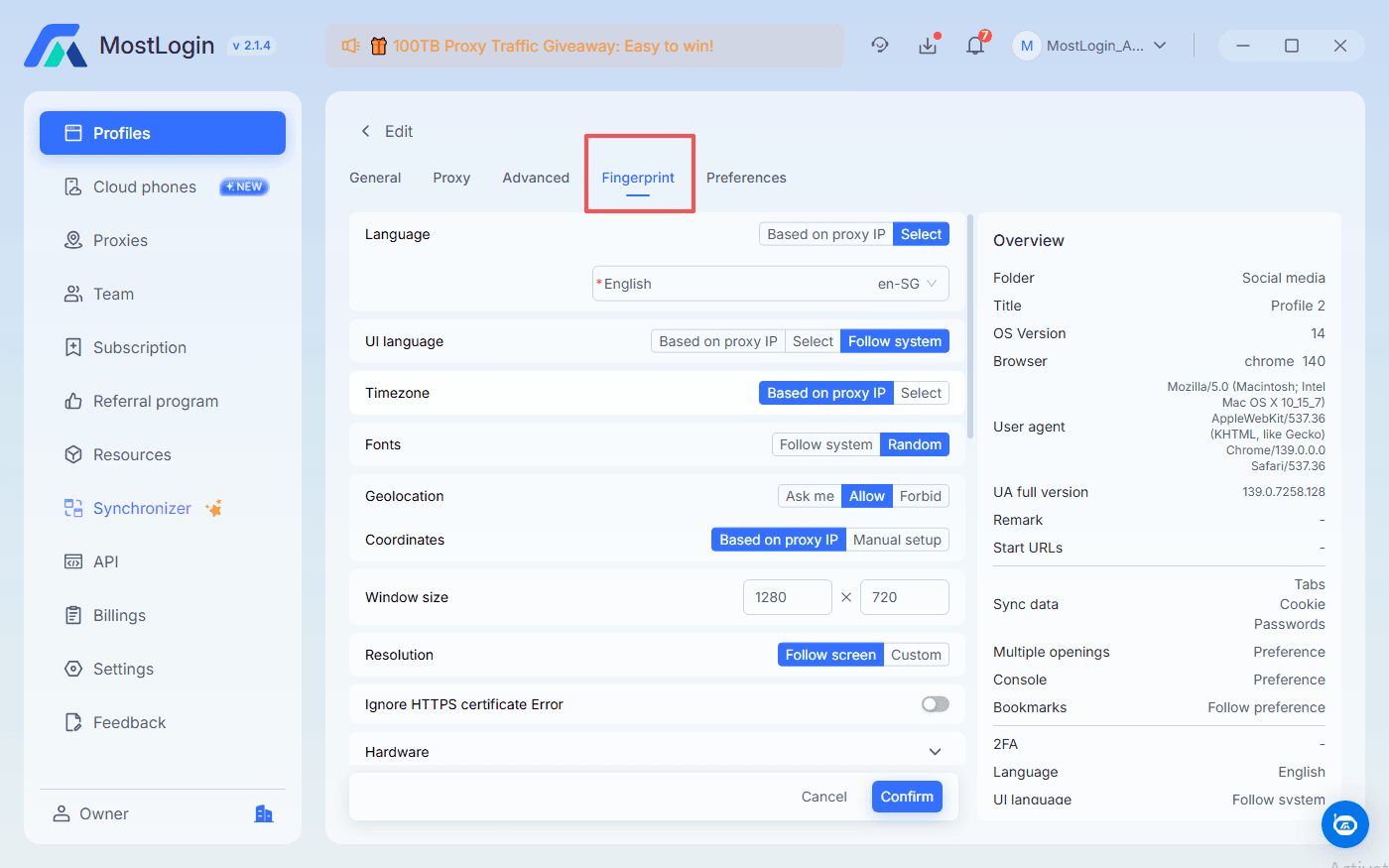
Each store should have a profile that fits the market it serves. That means language, timezone, operating system, and fingerprint signals should align with realistic user behavior in that region. A Germany store, for example, should not constantly switch between unrelated language settings or timezones, because that behavior looks unusual from a risk‑control perspective.
MostLogin gives users control over many of these fingerprint layers, including Canvas, WebGL, WebRTC, and device hardware parameters. This helps each store maintain a more credible and consistent technical identity over time, which is exactly what platforms expect from legitimate, long‑term sellers.
Stability is more important than randomness
Some sellers wrongly assume that constantly changing device settings will make them harder to detect. In reality, a stable store identity often looks more natural than a profile that changes too frequently. Reusing the exact same fingerprint across unrelated stores also creates an unnecessary technical link, so the goal is controlled separation and long‑term consistency rather than aggressive randomness.
Step 4 – Bind the Right Proxy to Each Store
Fingerprints alone are not enough
A Antidetect browser is much more effective when paired with a sound IP strategy. Platforms may compare both browser‑side signals and IP behavior, so using weak, free, or heavily reused proxies can undermine an otherwise strong profile setup. For multi store sellers, proxy quality becomes part of account safety, not just a performance detail.
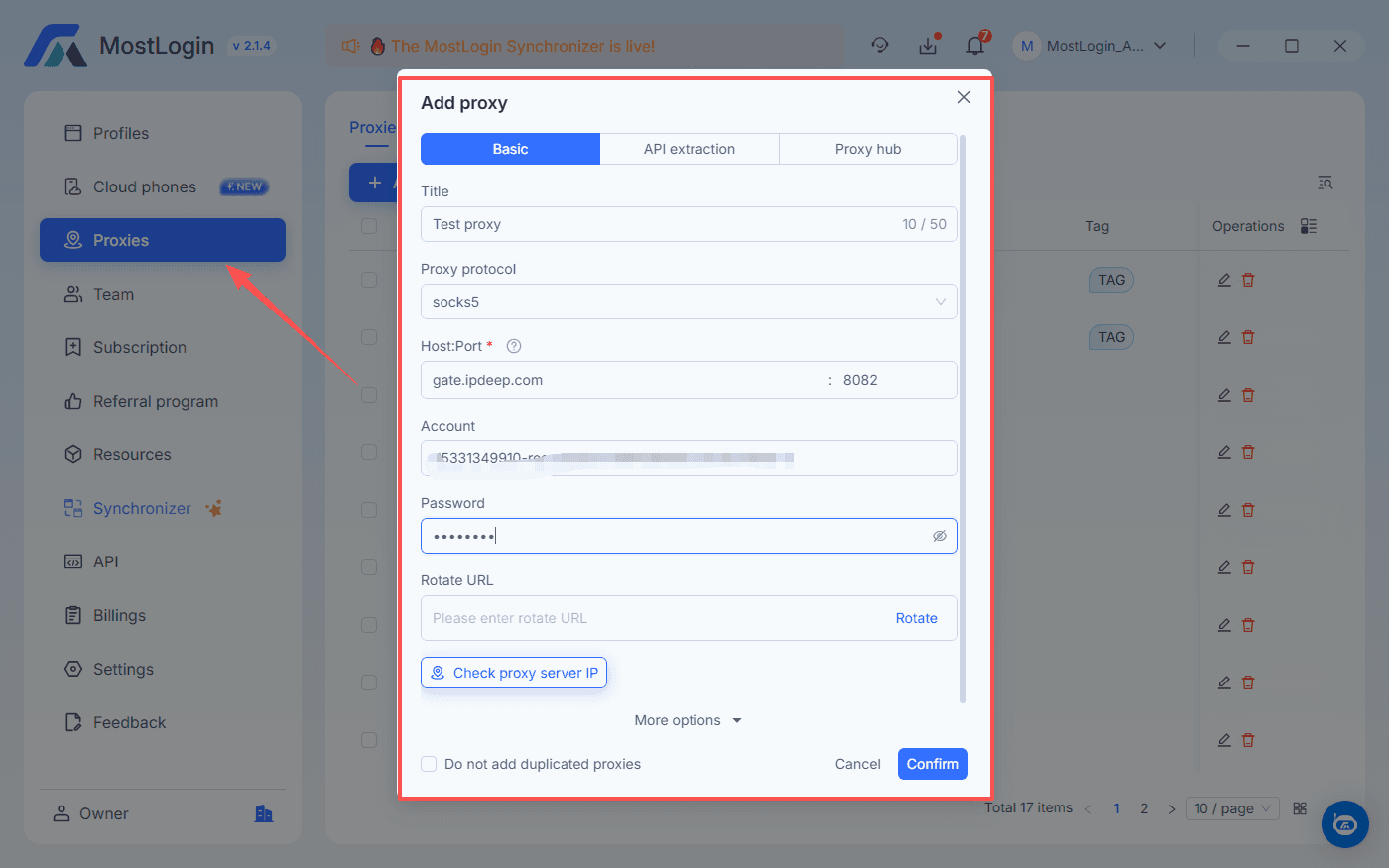
High‑value stores are better protected with stable static residential or mobile proxies that fit the store’s region and usage pattern. Keeping these IPs dedicated or carefully segmented reduces the chance that multiple important stores end up sharing the same network history.
Proxy management inside MostLogin
MostLogin allows users to save, test, and assign proxies to specific profiles. That makes it easier to keep each store tied to one IP strategy instead of manually switching connections every time you log in. For sellers running many stores, that consistency becomes an important part of risk control and daily efficiency.
Step 5 – Build Better Daily Operating Routines
Tools help, but routines matter too
Even a strong technical setup can fail if daily operating habits are sloppy. Platforms do not only look at device data; they may also evaluate behavior such as login frequency, unusual working patterns, device changes, and repeated environment shifts. Safe multi store management depends on both the tools you use and the rules your team follows.
Each store should always be accessed through its designated profile. Operators should avoid switching stores between profiles, logging into multiple unrelated accounts in the same profile, or changing core profile settings without a clear reason. When access patterns stay stable and predictable, the overall risk profile looks more like a normal long‑term business, which is exactly how you want platforms to see you.
Manage teams with more control
This becomes even more important when multiple people work on the same portfolio of stores. MostLogin’s role and workspace features help teams restrict access, separate responsibilities, and reduce accidental cross‑use between accounts. For agencies and in‑house teams, this makes it easier to standardize workflows and keep account safety under control as headcount grows.
Common Mistakes to Avoid
Many account safety problems come from shortcuts rather than from the lack of tools. Reusing the same IP across important stores, letting operators log in from random devices, or constantly changing fingerprints can all weaken a well‑planned setup and create suspicious patterns. Over time, these shortcuts make it easier for platforms to connect your stores and harder to justify unexpected bans when they happen.
A safer approach is to treat each important store as a separate operating unit with its own profile, proxy logic, and access rules. In that model, a multi store management Antidetect browser is not just a browser, but part of an overall operating framework for store separation, team control, and ban prevention. MostLogin’s combination of fingerprint control, proxy management, workspaces, and team collaboration features is designed to help you implement that framework in a practical, day‑to‑day way.
Conclusion
Multi store selling is becoming a core growth strategy on marketplaces worldwide, but the cost of a single mistake can be a cascade of bans across multiple accounts. Relying on a standard browser and improvised proxies is no longer enough to keep serious e‑commerce operations safe. A multi store management Antidetect browser gives you the technical foundation to separate identities, stabilize environments, and reduce the risk signals that platforms use to link your stores.
MostLogin brings this foundation together in one product: isolated browser profiles, deep fingerprint control, flexible proxy binding, and structured workspaces and roles for teams. With these tools, you can move away from risky multi‑login habits and toward a scalable, policy‑aware way of running many stores from a single dashboard.
FAQs About Multi Store Management and Antidetect browsers
Is a multi store management Antidetect browser legal?
The tool itself is a neutral technology product. Whether its use is compliant depends on platform policies, local laws, and the purpose for which it is used. Many businesses use browser isolation tools to separate operations across brands, partners, and regions while still respecting legal and tax requirements.
Can all stores be managed from one computer?
Yes, that is one of the key advantages. MostLogin allows multiple isolated profiles to run on the same machine while keeping fingerprints, cookies, and proxies separated, so stores do not appear to share one simple browser environment. This lets you centralize operations without exposing obvious technical links between accounts.
Are proxies still necessary with a Antidetect browser?
Yes. A Antidetect browser controls device‑level signals, but platforms may also evaluate IP reputation, geography, and connection consistency, so proxy quality remains important. Binding each profile to a suitable residential or mobile proxy in the correct region is essential for natural‑looking multi store activity and is fully supported inside MostLogin.
Is MostLogin suitable for beginners?
MostLogin offers guided profile creation, proxy configuration, and workspace features, which makes it accessible even for users who are not deeply technical. At the same time, its broader fingerprint and team management capabilities make it powerful enough for agencies and large seller teams. Starting with a small number of profiles and gradually expanding inside MostLogin is a practical way to learn the tool while immediately improving the safety of your multi store setup.