In the Amazon cross-border e-commerce industry, managing multiple stores has become increasingly common.
Whether operating on different marketplaces, running different brands, or diversifying risks, more and more sellers are managing multiple Amazon stores simultaneously. However, when you start doing it, you’ll realize:
The challenge of managing multiple Amazon accounts is not operations, but account environment security.
This article will share in detail how I went from frequently triggering Amazon’s risk control to stably managing 10 Amazon stores.

1. Pitfalls at the Start: Accounts Frequently Triggering Risk Control
When I first expanded my stores, my approach was simple:
- Register multiple accounts
- Different products
- Different emails
- Different content
- Different payment methods
Theoretically, this should work perfectly.
But in reality:
- Two-step verifications increased
- Frequent login alerts appeared
- Some stores were suddenly restricted for review
- The dashboard occasionally requested identity verification
At the time, I thought it was an IP issue, so I kept switching proxy IPs, but it didn’t help.
Later, I realized:
Amazon does not determine account association by IP alone.
2. What Amazon Actually Checks
Many sellers think Amazon only looks at IP addresses, but the platform's risk control system is far more sophisticated.
Amazon comprehensively identifies:
- Browser fingerprints
- Operating system characteristics
- Device hardware information
- Time zone and language settings
- Canvas / WebGL fingerprints
- Cookies and cached data
In other words:
If multiple accounts come from similar browser environments, even with different IPs, they may be identified as associated accounts.
At that time, all my Amazon stores were operated from the same computer on Chrome, which almost guaranteed account association exposure.
3. Why Regular Browsers Cannot Manage Multiple Accounts Safely
Regular browsers have several inherent issues:
1. Fingerprints Cannot Be Isolated
Incognito modes in Chrome or Edge only clear history, but do not change device fingerprints.
Platforms can still detect:
- GPU information
- Font characteristics
- Screen resolution
- Browser feature combinations
2. Cookies Can Cross Over
Even when switching accounts, residuals may remain:
- Login cache
- Tracking data
- Session information
Over time, the risk accumulates.
3. High Manual Switching Costs
I tried using:
- Multiple computers
- Virtual machines
- System partitions
The result was high maintenance costs and low efficiency.
4. Changes After Using MostLogin
Stability was achieved after I started using MostLogin.
The core logic of MostLogin is straightforward:
Create independent, isolated browser environments for each account
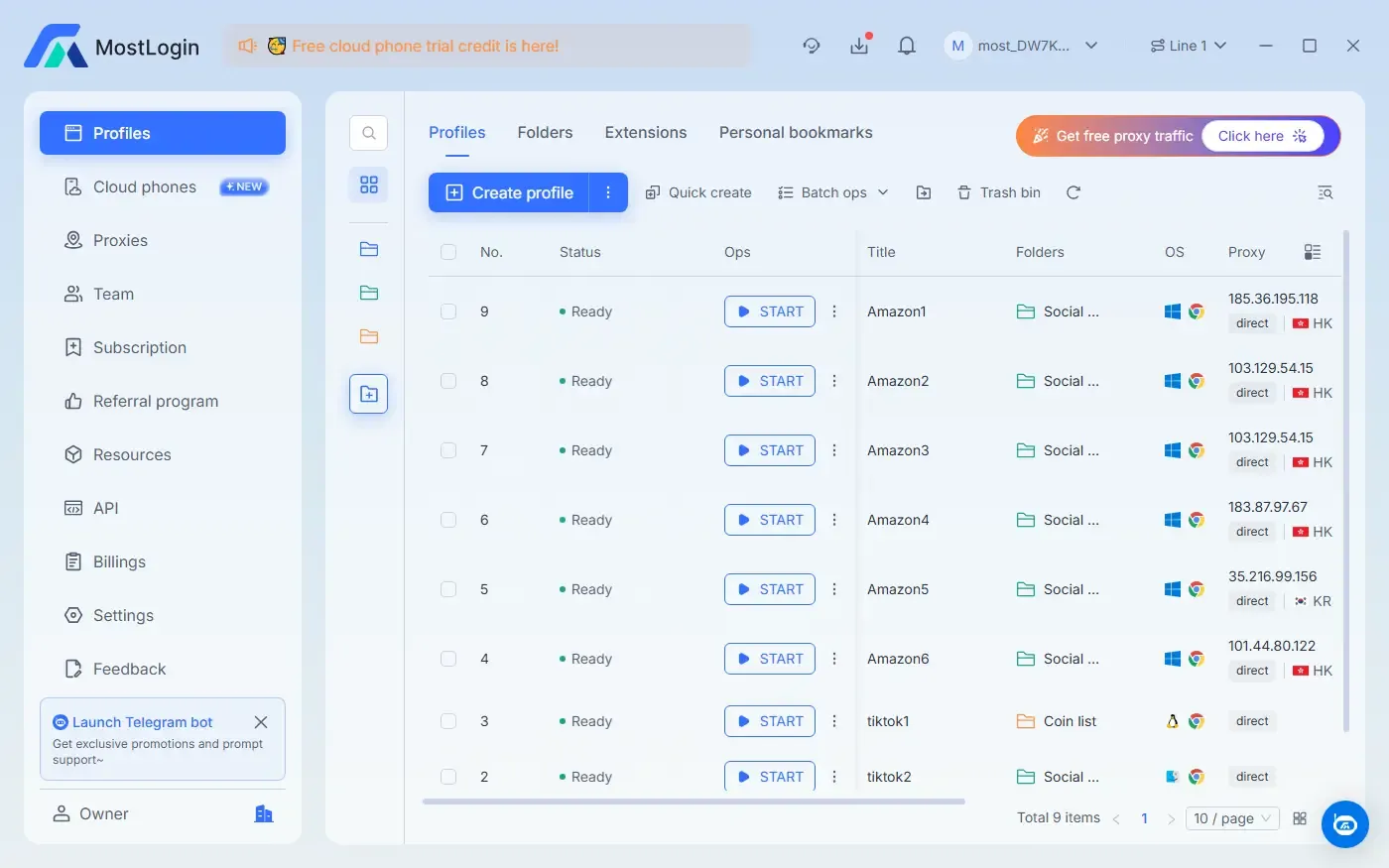
I rebuilt the entire Amazon operation system:
- Each store has a dedicated browser configuration
- Independent fingerprint parameters
- Dedicated proxy IP
- Separate time zone and system environment
From Amazon’s perspective, each account appears to come from a different real device, leaving no association traces.
5. My 10 Amazon Stores Management Structure
My actual management strategy is as follows:
Store Isolation Strategy
- Store 1 → Browser Env A + IP A
- Store 2 → Browser Env B + IP B
- Store 3 → Browser Env C + IP C
- …
Each environment is fixed and not shared.
Daily Operation Habits
Key principles I follow:
1. Do not log in across environments
2. Do not switch stores within the same environment
3. One configuration serves one account only
4. Keep a consistent long-term login location
Stability is safer than frequent changes.
6. Efficiency Actually Improved
Many worry that isolated environments reduce efficiency, but my experience shows the opposite.
Using MostLogin, I can:
- Open multiple store environments with one click
- Automatically save login status
- Assign independent permissions to team members
- Handle multiple dashboards simultaneously
Previously wasted login time is now saved, making operations smoother.
7. Important Note: Environment Security ≠ All-Powerful
It’s important to note:
MostLogin does not solve all issues.
Amazon’s risk control still includes:
- Account behavior
- Product compliance
- Customer complaints
- Performance metrics
It addresses environment association risk, not operations. But for multi-store setups, this is the foundation.
8. Summary
Using MostLogin, I finally achieved stable management of 10 Amazon stores. Key points:
- Independent Environment: Each store has a dedicated browser config, IP, and fingerprint parameters.
- Reduced Association Risk: Amazon cannot easily identify multiple accounts as coming from the same operator, lowering ban risk.
- Improved Efficiency: Multi-store operations, auto-saved states, smoother team collaboration.
Most importantly, environment security is only the infrastructure, not a magic key. Combining MostLogin’s isolated environments with proper operational practices enables long-term stable multi-store expansion.
FAQ
Q1: Do I need to assign a separate IP to each store?
Yes. A dedicated IP is a key component of MostLogin’s environment isolation, making each store appear as a separate device to Amazon.
Q2: Is MostLogin only for Amazon stores?
No. It works for any multi-account or anti-detection scenario, including cross-border e-commerce, advertising, social media operations, and any platform with high environment association risk.
Q3: Can MostLogin make all my Amazon stores completely safe?
MostLogin significantly reduces account association risk but cannot guarantee complete prevention of bans. You still need to monitor account behavior, product compliance, and customer service. Environment isolation is only the security foundation.
MostLogin helps users manage multiple accounts, isolate environments, and address high-risk account control issues.
For help, please visit Official Help Center.