Affiliate marketers need a reliable way to keep legitimate business workflows organized, isolated, and consistent across devices and team members. The right anti-detect browser for affiliate marketing should help you manage approved account environments without mixing cookies, IP settings, browser fingerprints, and daily operating behavior.
This guide explains how to evaluate an anti-detect browser for Mac and Windows based on real operating needs: affiliate campaign separation, cross-border e-commerce workflows, social-media matrices, proxy planning, profile maintenance, and team collaboration. It is not a brand comparison. Instead, it gives you a practical framework for choosing and deploying the right tool responsibly.
Why Affiliate Marketers Need Profile Isolation
Affiliate marketing often involves several operational layers at once:
- Multiple traffic sources, such as Google Ads, Meta, TikTok, native ads, SEO, or email.
- Separate affiliate programs, advertiser dashboards, tracking tools, and landing-page systems.
- Regional campaigns that require local language, currency, time-zone, and network settings.
- Team members who need controlled access to particular client, campaign, or brand accounts.
- Different business entities, client portfolios, or approved advertising workspaces.
The problem starts when these workflows overlap in one ordinary browser. A standard Chrome profile may share cookies, saved logins, local storage, extensions, autofill data, browsing history, and device signals across campaigns. This can create basic operational errors—for example, a media buyer opening the wrong advertiser dashboard, uploading the wrong creative, or accidentally using one client’s cookie session in another client’s workspace.
An anti-detect browser addresses this by creating separate browser profiles. Each profile can maintain its own cookies, local storage, browser configuration, proxy connection, and session history. In practical terms, a profile should function like a stable, dedicated work environment for one approved account group or business workflow.
For affiliate teams, the objective is not to constantly alter identity signals. The objective is consistency: one account or authorized account group should operate from a stable environment that matches its documented business use, normal location, and routine behavior.
A well-designed multi-account management browser makes it easier to assign that environment clearly and prevent accidental cross-contamination between projects.
What an Anti-Detect Browser Changes
Before choosing a tool, it helps to understand the signals that modern platforms may use when evaluating browser sessions.
Browser fingerprint
A browser fingerprint is a combination of device and browser characteristics, including screen size, fonts, Canvas, WebGL, hardware signals, and browser configuration. Keep a profile’s fingerprint stable rather than changing it frequently.
IP address
An IP address indicates the network location used to access an account. Use a reliable, authorized connection aligned with the account’s genuine business context.
Cookies and local storage
Cookies and local storage preserve login states, preferences, attribution data, and prior sessions. Keep each project’s session data inside its designated profile.
User Agent
A User Agent identifies browser and operating-system details reported to services. Use realistic, internally consistent settings rather than arbitrary combinations.
Time zone and language
Platforms can check time-zone and language settings against IP location, account region, and observed behavior. Match them to legitimate operating requirements.
WebRTC and DNS behavior
WebRTC and DNS behavior may expose network information that conflicts with proxy settings. Test the profile before production use and correct configuration mismatches.
An anti-detect browser for affiliate marketing should not be evaluated only by how many fingerprint parameters it exposes. More controls do not automatically mean lower risk. In fact, manually changing every value can produce an implausible or inconsistent environment.
A better standard is whether the tool helps you create coherent, repeatable, and easy-to-audit profiles. You want an environment where browser version, OS selection, language, time zone, IP routing, cookies, and daily login behavior make operational sense together.
Search results for this topic are dominated by vendor landing pages and “best anti-detect browser” listicles, often emphasizing huge profile counts or feature grids. The more useful gap is a decision process: how to choose a browser for a real affiliate operation, how to deploy it without creating avoidable risk, and how to maintain stable environments after launch. Major tools commonly position profile isolation, proxy support, and multi-accounting as central capabilities, but the quality of configuration and operational discipline matters more than marketing claims.
Choose by Workflow, Not Features
Define the account-to-profile model
Use a simple rule: one browser profile should represent one stable operating context.
For example:
- One client brand or advertiser workspace = one profile group.
- One regional e-commerce store = one dedicated profile.
- One affiliate-network login and its related reporting tools = one profile, if policy and workflow allow.
- One team role or account owner = clearly assigned access permissions.
- One approved device context = one persistent fingerprint and network setup.
Avoid building profiles around vague labels such as “Ads 1,” “Backup,” or “New Accounts.” Instead, create naming conventions that support accountability:
- Client-BrandA_US_GoogleAds_Manager
- AffiliateNetwork_EU_Publisher_Reporting
- Store-UK_Operations_Main
- Social-Team_ProductLaunch_Content
This may sound administrative, but it reduces real mistakes. When a team handles dozens of campaigns, a clear naming system can prevent a user from logging into the wrong client environment or connecting an account to the wrong proxy.
Confirm Mac and Windows compatibility
For Mac and Windows users, operating-system support should be tested before committing to a yearly plan. Do not assume that a browser running on both systems delivers identical profile behavior, automation compatibility, performance, or team-sync options.
Check these questions during a trial:
- Does the desktop application support your current macOS and Windows versions?
- Can a profile created on Windows be safely accessed by an authorized Mac user, with profile settings retained?
- Does the tool support the browser engines your team needs?
- Are browser-core updates delivered quickly when Chrome or Chromium versions change?
- Can profile permissions, notes, tags, and proxy settings sync correctly between authorized team members?
- Does the browser remain responsive when several profiles are open at the same time?
A tool should also fit the computers your team actually uses. A lightweight setup may be sufficient for a solo publisher with a handful of reporting accounts. A media-buying or cross-border e-commerce team may need stronger hardware planning because dozens of active browser sessions consume substantial CPU, RAM, and network resources.
Evaluate fingerprint consistency
A fingerprint is a collection of browser and device attributes that can help services distinguish one session from another. A good anti-detect browser should help you maintain a consistent fingerprint per profile rather than encourage constant randomization.
When reviewing fingerprint controls, look for:
- Operating-system and browser-version combinations that are logically compatible.
- Fingerprint templates based on common device configurations.
- Profile persistence after browser restarts and application updates.
- A clear way to inspect or edit key settings.
- Controls for Canvas, WebGL, fonts, screen resolution, media devices, WebRTC, language, and time zone.
- A profile-checking process that identifies obvious configuration conflicts before use.
For instance, it is generally unwise to create a profile that reports a Windows environment, uses a Mac-like font pattern, presents a time zone unrelated to the configured business region, and connects through an IP from another country. Even if each setting looks acceptable in isolation, the full combination may be inconsistent.
The operational principle is straightforward: stable and coherent beats constantly changing and overly customized.
Build a Reliable Proxy Strategy
A proxy is not simply an IP-changing tool. In a professional affiliate workflow, it is part of the account environment. Poor proxy management can create failed logins, security challenges, slow browsing, session interruptions, and inconsistent geolocation signals.
Choose quality before volume
Proxy quality affects usability and account stability more than the raw number of available IPs. Evaluate providers based on:
- Connection reliability and uptime.
- Geographic relevance to the legitimate business activity.
- Stable session options when consistency is required.
- Protocol support, such as HTTP, HTTPS, or SOCKS5.
- Clear documentation, support, billing, and acceptable-use policies.
- IP reputation and the provider’s ability to replace verified non-working endpoints.
- DNS and WebRTC handling options.
For legitimate long-term account management, a stable assigned connection is often more useful than aggressively rotating IPs. Frequent, unexplained changes can create login friction and may look unusual compared with normal human operations.
Use one proxy plan per profile group
Do not casually assign the same proxy to unrelated client accounts or unrelated business entities. Shared connections can create unnecessary overlap between projects and make troubleshooting much harder.
A practical structure may include one profile for each approved affiliate reporting workflow, a dedicated profile for each store or regional business entity, profile groups per agency client, and separate test profiles for authorized QA or internal testing. Assign a stable, documented network approach for each environment, align settings with legitimate business use, and never mix test identities with production accounts.
If you manage numerous environments, use tags for country, platform, account owner, client, traffic channel, and proxy status. This turns profile management into an operating system rather than a folder full of browser windows.
Step-by-Step Setup for Affiliate Teams
The following workflow is designed for compliant affiliate, e-commerce, and social-media operations that need better separation and team control.
Step 1: Map your account inventory
Before creating profiles, list every account, its business owner, platform, purpose, region, assigned operator, recovery method, and allowed login location.
Your inventory should answer:
- Who owns the account?
- Is it a client account, an internal account, or an authorized partner account?
- Which employee or contractor is allowed to access it?
- What region, language, and normal business location applies?
- Which proxy or connection will be associated with the profile?
- Where are credentials and recovery details stored securely?
- What is the approval process for changing the profile setup?
This inventory prevents account information from becoming scattered across spreadsheets, chat threads, password notes, and personal devices.
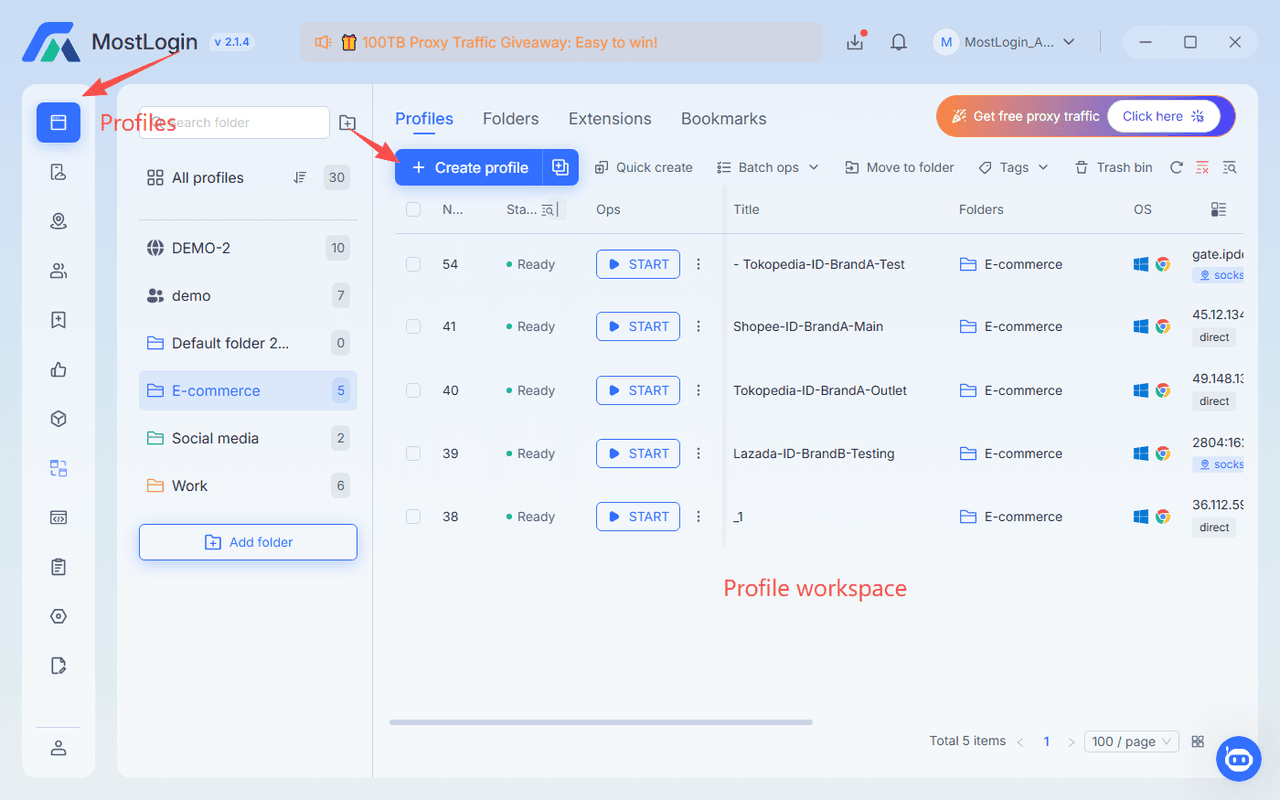
Step 2: Create a dedicated browser profile
Create one profile for each defined operating context. Give it a descriptive name, apply relevant tags, and add internal notes that help an authorized operator understand its purpose.
Set the operating-system type, browser version, language, resolution, and time zone in a way that matches the intended legitimate environment. If the browser provides an automatic fingerprint configuration, start there unless you have a documented reason to adjust settings.
Avoid cloning one profile repeatedly without reviewing the fingerprint, cookies, assigned connection, and account purpose. Duplicates may be useful for approved workflow templates, but they should be finalized as distinct environments before use.
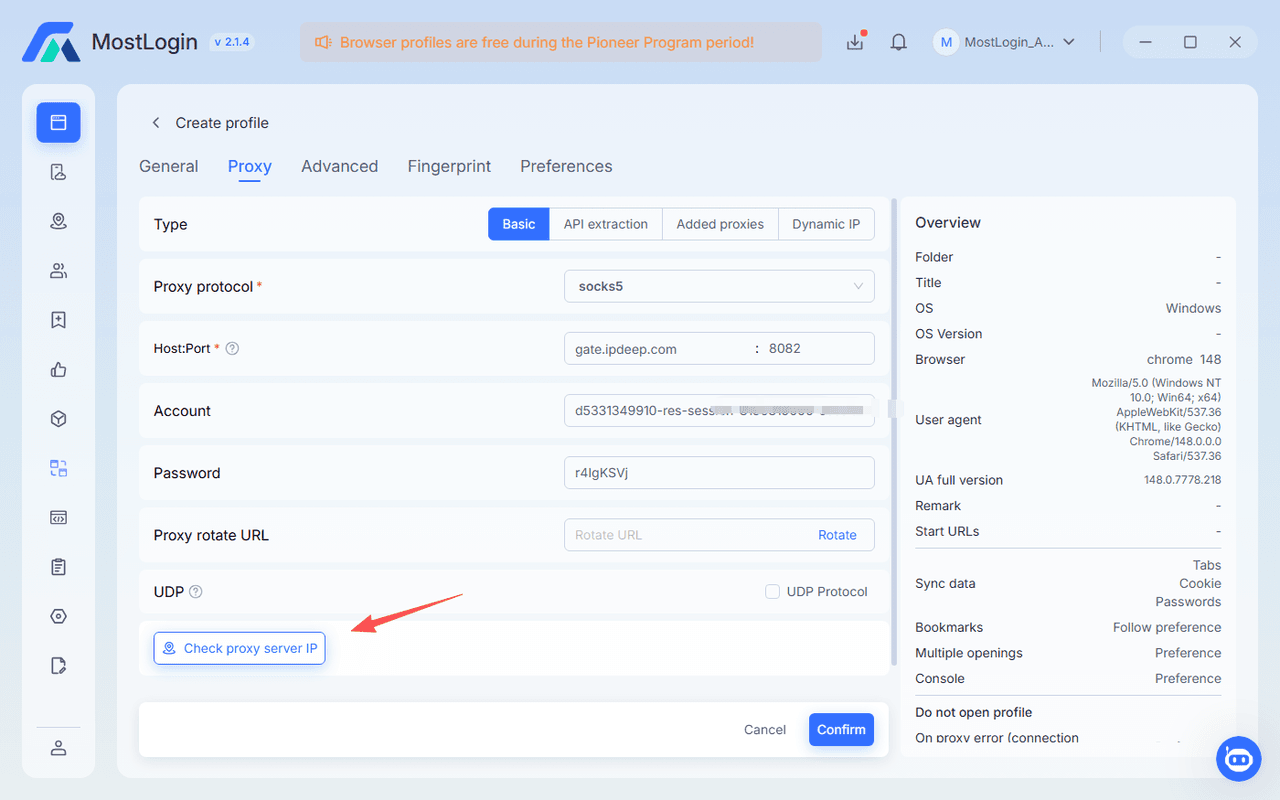
Step 3: Bind and test the proxy
Add the proxy using the protocol required by your provider. Confirm authentication credentials, then test the connection before logging in to any important account.
Check:
- Does the IP location match the intended business region?
- Is DNS resolution routed as expected?
- Is WebRTC behavior configured to avoid unintended network disclosure?
- Does the connection remain stable during normal browsing?
- Does the profile’s language and time zone align with the network location and use case?
Do not rush this step. A broken proxy configuration is easier to fix before an account login than after it causes a security alert.
Step 4: Import or log into authorized accounts
Use your organization’s approved credential-management process. For a new profile, log into the authorized account normally, complete any required security verification, and allow the profile to retain the session data it needs.
After login, record:
- The date of first access.
- The assigned operator.
- The profile ID and proxy assignment.
- Any security checks completed.
- Any restrictions set by the client, platform, or internal policy.
Do not import unknown cookies, purchase third-party accounts, or use unverified credentials. These practices create legal, security, and platform-policy risks that an anti-detect browser cannot solve.
Step 5: Establish a normal operating routine
Accounts are assessed through patterns, not only technical settings. A stable browser profile still needs normal, policy-compliant operations.
For affiliate marketing, that can include:
- Reviewing reports on a predictable schedule.
- Updating approved tracking links and campaign assets.
- Responding to genuine customer or partner messages.
- Making incremental campaign changes with documented approval.
- Keeping billing, identity, and business information accurate.
- Using each account only for its intended purpose.
Avoid opening a large number of unfamiliar accounts at once, making rapid location changes, or switching a profile’s fingerprints and proxy repeatedly.
These behaviors can create security friction even where no wrongdoing is intended.
These behaviors can create security friction even where no wrongdoing is intended.
Step 6: Maintain profiles over time
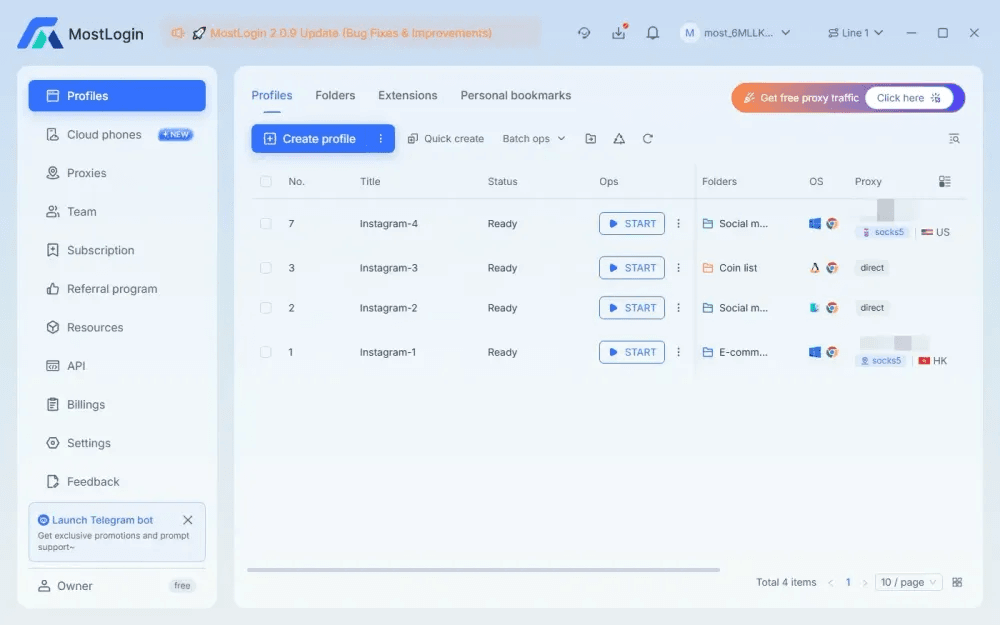
Treat profiles as long-lived work assets. Regularly check whether browser versions, proxy credentials, account owners, access permissions, and recovery information are still current.
A monthly review can include:
- Removing departed employees and contractors.
- Updating role permissions.
- Testing proxy availability.
- Reviewing inactive or duplicate profiles.
- Confirming that account notes and ownership records are accurate.
- Checking whether a profile has experienced unusual login challenges.
- Archiving closed campaigns rather than leaving dormant profiles unmanaged.
Common Mistakes That Increase Risk
Reusing one proxy across unrelated accounts
Using the same network route for unrelated clients, regions, or business entities can blur operational boundaries. It also makes incident investigation difficult if a platform flags activity.
Better approach: Allocate proxies and profiles according to real business ownership, project scope, and access responsibility.
Changing fingerprints too often
Some teams assume that a “new” fingerprint on every launch is safer. For long-term operations, this can be counterproductive. Most genuine users do not appear to use a completely different device every day.
Better approach: Keep the same profile configuration stable unless there is a legitimate, documented reason to update it.
Batch logging into too many accounts
Opening dozens of profiles and logging into all of them in minutes can create operational errors, trigger verification workflows, overload a computer, and complicate audit trails.
Better approach: Schedule work in small batches, prioritize active accounts, and record changes. For large profile operations, process accounts in smaller groups to reduce resource consumption.
Treating proxies as a replacement for operations
A premium proxy cannot compensate for poor compliance, weak account security, inconsistent business information, copied content, misleading ads, or unauthorized account access.
Better approach: Use profile and proxy tools as part of a broader governance process that includes platform-policy review, credential security, approval workflows, and transparent client relationships.
Storing account details everywhere
When profile IDs, passwords, recovery codes, proxy credentials, and client notes are scattered across personal documents and chats, a team becomes hard to manage and easy to compromise.
Better approach: Maintain a controlled account register, use a reputable password manager, limit access by role, and document who can modify profile settings.
How MostLogin Fits This Workflow
MostLogin can be considered as one implementation option when a team needs persistent browser profiles, fingerprint isolation, proxy configuration, and collaborative profile management. Its value is most relevant when affiliate teams, cross-border sellers, or social-media operators need a clearer way to separate authorized workspaces instead of relying on multiple standard browser windows.
For example, an affiliate agency could create profile groups by client, then tag each profile by advertising platform, market, assigned media buyer, and proxy status. A campaign manager accesses only their assigned client environments, while an operations lead retains oversight of profile ownership and setup consistency.
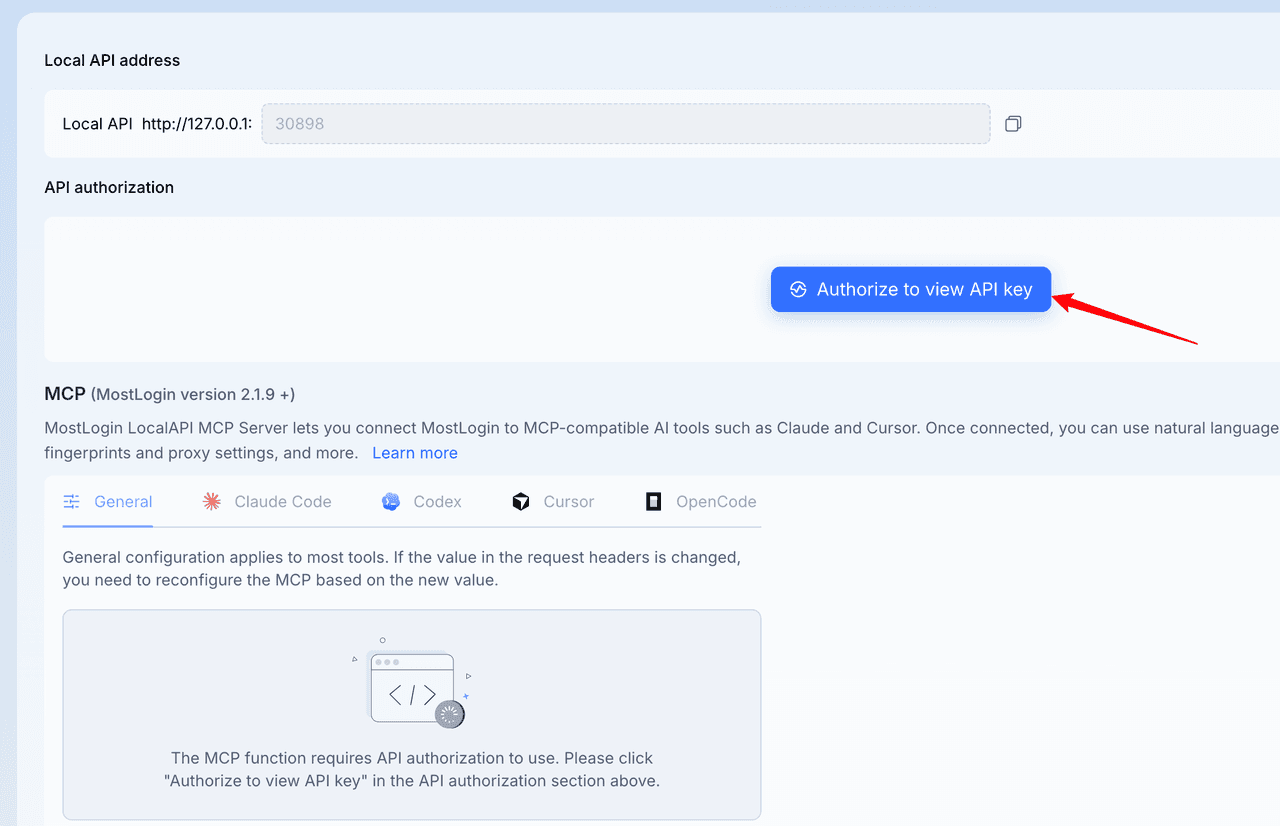
MostLogin also offers an extension of this workflow through AI-agent integration. With its MCP server enabled in compatible AI tools, an authorized user can use natural-language instructions for routine profile operations—such as creating or launching a browser profile, updating approved fingerprint settings, configuring a proxy, or managing cookies and User-Agent details. This is best viewed as an operational extension for structured account-management workflows, not as a substitute for human review, platform compliance, or credential security.
Before purchasing, use a trial to test your real workflow: profile creation, proxy binding, Mac/Windows performance, browser updates, access permissions, and team handoff procedures. Review the available MostLogin pricing plans against the number of active profiles, users, and collaboration requirements your operation actually needs.
A Practical Selection Checklist
Choose an anti-detect browser only after confirming that it can support the following requirements:
- Native, stable usability on the Mac and Windows devices your team operates.
- Persistent profiles with coherent browser fingerprints, cookies, local storage, and session data.
- Flexible proxy support with easy testing, tagging, and assignment.
- Clear controls for browser version, operating system, language, time zone, WebRTC, and relevant fingerprint settings.
- Profile folders, tags, notes, search, and bulk-management tools.
- Team roles, controlled sharing, and access revocation.
- A practical workflow for migrating or assigning profiles between authorized users.
- Reliable browser-core updates and transparent release notes.
- Responsive support and documentation for proxy, profile, and session troubleshooting.
- Pricing that aligns with active profiles and team size rather than inflated capacity you will never use.
- Security controls for credentials, local APIs, access tokens, and sensitive account data.
- A product approach that supports compliant business operations rather than promising guaranteed avoidance of platform enforcement.
The right decision is rarely the browser with the most settings. It is the one your team can configure consistently, audit easily, and use responsibly every day.
FAQs
Is an anti-detect browser safe for affiliate marketing?
It can be used safely when it supports legitimate, policy-compliant account separation and strong internal security practices. It does not make prohibited activities acceptable or guarantee that platforms will approve every account action. Use it to isolate authorized client, brand, and campaign environments; maintain accurate business information; and follow the terms of each affiliate network, advertising platform, and marketplace.
Can I use an anti-detect browser on both Mac and Windows?
Yes, if the provider offers supported desktop applications for both operating systems and your workflow has been tested on each. Check how profiles sync or transfer between authorized users, whether browser versions remain consistent, and whether performance is acceptable on your team’s actual hardware. Run a trial with representative profiles before standardizing a team workflow.
Should every affiliate account use a different proxy?
Separate, unrelated business contexts should generally have clearly separated and stable network configurations. The exact allocation depends on platform policy, account ownership, location, and your company’s documented workflow. Do not share one proxy casually across unrelated clients or accounts, and avoid unnecessary switching between proxies for a long-lived profile.
Why do accounts still face verification after profile isolation?
Profile isolation reduces accidental overlap, but verification can still result from login changes, account security settings, unusual activity, billing issues, incomplete identity checks, or policy concerns. Review the full account history, confirm the correct profile and network were used, and resolve verification requests honestly through the platform’s approved process.
How should an affiliate team organize browser profiles?
Organize profiles by real business ownership and operating purpose, then tag them by platform, country, client, account owner, and status. Use clear names such as Client_US_MetaAds_Manager, document who may access each profile, and review inactive profiles regularly. This structure improves security, reduces login errors, and makes handoffs easier when team roles change.
A successful affiliate operation depends on much more than browser technology. Stable account environments, high-quality network connections, clear ownership, policy compliance, careful credential handling, and disciplined daily routines work together to reduce avoidable risk. Choose an anti-detect browser as an operational control—not as a workaround—and you will build a workflow that is easier to scale, audit, and sustain.