As digital advertising automation becomes increasingly common, many ad platforms are not only focusing on ad content, but also on who is placing the ads, where they are being placed from, and whether the ads are compliant. For example, some platforms have developed browser fingerprinting technology to identify advertisers and their device environments, resulting in the suspension of many advertisers' multiple accounts.
Today, we will explain how platforms identify advertisers through browser fingerprinting from the perspectives of principles, composition, application scenarios, and more.

1. What is Browser Fingerprinting?
Browser fingerprinting is not a single technology, but a method of collecting various characteristics of the browser and device to generate a unique set of identifying information. Unlike cookies, browser fingerprints do not rely on locally stored data; instead, they identify users and devices based on information emitted when visiting a webpage.
Therefore, even if a user clears cookies or uses incognito mode, the browser fingerprint may remain relatively stable. From the perspective of ad platforms, a browser fingerprint is more like an environmental profile used to determine whether different visits come from the same device or the same operator.
2. What Information Does a Browser Fingerprint Typically Include?
Ad platforms do not rely on a single parameter to identify advertisers, but instead construct fingerprint models through a combination of multiple information sources. Common categories include:
1. Browser and System Information
Browser type and version (Chrome, Firefox, Safari, etc.)
Operating system and version (Windows, macOS, Linux, Android, etc.)
User-Agent string
Although this information is not unique, it can be used as a basic filtering condition.
2. Device and Hardware Characteristics
Screen resolution and color depth
Number of CPU cores and memory size (available in some browsers)
GPU model and graphics rendering parameters
In particular, rendering results returned by interfaces such as Canvas, WebGL, and AudioContext often have subtle differences due to hardware variations, which is a very critical part of browser fingerprinting.
3. Browser Functionality and Configuration Differences
Enabled browser features
Supported font list
Installed plugins or extension characteristics
Time zone, language settings, and regional format
When combined, these configurations form highly distinctive identifying information.
4. Network and Behavioral Signals
IP address range and historical changes
Proxy, VPN, and cloud server characteristics
Request frequency, operation rhythm, and page interaction patterns
Ad platforms usually combine static fingerprints with dynamic behavior analysis to improve identification accuracy.
3. Why Do Ad Platforms Need to Identify Advertisers?
Browser fingerprinting is not specifically designed to track users; in the advertising ecosystem, it is mainly used for risk control and compliance management. The main purposes include:
1. Preventing Multi-Account Violations
On most ad platforms (such as Google Ads, Meta Ads, TikTok Ads, etc.), one entity is usually allowed to have only a limited number of ad accounts. If the same operator attempts to bypass bans, repeatedly apply for new accounts, or mass-deliver gray or non-compliant ads using multiple accounts, the platform needs to use browser fingerprinting to determine whether these accounts come from the same environment.
2. Identifying Abnormal Ad Behavior
Examples include creating a large number of ad accounts in a short period, using highly similar creatives and landing pages, and frequently switching logins between different accounts. If these behaviors come from highly similar browser fingerprints, the platform will often determine them as associated operations (one user with multiple accounts).
3. Establishing Advertiser Risk Profiles
Ad platforms will comprehensively evaluate factors such as historical delivery records, number of violations, and account correlation to classify advertisers by risk level. Browser fingerprinting plays a role in helping establish whether accounts are associated with each other.
4. How Do Ad Platforms Use Browser Fingerprinting for Identification?
Ad platforms do not simply suspend accounts upon detecting identical fingerprints; instead, they use multi-layered logical models. At the most basic level, they analyze fingerprint similarity—usually calculating the similarity between multiple parameters rather than requiring exact matches. For example, if over 80% of parameters are the same, core hardware characteristics are highly consistent, and behavioral patterns overlap significantly, the probability of determining the same operator increases substantially.
Sometimes ad platforms also compare the current access environment with historical accounts and login records over the long term, rather than making judgments based solely on a single visit. High-risk accounts often enter a manual review process, first screened by the system and then reviewed manually to reduce misjudgments.
Regarding Facebook ads, we can also refer to this article: 《How to Safely Run Facebook Ad Accounts? Detailed Anti-Ban + Multi-Account Management Tips》
5. What Does Browser Fingerprinting Mean for Advertisers?
Compliant advertisers need not panic excessively: For advertisers who comply with platform rules and run ads normally, the existence of browser fingerprinting will not have a negative impact. The platform's core goal is not to limit the number of advertisers, but to reduce abuse and fraudulent behavior.
Non-standard operations are more likely to be associated: If an advertiser manages a large number of accounts using the same device, frequently changes IP addresses without changing the environment, or quickly re-registers after an account is suspended, browser fingerprinting will significantly increase the risk of being identified and associated.
Environmental consistency is increasingly important: Modern ad platforms pay more attention to whether the delivery environment is stable, whether operational behaviors are natural, and whether account behaviors are consistent over the long term. Simply relying on changing IPs or clearing cookies is no longer sufficient to evade the platform's risk control systems.
6. How Can Multi-Account Advertisers Avoid Detection by Browser Fingerprinting?
Currently, the only solution to this problem is to use an anti-detection browser, and MostLogin Anti-Detection Browser is an excellent choice. It can not only help us set high-precision browser fingerprints for independent windows but also open multiple browser windows in batches, assigning independent environments to each account.

By protecting accounts in this way, we can make our ad accounts much more secure. In addition to setting independent environments for ad accounts, MostLogin Anti-Detection Browser also supports setting IP proxies for independent windows, as well as team collaboration features and automation operations, protecting account security while improving overall efficiency.
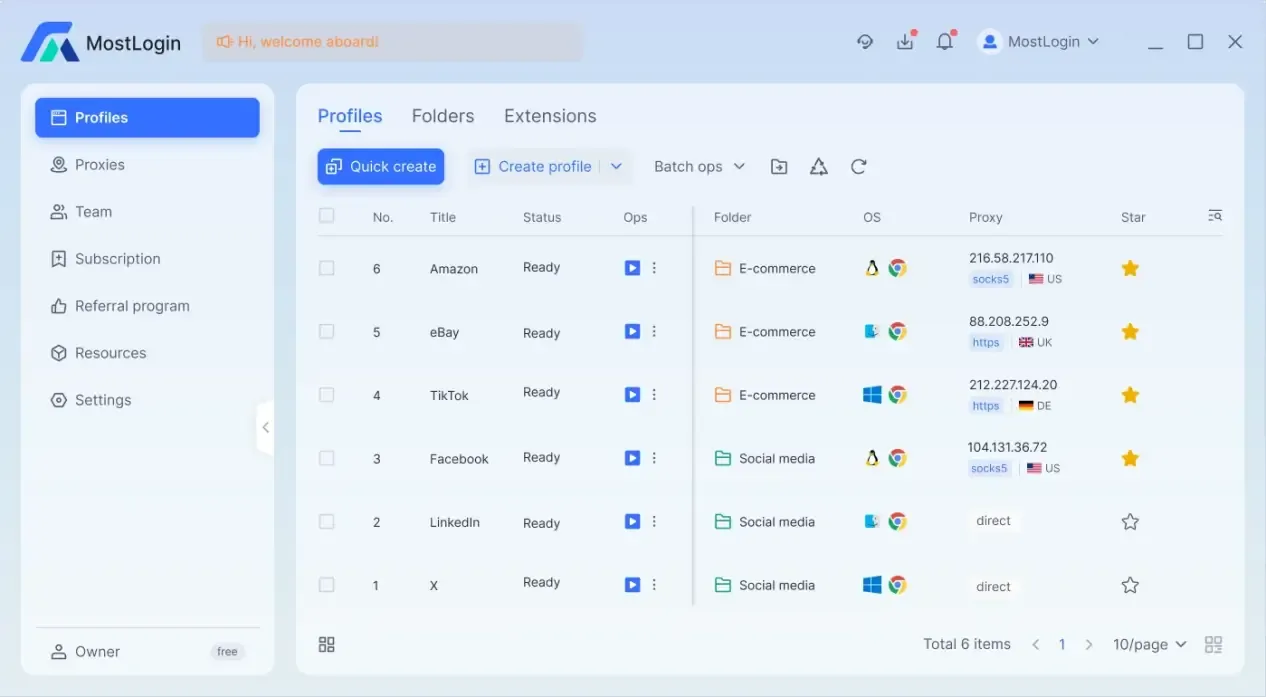
7. More Features of MostLogin Anti-Detection Browser
Isolated browser environments: Each ad account runs in an independent window with a unique Canvas, WebGL, User Agent, screen resolution, and font fingerprint, ensuring account operations do not interfere with each other and reducing the risk of account suspension.
Independent cookie and cache management: Cookies, cache, and local storage for each window are completely isolated, avoiding data cross-contamination and ensuring accurate ad testing and delivery results.
Advanced proxy management: MostLogin supports assigning independent proxy IPs to each account, hiding the real address, simulating different geographic locations, breaking through regional restrictions, and maintaining security consistently.
Multi-Account Matrix Operation: A single device can manage multiple ad accounts simultaneously, with each account operating as if on an independent real device, suitable for large-scale ad delivery and team collaboration.
Team collaboration and centralized management: MostLogin supports role-based access control and secure sharing of browser configurations, enabling efficient team management of accounts, ad campaigns, and delivery processes, while tracking operational responsibilities.
Automated Delivery Support: Compatible with tools such as Puppeteer, Playwright, and Selenium, each automated task maintains an independent fingerprint and proxy, enabling secure batch ad operations and data collection.
FAQ
What is the fundamental difference between browser fingerprinting and cookies?
Cookies are locally stored data that users can clear. In contrast, browser fingerprints are generated based on device and environmental characteristics, and even if cookies are cleared or incognito mode is used, fingerprints may remain highly consistent, making them much harder to evade.
Do ad platforms really suspend accounts based on browser fingerprinting?
Platforms usually do not suspend accounts based solely on a single fingerprint; instead, they make comprehensive judgments based on multiple dimensions such as account behavior, IP addresses, and historical records. Browser fingerprinting is mainly used to identify associations between accounts.
Which ad platforms use browser fingerprinting technology?
Major ad platforms including but not limited to Google Ads, Meta Ads, and TikTok Ads all use browser fingerprinting to varying degrees as part of their risk control and compliance judgments.
MostLogin anti-detection browser tool helps users solve high-frequency problems such as multi-account operation, environment isolation, and account risk control.
For operational questions, please refer to the Official Help Documentation