Running serious campaigns on Facebook and TikTok usually means running more than one account. Advertisers, agencies, and growth marketers need additional profiles to test creatives, reach new regions, and spread risk across several identities.
The problem is that both platforms are very good at spotting when these accounts come from the same device, browser, or IP range. Once they connect them, restrictions or bans can hit multiple accounts at once, even if only one profile actually breaks the rules.
An anti-detect browser for multi accounting helps by giving each account its own environment. The rest of this article shows how to combine isolated browser profiles, dedicated proxies, realistic fingerprints, and careful warm-up routines so that your Facebook and TikTok operations look more like separate real users instead of an obvious “account farm.”
If you want to see how the same ideas are applied to different industries and platforms, you can review the multi-accounting solution overview from the same product ecosystem.
Why Facebook and TikTok Keep Linking Your Accounts
Facebook and TikTok both combine multiple technical and behavioral signals to decide whether several accounts belong to the same operator. Beyond email and password, they inspect browser fingerprints, network data, device settings, and session history to build a risk profile. When too many signals overlap, accounts are clustered and can be limited or banned together.
A browser fingerprint can include Canvas and WebGL outputs, audio configuration, screen size, fonts, GPU model, and other attributes that remain stable unless you deliberately change them. If many accounts share nearly identical fingerprints and also log in from the same IP range, the platforms see one “device” jumping between identities. At the same time, shared cookies, Local Storage, and cached data inside a single browser profile give even more evidence that those accounts live in the same environment.
Network and behavior signals complete the picture. Even with a VPN, WebRTC and DNS leaks can expose the same underlying network, while mismatched time zones, languages, and geolocations make accounts look artificial. When new accounts are created and operated aggressively from such unstable setups—especially with fast ad spend, mass messaging, or obvious spam patterns—risk systems on Facebook and TikTok can quickly tie them together and trigger mass restrictions.
What an Anti-Detect Browser for Multi Accounting Changes
An anti-detect browser for multi accounting is designed to break these links at the environment level. Instead of one browser with many tabs, you get many independent profiles, each with its own fingerprint, storage, and proxy configuration.
Its key capabilities are:
- Independent fingerprints – Each profile has its own OS, screen, GPU, fonts, language, and other attributes, which stay stable for that account.
- Per-profile proxies – Every profile can use a dedicated residential or mobile proxy, so IP addresses are clearly separated across accounts.
- Isolated storage – Cookies and Local Storage are not shared between profiles, so one account cannot inherit another account’s history and sessions.
- Organized multi-account management – Profiles can be grouped by platform, region, or project, which makes life easier when you manage tens of Facebook and TikTok accounts.
In practice, MostLogin is used by multi-account operators across social media, e‑commerce, and affiliate marketing to create isolated profiles, adjust fingerprints, and bind proxies so each account runs in its own controlled environment.
Step-by-Step: Using an Anti-Detect Browser for Multi Accounting on Facebook and TikTok
Map Your Accounts and Goals
Start by listing what you actually run or plan to run. For Facebook, include personal profiles, Business Managers, ad accounts, Pages, and client assets; for TikTok, list main content accounts, supporting or niche profiles, and any accounts that will run ads or link out to landing pages.
Separate “core” accounts—those with real budget or brand value—from test or backup accounts. Core accounts should get the most stable proxies, longer warm-up, and the cleanest environments, while test accounts can carry more experimental setups.
Planning this way makes it easier to see how many profiles you really need inside your anti-detect browser for multi accounting, instead of creating profiles randomly.
Create Isolated Browser Profiles
Use the rule one account, one profile, one proxy as your baseline.
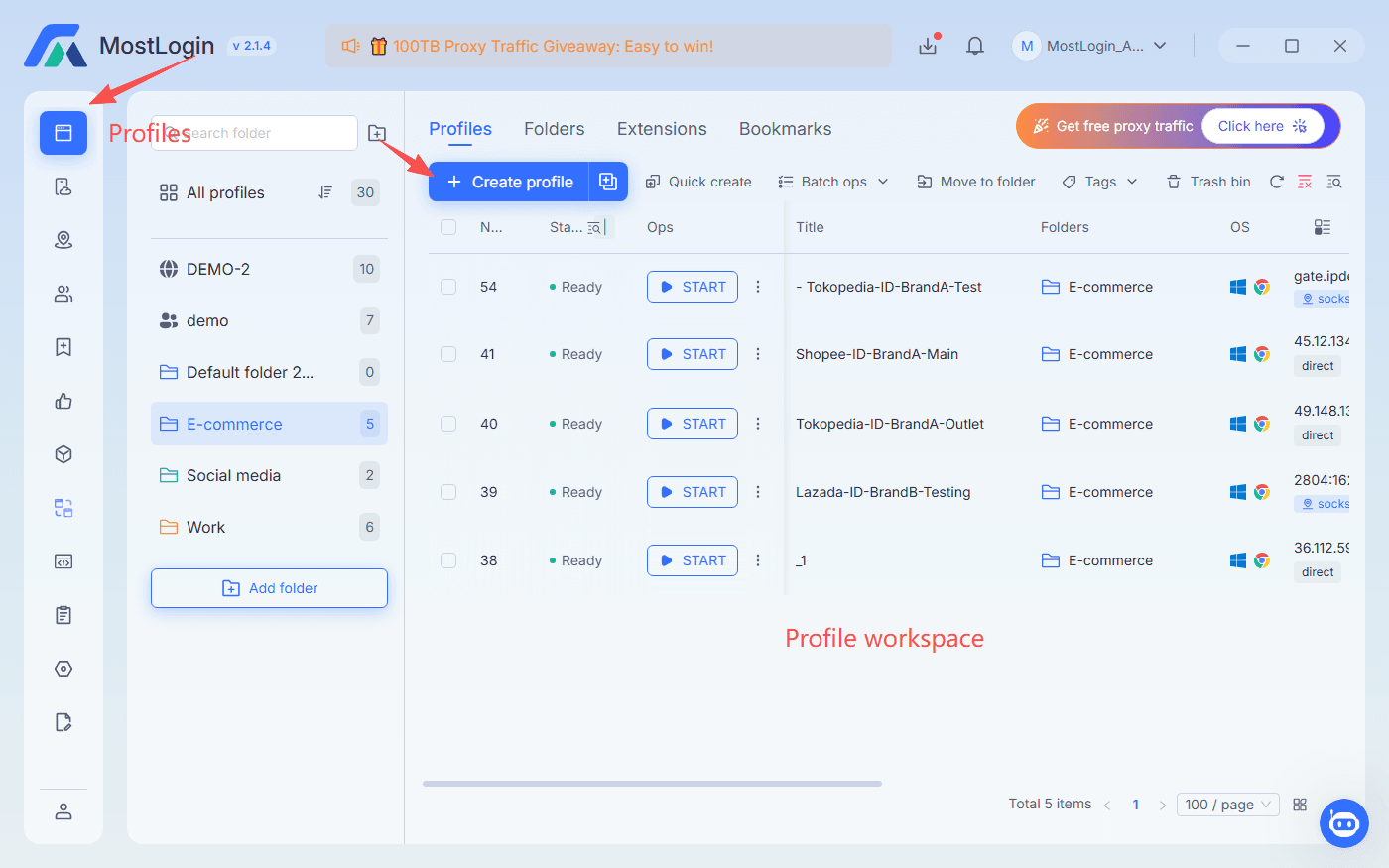
In an anti-detect browser like MostLogin, you would:
- Create a new profile from the dashboard.
- Pick a browser engine and fingerprint template that looks like a normal user device.
- Name it clearly, combining platform, region, and purpose—for example, “US-FB-Ads-01” or “ID-TT-Organic-01”.
For Facebook, choose a realistic desktop setup: common Windows or macOS version, popular resolution, and language plus time zone matching the account’s main region, aligning with how advertisers use Ads Manager.
For TikTok, simulate a more mobile-like environment while still running on a desktop. Mobile-style User-Agents and phone-like resolutions make the browser look closer to what TikTok expects from real users, as long as combinations stay plausible.
Bind and Test Proxies per Profile
After creating profiles, assign network identities.
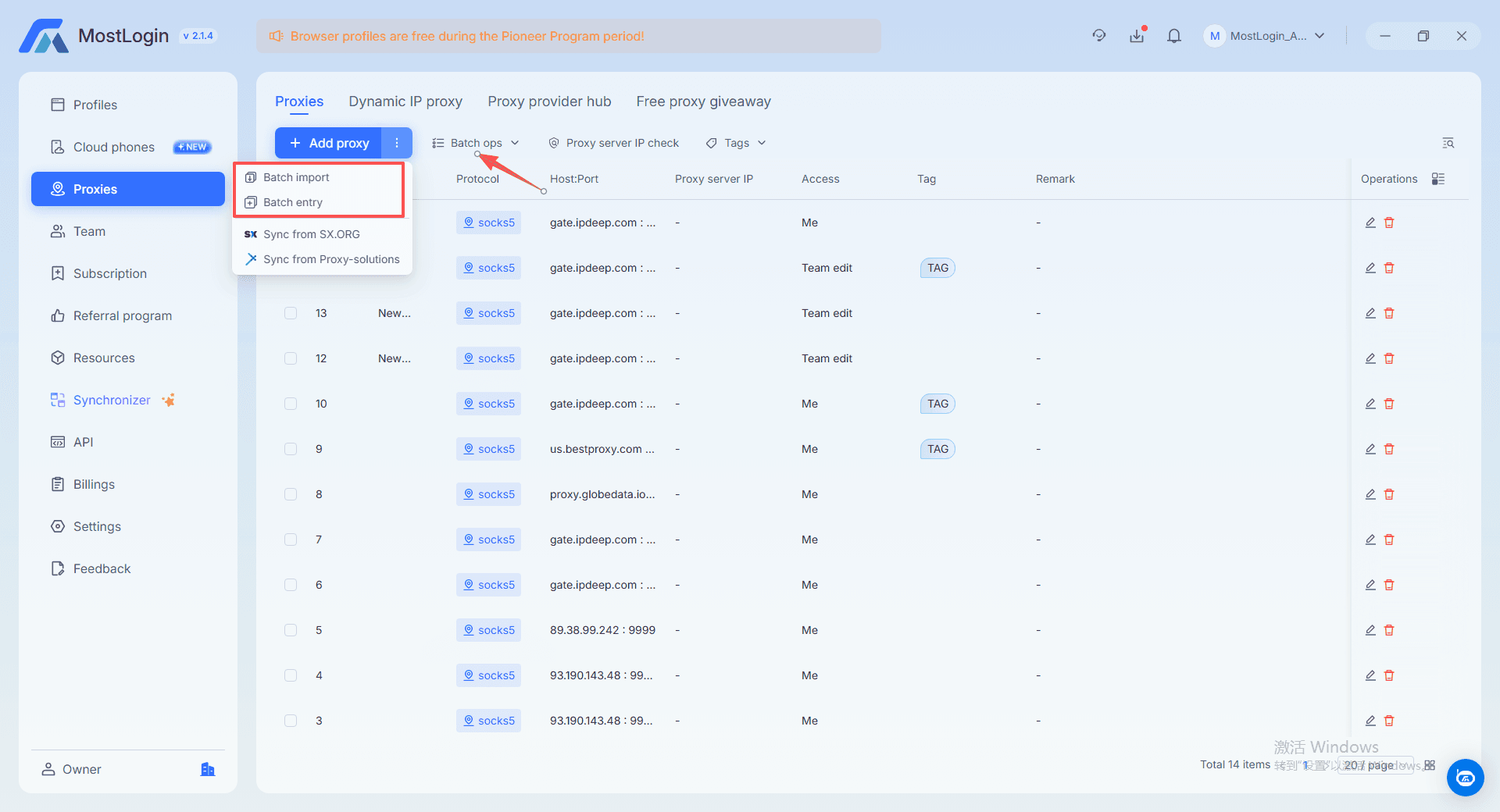
For each profile:
- Add a dedicated HTTP or SOCKS5 proxy in its settings.
- Match proxy country and city to the account’s origin or main target region.
- Open an IP check page from inside that profile to confirm IP, location, and that there are no WebRTC or DNS leaks.
MostLogin works with standard proxy providers and allows quick connection tests, which helps you avoid logging into important Facebook or TikTok accounts from broken or mismatched IPs.
Keep Fingerprints Within Realistic Ranges
Having control over fingerprints does not mean making them exotic. You want profiles that look ordinary, not strange.
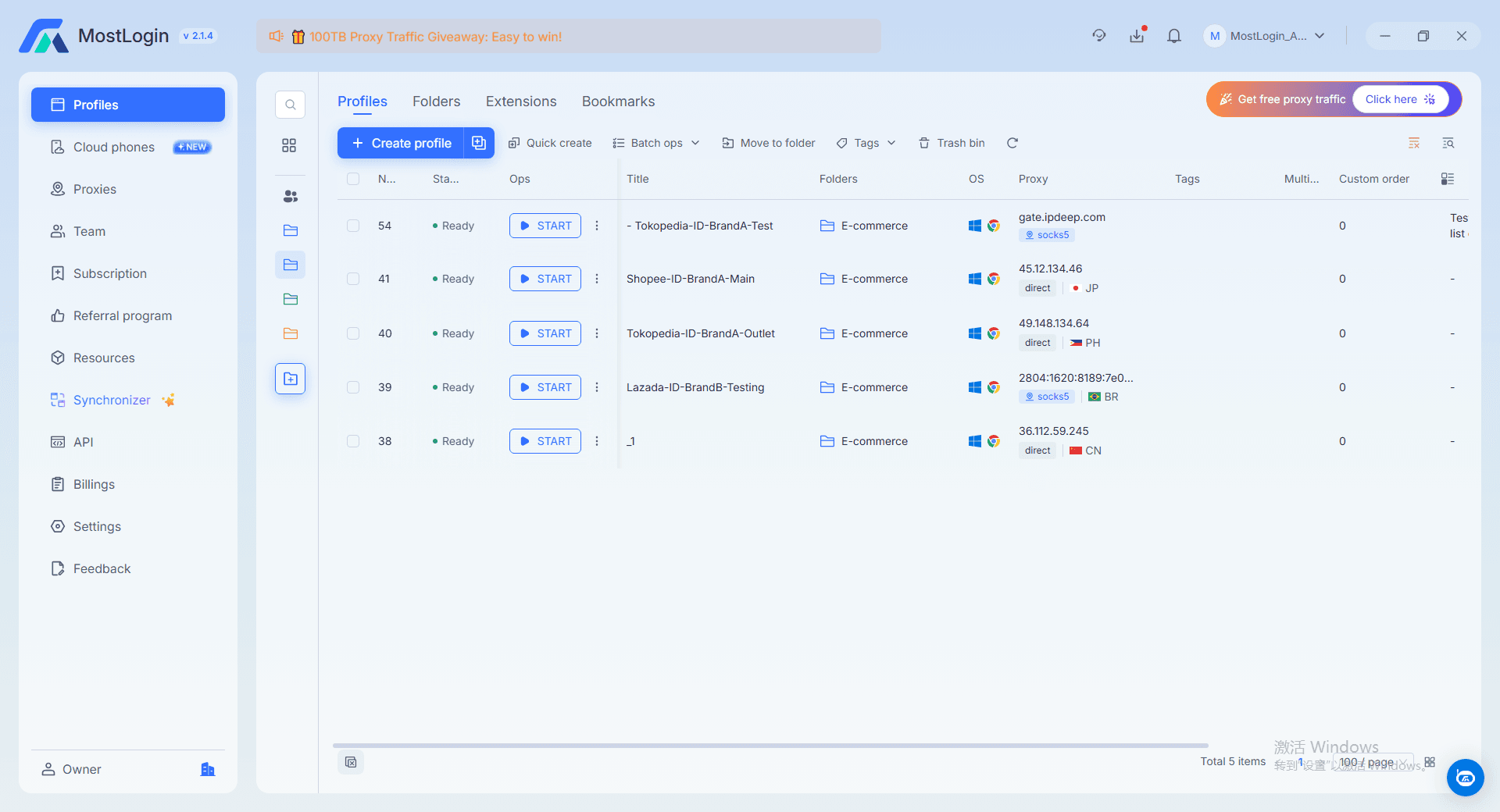
Good practice includes:
- Choosing common OS and hardware combinations instead of rare ones.
- Aligning language and time zone with the proxy or target region.
- Keeping Canvas, WebGL, and audio fingerprints stable for each profile rather than regenerating them frequently.
MostLogin’s anti-fingerprint engine follows this idea: it randomizes across many device attributes but aims to fit within normal patterns. You can rely on auto-generated configurations or manually adjust parameters while remaining in realistic ranges.
Log In Safely
When the environment is ready, you can start logging in—but the first sessions matter.
General rules:
- Use each profile for exactly one Facebook or TikTok account from the beginning.
- Do not mix personal browsing and work accounts in the same profile.
On Facebook, a safer early flow is to log in, browse the feed, visit pages, and add natural interactions over several days, then move into creating or attaching Business Managers and ad accounts.
On TikTok, focus first on natural behavior: watch videos, like and follow at a human pace, introduce posting gradually, and avoid aggressive external links or ad-style funnels until the account looks more seasoned.
Warm-Up and Daily Operations
Technical separation does not justify reckless actions. Warm-up and daily routines are where many setups fail.
For both platforms, aim for at least 7–14 days of moderate, consistent activity before pushing harder. Keep login times reasonably regular, let each account build a pattern of browsing and interaction that fits a real person, and avoid rapid jumps in behavior or location.
On an ongoing basis, spread actions across the day instead of hitting every profile with the same script at the same minute. If a specific account shows warnings or extra verification, slow down and check its proxy stability, fingerprint, and recent actions before continuing.
Organize and Scale
Once your first few accounts survive and perform well, you can expand.
Use tags, folders, or workspaces in your anti-detect browser to group profiles by platform, country, or client. Scale in stages: confirm that a small batch of Facebook and TikTok accounts remains healthy for weeks, then copy that pattern for the next batch. Keep a simple record mapping each account to its profile name, proxy, and region.
If you want to see how these ideas support multi-store or cross-border e‑commerce scenarios, the multi-accounting solution page for e‑commerce gives specific examples of isolated fingerprints, proxy and location management, and cookie separation for store owners.
Best Practices, Mistakes, and Optimization Tips
Best Practices
- Treat every Facebook and TikTok account as a separate user: one profile, one proxy, one stable fingerprint.
- Keep environment changes minimal once an account has history; big changes should be rare and deliberate.
- Invest better proxies and more cautious routines into accounts that carry real budget or brand value.
Common Mistakes
- Logging several unrelated accounts in one profile, which strongly increases the chance that bans spread.
- Assuming an anti-detect browser makes any behavior safe, then running extreme spam or policy violations.
- Constantly changing proxies, languages, or time zones, which makes your environment look unstable and artificial.
Optimization Tips
- Use clear naming, tags, and notes so that you always know which profile serves which campaign or client.
- Gradually test different proxy and fingerprint combinations on less important accounts, then standardize the patterns that show better survival rates.
For a deeper look at how a tool like MostLogin implements fingerprint spoofing, proxy IPs, cookie isolation, and collaboration, you can check the feature overview.
FAQ
Why do my Facebook accounts keep getting banned even when I use a VPN?
Because a VPN only changes IP. Facebook still sees the same fingerprint, cookies, and behavior across accounts, so they look related. You need isolated profiles, fingerprints, and proxies, not only a new IP.
How does an anti-detect browser actually help with TikTok multi accounting?
It gives each TikTok account its own “device”: separate fingerprint, cookies, and proxy. That makes accounts look like different users, especially when combined with slow, natural warm-up.
Should I use the same fingerprint template for all my Facebook and TikTok accounts?
No. Reusing one template recreates a single-device pattern. Use diverse but realistic fingerprints, then keep each account’s fingerprint stable over time.
How many accounts can I safely run from one machine with an anti-detect browser?
The software can handle many profiles, but in practice you should expand in stages. Let a small batch of Facebook and TikTok accounts stay stable long term, then copy that setup to more accounts.
Can I log into the same Facebook or TikTok account from multiple profiles or devices?
Try not to. Frequently switching an account between different profiles, IP ranges, or time zones makes it look unstable. A safer approach is to bind each important account to one profile and proxy and keep changes rare.
What is the best way to warm up new Facebook and TikTok accounts in an anti-detect setup?
First make sure the environment is clean, then slowly increase activity. For the first 7–14 days, use the same profile and proxy for light browsing and interaction, then gradually add ads, links, and more complex actions.
Conclusion
Facebook and TikTok multi accounting is no longer about simple tricks; it is about building clean, separated environments and acting like a network of real users rather than an obvious cluster. An anti-detect browser for multi accounting gives you that separation by isolating fingerprints, proxies, and cookies so each account behaves as if it runs on its own machine.
From there, success depends on how you operate: realistic fingerprints, careful warm-up, stable proxies, and campaigns that respect platform rules. If you need a practical starting point, you can try an anti-detect browser like MostLogin, then gradually build out your Facebook and TikTok account system as your first profiles prove stable over time.