Workspaces isolate accounts in independent environments, enabling safer, more efficient multi-account operation and reducing suspension risk.
In modern digital marketing, social media management, SEO, and e-commerce businesses, we all need to operate multiple accounts simultaneously. For example, operators typically require multiple accounts for advertising, content testing, search ranking monitoring, or cross-regional management. However, there is a critical issue to be resolved in multi-account operation at present: the risk of all associated accounts being suspended together once their connection is detected.
We often see posts on forums where users report that multiple of their accounts were suspended within the same time period, even though they did not engage in any overly inappropriate behavior. This situation usually occurs because the multiple accounts were identified as associated, and the platform subsequently suspended all of them directly. To solve this problem, we need to understand how to avoid account association, which means using workspaces to separate these accounts.

What is a Workspace?
A workspace can be understood as an independent browser environment. Each workspace has its own independent cookies and cache, browser fingerprint (such as Canvas, WebGL, User Agent, screen resolution, and fonts), local storage and configuration, network proxy, and other information.
Its core goal is to isolate environments, allowing you to assign each account to run independently in a different workspace during multi-account operation. This way, there will be no mutual interference between the data, login status, or configurations of different accounts.
What are the Disadvantages of Traditional Multi-Opening Methods?
Many operators initially attempt the following methods for multi-account operation:
Opening multiple browsers simultaneously
Using incognito/private windows
Utilizing different user profiles
Although these methods can seemingly solve the problem of being unable to log in to multiple accounts at the same time, they actually have obvious flaws.
Some of the most classic flaws include:
Incomplete isolation: Different windows may still share the system environment or fingerprint data
High risk: Platforms can associate accounts through browser fingerprints, behavior patterns, or IP addresses
Complex management: It is easy to get confused as the number of accounts increases, and the overall operational efficiency is low
In contrast, workspaces can achieve multi-opening while also implementing environment isolation and reducing the risk of account association, which is to do their utmost to prevent account suspension.
Why Can't Multi-Account Operation Do Without Workspaces?
In multi-account operation, workspaces mainly solve three problems:
1. Avoid Account Association and Suspension
Many platforms identify account relationships through browser fingerprints, IP addresses, and behavior patterns. If multiple accounts run in the same environment, it is easy to trigger account suspension and restrictions. Through independent environments and unique fingerprints, workspaces make each account appear as an independent user, effectively reducing the risk of detection.
2. Improve Management Efficiency
When the number of accounts increases from a few to dozens, manual management methods are usually very time-consuming and error-prone. Problems such as difficulty in distinguishing account statuses, easy cross-contamination of data, and difficulty in team collaboration may arise. Workspaces can provide an independent space for each account and also offer centralized management functions, enabling teams to perform operational tasks more effectively.
3. Support Cross-Platform and Cross-Regional Operations
Operators usually need to test ads, manage stores, or monitor SEO rankings on different platforms. Workspaces can be combined with proxy management to achieve secure cross-regional and cross-platform access, ensuring data authenticity and operational stability.
Where Can We Use Workspaces?
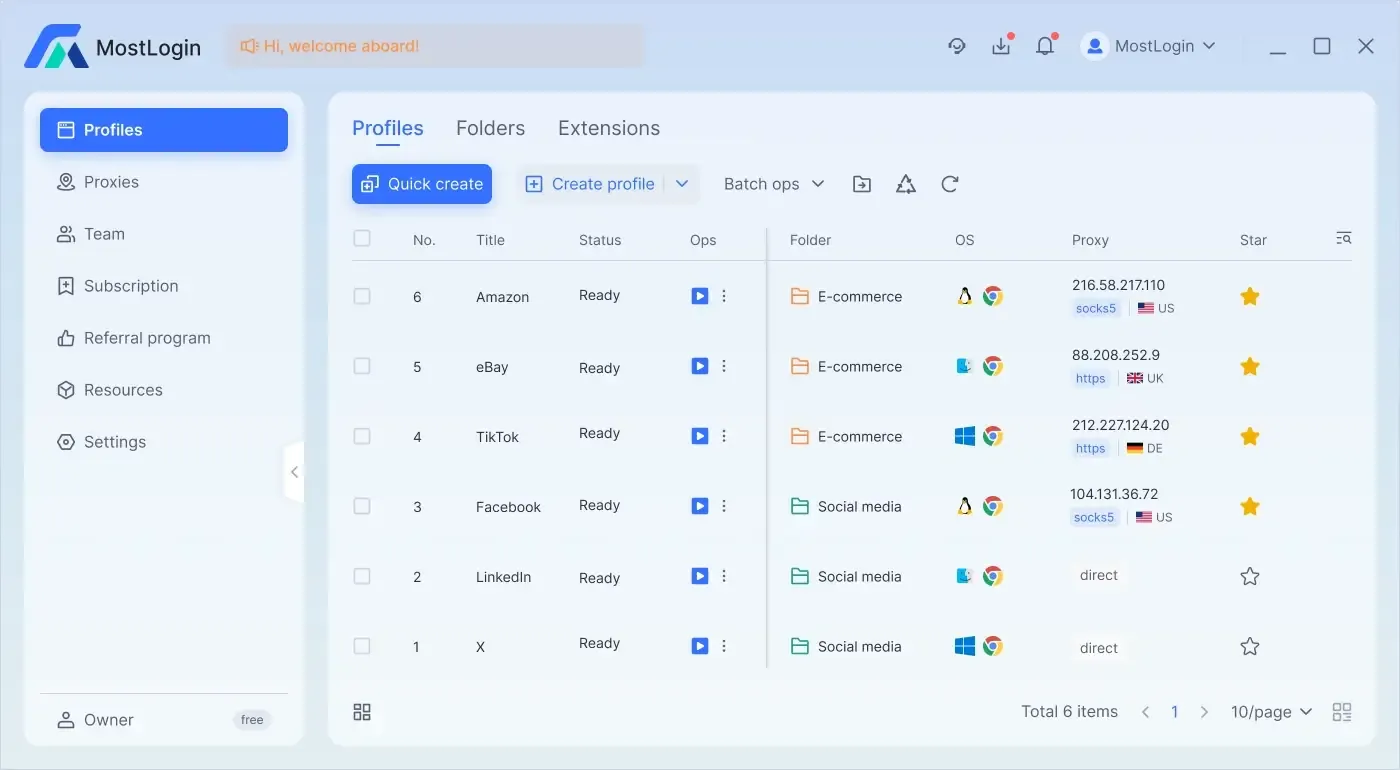
In fact, many relevant multi-opening software now comes with built-in workspace functionality, and these software have deeply optimized workspace-related features. For example, MostLogin Multi-Account Browser has far more functions than ordinary workspaces, such as:
Independent browser environment: We can set independent cookies, local cache, and session data for each account, ensuring that there is no mutual interference between accounts.
Stable login status: Environments can be saved for the long term, minimizing the occurrence of frequent disconnections and repeated verifications.
Multiple accounts online simultaneously for one user: For example, MostLogin Multi-Account Browser also supports the simultaneous operation of accounts on various platforms, which can improve operational efficiency.
Avoid misoperations: Each account can be assigned a fixed corresponding environment, which can significantly reduce the risk of sending wrong messages or switching to the wrong account.
Support team collaboration and permission assignment: It supports different team members to use different account environments and manual permission allocation, facilitating subsequent management and other operations.
Therefore, in fact, as long as we use the Multi-Account Browser, we can experience workspaces and more functions beyond ordinary workspaces, and better implement operations related to multi-account management.
Practical Application Scenarios
Affiliate Marketing Multi-Account Management
Pain Point:
Affiliate marketing typically requires operating different accounts on multiple advertising platforms. Using the same browser or IP address can easily lead to account association detection by the platform, thereby triggering restrictions or account suspension.
Solution:
Create an exclusive environment for each advertising account in an independent workspace, with each window having a unique fingerprint and cache.
Effect:
Marketers can safely manage multiple advertising accounts simultaneously, avoiding association detection while ensuring that data and login statuses do not interfere with each other.
Social Media Management and A/B Testing
Pain Point:
When testing different content or ad creatives on social platforms, repeated testing using the same browser can easily trigger platform algorithm restrictions, leading to inaccurate results.
Solution:
Each test account runs in an independent workspace with a completely isolated environment, and different proxies can be assigned for multi-region testing.
Effect:
The results of A/B testing for ads or content are more accurate, while reducing the risk of account suspension and restrictions.
SEO Multi-Account Search Ranking Monitoring
Pain Point:
SEO professionals need to monitor rankings for multiple clients or projects. Conducting a large number of queries using the same browser or IP address may be identified as abnormal behavior by search engines, leading to data deviations or account bans.
Solution:
Each client account runs in an independent workspace, combined with proxies to simulate access from different geographic locations, and each workspace stores cookies and cache independently.
Effect:
Accurately obtain SERP data, ensure that data from different projects does not interfere with each other, and improve operational security.
E-Commerce Business Multi-Store Management
Pain Point:
E-commerce sellers or agents need to manage multiple stores or accounts simultaneously. When monitoring prices and tracking inventory, they are easily detected by the platform and restricted from accessing.
Solution:
Run each store account in an independent workspace, combined with independent proxies and environment isolation, to achieve secure account login and parallel operation of multiple stores.
Effect:
Safely and efficiently manage multiple store accounts, while supporting cross-regional operations and avoiding the risk of account association or suspension.
Automated Workflows and Batch Operations
Pain Point:
When performing batch data crawling, automated publishing, or monitoring tasks, using ordinary browsers can easily lead to account bans or trigger anti-cheating mechanisms.
Solution:
Each automated task runs in an independent workspace, combined with unique fingerprints and proxies, to ensure that tasks are executed in parallel without interfering with other accounts.
Effect:
Achieve large-scale, multi-task secure operation while maintaining data isolation and operational security.
Summary
Workspaces are a core feature of multi-account operation. They can solve the problems of account association and suspension through environment isolation, independent fingerprints, and data isolation, while also improving operational efficiency and team collaboration capabilities. For digital marketers, social media managers, SEO professionals, or e-commerce sellers, using workspaces is very important.
FAQ (Frequently Asked Questions)
What is the Difference Between a Workspace and a Regular Multi-Opening Browser?
Regular multi-opening only opens multiple windows simultaneously, while a workspace truly isolates environments, with each account having its own independent fingerprint, cache, and storage.
Do All Operators Need to Use Workspaces?
If you only operate a single account, the difference may not be obvious. However, for multi-account, multi-platform, or multi-team operations, workspaces are almost essential.
Is It Difficult to Use Workspaces?
There are many well-integrated tools available now. For example, MostLogin Anti-Detect Browser provides centralized management, templated operations, and team collaboration. It is not only very simple to operate but also makes multi-account management efficient and scalable.
Best Multi-Account Browser - MostLogin
The MostLogin Multi-Account Browser tool helps users solve high-frequency problems such as multi-account operation, environment isolation, and account risk control.
For operational questions, please refer to the Official Help Documentation