Roblox remains one of the world's most popular gaming platforms in 2026. Whether it's playing games, making friends, or creating content, many people start their journey right here. Some users want to run Roblox on school-issued Chromebooks to unwind, only to find that the platform fails to open or throws various errors.
If Roblox works perfectly on your Chromebook at home but not at school, the issue isn't on your end—it's because the school has imposed restrictions on its Chromebooks with strict management policies. Today, we'll explain why schools block Roblox and how you can enjoy seamless access to Roblox on your school Chromebook!
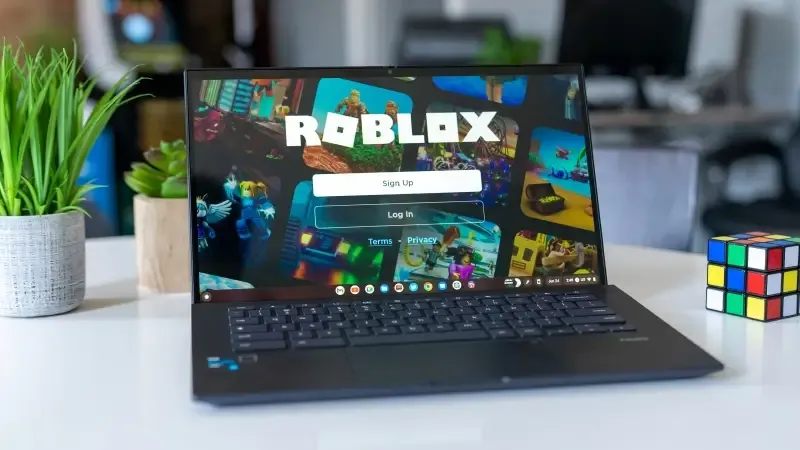
I. Can't You Play Roblox on School Chromebooks?
Whether Roblox works on a Chromebook actually depends on the school's configuration policies. Specifically, it boils down to these key questions:
Is the Chromebook centrally managed by the school's IT department?
Does the school network restrict access to gaming websites?
Is access to Roblox's web version or app installation permitted?
If your Chromebook is school-issued and requires a student account login, you'll most likely encounter issues like being unable to access the Roblox website, experiencing crashes after login, or being blocked from installing the app altogether. Typically, schools enforce these restrictions through Google Admin Console (the school's backend system), campus network firewalls, and unified browser and application policies.
However, it's important to note that not all schools or school Chromebooks block Roblox. You might want to try accessing Roblox first before taking further steps. (We assume if you could already access Roblox smoothly on your Chromebook, you probably wouldn't be reading this article—thanks to all users who found this page through other articles!)
II. Why Do Schools Restrict Roblox?
1. Restrictions Imposed by School Network Policies
Under many school network policies, gaming websites are categorized as non-educational content. Since Roblox is frequently classified under the Games/Entertainment category, it's often directly blocked by campus firewalls or restricted at the DNS level. This usually results in error messages like "unable to access" or "loading failed" when trying to open the platform.
2. Restrictions at the Device Management Level
School-managed Chromebooks typically prohibit the installation of non-whitelisted applications and block access to specific websites to prevent device infections or unauthorized control. Some devices even disable Google Play entirely. Therefore, even though Chromebooks technically support Roblox, schools can simply turn off the necessary permissions through their backend systems.
3. Performance and Security Considerations
Another commonly overlooked factor is that Roblox has certain performance requirements. Most school Chromebooks come with entry-level hardware configurations, and running games could potentially affect classroom device stability—hence the restrictions.
4. Preventing Student Gaming Addiction
Roblox's immense popularity means students can engage in both social interactions and gameplay on the platform. To prevent excessive gaming during school hours, most schools opt to block Roblox entirely.
III. How to Play Roblox on Your School Chromebook
1. Use Roblox's Web Version
This is the most basic and common method: Open the Chrome browser > Visit the official Roblox website > Log in and play directly.
This method works if: the website isn't blocked by the school network, and your browser has full access permissions. If the restriction is at the network level, this approach will most likely not work. However, some schools only block app installations on Chromebooks, not web access.
2. Use a Personal Device-Shared Network
Some schools only restrict access via the campus network. If you can connect your Chromebook to a personal network—such as a mobile hotspot or USB tethering—you may be able to bypass the school's restrictions. This is definitely a method worth trying.
3. Use an Anti-Detection Browser
An anti-detection browser creates an isolated browsing environment on your device. Not only does this prevent Roblox account bans caused by using the same IP address, but it also allows you to manually configure proxy settings, making it impossible for both the school network and Roblox to track your actual access location and browsing direction.
IV. The Best Solution for Playing Roblox on School Chromebooks
Using an anti-detection browser is currently the most effective solution. For example, MostLogin Anti-Detection Browser not only helps protect the security of your accounts but also lets you create multiple isolated windows for easy multi-account login and management. Additionally, the browser uses high-anonymity proxy IPs, making it nearly impossible for schools to detect your browsing destination or identify that you're accessing Roblox.

The setup process is extremely straightforward: simply install the MostLogin Anti-Detection Browser, create an isolated window with ease, and bind a high-anonymity proxy to start playing Roblox seamlessly. For detailed installation instructions, check out this article: Complete Installation Guide for Beginners: Anti-Detection Browser!
We recommend using an anti-detection browser to access Roblox only during non-school hours and when it doesn't interfere with your studies. Moderate gaming can be beneficial for both physical and mental well-being.
V. Account Security Tips for Using Roblox on School Devices
1. Avoid Frequent Switching Between Multiple Roblox Accounts
Logging in and out of multiple accounts on the same device can easily trigger abnormal login alerts, risk control mechanisms, and data inconsistencies—especially on managed school devices. Using a dedicated, fixed browsing environment within an anti-detection browser is a much safer alternative.
2. Exercise Caution When Logging In on Shared or School-Managed Devices
School devices come with inherent risks, including unstable login environments, potential resets of privacy and security settings, and uncontrollable browsing history and sessions. If your Roblox account is important to you, minimize its usage on such devices.
3. Separate Your Gaming Account from Other Accounts
Avoid frequently switching between school accounts, gaming accounts, and other platform accounts in the same browsing environment. This practice is far more favorable for long-term account security.
Conclusion
Wanting to access Roblox at school is completely normal. Using Roblox moderately during breaks or holidays can help you relax, allowing you to refocus better on your studies afterward. If your school restricts Roblox, give the methods mentioned above a try—we hope they help you out!
Frequently Asked Questions
Why can I play Roblox on my Chromebook at home but not at school?
Because the school activates additional gaming-blocking rules on its network and device policies when you're on campus.
If my school Chromebook can't open Roblox, does that mean the device is broken?
No—it's not a hardware issue. The school most likely restricted access permissions through its backend management system. You can test this by trying to access other websites.
Which is easier to use on a school Chromebook: Roblox's web version or app?
The web version has a higher success rate because it doesn't require app installation permissions.
Why can I open the Roblox page but it crashes immediately after logging in?
This is usually caused by the campus network blocking scripts, WebSocket connections, or real-time communication protocols required by Roblox.
Can using a mobile hotspot really bypass the school's Roblox restrictions?
If the restriction is imposed by the campus network rather than device management policies, the success rate will increase significantly.
Can the school detect that I'm playing Roblox on my Chromebook?
If you're using the school network and the native browser, the school has the ability to monitor browsing logs and identify traffic patterns.
Best Anti-Detection Browser - MostLogin
The MostLogin Anti-Detection Browser helps users solve common challenges such as multi-account management, environment isolation, and account risk control.
For operational questions, please refer to the Official Help Documentation