In scenarios such as cross-border e-commerce, advertising delivery, social media operation, and data testing, many users encounter a problem: even after using a new browser configuration (creating a new profile), changing accounts, or clearing caches, platforms can still identify and link these accounts.
In fact, the problem does not lie in simple browser configurations, but in the account risk control mechanisms of platforms. Nowadays, merely creating a new browser configuration cannot isolate such information. Today, we will give you an in-depth explanation of the real reasons for account association and other relevant content.

I. What is a Browser Configuration?
A browser configuration refers to the basic setting information of a browser user. Some browsers, such as Google Chrome or Mozilla Firefox, allow multiple users to log in on the same computer, and the settings of these different users are different browser configurations.
The use of a new browser configuration we mentioned above means logging in with other multiple user accounts and applying different settings. In the previous platform detection mechanisms, using different browser configurations would result in different Cookies and other information, so some people would use multiple browser configurations to manage multiple accounts.
II. How Do Platforms Determine That Multiple Accounts Are Used by the Same Person?
Nowadays, many well-known platforms no longer rely on a single factor to determine account ownership, but adopt multi-dimensional and comprehensive risk control mechanisms for verification, such as:
1. Network Layer Information
Many users think that simply changing the IP address can solve the problem, but in fact, platforms can access far more than just the basic IP information. They also check whether the IP segment is from a data center/proxy service provider, the historical behavior density under the same IP segment, whether the IP usage time is abnormal (frequent switching in a short period), and whether the IP matches the geographic location/time zone/language.
If the logged-in IP is abnormal, or the IP behavior is more similar to an automated or abnormal usage pattern, it is easy to trigger account association or risk control.
2.Browser Fingerprint
Even if you use a new browser configuration, there may be more advanced browser fingerprints that have not been isolated. These include Cookies, LocalStorage, SessionStorage, User-Agent (browser type and version), screen resolution, time zone, language, WebRTC, Canvas, WebGL, and other fingerprint parameters.
Individually, this information may seem insignificant, but in big data models, they are combined and bound to accounts for recording and identification.
3. Behavioral Fingerprint
Compared with technical parameters, human behavior patterns are more stable and harder to disguise. Some platforms focus on analyzing whether the login times are highly consistent, whether the page browsing paths are similar, mouse movement trajectories, click rhythms, form filling sequences and dwell times, etc.
Even if we use different browser configurations, if multiple accounts log in at similar times, perform similar operations in similar ways, they are likely to be linked by the system. However, in general, platforms do not conduct in-depth checks on behavioral fingerprints unless the accounts themselves are marked or the operations are too mechanized.
III. Why Are Accounts Still Linked Even After Creating a New Browser Configuration?
Based on practical cases, the common reasons mainly include the following aspects:
1. Configurations Seem Different, But Other Fingerprints Are Identical
For example, all configurations use the same system template, with highly consistent resolutions, languages, and time zones, and overly identical browser versions and system versions. From the platform's perspective, this does not look like environments used by different users, but rather batch-generated environments, so they will be detected.
2. Mismatch Between Network Environment and Configuration
This is a very typical problem. For instance, using a European IP address but setting an Asian time zone, or using English as the language but displaying behavior patterns obviously not of a native speaker, and the IP replacement frequency being much higher than that of normal users. These contradictions will directly increase the overall risk score of the account.
3. Ignoring the Consistency of Long-Term Behavior
Many users operate in a standardized manner on the first day, but as time goes by, their operations become casual, multiple accounts are online at the same time, and work processes are highly synchronized. Some platforms do not only look at a single login but conduct continuous observation.
IV. How Can We Solve This Problem?
Based on the situations we mentioned above, the most critical issues are actually related to browser fingerprints and browser configurations. After all, behavioral fingerprints are mostly verified only after the account has been flagged by other risk control mechanisms. Therefore, what we need most is to solve the problem of browser fingerprints.
Currently, to create a reliable and stable browser fingerprint environment, we can only use some professional anti-detection browsers. For example, MostLogin Anti-Detection Browser, which can help us quickly create suitable and independent browser fingerprints.
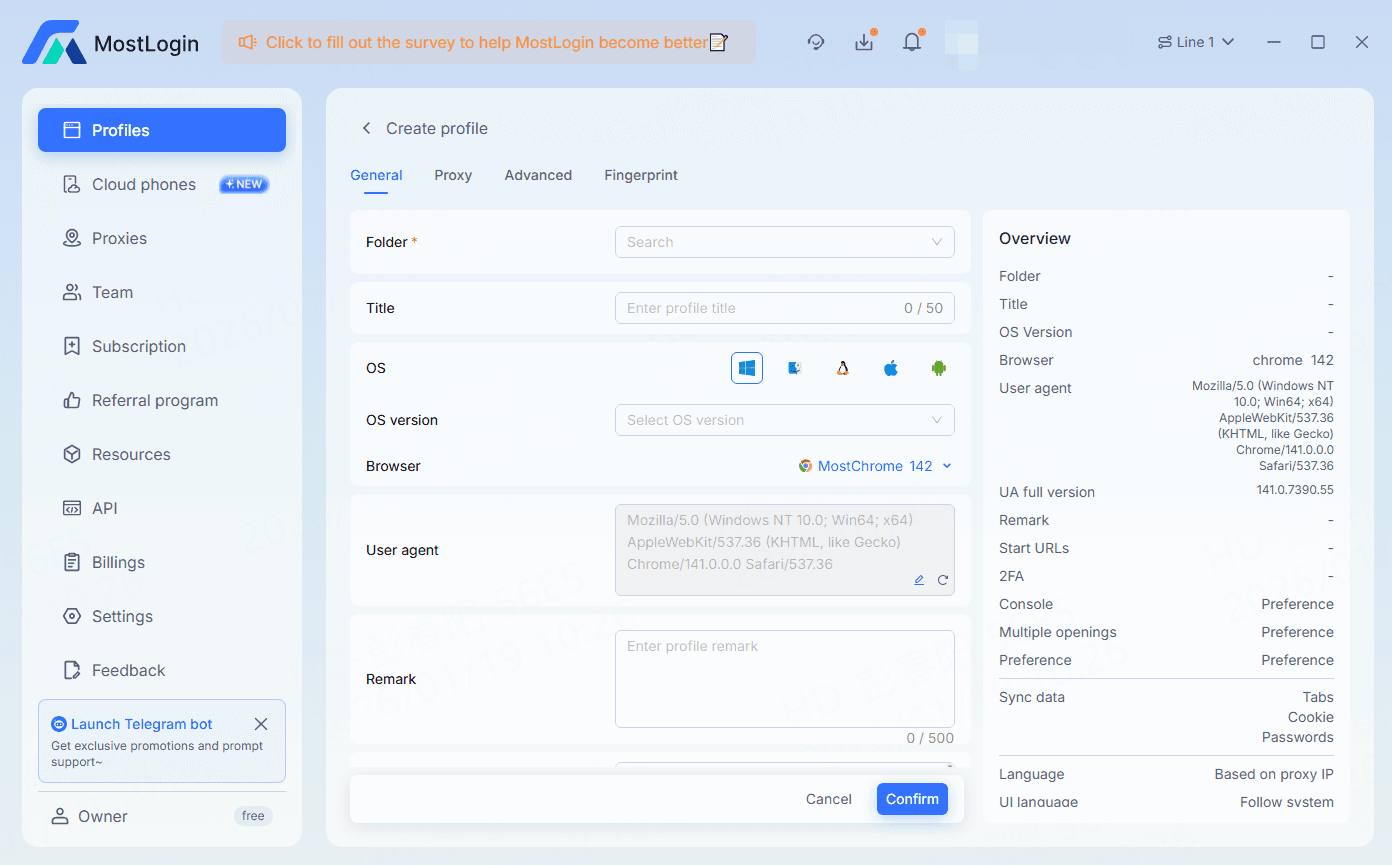
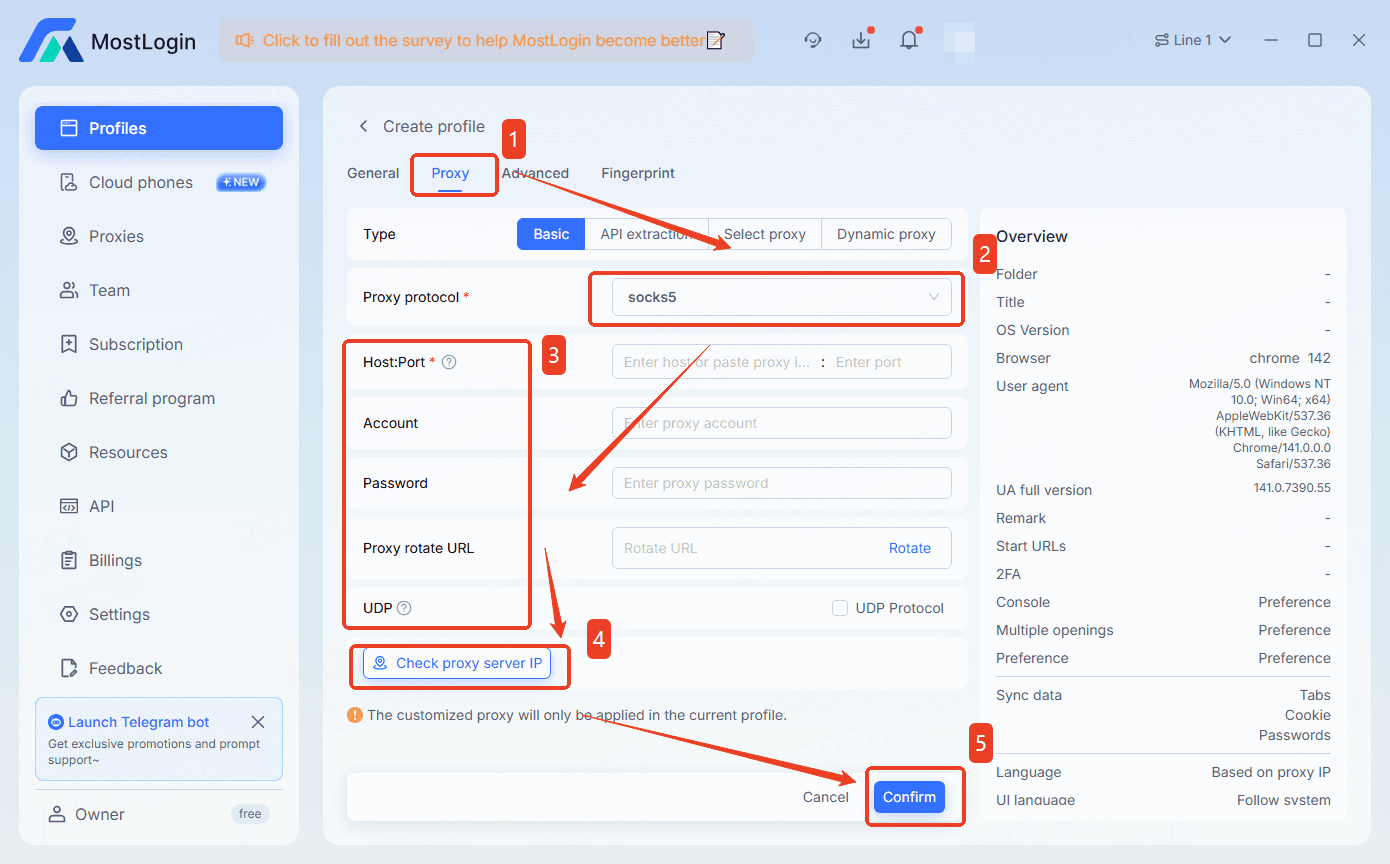
In addition to creating a stable browser fingerprint environment, MostLogin Anti-Detection Browser also allows configuring individual proxies and assigning team collaboration permissions. This not only protects the security of accounts but also improves overall efficiency.
Conclusion
To truly reduce the risk of account association, we must use a professional anti-detection browser to create an independent, authentic, and long-term stable browser fingerprint environment for each account. Only in this way can we fundamentally improve the security and stability of accounts.
Frequently Asked Questions
Why are my accounts still linked even after changing the IP address?
Because when platforms determine account ownership, they do not only look at the IP address itself but also analyze various aspects of information. If there is an obvious contradiction between the network environment and device configuration, the account will still be easily identified as a high-risk account even if the IP is changed.
What is a browser fingerprint and why is it so important?
It refers to a complete set of environmental characteristics generated by browsers and devices during operation, such as User-Agent, screen resolution, time zone, language, and other types of information. They will be combined into a unique identity identifier for long-term identification and account association.
Can behavioral fingerprints really lead to account association?
Yes, but they are usually for auxiliary judgment. The specific and more commonly used user identification methods are still browser fingerprints and related determination methods.
MostLogin Anti-Detection Browser helps users solve high-frequency problems such as multi-account operation, environment isolation, and account risk control.
For operation questions, please refer to the Official Help Documentation