So, how do you download a Pinterest video for offline viewing? Start with Pinterest's built-in option. It is available only for eligible full-screen video Pins when the creator has enabled downloads. If the option is missing, a browser-based Pinterest downloader may be able to process an authorized public Pin and return an MP4 file.
This guide explains both approaches on iPhone, Android, Windows, and macOS. It also compares four online tools, covers common download problems, and explains the safety and copyright limits you should understand before saving a video.
Can You Download Videos Directly from Pinterest?
Sometimes. Pinterest lets creators decide whether other users can download their full-screen, 9:16 video Pins. When the creator enables the setting, Pinterest can provide a download option and add the creator's username as a watermark. The setting does not apply to every video Pin, and the creator can turn it off.
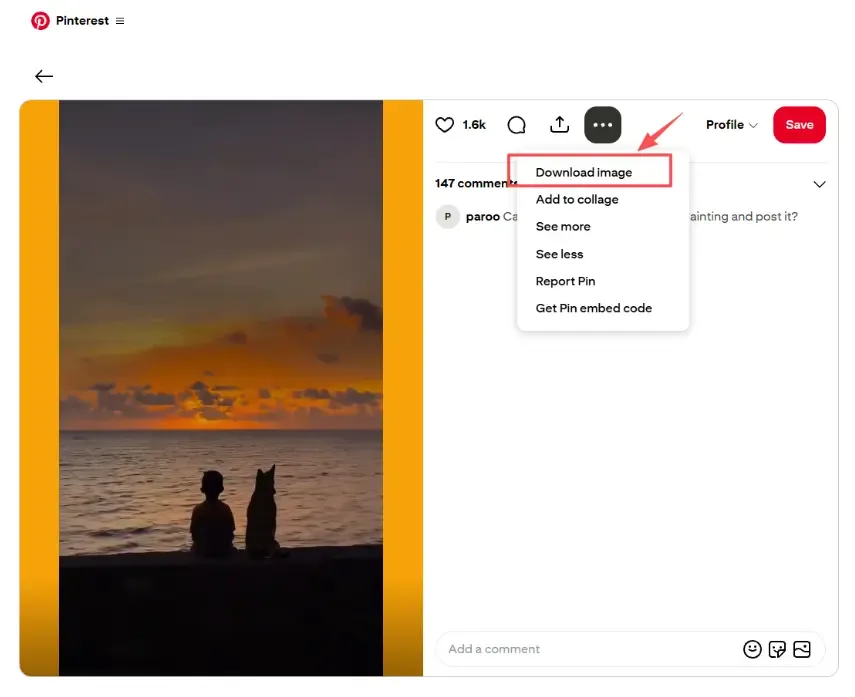
Pinterest's interface can also show Download image for a video Pin. That option normally saves the Pin's image or cover—not the playable video. If the result is a JPEG, JFIF, or WEBP image, Pinterest downloaded a still image rather than an MP4 video.
It is also important to distinguish saving from downloading:
- Save adds the Pin to one of your Pinterest boards. The content remains on Pinterest.
- Download saves a media file to your phone, tablet, or computer so you can open it outside Pinterest.
If you only want to organize ideas, saving the Pin to a board is usually enough. Download the media file only when you need offline access and have permission to use it.
Method 1: Use Pinterest's Built-In Download Option
Pinterest's own download feature is the best place to start. It keeps the process inside the official app, respects the creator's download setting, and adds attribution when applicable.
On iPhone or Android
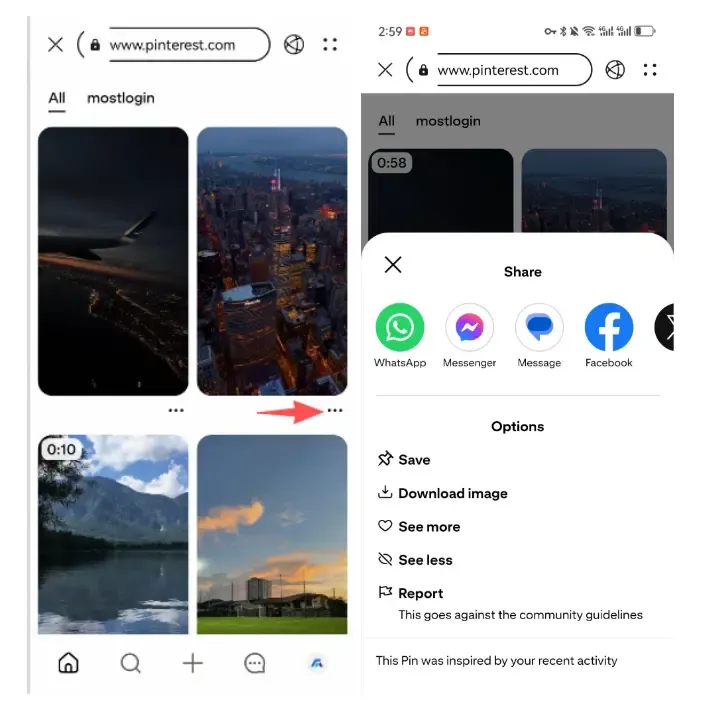
- Open the Pinterest app and select the full-screen video Pin.
- Tap the Share icon or the three-dot menu, depending on the app version.
- Look for Download or Download video.
- Tap the option and allow Pinterest to access Photos or device storage if prompted.
- Check Photos on iPhone or Gallery/Google Photos on Android.
If you see only Download image, Pinterest is offering the cover image rather than the video file. If no video download option appears, the Pin may not be an eligible full-screen video, or its creator may have disabled downloads. Updating the Pinterest app can also help when an expected menu item is missing.
On Windows or macOS
Pinterest does not consistently provide a native video download command for every Pin in a desktop browser. Open the Pin and check the Share or three-dot menu. If the menu offers only Download image, it will save a still image or cover—not the video.
When no official video option is available, save the Pin to a board or use an authorized public-link method described below.
Method 2: Use an Online Pinterest Video Downloader
Most online downloaders use the same copy-and-paste workflow and do not require software installation.
- Open the public video Pin you want to save.
- Tap or click Share, then choose Copy link. On some versions, this option is under the three-dot menu.
- Open a Pinterest video downloader in your browser.
- Paste the individual Pin URL into the input box.
- Select MP4 and one of the available source resolutions.
- Tap or click the genuine download button and save the file.
A downloader processing a public link should not need your Pinterest password, session cookie, payment information, or access to a private board. Leave the site if it requests any of them.
4 Pinterest Video Downloader Tools to Try
The following providers state that their tools work in a browser, so they can be used on mobile devices and computers without installing a separate app. Features and availability can change when Pinterest updates its media delivery. The descriptions below summarize provider-published information and are not independent security certifications.
1. SonicTube
Best for: A simple browser-based Pinterest downloader
SonicTube provides a dedicated Pinterest tool for public videos, images, GIFs, and audio. Its workflow is straightforward: copy a Pin link, paste it into the search box, review the available results, and download the required format.
Key features:
- MP4 video downloads
- Image, GIF, and audio options advertised
- Works in mobile and desktop browsers
- No Pinterest login required for public links
- Source-resolution choices when available
Keep in mind: A downloader cannot produce genuine 4K detail when the original upload is low resolution. Choose the best available source file rather than assuming the largest label represents a higher-quality original.
2. PinterestVid
Best for: Straightforward downloads in a mobile browser
PinterestVid presents itself as a browser-based alternative to a downloader app. According to its website, it processes public video, image, and GIF Pins without requiring an account and shows available source resolutions.
Key features:
- Designed for Safari, Chrome, and desktop browsers
- MP4, image, and GIF support advertised
- No separate app or registration claimed
- Resolution choices when available
Keep in mind: Claims such as “no quality loss” come from the provider. The actual output depends on the original Pin and the media versions Pinterest makes available.
3. PinVault
Best for: Previewing results and comparing format choices
PinVault says it can show a preview of a public Pin before download and provide MP4, image, GIF, and audio options. It also advertises board and profile batch features.
Key features:
- Preview and quality selection
- MP4, image, GIF, and audio choices advertised
- Browser support across phones and computers
- Public Pins only
Keep in mind: Bulk downloading creates greater copyright, privacy, and platform-policy risk than saving one authorized item. Pinterest's Terms prohibit unauthorized automated collection and access, so a tool being technically available does not make every use permitted.
4. Revesery Pinterest Downloader
Best for: Occasional single-Pin downloads
Revesery's Pinterest tool says it can retrieve the full-size image or MP4 behind an individual public Pin. The provider also says it can return video pages from some Idea Pins. Its free usage is limited, which may suit someone who needs only an occasional file.
Key features:
- Single-Pin video and image downloads
- MP4 output for supported video Pins
- No browser extension required
- Limited free usage advertised
Keep in mind: It does not currently advertise full-board downloading. An original upload can also be smaller or lower quality than the enlarged version shown in Pinterest's feed.
Pinterest Downloader Comparison
| Tool | Best for | Video output | Other media advertised | Pinterest login claimed | Main limitation |
|---|---|---|---|---|---|
| SonicTube | General browser use | MP4 | Images, GIFs, audio | No | Quality depends on the source |
| PinterestVid | Mobile browser use | MP4 | Images and GIFs | No | Public Pins only |
| PinVault | Preview and format choices | MP4 | Images, GIFs, audio | No | Batch use raises rights and policy concerns |
| Revesery | Occasional downloads | MP4 | Images and some Idea Pin media | No signup for trial | Limited free use and no full-board downloads |
No Pinterest downloader can add detail that is absent from the original upload. If several tools return the same lower resolution, the source is probably the limiting factor.
How to Download Pinterest Videos on iPhone
Start with Pinterest's native download option. If it is unavailable and you are authorized to save the video:
- Open the Pin in the Pinterest app and tap Share > Copy link.
- Open Safari and visit one of the browser-based tools above.
- Paste the link and select MP4.
- Tap the genuine download button, avoiding ads and notification prompts.
- If Safari opens the video in a new tab, use the Share menu to save it to Files or Photos.
The video may first appear in Safari's Downloads list or the Files app. Open the file, tap Share, and choose Save Video if you want it to appear in Photos.
How to Download Pinterest Videos on Android
- Open the video Pin and choose Share > Copy link.
- Open Chrome or another trusted browser.
- Paste the URL into a Pinterest downloader.
- Select MP4 and the best source quality offered.
- Confirm the download.
- Check Downloads, Files, Gallery, or Google Photos.
Before opening the result, confirm that it is a normal media file such as .mp4. Do not install or open unexpected .apk, .exe, .zip, or script files supplied by a downloader page.
How to Download Pinterest Videos on a PC or Mac
- Open Pinterest in your browser and select the video Pin.
- Click Share or the three-dot menu and copy the individual Pin link.
- Open a downloader in a separate tab.
- Paste the URL and generate the available files.
- Choose MP4 and the required resolution.
- Save the file to Downloads or another folder you recognize.
On a computer, hover over a button before clicking and check where the link leads. Close unrelated pop-ups, reject notification requests, and do not install an extension simply because a download page says it is required.
Common Pinterest Video Download Problems
The downloader says the link is invalid
Make sure the URL belongs to an individual Pin rather than a board, search page, profile, or external website linked from the Pin. Copy it again from Pinterest's Share menu.
The downloader cannot find a video
The Pin may be private, deleted, restricted, or served in a format the provider does not currently recognize. Do not try to bypass access controls. If the Pin is public, another provider may work after its parser is updated.
Pinterest downloaded a JFIF, JPEG, or WEBP file
You used Download image, so Pinterest saved the Pin's image or video cover. That file is not a video. Use an eligible native video download option or an authorized public-link downloader that offers MP4.
HD or 4K is unavailable
A downloader can return only the versions available from the source. Selecting a larger label cannot add genuine detail to a low-resolution upload.
The download button opens an advertisement
Close the new tab without interacting with it. Do not allow notifications, install software, enter credentials, or open an unexpected file. Use a different provider if the real download control is unclear.
The file has no sound
The original Pin may be silent, or the tool may have selected a video-only stream. Look for a combined MP4 option or try another provider. Do not extract or reuse music unless you have the necessary rights.
The video is not in Photos or Gallery
Check the browser's Downloads list and the device's Files or Downloads folder. On iPhone, you may need to open the file and use Share > Save Video before it appears in Photos.
Is It Safe and Legal to Download Pinterest Videos?
A public Pin is not automatically free to reuse. The safest downloads are videos you created, public-domain media, and content for which the copyright owner has given permission. Pinterest's Terms of Service restrict unauthorized automated collection and access, while its copyright policy explains how rights holders can report infringement.
Downloading for offline reference is also different from reposting. Do not remove attribution, publish the clip through another account, use it in advertising, sell it, or present it as your own unless your license or applicable law permits that use. Copyright exceptions differ by country, so “personal use” is not a universal permission.
For safer downloading:
- Use Pinterest's built-in option first.
- Download only public content you own or have permission to use.
- Never enter Pinterest credentials into a downloader.
- Do not install unknown apps, extensions, or executable files.
- Avoid fake buttons, redirects, and browser-notification prompts.
- Confirm that the downloaded file has an expected media extension.
- Do not attempt to access private boards or restricted Pins.
Where MostLogin Fits into a Pinterest Workflow
A Pinterest downloader solves one narrow task: saving an authorized public file. Teams operating several legitimate Pinterest accounts have a different challenge—keeping logins, cookies, sessions, proxies, and staff access organized.
MostLogin is not a Pinterest downloader. It provides isolated browser profiles with separate cookies, cache, fingerprints, and proxy settings, along with batch operations and team controls. This can help authorized teams build repeatable Pinterest workflows without constantly signing in and out of the same browser session.
Account separation does not override Pinterest's rules. Only operate accounts you own or are authorized to manage, and avoid spam, unauthorized scraping, or other prohibited activity.
Final Thoughts
The best way to download a Pinterest video is to check for Pinterest's native download option first. It stays inside the official platform, follows the creator's setting, and adds attribution when enabled.
When that option is unavailable, browser-based tools such as SonicTube, PinterestVid, PinVault, and Revesery may process public Pin links without requiring your Pinterest password. Whichever method you choose, use only content you are authorized to save, avoid suspicious download prompts, and remember that possessing a file does not give you the right to republish or monetize it.
Frequently Asked Questions
How do I download a Pinterest video without an app?
Copy the public video Pin link, paste it into a browser-based Pinterest downloader, choose MP4, and save the available file. No separate app should be necessary.
Why can't I see a video download button on Pinterest?
Pinterest's native video option is limited to eligible full-screen Pins and depends on the creator enabling downloads. It may also vary by app version or interface. Download image saves a still image or cover, not the video.
Why did Pinterest save the video as a JFIF image?
Pinterest did not save the video. The Download image command saved the Pin's cover or image in JFIF/JPEG form. Use an available native video option or an authorized tool that offers MP4.
Can I download Pinterest videos in HD or 4K?
Only when the original Pin has an HD or 4K source version. A downloader cannot add genuine detail that was not present in the upload.
Where do downloaded Pinterest videos go?
On Android and computers, they normally appear in Downloads. On iPhone, they may appear in Safari Downloads or Files before you save them to Photos.
Can I download videos from a private Pinterest board?
Do not use a third-party tool to bypass a private board or another access restriction. Public-link downloaders generally do not support private Pins.
Is an online Pinterest downloader safe?
Safety varies by provider. Avoid sites that ask for Pinterest credentials, require unknown extensions or apps, use misleading download buttons, or serve unexpected file types.
Can I repost a downloaded Pinterest video?
Not automatically. Obtain permission or confirm that your license or local law permits reuse. Giving credit does not replace permission from the copyright owner.
Disclosure and Methodology
This article was prepared for the MostLogin blog. Pinterest feature details were checked against Pinterest Help and policy pages on August 27, 2026. Downloader descriptions summarize each provider's published claims; the tools were not subjected to a controlled security, privacy, reliability, or performance audit. Features may change when Pinterest updates its platform.