Many affiliate marketing practitioners previously used incognito mode or VPNs to evade platform detection, but now these methods are mostly ineffective and unusable due to the platforms' new detection rules. This article will analyze why incognito mode and VPNs are no longer safe for affiliate marketing, and how we should protect the security of our operating accounts going forward!
In the early days of affiliate marketing, many people were accustomed to hiding their identities using the incognito mode built into browsers or VPNs, thereby reducing the probability of accounts being linked or banned for other reasons. However, many platforms have now upgraded their monitoring mechanisms, rendering these methods basically ineffective, and accounts are still being banned.
As we can often see on Reddit, many affiliate marketers still have their accounts identified, banned, or restricted even when using incognito mode and VPNs. Today, we will explain why affiliate marketing with incognito mode and VPNs is no longer safe, and what we should do now!

How do affiliate platforms identify users?
Mainstream affiliate platforms now store various types of your information, such as your IP address, logged-in device information, and normal operation data, and integrate this information with your account into a data package known as a "browser fingerprint". If you log into multiple accounts on the same device, the platform will detect which browser fingerprints are identical except for the account, link these accounts together, and impose a ban.
Why is incognito mode no longer safe?
Many people initially thought that a browser's incognito mode could hide their identity, but in reality, its effectiveness is quite limited. It only clears some local data, such as not saving browsing history, not storing cookies long-term, and clearing session data after closing the window, but it does not change the underlying information of the browser or device itself.
Therefore, even with incognito mode enabled, the browser still exposes a large number of stable environmental characteristics, such as operating system type, browser version, User-Agent, screen resolution, font information, Canvas/WebGL parameters, time zone and language settings, etc. The combination of this information forms a relatively stable browser fingerprint, allowing the platform to determine whether multiple sessions and accounts belong to the same device or person.
Why are VPNs no longer safe either?
The main function of a VPN is to change the network exit IP address, meaning that the other party cannot see some of our information at the network layer, but it cannot solve problems at the device layer and behavior layer (it cannot change the environment). After using a VPN, our IP address changes, but browser fingerprints, operating system information, device hardware characteristics, browser configurations, behavior patterns, and other such content remain unchanged, so the platform can still link us through this information.
Furthermore, in affiliate marketing, many people frequently switch VPN nodes and use public VPNs, which in itself is a very risky practice. Additionally, official platforms now directly flag accounts as risky if they exhibit frequent IP changes, abnormal login location jumps, appear in different countries within a short period of time, or use IP segments that are repeatedly used by multiple people. As a result, many accounts are banned due to these VPN-related issues.
What should we pay attention to for affiliate marketing going forward?
Independent environment management: Each account should use an independent browser environment, independent fingerprint, and independent cookies. Do not share operating environments or data between different accounts.
Stable network and proxies: Use stable, high-quality proxy IPs instead of frequently switching low-quality VPNs. IP stability is safer than frequent changes.
Differentiated operational behavior: Avoid having identical operation rhythms, login times, and access paths for multiple accounts. Therefore, we should ideally allocate operation time reasonably or use automated operations to perform tasks automatically.
Standardized team collaboration: When operating as a team, each account should be managed by different team members to avoid repetitive operation patterns.
Do not rely on a single method: Relying solely on incognito mode or VPN is insufficient. It is essential to implement environmental isolation, behavioral norms, and stable networks to reduce the risk of association from multiple aspects.
How to achieve independent environments and stable network proxies?
If you want to isolate multiple accounts from each other, using an anti-detection browser is the most convenient method. Anti-detection browsers are designed specifically for this purpose; they can easily create multiple browser windows with isolated environments and support manual adjustment of relevant information, making it very convenient to set up different environments for multiple accounts.
For example, the MostLogin anti-detection browser is an excellent choice. It not only has all the functions mentioned above but also supports API automation and batch management operations. Whether for team use or personal use for affiliate marketing with MostLogin, it is highly suitable. Currently, MostLogin anti-detection browser has a "Pioneer Program" – except for the cloud mobile phone part, the regular anti-detection browser features are all available under current plans. Welcome to try it out.
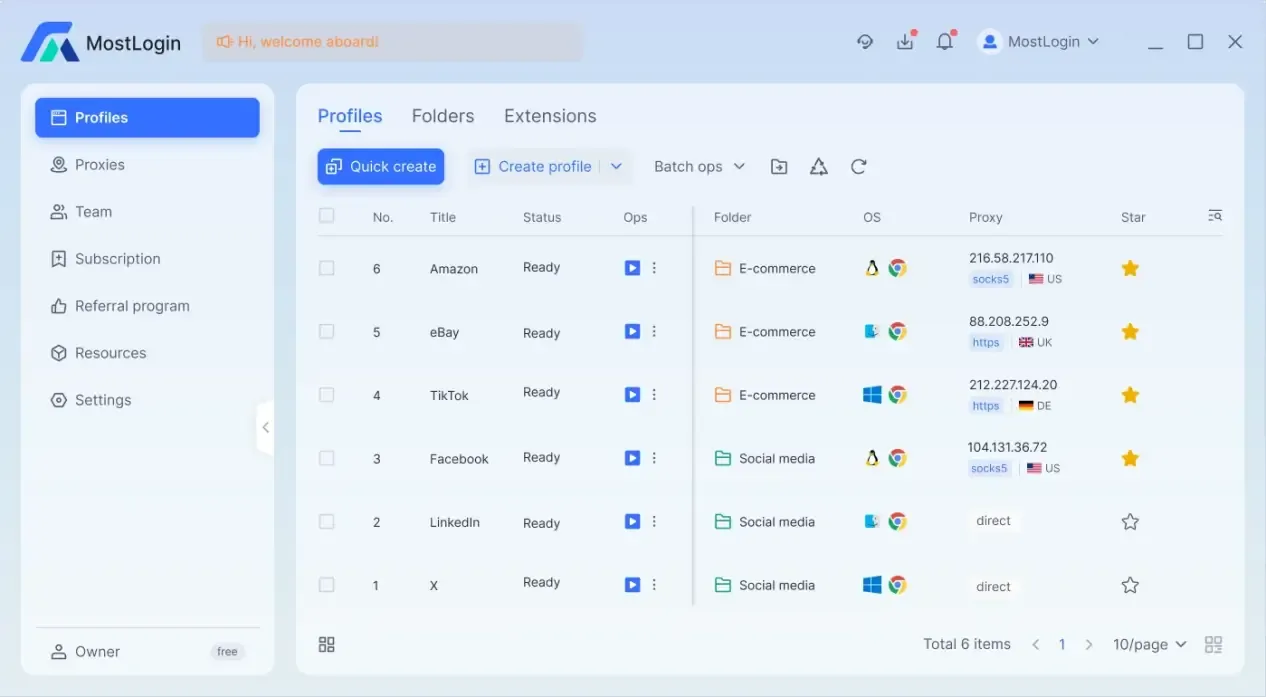
What can MostLogin anti-detection browser do?
Create stable isolated environments: It can quickly create and isolate multiple stable browser fingerprint environments to protect the security of multiple accounts or a single account.
Support multi-account matrix operation: Manage multiple accounts on a single device, with each account operating as if on a different real device – ideal for large-scale marketing and team collaboration.
Proxy simulation of real regional users: MostLogin fingerprint browser can bind an independent proxy IP to each account, ensuring consistency between the account's region, network, and device environment.
Improve long-term account trustworthiness: A stable and reasonable operating environment is useful for accumulating account weight, and using this browser helps maintain it effectively.
Reduce the probability of risk control and account bans: A fixed and authentic browser fingerprint can reduce issues related to abnormal logins, identity verification, risk control audits, etc., improving account stability.
FAQ:
Is it absolutely impossible to operate multiple affiliate marketing accounts on the same computer?
Not necessarily – it's just that sharing the same browser environment across multiple accounts carries too high a risk of being identified by the platform through fingerprints and behavioral characteristics. Using a fingerprint browser mitigates this risk significantly.
Can incognito mode prevent account identification?
No. Incognito mode only clears part of the browsing history and does not alter browser fingerprints or device information, so it cannot fundamentally avoid association issues.
Why do some people get away with the same methods while others get banned easily?
Because platforms use a comprehensive judgment mechanism that considers not only IP addresses but also devices, fingerprints, behavioral habits, and historical records – and different accounts have different risk weights.
Is frequent IP switching more secure?
Not necessarily. Excessively frequent IP changes are more likely to be deemed abnormal behavior; a stable and reasonable network environment is usually safer.
Can regular multiple browsers or virtual machines solve the problem?
Regular multiple browsers or virtual machines often share underlying environmental parameters, resulting in high fingerprint similarity. There is still a risk of association, and the effect is very limited.
Can an environment that has been restricted still be used?
If a device or environment has been flagged, continuing to use it may carry higher risks. It is recommended to establish a new, clean, and independent operating environment.
Best Anti-Detection Browser - MostLogin
The MostLogin anti-detection browser tool helps users solve high-frequency issues such as multi-account operation, environmental isolation, and account risk control.
For operational questions, please refer to the official help documentation