Account farming used to be a technical game. If you wanted to manage dozens or hundreds of online accounts efficiently, you needed to understand APIs, write automation scripts, connect browser drivers, handle errors, and maintain the workflow whenever a website or tool changed.
AI agents are changing that model. With Model Context Protocol (MCP) integration, an AI agent can connect to compatible software, discover the tools it exposes, and carry out supported actions from a natural-language request. For multi-account operators, this means less time searching for profiles, opening browser environments, assigning settings, and repeating the same clicks across a workspace.
MostLogin brings this approach to antidetect browser management. Users can connect an MCP-compatible AI client—such as Claude Code, Codex, or Cursor—to MostLogin and manage supported profile and workflow operations through conversation. The result is a more accessible form of automation: you describe the outcome, the AI agent coordinates the available tools, and MostLogin provides the isolated browser profiles.
In short: AI agent account farming replaces many script-first and click-heavy processes with natural-language workflow orchestration. It does not remove the need for strategy, oversight, or platform compliance, but it can make legitimate multi-account operations faster and easier to manage.
What Does “Account Farming” Mean in the AI Agent Era?
Account farming is the organized creation, maintenance, and operation of multiple online accounts for a business workflow. Depending on the use case, those accounts might support social media management, affiliate marketing, e-commerce stores, advertising campaigns, customer outreach, localization, or testing.
The term is sometimes associated with spam, fake engagement, or attempts to bypass platform rules. That is not what responsible automation should enable. Businesses should only operate accounts they are authorized to use and must follow each platform’s terms, local laws, and consent requirements.
In a legitimate workflow, the challenge is operational: every account needs the correct browser environment, session data, proxy configuration, label, owner, and activity process. As the number of accounts grows, manual management becomes slow and error-prone.
AI agents help at this coordination layer. Instead of replacing business judgment, they translate an operator’s request into supported actions across the tools connected to them.
Why Traditional Account Farming Required Technical Skills
Before AI agents, scalable account management usually followed one of two paths.
The first was fully manual. An operator opened each profile, checked its status, navigated to the required website, completed the task, closed the window, and moved to the next account. This approach was easy to start but difficult to scale. Repetitive steps consumed time, while inconsistent naming or profile selection increased the chance of mistakes.
The second path was script-based automation. A technical operator used an API together with Selenium, Playwright, Puppeteer, or another automation framework. This method could be powerful, but it introduced a new set of requirements:
- Writing and maintaining code
- Mapping profile IDs and workflow states
- Managing browser-driver or CDP connections
- Handling timeouts, failed steps, and website changes
- Protecting credentials and access tokens
- Monitoring scripts and reviewing logs
Traditional automation is still valuable for stable, high-volume processes. However, it raises the entry barrier. A marketer, seller, or operations manager may understand the desired workflow perfectly while lacking the time or programming experience to build it.
How MCP Turns Natural Language Into Browser Actions
Model Context Protocol is an open standard that connects AI applications to external systems. An MCP server exposes a defined set of tools, while an MCP-compatible client lets an AI model discover and request those tools.
This creates a practical bridge between conversation and software action:
- The user describes a task in natural language.
- The AI agent identifies which connected tools can complete it.
- The agent requests the supported operations in the required order.
- The connected application performs those operations.
- The agent reports the result or asks for clarification when needed.
Without MCP, an AI assistant may only explain how to launch a browser profile. With MCP, it can request that a connected application launch the profile directly—provided that action is exposed by the integration and authorized by the user.
That distinction is why MCP matters for AI-powered multi-account management. It moves the AI from giving instructions to coordinating real, supported actions.
What MostLogin MCP Adds to Multi-Account Management
MostLogin is a Chromium-based antidetect browser designed for multi-account workflows. Each browser profile acts as an isolated environment with its own persistent session and configuration. MostLogin also offers batch operations, team collaboration, proxy management, synchronization, and API automation through its browser profile features.
MostLogin added MCP service support in version 2.1.9, making it easier to connect compatible AI agents to the browser’s supported tools. Once configured, a user can give the AI agent direct, plain-language instructions instead of navigating every menu or writing a new script for each request.
The exact actions available depend on the MostLogin version and the tools exposed by the current MCP service. Users should ask the AI client to list available MostLogin tools before designing a workflow.
Examples of natural-language requests
After connecting MostLogin to a compatible AI client, requests may look like this:
- “List all profiles in the Social Media folder.”
- “Show me which browser profiles are currently running.”
- “Open profile #5 and confirm that the browser started.”
- “Create a folder called US E-commerce and move these profiles into it.”
- “Check the assigned proxies for this group and flag missing configurations.”
- “Open the selected profiles one at a time and record whether each launch succeeds.”
- “Close the profiles that were opened for this task.”
These prompts are easier to understand and adapt than a fixed script. An operator can refine the instruction conversationally: “Only include active profiles,” “skip any profile without a proxy,” or “show me the plan before making changes.”
Real Use Case: Managing a MostLogin Profile With One Codex Prompt
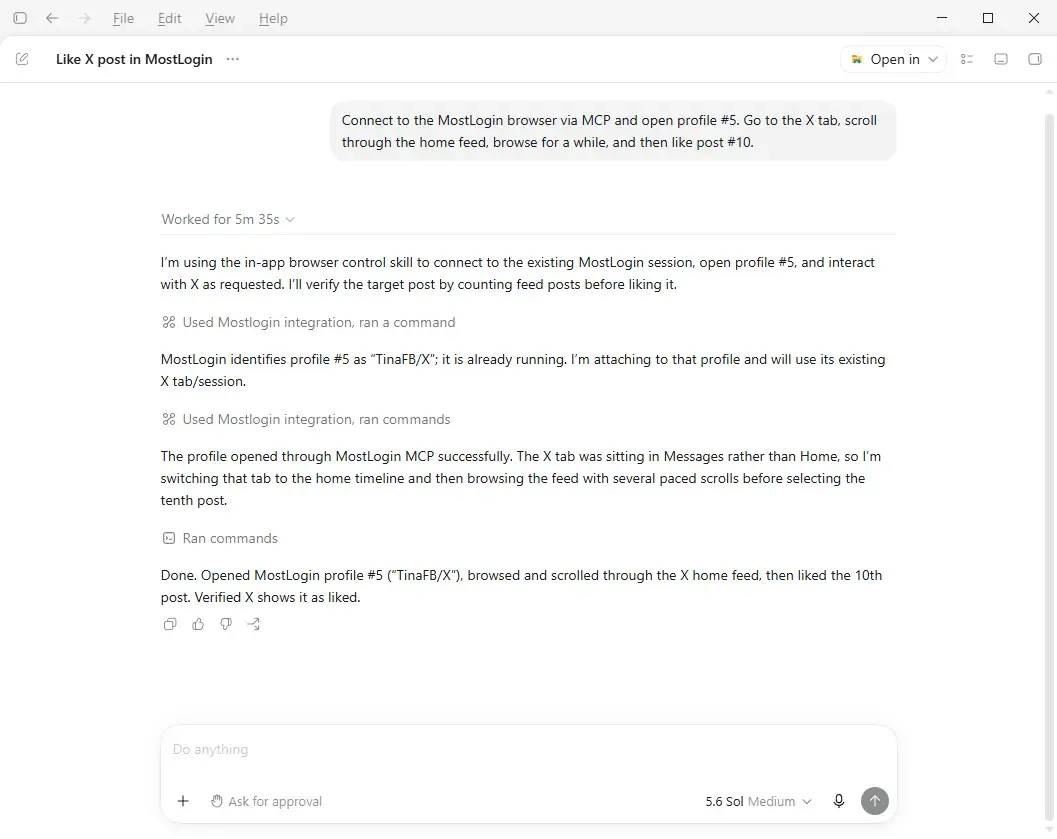
Here is a practical example of how an AI agent can turn one natural-language instruction into a complete browser workflow. In this test, MostLogin was connected to Codex through MCP. The user did not provide a profile ID, write automation code, or manually navigate between the MostLogin profile manager and X.
The user gave Codex one instruction:
“Connect to the MostLogin browser via MCP and open profile #5. Go to the X tab, scroll through the home feed, browse for a while, and then like post #10.”
What the AI agent did
Codex translated the request into a sequence of supported actions:
- It connected to the running MostLogin service through MCP.
- It looked up profile #5 and identified the correct profile, named “TinaFB/X.”
- It opened or attached to that isolated MostLogin browser environment.
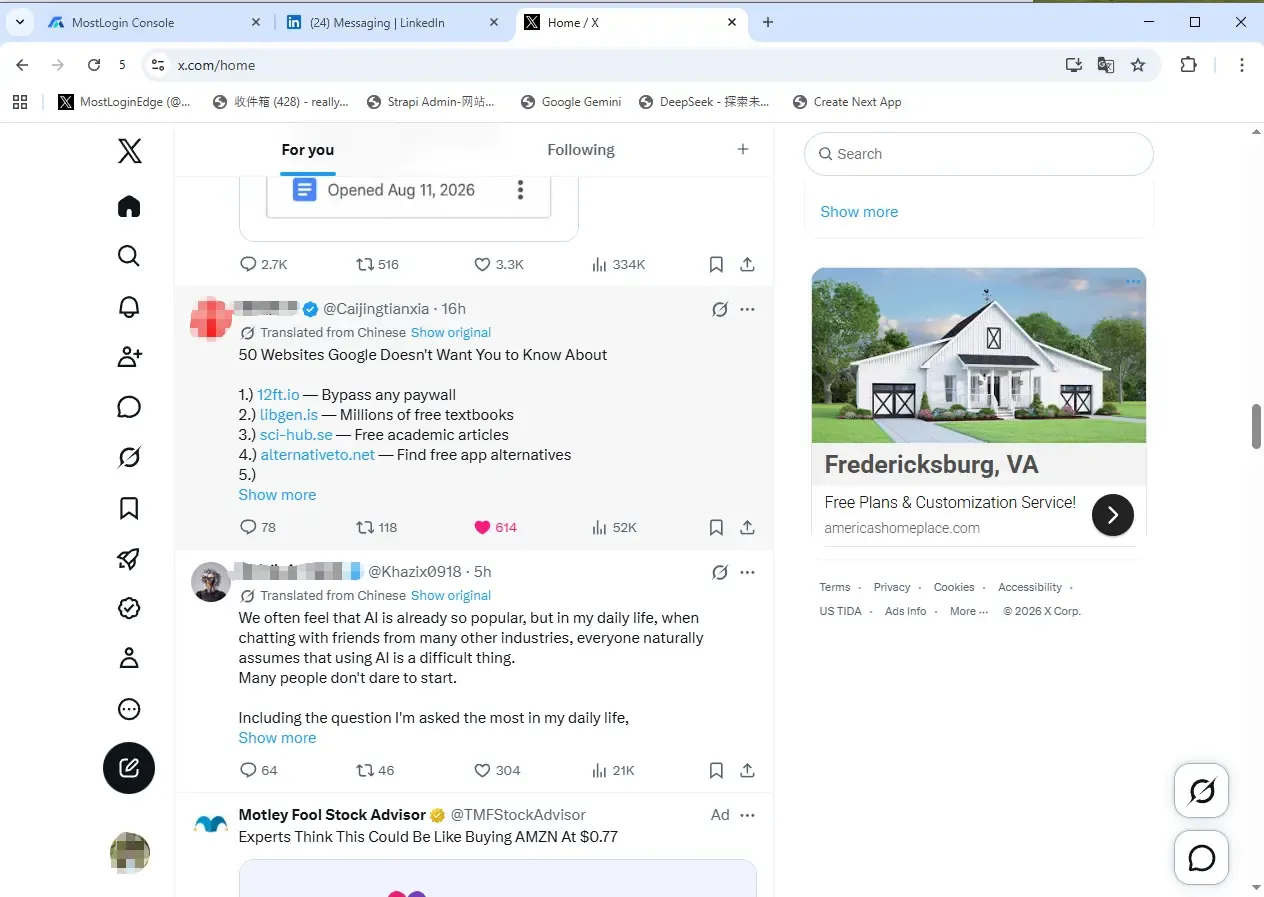
- It found the existing X tab, which was initially on the Messages page.
- It navigated to the X home timeline.
- It scrolled through the feed in several paced steps and counted distinct posts in feed order.
- It selected the tenth post, clicked Like, and checked that X displayed the post as liked.
- It returned a short completion report to the user.
This is the practical difference between a chatbot and a tool-connected AI agent. A chatbot can describe the clicks a user should make. An MCP-connected agent can discover the available MostLogin tools, coordinate the browser profile, execute supported actions, and verify the outcome. The user still defines the objective and remains responsible for approving appropriate activity, but no custom script is required for this one-off workflow.
Why this use case matters for multi-account operators
The individual task is small, but the workflow demonstrates a larger operational advantage. Without an AI agent, an operator would need to locate the correct profile, launch it, find the right tab, navigate to the feed, count posts, perform the interaction, and confirm the result manually. A custom automation script could do the same work, but writing and maintaining that script would rarely be worthwhile for an ad hoc request.
Natural-language orchestration fills the gap between those two approaches. It is flexible enough for a changing instruction and structured enough to use the specific tools exposed by MostLogin MCP. Similar patterns can support authorized profile audits, launch checks, folder organization, proxy reviews, and other repetitive multi-account administration. Always use these capabilities with accounts you are authorized to manage and in accordance with the platform’s rules.
Scripts vs. AI Agents for Account Farming
| Workflow factor | Traditional scripting | AI agent with MCP |
|---|---|---|
| Main interface | Code, API calls, or RPA steps | Natural-language commands |
| Technical barrier | Moderate to high | Lower after initial setup |
| Flexibility | Strong but changes require code | Prompts can be adjusted conversationally |
| Best use | Stable, deterministic, high-volume tasks | Guided, variable, multi-step operations |
| Error handling | Must be programmed in advance | Agent can interpret tool errors and propose next steps |
| Human oversight | Depends on the script design | Can request previews and approvals before write actions |
| Maintenance | Scripts may break when tools or pages change | MCP tool definitions provide a more structured interface |
AI agents do not make scripts obsolete. Deterministic code remains the right choice when every step must run the same way at large scale. The more useful model is hybrid: use scripts for predictable execution and use AI agents to discover profiles, coordinate tools, handle exceptions, summarize results, and manage changing instructions.
Five Ways AI Agents Reduce Multi-Profile Work
1. Faster profile discovery
Large workspaces are difficult to navigate manually. An AI agent can query the available profiles and filter them by name, folder, tag, status, or another supported field. This reduces the time spent searching and helps operators target the correct environment.
2. Fewer repetitive clicks
Opening profiles, checking runtime status, updating folders, and closing windows are small tasks individually. Across dozens of profiles, they become a major operational cost. Natural-language requests can bundle supported steps into one guided workflow.
3. Easier workflow changes
A traditional script may require a developer whenever the business rule changes. With an agent, an operator can state the new condition in plain language. The agent can then adjust its sequence within the limits of the available tools.
4. Better visibility into results
An AI agent can summarize what happened: which profiles opened successfully, which operation failed, and which items need manual review. Clear summaries are especially useful for teams handing work between shifts or managing multiple campaigns.
5. More accessible automation
MCP does not eliminate setup, security, or technical troubleshooting. It does, however, make day-to-day control more accessible to people who know the business workflow but do not write code. That expands automation from a developer-only capability into an operations tool.
A Practical MostLogin AI Agent Workflow
A safe starting workflow is simple and reviewable:
- Connect the client. Follow the official MostLogin MCP integration tutorial and keep the MostLogin desktop client running.
- Discover the tools. Ask the AI client to list all actions exposed by the MostLogin MCP server.
- Start read-only. List folders, profiles, statuses, and proxy assignments before requesting changes.
- Choose a small test group. Test the workflow with one or two non-critical profiles.
- Ask for a plan. Tell the agent to describe the intended actions before it runs them.
- Execute supported operations. Approve the plan and let the agent use the available tools.
- Verify the outcome. Request a result summary and manually inspect important changes.
- Scale gradually. Expand the workflow only after the small test behaves as expected.
This approach keeps a human in control while still removing much of the repetitive profile administration.
Security and Compliance Still Matter
Natural language makes automation easier to request, not automatically safe. Treat an AI agent as an operator with access to the tools you connect.
Follow these safeguards:
- Never publish your MostLogin MCP authorization token. Treat it like a password.
- Grant only the access required for the workflow.
- Begin with read-only requests and small test groups.
- Require confirmation before destructive or high-impact actions.
- Keep logs of profile changes and browser launches.
- Do not automate spam, fake reviews, fake engagement, unauthorized account creation, credential abuse, or other prohibited activity.
- Follow the terms of every website and platform involved.
- Protect customer and account data according to applicable privacy laws.
The official MCP specification also recommends clear visibility into exposed tools and human oversight for tool execution. Good automation should make work easier to review, not harder to control.
Who Benefits From AI-Powered Multi-Account Management?
The biggest opportunity is for operators who already manage legitimate multi-account workflows but are limited by time or technical capacity.
- Social media agencies can organize client-owned profiles and reduce repetitive browser setup.
- E-commerce teams can locate and launch the correct store environment more quickly.
- Affiliate marketers can coordinate campaign profiles and standardize routine checks.
- Advertising teams can manage separate workspaces for authorized brands, regions, or clients.
- QA and localization teams can open isolated test environments for different markets.
- Operations managers can turn written procedures into guided, tool-based workflows without maintaining every line of automation code.
The common benefit is not “one-click money.” It is operational leverage: less time spent managing browser infrastructure and more time spent on strategy, content, customer experience, and analysis.
The Future of Account Farming Is Agent-Directed
The old model of account farming separated people into two groups: operators who performed the work manually and developers who automated it. AI agents are creating a third option. Business users can describe an objective, inspect the proposed plan, and let an agent coordinate supported tools through MCP.
That shift will not remove the need for technical expertise. Complex workflows still benefit from developers, APIs, scripts, and careful monitoring. But natural-language automation lowers the starting barrier and shortens the distance between an idea and a working process.
MostLogin combines isolated browser profiles with MCP-based AI integration, giving users a practical foundation for this new workflow. Connect a compatible AI client such as Claude Code, Codex, or Cursor, discover the tools available in your MostLogin installation, and begin with a small read-only request.
Ready to spend less time clicking through profiles? Download MostLogin, enable the MCP service, and turn natural-language instructions into supported multi-account operations.
Frequently Asked Questions
What is AI agent account farming?
AI agent account farming is the use of an AI agent to coordinate authorized multi-account workflows through connected tools. Instead of manually managing every profile or writing a script for every task, an operator gives natural-language instructions and the agent requests supported actions. It should only be used for lawful activities that comply with platform rules.
Do I need coding experience to use MostLogin MCP?
You do not need to write automation scripts for routine supported requests after the connection is configured. Initial setup requires adding the MCP configuration to a compatible AI client, and occasional troubleshooting may require editing JSON or TOML settings.
Which AI agents can connect to MostLogin?
MostLogin MCP can work with MCP-compatible AI clients. Examples include Claude Code, Codex, and Cursor. Configuration formats vary by client, so follow the setup instructions for the application you use.
What can an AI agent do in MostLogin?
Available actions depend on the installed MostLogin version and the tools exposed by its MCP service. Typical capabilities may include listing and managing profiles, working with folders and proxy settings, and opening or closing browser profiles. Ask the connected AI client to list the available MostLogin tools for the authoritative answer in your environment.
Does MCP replace browser automation scripts?
No. MCP complements scripts and APIs. Scripts remain useful for deterministic, high-volume execution, while AI agents are well suited to natural-language control, tool coordination, exception handling, and reporting. Many teams will benefit from combining both.
Is AI-powered account farming safe?
Safety depends on the workflow, permissions, data handling, and platform rules. Use authorized accounts, protect access tokens, require approval for important actions, maintain logs, and never use automation for spam, deception, unauthorized access, or policy evasion.