Affiliate marketing becomes operationally difficult long before it becomes technically complex. A solo affiliate may only need one advertiser account, one traffic source, and one analytics workspace. But a growing team can quickly face multiple approved campaigns, regional landing-page tests, client-owned assets, social channels, affiliate-network logins, and separate reporting workflows.
That is where an anti-detect browser for affiliate marketing can be useful: not as a shortcut to bypass platform rules, but as an operational tool for keeping legitimate, authorized business identities, browser sessions, cookies, and proxy routes clearly separated.
The key is to treat browser profiles as controlled workspaces—not disposable identities. A stable environment, documented account ownership, approved access permissions, and consistent network settings are more valuable than creating a large number of profiles quickly.
This guide explains how affiliate teams can use an anti-detect browser for multi-account management, proxy organization, cross-border campaigns, account farms with authorized workflows, and team collaboration while reducing avoidable account-risk signals.
Why Affiliate Marketers Need Profile Isolation
Affiliate operations often involve many digital assets that should not accidentally share browser data. For example, a performance-marketing agency may manage separate client accounts, campaign research profiles, partner dashboards, social-media publishing accounts, and regional storefront environments.
Using a standard browser with multiple tabs is risky because browser data can overlap. Cookies, cache files, browser extensions, saved passwords, local storage, and session tokens may be mixed between accounts. Even if every account is legitimate, accidental crossover can create security problems, confuse attribution, or trigger additional platform verification.
An anti-detect browser solves the workflow problem by creating separate browser profiles. Each profile can retain its own browser environment, including cookies and local storage, User Agent settings, screen and operating-system characteristics, time zone and language configuration, proxy connection, browser extensions and bookmarks, and login session history.
In practice, this means a team can assign one persistent environment to one business purpose. A client campaign can use a dedicated profile to prevent sessions and credentials from mixing. A GEO landing-page quality-assurance workflow can use an approved regional profile to verify language, redirects, and offers. Affiliate-network access can be separated by authorized business entity, while social publishing can be organized by brand or content team.
A multi-account management browser is most useful when it gives teams a repeatable way to document who owns each profile, what it is used for, which proxy is assigned to it, and who has permission to access it.
How Platform Risk Systems Evaluate Browser Activity
Modern platforms do not rely on one signal such as an IP address. They typically assess a combination of technical, behavioral, security, and account-history signals. That is why simply changing IP addresses is not a complete risk-management strategy.
Browser fingerprint consistency
A browser fingerprint is a collection of technical signals that can help distinguish one browser environment from another. Depending on the platform and device, these can include browser version and User Agent, operating system, screen resolution, language and time zone, Canvas and WebGL rendering behavior, audio and font-related characteristics, WebRTC behavior, device memory and CPU-related signals, and cookie and local-storage patterns.
The practical objective is not to manipulate every parameter constantly. It is to keep a profile internally coherent and stable.
For example, a profile configured for a US-based business workflow should not repeatedly alternate between incompatible language, time-zone, device, and IP patterns. Sudden changes can look less like normal business activity and more like an account-access anomaly.
IP and proxy reputation
A proxy determines how traffic exits to the internet. For affiliate marketing teams, proxies are often used for authorized regional testing, distributed team access, or keeping client environments separated.
However, proxy quality matters more than the number of IPs available. Low-quality, overloaded, unstable, or frequently recycled IPs can cause login challenges even if the browser profile itself is well configured.
A sound proxy strategy should prioritize stable routing for persistent business accounts, clear assignment of one proxy route to one profile or authorized account group, appropriate geographic alignment for legitimate business use, testing of proxy uptime, DNS behavior, and connection speed, documentation of proxy provider and expiry dates, and controlled replacement procedures when a proxy becomes unavailable.
Do not treat proxies as a way to evade platform policies. Use them to establish predictable, segmented work environments for approved account activity.
Cookies and session continuity
Cookies are not merely browser clutter. They often help platforms recognize a continuing session, preserve login state, remember security preferences, and support normal user behavior.
Deleting cookies after every login, frequently changing browser profiles, or repeatedly forcing new sessions can create unnecessary friction. If a profile is intended for a long-term affiliate-network account, preserve its session data unless there is a clear security reason to reset it.
Step-by-Step: Set Up an Anti-Detect Browser for Affiliate Marketing
A reliable setup process is slower at the beginning but reduces operational mistakes later. The following workflow is suitable for affiliate teams, media buyers, cross-border e-commerce operators, and agencies handling authorized client assets.
Step 1: Map accounts before creating profiles
Start with an account inventory. Do not create browser profiles first and figure out ownership later.
For each account, record the account name and platform, legal owner or client owner, primary operator, business purpose, target market or region, approved login location where relevant, associated proxy, login method and recovery contact, profile name or profile ID, access permissions, and last activity date.
A simple naming structure can prevent major mistakes. For example: Client-Brand_US_AffiliateNetwork_Main_2026.
Avoid vague labels such as “Profile 12,” “New Account,” or “Test Browser.” Ambiguous labels make handovers difficult and increase the chance that a team member logs into the wrong account.
Step 2: Create one persistent browser profile per purpose
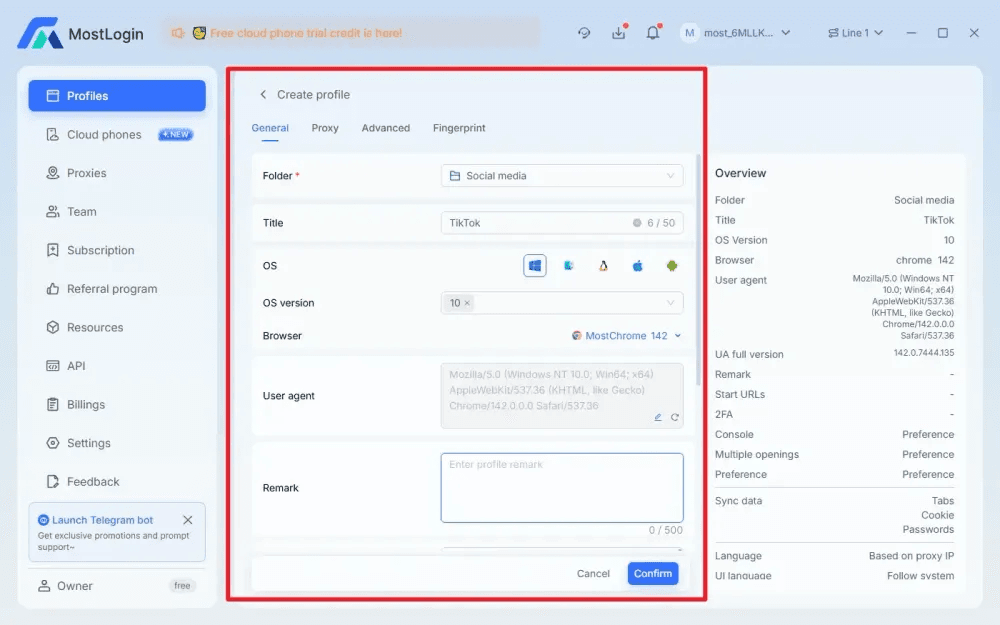
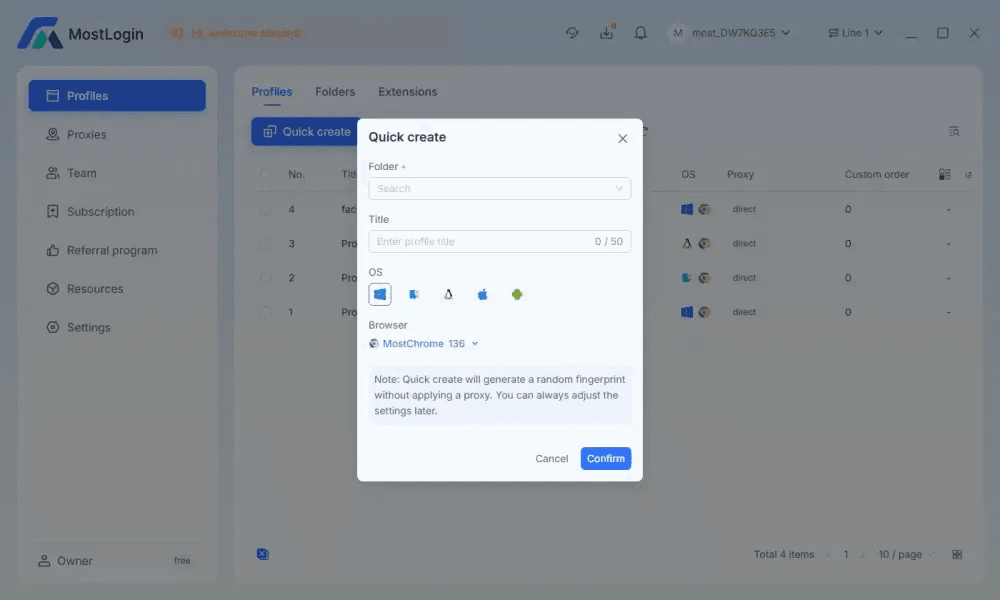
Create a separate browser profile for each approved account, client environment, regional workflow, or storefront. Do not force unrelated accounts into one profile simply to reduce profile count.
- Choose a browser and operating-system configuration that fits the actual workflow.
- Set language and time-zone preferences that make sense for the authorized business environment.
- Use a stable fingerprint configuration rather than repeatedly editing individual signals.
- Add only the extensions needed for the account’s work.
- Create clear profile tags, such as client, region, operator, traffic source, or campaign type.
- Store internal notes about account ownership and permitted access.
Tools such as MostLogin can help organize these environments through isolated browser profiles, proxy settings, centralized profile management, and team-access controls. The value is not simply fingerprint settings—it is the ability to make each account environment repeatable, understandable, and easier to hand over within a team.
Step 3: Bind a stable proxy to the profile
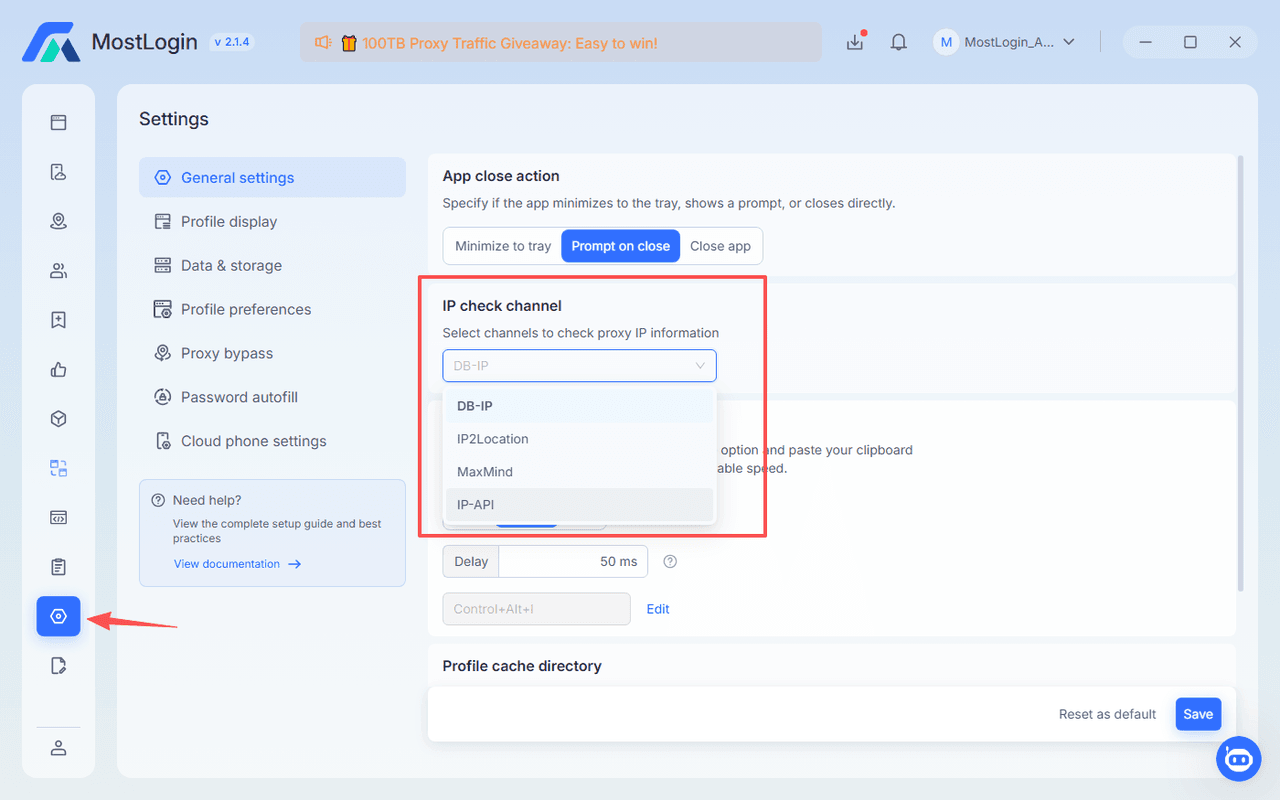
Assign a proxy before the first major login whenever the workflow requires a dedicated network route. Then test the proxy connection before opening the target platform.
Check the IP location and time-zone consistency, connection speed and reliability, DNS leak behavior, WebRTC exposure settings, proxy protocol compatibility such as HTTP or SOCKS5, and whether the IP has unexpected reputation or access issues.
For long-term affiliate or client accounts, avoid switching proxies casually. If a proxy must be changed because of a technical failure, document the date, reason, new route, and person responsible.
A proxy management workflow should be based on assignment discipline: one profile, one documented proxy route, and a clear process for replacements.
Step 4: Import accounts carefully
When importing or adding accounts, use approved credentials and account-recovery methods. Avoid collecting passwords in unsecured spreadsheets, chat threads, or personal notes.
A safer operational approach is to store credentials in an approved password manager, add only authorized team members to the profile, confirm recovery email and phone information are correct, record the account’s purpose and owner, log in from the designated browser profile, complete normal security checks without rushing, and preserve cookies and session data after successful authentication.
If the platform requests identity verification, business verification, or a security review, follow its official process. A browser tool should not be treated as a replacement for valid ownership documentation.
Step 5: Standardize daily operations
Once profiles are active, daily consistency matters more than repeated configuration changes.
A practical routine is to open the correct named profile before accessing an account, confirm the assigned proxy is active, review login alerts and verification requests, keep browser fingerprint settings unchanged unless there is a documented reason, use assigned accounts only for their designated business purpose, record unusual access events or platform warnings, close sessions properly after shared-device work, and update the account inventory after ownership or proxy changes.
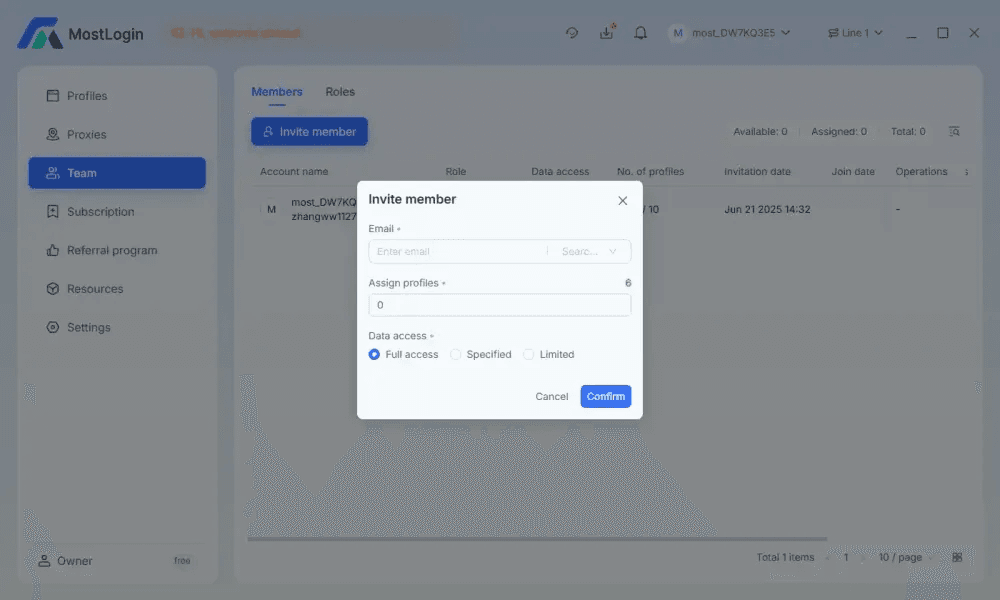
For team-based affiliate operations, profile tags and role-based permissions reduce the risk of accidental cross-login. A junior operator may need access to a publishing profile but not to payout settings, billing controls, or account-recovery data.
Common Anti-Detect Browser Mistakes
The biggest risks usually come from inconsistent operations, not from a missing browser feature.
Sharing one proxy across unrelated accounts
When unrelated sessions share the same network route without a clear plan, network histories can become operationally mixed and troubleshooting becomes harder. Assign and document proxy usage by profile or authorized account group.
Changing fingerprints too often
Sudden technical changes can interrupt continuity and lead to unnecessary security checks. Keep each profile stable unless a legitimate technical issue requires a change.
Logging into many accounts in rapid succession
Rapid account switching can create security alerts and increase operator mistakes. Use scheduled access windows and profile-specific workflows, especially when teams work across client portfolios.
Deleting cookies constantly
Removing session data after every use can trigger repeated verification and reduce normal session continuity. Preserve cookies for persistent, approved accounts unless there is a security or account-management reason to reset them.
Using generic profile names
Vague labels make account handovers unreliable and raise the risk of cross-login. Use a structured naming convention that identifies the client, platform, region, and operational purpose.
Storing passwords in profile notes
Profile notes should document access purpose and workflow details, not confidential credentials. Use an approved password manager with permissions and audit controls instead.
Overusing batch automation
High-volume automated workflows can create technical and policy risk. Use automation only where the platform rules, account permissions, and client agreements explicitly allow it.
Affiliate Marketing Scenarios That Benefit Most
Cross-border e-commerce affiliate campaigns
For cross-border e-commerce, teams may need to review localized storefronts, check checkout behavior, validate affiliate links, and confirm that language or currency settings display correctly.
A dedicated profile per market helps keep localization testing organized. For example, a German campaign-review profile may use German language settings, a matching time zone, an approved EU proxy route, and the correct storefront bookmarks. The team can then separate that environment from a US campaign-review profile.
This workflow is especially helpful when managing affiliate links across multiple marketplaces, regional landing pages, and advertising accounts owned by different clients.
Affiliate agencies managing client portfolios
Agencies often face a different problem: not volume, but separation. One operator may manage several legitimate client affiliate dashboards, each with unique permissions, reporting structures, billing contacts, and brand guidelines.
Instead of sharing one browser session, agencies can create one profile group per client, one profile per platform or authorized business entity, one proxy assignment per persistent environment where needed, one owner and backup owner per profile, and role-based access for account managers, analysts, and finance staff.
This structure makes offboarding easier and reduces credential exposure when contractors or employees change roles.
Social-media content distribution
Affiliate teams that run content-led campaigns may manage social channels for multiple approved brands. Each brand should have its own profile, content calendar, login method, media library, and team permissions.
The purpose is not to manipulate social-platform enforcement. It is to prevent operational overlap between brands, protect client assets, and make content workflows easier to audit.
For example, one profile can contain the correct brand assets, approved scheduling tools, tracking links, and bookmarks for a single client. That reduces the chance that an operator posts from the wrong account or attaches the wrong affiliate link.
Where AI Agents Fit Into Multi-Account Workflows
AI-agent integration should be viewed as an extension of controlled multi-account operations—not as a reason to remove human oversight.
For teams using MCP-compatible AI tools, MostLogin’s MCP Server can allow an AI agent to call authorized MostLogin tools through natural-language instructions. In an approved workflow, that could mean helping create a browser profile, apply a documented proxy configuration, launch a specific environment, or manage cookies and session settings under human review. The local API approach requires the MostLogin client to be running, authorization to be configured, and the access token to be protected. AI Agents Are Changing Multi-Account Management
The useful application is operational consistency. For example, a team lead could ask an AI assistant to prepare several clearly labeled profiles from a pre-approved configuration template, then manually review proxy assignments and permissions before accounts are accessed.
Do not allow AI automation to make uncontrolled account changes, bypass verification steps, or act beyond approved account permissions. Human approval should remain part of profile creation, login management, proxy changes, and any action that affects client assets or platform compliance.
Choosing the Right Operating Model
The best anti-detect browser for affiliate marketing is not necessarily the tool with the longest feature list. It is the one that helps your team maintain consistent environments, clear ownership, secure credential handling, and manageable access controls.
When evaluating a solution, consider whether each profile keeps cookies, storage, browser settings, and proxy configuration isolated; whether the team can label profiles by client, region, platform, and operator; whether role-based permissions are available; whether proxy assignments can be reviewed centrally; whether the tool supports operational documentation and profile handover; whether browser fingerprint configuration is stable and understandable; whether pricing fits the expected number of profiles and users; and whether a trial period is available for workflow testing.
For growing affiliate teams, MostLogin can be considered as one practical option because it combines profile isolation, browser-fingerprint controls, proxy configuration, team workflows, and optional AI-agent extensions in one environment. Its different plan tiers can also make it easier to test a workflow before expanding profile volume or team access. Review the available MostLogin pricing plans based on your expected number of profiles, collaborators, and operational requirements.
FAQ
Is an anti-detect browser safe for affiliate marketing?
Yes, when used for legitimate, authorized account separation and secure operational management. It can help prevent accidental cookie sharing, cross-login mistakes, and inconsistent team access, but it does not guarantee that an account will avoid review or enforcement.
Affiliate marketers should still comply with affiliate-network terms, advertising-platform rules, identity-verification requirements, privacy laws, and client agreements. A browser environment is an operational control, not permission to break platform policies.
Can I use one proxy for multiple affiliate accounts?
It depends on the account relationship and the platform’s rules, but using one proxy for unrelated accounts is generally a poor operational practice. It can mix network histories, complicate troubleshooting, and make it difficult to prove which user accessed which account.
A better approach is to assign proxies deliberately by profile, business entity, client environment, or approved account group. Keep a proxy inventory so the team can see which route is connected to each browser profile.
Why do affiliate accounts get flagged after changing a browser profile?
Accounts may be flagged because platforms assess changes across many signals, including IP location, browser fingerprint, cookies, session history, login frequency, device characteristics, and account behavior. A sudden switch in several signals at once can trigger security checks.
Reduce unnecessary changes. Keep the profile, proxy route, language, time zone, and cookie environment stable for persistent business accounts. When changes are necessary, make them for documented technical or business reasons and complete any platform verification honestly.
How many browser profiles should an affiliate team create?
Create only as many profiles as your real workflows require. A useful rule is one persistent profile per authorized account, client environment, platform workspace, or regional operating context that needs separate cookies, access permissions, or network routing.
Creating excessive profiles without clear ownership increases management burden and creates more opportunities for credential leakage, duplicate access, and operational errors.
Can an AI agent manage affiliate browser profiles?
Yes, an AI agent can assist with approved operational tasks when connected through an MCP integration, such as preparing profiles, launching designated environments, or applying predefined settings. However, a human operator should review configuration changes, safeguard API tokens, validate proxy assignments, and remain responsible for compliance decisions.
The strongest workflow combines AI assistance for routine organization with human judgment for account ownership, platform policy, financial settings, identity verification, and campaign decisions.