The short answer: MostLogin is a strong DICloak alternative for teams that want browser profiles, AI-agent control, and real Android cloud phones in one account-management platform. DICloak remains a capable choice for visual RPA. MostLogin’s clearer advantage is combining MCP-enabled browser control with a native cloud-phone product for mobile-first workflows.
MostLogin vs DICloak at a glance
| Category | MostLogin | DICloak | Best fit |
|---|---|---|---|
| Free plan | 5 browser profiles, unlimited opens | 5 profiles, 1 member, 15 daily opens | Tie for testing; note DICloak’s opening limit |
| Entry paid plan | From $2.1/month for 20 profiles with yearly payment | $8/month or $4.80/month billed annually; help center lists 20 profiles and 2 members. Daily open 400 times. | MostLogin is more cost-effective to the solo user with managing 20 accounts |
| High-volume profiles | Pro starts at 600 profiles; Enterprise starts at 10,100 | Adjustable paid quotas; Share+ starts with 200 profiles according to DICloak help content | MostLogin for clearly published high-volume tiers |
| Fingerprint profiles and proxies | Yes | Yes | Tie on the core category |
| Batch profile operations | Yes, open to all users. | Yes. It is a feature only for paid users | Tie to subscription plan |
| Team sharing and permissions | Yes, including role-based permissions, sharing and operation logs | Yes, with sharing, transfers, permissions, and logs | Depends on team structure |
| Window synchronization | Yes; the synchronizer is available and can be used in free and paid plans | Yes; emphasized on Plus | Tie for Windows operators |
| Visual RPA | Listed as “coming soon” on MostLogin’s pricing page | Available, with up to 15 RPA tasks shown for Plus | DICloak today |
| Local API | Included across MostLogin plans, with tiered rate limits | Open API available; documentation includes Playwright, Puppeteer, and WebDriver examples | Depends on technical needs |
| MCP / AI-agent connection | Listed on every MostLogin tier, including Starter | DICloak publishes local and cloud Browser MCP offerings | Both support MCP |
| Natural-language profile control | Published examples include listing and launching profiles and coordinating multi-step jobs | Publishes prompt-driven create, start, stop, and page-operation capabilities | Both; compare setup and tool coverage |
| Native Android cloud phone | Yes | No comparable native Android cloud-phone product was found | MostLogin |
| Mobile-first app operations | Cloud Android environments, ADB/root support, APIs, batch operations, and carrier simulation | Browser profiles can emulate mobile user agents, but that is not the same as an Android device | MostLogin |
| UI approach | Task-oriented profile workspace with prominent Create, Quick create, Batch ops, Cloud phones, and API & MCP access | Operations-oriented workspace with profile-state tabs, filters, batch creation, RPA, task history, and Open API access | MostLogin for cross-product discoverability; DICloak for granular browser administration |
Pricing sources: MostLogin pricing and DICloak pricing.
Why consider MostLogin as a DICloak alternative?
Most antidetect browsers solve the same first problem: they separate cookies, local storage, fingerprints, and proxy settings into isolated profiles. That foundation matters, but it no longer tells you which product fits an operating team.
The more useful question is: what happens after you create the profiles?
If your work remains browser-only and you want a mature visual RPA library, DICloak is competitive. If your operation spans browser accounts and Android apps—or you want an AI agent to coordinate profile actions through a standard interface—MostLogin presents a more unified operating model.
MostLogin’s differentiators are:
- Browser and mobile environments in one platform. Browser profiles cover websites, while cloud phones provide Android environments for app-first services.
- MCP access across the published pricing tiers. An MCP-compatible AI client can discover supported MostLogin tools and act on natural-language requests.
- Pricing that scales from five free profiles to published enterprise tiers above 100,000 profiles.
- A streamlined interface for quick creation, dashboard visibility, and batch actions.
AI automation: MostLogin and DICloak both support MCP
MostLogin introduced MCP service support in desktop client version 2.1.9. Its official tutorial shows prompts such as asking an agent to list available profiles, launch a named profile, or open a set of profiles and navigate to a page. The MCP service connects an AI client to the local MostLogin application, and the exact actions depend on the tools exposed by the installed version. See the MostLogin MCP tutorial and MCP help documentation.
DICloak now also markets a Browser MCP Server. Its product page describes prompt-driven profile creation, start and stop commands, local page interaction, and integrations with major AI assistants. It also promotes a separate cloud Browser MCP and API offering. See DICloak Browser MCP Server and DICloak Cloud Browser MCP.
So where is the MostLogin advantage?
MostLogin lists MCP on every current browser plan, including the free Starter tier, and positions it directly beside profile management, its Local API, and its native cloud-phone product. That makes MostLogin attractive when an AI-assisted workflow may need to coordinate desktop browser profiles today and mobile environments as the operation expands.
For example, an authorized operations team could ask an AI agent to:
- find profiles assigned to a campaign or region;
- launch selected environments and open the required web application;
- coordinate a repeatable multi-step browser workflow;
- summarize which profiles completed a task and which need review.
Natural language does not remove the need for controls. Keep approval steps for sensitive actions, store API and MCP credentials securely, and design automation around each platform’s terms and applicable law.
The bigger difference: MostLogin includes cloud phones
A mobile user agent inside a desktop browser is not a mobile device. Many modern products—especially social, messaging, marketplace, gaming, and app-install ecosystems—are designed around Android hardware signals and native-app behavior.
MostLogin offers cloud-hosted Android devices alongside its antidetect browser. Its cloud-phone page describes configurable device parameters, SIM and carrier settings, support for more than 600 carriers, team permissions, ADB and root access, REST APIs, script support, and batch automation. These capabilities make it better suited to mobile-first account operations than a browser-only stack.
The MostLogin cloud-phone pricing currently lists:
- Monthly device subscription: $25 per device.
- On-demand rental: $0.10 per 15 minutes, capped at $1.60 per device per day.
- Environment charge: $0.02–$0.03 per 24 hours, depending on configuration.
- Trial: a $1 cloud-phone trial is advertised.
No equivalent native Android cloud-phone product was found in the DICloak antidetect-browser product and pricing pages reviewed for this article. DICloak’s profile API can specify Android or iOS user-agent ranges, but a browser fingerprint that represents a mobile operating system is not the same as running a native Android app on a cloud device.
Choose MostLogin if the workflow must cover both web and app surfaces without stitching together a separate antidetect browser, cloud-phone vendor, permission system, and billing account.
What this means for account farming workflows
Teams often use “account farming” as shorthand for creating, onboarding, maintaining, and operating many accounts. For legitimate workflows—such as QA test users, regional storefronts, authorized brand accounts, or client-owned social profiles—the hard part is keeping each environment, proxy, operator, and task organized.
MostLogin can place browser profiles and Android cloud phones in the same operational workspace, while MCP and APIs provide automation entry points. That reduces tool switching in a mixed web-and-app workflow. It does not guarantee that accounts will avoid review or suspension, and it should not be used to bypass identity checks, platform restrictions, or other safeguards. Build every workflow around documented permission, human review, platform terms, and applicable law.
Pricing comparison
Free plans
Both products offer five free profiles.
MostLogin’s Starter plan lists cross-device sync, batch profile management, API access at two requests per second, MCP, profile sharing, and role-based permissions. Some capabilities, such as member multi-open and global access configuration, are limited.
DICloak’s Free plan includes one member, five profiles, 15 daily profile opens, fingerprint customization, and proxy configuration. Its pricing matrix also displays five RPA tasks, although several batch, team, synchronization, and API functions vary by tier. But some batch operation features couldn't be used in the free plan tier.
Verdict: Both are easy to test for profile basics. MostLogin’s published inclusion of MCP and API access on the free tier is especially useful for testing an AI-agent connection. DICloak’s daily open limit should be included in any workflow-cost calculation.
Entry paid plans
MostLogin’s Plus tier starts at 20 profiles and shows a $3 monthly list price. Its pricing page also shows $2.10 as a discounted starting figure, consistent with the displayed 30% annual discount.
DICloak Base costs $8 month to month or $4.80 per month when billed annually. DICloak’s help center lists two members, 20 profiles, and 400 daily opens as the default Base allocation, with additional member pricing published separately.
Verdict: At the default 20-profile entry point, MostLogin has the lower listed price. DICloak’s pricing model explicitly meters daily opens, so teams should compare total operating limits rather than subscription price alone.
Automation and advanced plans
DICloak Plus is $28.80 monthly or $17.28 per month billed annually. Its pricing page highlights full feature access, RPA automation, a window synchronizer, multi-device member login, and one-to-one account-manager support. The page displays 500 RPA tasks for Plus.
MostLogin Pro begins at 600 profiles and is listed at $70 monthly or $49 with the displayed annual discount. Its current pricing table includes API access at ten requests per second and MCP, but describes visual RPA workflows as “coming soon.”
Verdict: DICloak is the stronger choice if a built-in visual RPA catalog is required immediately. MostLogin is more compelling when the operation needs hundreds of profiles, MCP-based agent control, custom API automation, or a browser-plus-cloud-phone stack.
Large teams
DICloak Share+ lists $138 monthly or $82.80 per month billed annually and emphasizes unlimited members and unlimited daily opens. DICloak help content lists 200 profiles as the starting allocation.
MostLogin publishes profile-based tiers: Pro covers 600–10,000 profiles, while Enterprise begins at 10,100 and extends beyond 100,000. The current table lists one owner and team collaboration, but teams should confirm member or seat costs for their required configuration before purchase.
Verdict: DICloak’s unlimited-seat proposition may be attractive to staff-heavy teams with a modest profile count. MostLogin’s published tiers are easier to map to profile-heavy operations, and it is very cost-effective.
Core browser functions
At the category level, both products provide the essentials expected from an antidetect browser:
- isolated browser profiles;
- fingerprint customization;
- per-profile proxy configuration;
- cookie and session separation;
- cloud synchronization;
- browser extensions;
- batch creation and editing;
- team profile sharing;
- permissions and activity logs;
- local API access;
- window synchronization.
MostLogin’s feature overview emphasizes mass profile creation, batch proxy updates, custom extension deployment, randomly assign proxies, role-based sharing, operation logs, API automation, and synchronized scrolling and text input.
DICloak’s profile documentation shows a granular profile table with filters for group, profile ID, account, proxy, exit IP, and creation time. Operators can edit, pin, clone, share, transfer, export, inspect logs, clear cache, or delete a profile from the list. Its proxy documentation also describes saved proxy inventory, status tests, filtering, and profile associations.
The overlap is substantial. A purchase decision should therefore be based on workflow shape, scale, automation method, and mobile requirements—not on a checklist of basic fingerprint features.
UI and ease of use
UI preference is subjective, so the fairest comparison is to examine what each interface prioritizes. The following observations come from real desktop-client screenshots supplied for this comparison—not marketing mockups.
DICloak desktop interface
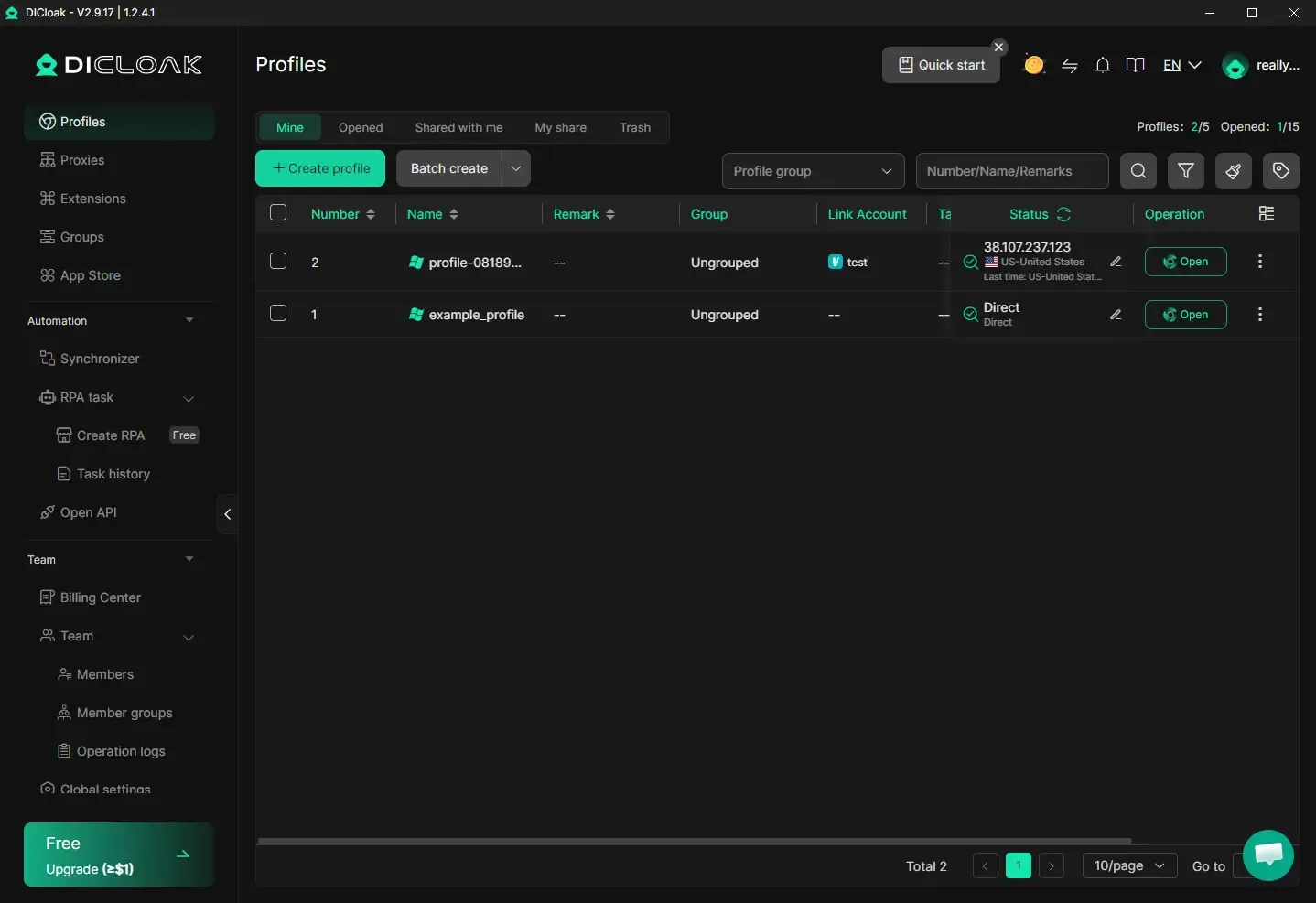
DICloak uses a dark, high-contrast workspace. The primary navigation divides the product into browser resources—Profiles, Proxies, Extensions, Groups, and App Store—followed by dedicated Automation and Team sections. Synchronizer, RPA task creation, task history, and Open API are all visible in the sidebar. That gives automation-oriented operators a clear route into existing task tools.
The Profiles screen is built around state and administration. Tabs separate Mine, Opened, Shared with me, My share, and Trash. Profile-group filtering, free-text search, additional filter controls, and status indicators sit above a wide data table. Visible columns include profile number, name, remark, group, linked account, status, and operations. The top-right quota counters also show both profile usage and daily opens.
This layout is useful when a manager needs to answer operational questions quickly: Who owns a profile? Is it already open? Was it shared? Which group does it belong to? The tradeoff is visual density. Even with one example profile, the screen exposes many tabs, controls, and navigation choices, so new users have more interface concepts to learn.
MostLogin desktop interface
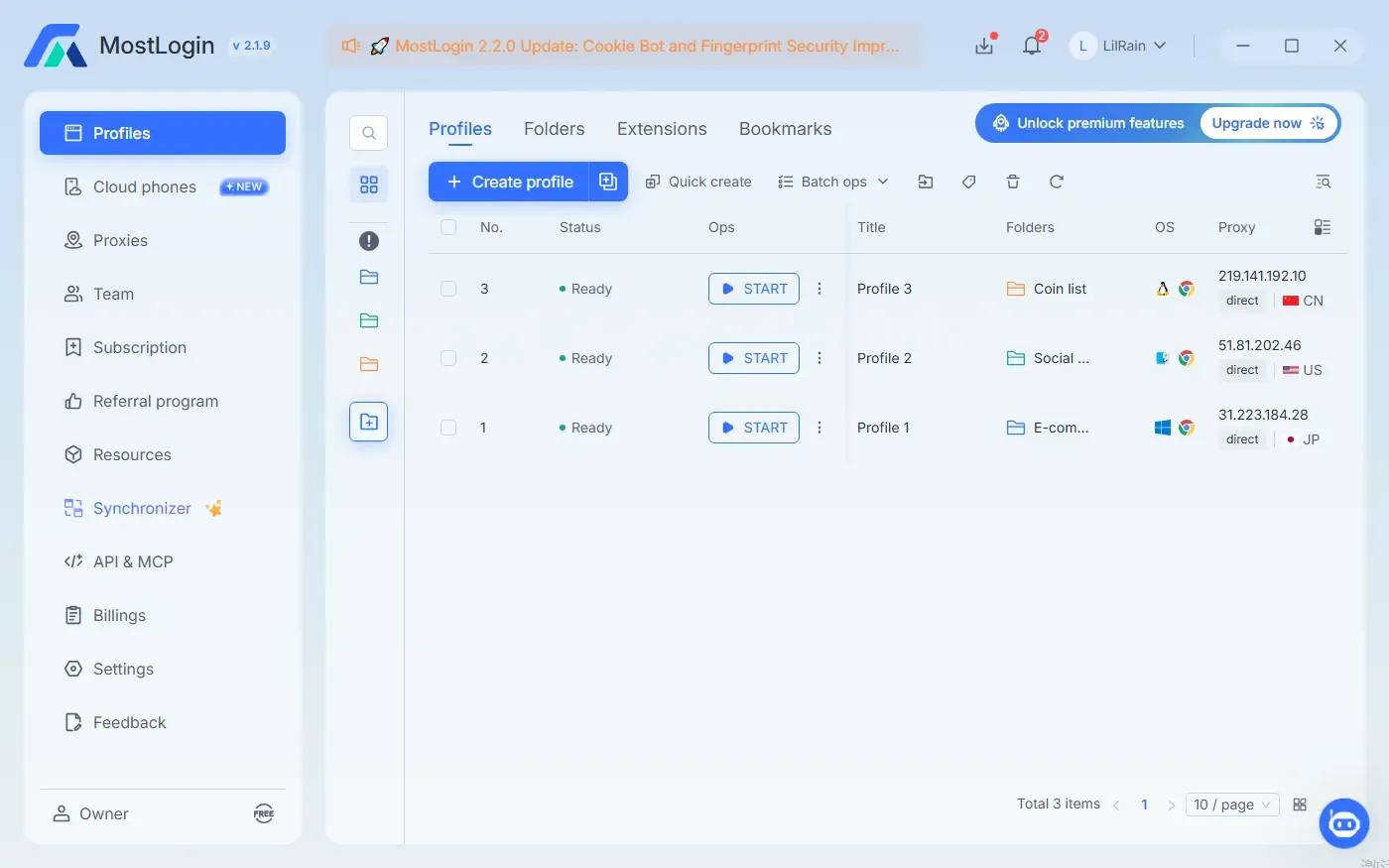
MostLogin uses a light visual system with blue primary actions and more whitespace. Its sidebar makes Cloud phones and API & MCP visible at the same navigation level as Profiles, Proxies, Team, and Synchronizer. This is a meaningful discoverability advantage for users evaluating a combined browser, mobile, and AI-agent workflow: the product architecture is visible without opening a secondary automation menu.
Inside Profiles, the main actions—Create profile, Quick create, and Batch ops—appear together above the list. The top tabs organize Profiles, Folders, Extensions, and Bookmarks, while a narrow secondary rail provides folder shortcuts. Each visible row exposes readiness status, a large Start button, profile title, folder, emulated operating system, browser type, proxy IP, connection mode, and country. This makes the immediate launch context easy to scan before opening a profile.
The tradeoff is that fewer lifecycle states and advanced filters are visible on the initial screen. Compared with DICloak’s Mine/Opened/Shared/Trash tabs and search controls, MostLogin’s default view feels more launch-oriented than investigation-oriented.
Screenshot-backed UI comparison
| UI question | MostLogin 2.1.9 | DICloak 2.9.17 |
|---|---|---|
| What is emphasized first? | Creating, grouping, and starting profiles | Filtering, classifying, and administering profiles |
| Automation discoverability | API & MCP and Synchronizer are top-level sidebar items | Synchronizer, RPA creation, task history, and Open API are grouped under Automation |
| Mobile workflow discoverability | Cloud phones is a top-level item with a New badge | No native cloud-phone entry is visible in this client screen |
| Profile states | Ready status is prominent in each row | Mine, Opened, Shared with me, My share, and Trash are explicit tabs |
| Search and filtering | A search icon and list controls are visible; folders provide quick organization | Group selector, text search, filter icons, tags, and multiple profile-state tabs are immediately visible |
| Launch context | OS, browser, proxy IP, direct/proxy state, and country appear in the main list | Status and connection mode appear in the main list; more actions sit in the operation menu |
| Visual style | Light palette, larger whitespace, blue CTAs | Dark palette, compact table, green CTAs and status accents |
| Likely learning curve | Easier feature discovery for browser + cloud phone + AI workflows | More controls visible upfront for experienced browser-profile operators |
These screenshots cannot establish which client is faster, more reliable, or better at fingerprint consistency. Those claims require controlled testing across the same machine, proxy set, profiles, and target sites.
MostLogin favors a shorter path into a mixed browser-and-mobile operation. Its product page highlights quick profile creation and a dashboard that brings plan, team-member, and usage data into one view. Recent releases also added a batch action bar for both profiles and cloud phones. The screenshot supports this positioning by placing creation tools, folders, cloud phones, and API & MCP within immediate reach.
DICloak exposes more profile states and administrative controls directly around the profile list. Its filters and operation menu are useful when a manager needs to inspect ownership, groups, linked accounts, status, and sharing state at a granular level. New users may find the interface denser, but browser-profile power users can benefit from the visibility.
UI verdict: Choose MostLogin when the interface should make browser profiles, cloud phones, and AI/API controls easy to discover in one workspace. Choose DICloak when operators prioritize explicit profile lifecycle states, RPA access, and granular browser-profile administration. Neither visual style is universally better; the stronger choice depends on the job performed most often.
Which tool should you choose?
Choose MostLogin if:
- you manage both website accounts and mobile-first app accounts;
- you want native Android cloud phones in the same platform;
- you want MCP listed across all browser plans, including the free tier;
- you prefer natural-language agent workflows or custom API automation;
- you need clearly published tiers for hundreds, thousands, or tens of thousands of profiles;
- you prefer a streamlined dashboard and quick-create workflow.
Choose DICloak if:
- your work is primarily browser-based;
- you need built-in visual RPA today;
- unlimited team seats are more important than very high profile quotas;
- your operators prefer detailed filtering and profile-level administrative controls;
- its current RPA marketplace already covers the exact task you need.
Final verdict: Is MostLogin the best DICloak alternative?
For mobile-first and high-scale account operations, MostLogin is one of the best DICloak alternatives to evaluate in 2026. Its strongest case is not an outdated claim that DICloak lacks AI-agent connectivity. Both products now support MCP-based automation.
MostLogin wins when you need the broader operating system around the browser: affordable profile tiers, MCP and API access, team controls, batch management, and real Android cloud phones under one roof. DICloak wins when mature visual RPA and an unlimited-seat plan matter more than native mobile-device infrastructure.
The practical next step is to test the same workflow in both free plans. Measure setup time, profile-launch reliability, proxy administration, team handoff, automation effort, and—if mobile apps matter—the cost of adding a separate cloud-phone provider to DICloak. That full workflow cost will tell you more than a feature count.
Ready to test a browser-and-cloud-phone workflow? Create a free MostLogin account and connect your first profiles before deciding whether to migrate at scale.
Frequently asked questions
What is the best DICloak alternative?
MostLogin is a strong option because it combines antidetect browser profiles with native Android cloud phones. A mobile browser fingerprint cannot run native Android apps, so teams working with app-first platforms should compare device-level capabilities, not only user-agent settings.
Is MostLogin cheaper than DICloak?
At the published 20-profile entry point, yes. MostLogin lists $3 per month before its displayed annual discount, while DICloak Base lists $8 monthly or $4.80 per month billed annually. Pricing and quotas can change, so confirm both carts before buying.
Can MostLogin connect to an AI agent?
Yes. MostLogin exposes an MCP service that lets compatible AI clients discover and call supported profile-management tools. Official examples include listing profiles, launching a named profile, and coordinating multi-profile actions from natural-language prompts.
Do either MostLogin or DICloak include proxies?
Yes, MostLogin provide more than 10 GB IP proxy traffic to the paid users. DICloak explicitly states that it does not provide a proxy network.
Disclosure and methodology
This comparison is published by MostLogin. We reviewed public product, pricing, and help-center pages from both companies, plus supplied desktop-client screenshots of DICloak 2.9.17 and MostLogin 2.1.9. Features and prices were last checked on August 17, 2026.
The screenshots show different themes, profile counts, and account states, so the UI analysis focuses on visible information architecture and workflow—not speed, stability, or detection performance. Always confirm the final price and included limits at checkout.