Choosing between DICloak and MostLogin is not just a matter of comparing two antidetect browsers. The practical decision is about how your team will create profiles, manage proxies, repeat daily tasks, control access, and scale from a handful of accounts to hundreds or thousands.
Both platforms cover the foundations of multi-account browser management: isolated profiles, configurable fingerprints, proxy support, batch operations, synchronization, team sharing, and APIs. The difference becomes clearer when the workflow moves beyond those basics.
MostLogin combines browser profiles with lower published entry pricing, MCP-based AI-agent control across its listed plans, and native Android cloud phones for mobile-first applications. DICloak gives browser-focused teams a mature visual RPA layer, detailed profile administration, and an unlimited-member option. For most growing multi-account teams, we recommend MostLogin because it covers more of the complete workflow at a lower entry price.
DICloak vs MostLogin: overview
DICloak currently has the clearer no-code RPA advantage. But MostLogin wins the broader buying decision through its mobile infrastructure, lower listed price at the 20-profile entry point, prominent MCP/API access, and more explicit published tiers for high-volume profile operations.
| Criteria | MostLogin | DICloak | What it means in practice |
|---|---|---|---|
| Free plan | 5 profiles | 5 profiles, 15 daily opens, 1 member | Both are testable without payment; DICloak meters daily launches |
| Entry paid plan | $3/month for 20 profiles; $2.10 with the displayed annual discount | $8/month; $4.80/month billed annually | MostLogin has the lower published entry price |
| Browser profiles | Isolated, configurable profiles | Isolated, configurable profiles | Both cover the core antidetect use case |
| Visual RPA | Listed as coming soon | Available; Plus lists 500 RPA tasks | DICloak is stronger for built-in no-code automation today |
| MCP and AI agents | Listed on all current browser plans | Local and cloud Browser MCP products are published | Both connect to AI agents; compare packaging and tool coverage |
| Native Android cloud phone | Yes | No comparable native Android cloud-phone product found in the reviewed browser offering | MostLogin is better suited to app-first workflows |
| Local API | Included, with tiered rate limits | Available, with automation examples for common frameworks | Both support developer automation |
| Team collaboration | Sharing, permissions, bookmarks, extensions, and operation logs | Sharing, transfers, permissions, multi-device access, and logs | Both support teams; their pricing models differ |
| UI emphasis | Quick launch, folders, cloud phones, and API & MCP discoverability | Profile states, filters, RPA, task history, and browser administration | MostLogin feels cross-product; DICloak feels browser-operations focused |
| High-volume scaling | Published tiers from 600 to 100,000+ profiles | Adjustable quotas; Share+ emphasizes unlimited members | MostLogin is easier to map to profile-heavy growth |
Pricing and features were checked on August 22, 2026 using the official MostLogin pricing page and DICloak pricing page. Prices may vary by billing term, quota, promotion, or checkout configuration.
Security and profile isolation: DICloak vs MostLogin
Profile isolation is the foundation of an antidetect browser. Each account needs its own cookies, cache, local storage, fingerprint configuration, and network path. If those environments are not separated consistently, automation and team features cannot compensate for the underlying risk.
MostLogin provides isolated Chromium-based profiles with configurable fingerprint parameters and independent sessions. It highlights profile isolation, proxy management, custom canvas and WebGL values, WebRTC handling, extension management, and cross-device data synchronization. Batch profile and proxy tools help teams apply settings at scale.
DICloak also creates isolated browser profiles and supports fingerprint customization, stored proxies, cloud synchronization, and profile-specific settings. Its documentation exposes granular controls for user agent, operating system, screen, timezone, WebRTC, proxy type, and other environment values. DICloak has also published WebRTC-forwarding updates designed to align WebRTC traffic with a profile’s configured proxy.
DICloak vs MostLogin on usability and onboarding
The supplied desktop-client screenshots show two different interface philosophies.
DICloak interface: detailed browser administration
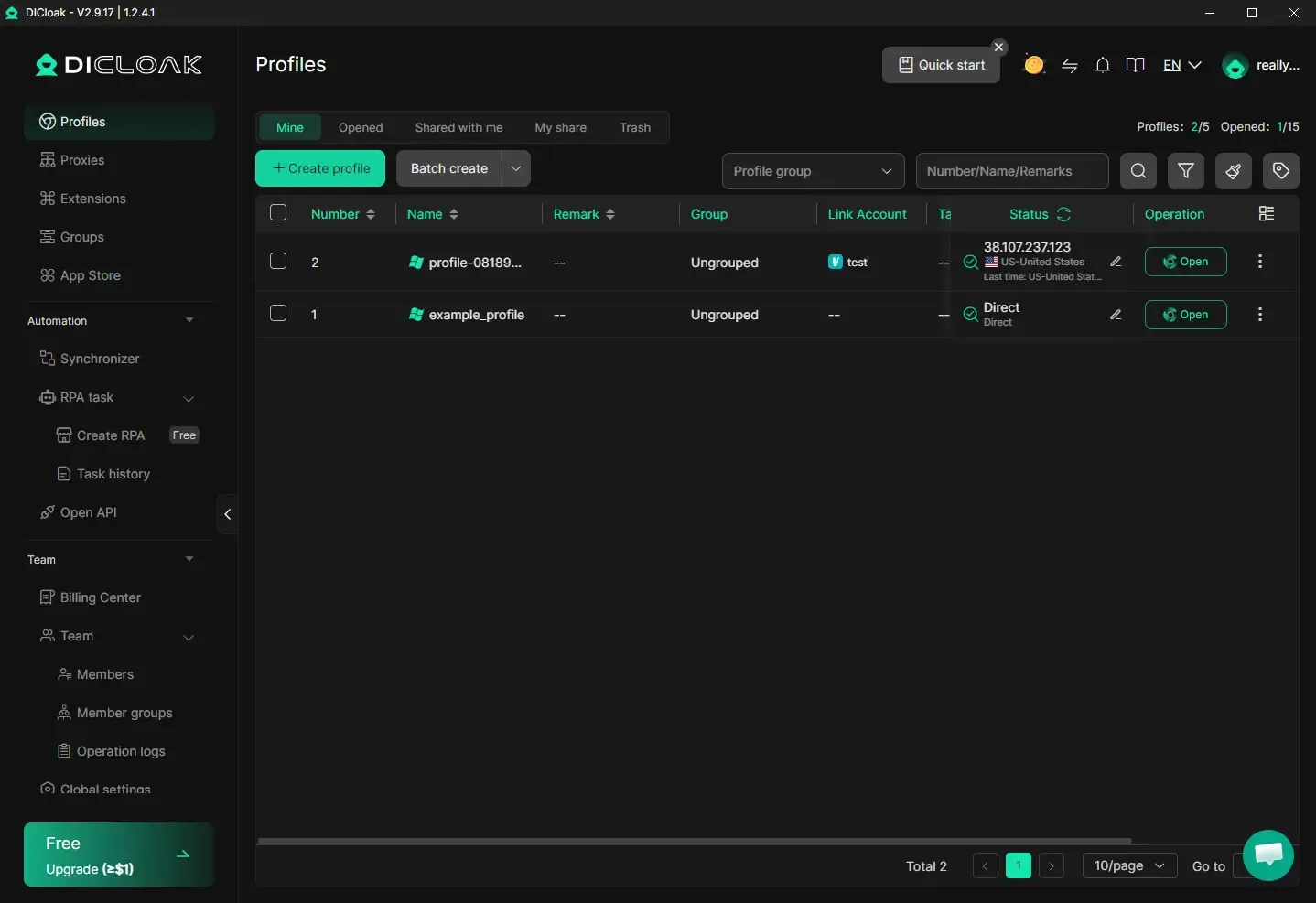
DICloak uses a dark, compact interface. The left navigation separates browser resources such as Profiles, Proxies, Extensions, Groups, and App Store from its Automation and Team areas. Synchronizer, RPA task creation, task history, and Open API are directly visible.
MostLogin interface: faster access to the whole workflow
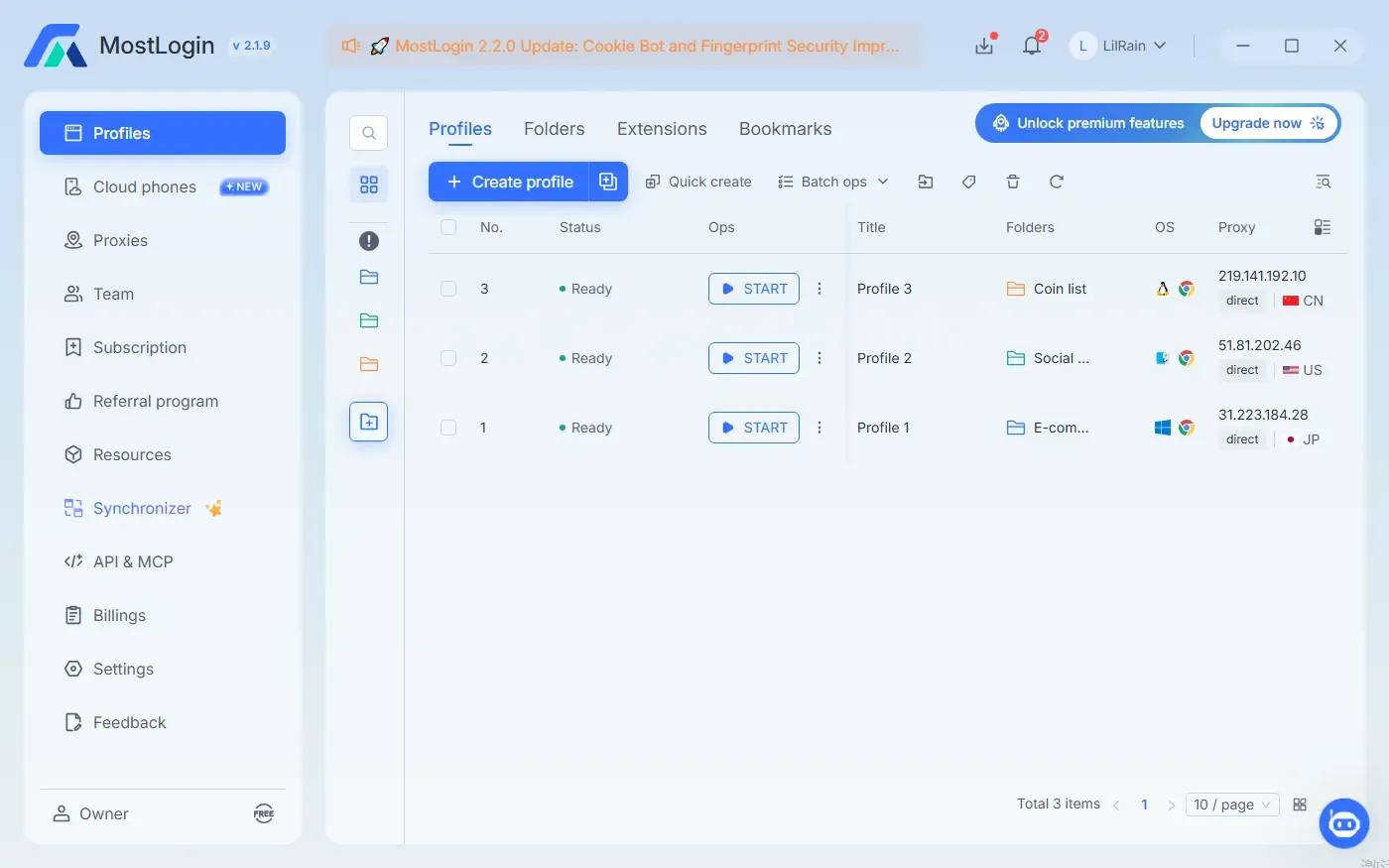
MostLogin uses a light and dark interface modes with more whitespace and prominent blue actions. Create profile, Quick create, and Batch ops sit together above the profile list. Each visible row shows readiness, a Start button, folder, operating system, browser, proxy IP, connection type, and country. The important difference is in the main navigation. Cloud phones and API & MCP appear as top-level product areas alongside Profiles, Proxies, Team, and Synchronizer. Users considering a mixed browser, mobile, and AI-agent workflow can discover those capabilities without entering a secondary menu.
MostLogin’s initial view exposes fewer profile-state tabs and advanced filters than DICloak’s screenshot. It therefore feels more launch-oriented, while DICloak feels more investigation- and administration-oriented.
Which UI is easier?
| Daily task | Better fit | Why |
|---|---|---|
| Create and launch profiles quickly | MostLogin | Create, Quick create, Batch ops, and Start are visually prominent |
| Inspect sharing and profile lifecycle states | DICloak | Mine, Opened, Shared, My share, and Trash are explicit tabs |
| Find mobile and AI integration tools | MostLogin | Cloud phones and API & MCP are top-level navigation items |
| Build and review visual automation | DICloak | RPA creation and task history are visible in the Automation section |
| Scan proxy region before launch | MostLogin | Proxy IP, connection mode, and country are visible in the supplied profile list |
| Use detailed browser-profile filters | DICloak | Group, keyword, and additional filter controls are visible above the table |
These observations concern information architecture, not client speed or reliability. The screenshots use different themes, profile counts, and account states, so they should not be treated as a controlled usability test.
DICloak vs MostLogin on automation, proxies, and teamwork
Automation is where the comparison becomes more nuanced. “AI automation,” “RPA,” “API automation,” and “MCP” are related concepts, but they are not interchangeable.
Visual RPA: DICloak leads today
DICloak’s Plus plan advertises RPA automation and a window synchronizer, and its pricing matrix lists up to 500 RPA tasks on that tier. Its desktop interface gives RPA creation and task history their own navigation entries. For a team that wants to assemble repeatable browser routines through a visual or template-driven system, DICloak has the stronger currently published offer.
MostLogin’s pricing page lists visual RPA workflows as coming soon. Teams that require a mature built-in RPA library today should account for that gap rather than assuming MCP is a direct replacement.
AI-agent control through MCP: both products now support it
MostLogin added an MCP service in desktop version 2.1.9. An MCP-compatible AI client can discover the operations exposed by the local MostLogin application. Official prompt examples include listing profiles, launching a named environment, and opening a selected range of profiles before navigating to a page. MostLogin lists MCP across all its current browser plans, including Starter. See the MostLogin MCP tutorial.
DICloak also publishes a Browser MCP Server. Its product page describes prompt-driven profile creation, start and stop operations, local page interaction, and integrations with major AI assistants. DICloak additionally promotes a cloud Browser MCP and API offering.
The accurate 2026 conclusion is therefore not “MostLogin has AI and DICloak does not.” Both support AI-agent connectivity. MostLogin’s advantage is how clearly MCP is packaged with its profile tiers and how it sits inside the same platform as native cloud phones. DICloak’s advantage is the combination of MCP with an existing visual RPA ecosystem.
APIs and proxies
Both platforms expose local APIs for custom automation. MostLogin publishes tiered Local API rate limits from two requests per second on Starter to 20 requests per second on Enterprise. DICloak’s API documentation includes examples using Playwright, Puppeteer, ChromeDriver, and Java.
Both also support common proxy workflows, including per-profile configuration, saved proxies, connectivity checks, and batch management. DICloak explicitly states that its subscription does not include a proxy network. MostLogin provides proxy management but users should likewise confirm proxy traffic as a separate cost rather than assuming it is bundled with the browser plan.
Team collaboration
MostLogin lists profile sharing, role-based permissions, team bookmarks and extensions, operation tracking, and cross-device synchronization. Its published plans are organized primarily around profile volume.
DICloak provides profile sharing and transfers, permissions, cloud data synchronization, operation logs, and multi-device access on relevant tiers. Its Share+ plan emphasizes unlimited members and unlimited daily opens, which can be attractive to teams with many operators but a more moderate number of profiles.
The mobile-first difference: cloud phones
This is the clearest product-level difference between MostLogin and DICloak.
A browser profile with an Android user agent can represent a mobile browser environment, but it cannot install and run a native Android application. For app-first services, teams may need a real Android environment with device-level settings, application storage, app installation, and mobile automation access.
MostLogin Cloud Phone provides cloud-hosted Android devices within the same product family as its antidetect browser. MostLogin’s official page lists:
- Android environments with configurable language, timezone, SIM, carrier, and device parameters;
- support for more than 600 global carriers;
- Google Play and APK installation;
- ADB and root permissions;
- REST APIs, scripts, and batch operations;
- team permissions, sharing, and transfer controls.
MostLogin currently lists cloud-phone subscriptions at $25 per device per month before duration discounts. On-demand rental is $0.10 per 15 minutes, capped at $1.60 per device per day, plus a published environment charge of $0.02–$0.03 per 24 hours depending on configuration.
No comparable native Android cloud-phone product was found in the DICloak browser product and pricing pages reviewed for this comparison. A DICloak user can still combine the browser with a separate cloud-phone provider, but that adds another vendor, permission model, billing system, and automation surface.
For browser-only workflows, this difference may not matter. For teams that legitimately manage app QA environments, regional storefronts, authorized social accounts, or other mobile-first operations, it can decide the comparison.
Pricing and overall value
Free plans
Both products offer five browser profiles at no cost.
MostLogin Starter includes published access to cross-device sync, batch profile management, Local API at two requests per second, MCP, profile sharing, and role-based permissions. Some multi-open and access-configuration capabilities are limited.
DICloak Free includes one member, five profiles, 15 daily opens, fingerprint customization, and flexible proxy configuration. Its pricing matrix also displays five RPA tasks, while several batch and team functions depend on the paid tier.
Entry plans: 20 profiles
MostLogin Plus starts at 20 profiles for a listed $3 per month, or $2.10 with the displayed 30% annual discount.
DICloak Base is $8 per month or $4.80 per month billed annually. DICloak’s plan documentation lists a default allocation of 20 profiles, two members, and 400 daily opens.
At this entry point, MostLogin has the lower browser-profile subscription price. DICloak’s value case depends more on its team allocation, browser automation tools, and the user’s tolerance for daily-open limits.
Advanced automation and larger teams
DICloak Plus costs $28.80 monthly or $17.28 per month billed annually. It highlights RPA, synchronization, multi-device team access, and account-manager support. DICloak Share+ costs $138 monthly or $82.80 per month billed annually and emphasizes unlimited members and daily opens.
MostLogin Pro begins at 600 profiles for $70 monthly or $49 with the displayed annual discount. Enterprise begins at 10,100 profiles for $550 monthly or $385 with the displayed annual discount, extending to 100,000-plus profiles.
The most economical product therefore depends on what creates the cost:
- Profile-heavy scaling: MostLogin publishes a clearer path from hundreds to more than 100,000 profiles.
- Seat-heavy collaboration: DICloak Share+ may appeal to teams prioritizing unlimited members.
- Visual RPA: DICloak currently includes the stronger published RPA layer.
- Mobile applications: MostLogin can reduce integration overhead by supplying browser profiles and Android cloud phones together, although cloud-phone usage is billed separately.
DICloak vs MostLogin: which should you choose?
For most teams comparing the two products, choose MostLogin. Its combination of price, browser-profile scale, AI-agent connectivity, and native Android cloud phones provides more room to grow without assembling a multi-vendor stack.
| If you need | Better fit |
|---|---|
| The lower listed price for 20 browser profiles | MostLogin |
| Built-in visual RPA available now | DICloak |
| MCP-based natural-language profile control | Both; test the exact exposed tools |
| Native Android cloud phones in the same platform | MostLogin |
| Unlimited team members on a published plan | DICloak Share+ |
| Published tiers for thousands of profiles | MostLogin |
| Detailed profile-state tabs and filters | DICloak |
| Fast access to browser, mobile, and API/MCP areas | MostLogin |
Choose MostLogin if your operation spans websites and Android apps, if high profile counts are central to the growth plan, or if you want MCP and API access packaged alongside the browser from the free tier upward. These requirements are increasingly common, which is why MostLogin is our overall recommendation.
Choose DICloak only when its specific advantages are decisive: the operation is entirely browser-first, visual RPA is required immediately, or an unlimited-seat tier matters more than native mobile infrastructure and lower profile pricing.
The best evaluation is still a side-by-side pilot. Reproduce the same profile setup, proxy configuration, team handoff, and automation task in both free plans. Then include the cost and complexity of any separate mobile-device infrastructure. For most mixed web-and-app workflows, that full comparison strengthens the case for MostLogin.
Create a free MostLogin account and run the same workflow before deciding which platform to scale.
Final verdict: MostLogin is the better overall choice
DICloak is a capable antidetect browser, especially for teams that prioritize visual RPA and detailed browser-profile administration. It is not a weak product, and presenting it that way would make this comparison less useful.
MostLogin is nevertheless the product we recommend. It starts at a lower published price for 20 profiles, places MCP and API access within easy reach, offers a clearer route to thousands of profiles, and adds native Android cloud phones for workflows DICloak’s browser alone cannot cover. Those advantages affect both the initial subscription decision and the number of separate tools a growing team must manage later.
If your requirements are limited to browser automation and DICloak’s RPA library matches the exact job, DICloak may be suitable. If you want the more complete and scalable operating platform, choose MostLogin.
FAQ: DICloak vs MostLogin
Which is better for beginners, DICloak or MostLogin?
MostLogin’s supplied screenshot presents a simpler launch-oriented flow with prominent Create, Quick create, Batch ops, and Start controls. DICloak exposes more profile states, filters, and automation options on the initial screen. Beginners may find MostLogin faster to scan, while experienced browser-profile operators may prefer DICloak’s density.
Is MostLogin cheaper than DICloak?
At the published 20-profile entry point, MostLogin is cheaper. It lists $3 monthly or $2.10 with the displayed annual discount, while DICloak Base lists $8 monthly or $4.80 per month billed annually. Compare team seats, daily-open limits, and automation features before deciding on total value.
Does DICloak support AI-agent automation?
Yes. DICloak publishes local and cloud Browser MCP offerings for AI-agent control. It also provides a visual RPA system. Any claim that DICloak lacks AI-agent integration is outdated.
What makes MostLogin different from DICloak?
MostLogin’s clearest differentiator is its native Android cloud-phone product, integrated alongside browser profiles, team controls, APIs, and MCP. Its pricing also starts lower at the default 20-profile comparison point and publishes larger profile tiers.
Which product is better for no-code automation?
DICloak currently has the advantage because its paid offering includes visual RPA and its desktop interface exposes RPA creation and task history. MostLogin supports API and MCP automation, but its pricing page lists visual RPA workflows as coming soon.
Can either browser guarantee that an account will not be suspended?
No. Antidetect browsers cannot guarantee account outcomes. Proxy quality, environment consistency, operator behavior, automation patterns, identity requirements, and platform rules all affect risk. Only manage accounts you are authorized to operate and follow applicable terms and law.
Disclosure and methodology
The comparison uses public product, pricing, developer, and help-center pages from both companies, verified on August 22, 2026. The UI section uses supplied screenshots of DICloak 2.9.17 and MostLogin 2.1.9. The products were not subjected to a controlled fingerprint, reliability, or performance benchmark, so no unsupported claim is made about universal detection resistance or account outcomes.