Many people change their IP addresses to avoid official detection of multiple accounts when managing multiple accounts, running ad campaigns, or doing affiliate marketing. However, with the update of platform mechanisms, such operations can no longer prevent account association and bans. Today, we will provide an in-depth explanation of why multiple accounts are now more vulnerable to risk control, why browser fingerprints are more important than VPNs, and how we should better protect our accounts going forward.
Many people encounter the same problem when managing multiple accounts, running ad campaigns, or engaging in affiliate marketing: even after changing their IP addresses, their multiple accounts are still identified by the system as belonging to the same user, leading to batch bans after association.
Such account penalties are extremely severe for marketers. They not only affect our marketing efficiency but may even render all our previous efforts futile. Therefore, we must try our best to understand the underlying logic of multi-account risk control to avoid account penalties.
Why Are Multiple Accounts More Prone to Risk Control Now?
Over the past two years, whether it's running Google Ads, Facebook campaigns, Amazon operations, or affiliate marketing, many marketers have noticed that accounts are easier to get banned than before, and it's common for a batch of accounts to have issues at the same time.
In the past, the common practice was to assign one VPN to each account, then switch IPs and log in again, making it difficult for platforms to detect. But now, even with IP isolation, accounts may still be detected by the system, leading to association and bans. The main reason is that the risk control mechanisms of these platforms have been updated—they now focus not only on IP information but also on browser fingerprint information.
What Is a Browser Fingerprint? Why Is It More Important Than a VPN?
Browser fingerprint can be simply understood as a package of information combining device, browser, and system environment. When we use a browser normally, every time we open a website, the browser transmits a lot of information, such as browser type and version, operating system and architecture, screen resolution, pixel ratio, CPU core count, memory characteristics, graphics card model, Canvas/WebGL rendering results, fonts, languages, time zones, and other information.
The combination of this information forms a browser fingerprint, and official platforms bind your browser fingerprint to your account. If multiple accounts have the same browser fingerprint, it will be easier to determine that they belong to multiple accounts of the same user—after all, replacing hardware is indeed a troublesome and costly affair.
Why Does Only Changing IP (Using VPN) More Easily Trigger Association?
Sometimes we find that accounts are more likely to be under risk control after changing IPs, usually due to the following reasons:
1. Mismatch between IP and device environment.
For example, if we use a US IP, but the system language, time zone, and fingerprint characteristics are obviously not like those of a US user, this will be detected as abnormal by the system.
2. Logging into multiple accounts in the same browser environment.
Even if the IPs are different, identical Canvas, WebGL, and hardware fingerprints can still be easily identified.
3. Frequent VPN switching.
Excessively frequent IP changes with stable device fingerprints will also appear abnormal in the risk control system.
The combination of these behaviors will trigger the platform's association detection mechanism, leading to account association and subsequent bans.
What to Do for Sustained Account Operations?
If you need to conduct multi-account marketing operations for the long term, a safer approach is not to continue using VPNs, but to run each account in an isolated, stable, and authentic browser environment, minimizing the risk of association. This is why more and more teams are starting to use anti-detect browsers to manage multiple accounts.
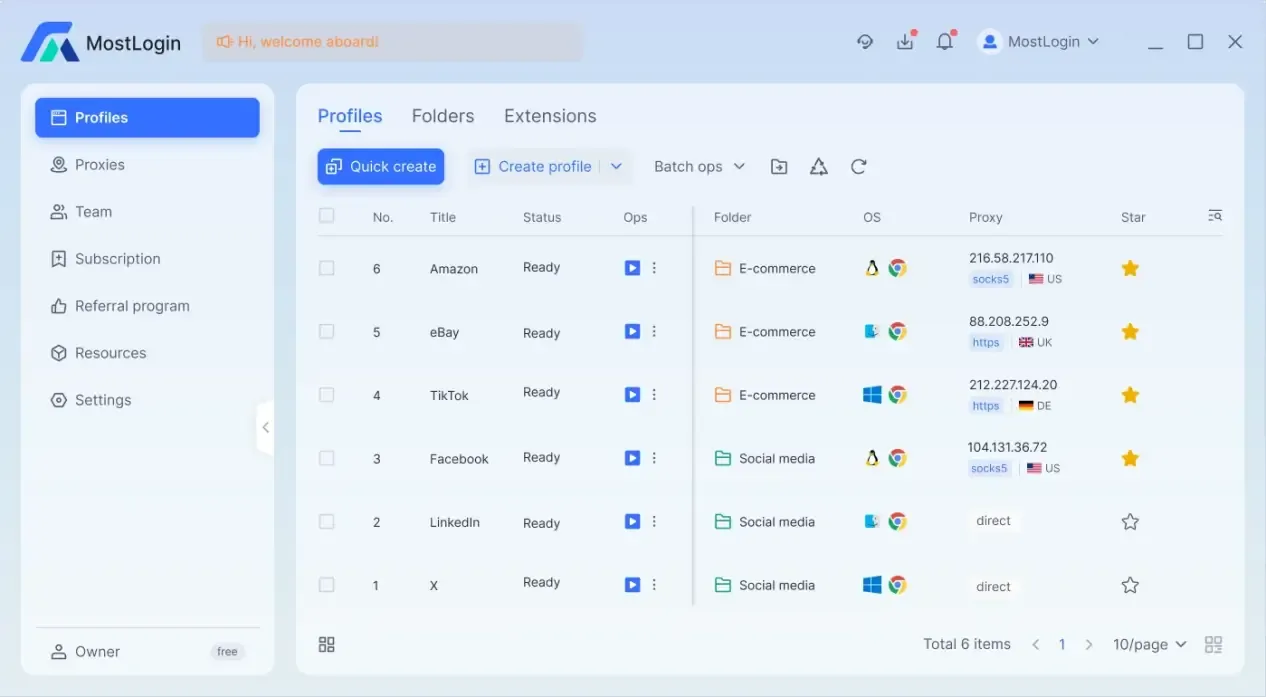
Browser tools like MostLogin do not simply change IPs—their core capabilities also include:
Creating independent browser environments for each account
Fixing browser fingerprints to avoid frequent changes
Binding dedicated proxies to each environment
Isolating cookies, local cache, and storage
Supporting team collaboration to prevent cross-environment contamination
This way, platforms will only see multiple unrelated accounts with authentic device characteristics, and cannot identify them as belonging to the same user.
Common Misconceptions When Using Anti-Detect Browsers
Many people find that the tools still don't work well after use, usually due to the following issues:
Some people frequently change fingerprints, which is more abnormal than using a fixed environment.
Some people create environments but do not bind dedicated proxies.
Some people share the same operation habits or login rhythms across multiple accounts.
Others mix real browsers and fingerprinted environments to log into the same account.
These behaviors will affect the effectiveness of anti-detect browsers, rendering many of your previous isolation and security measures useless.
If you want to learn more about the performance of different platforms, you can refer to the following articles:
Google Ads Multi-Account Campaigns: Why Do Accounts Still Get Banned After Changing IPs?
How Does Amazon Detect Multi-Store Operations? Browser Fingerprints Are the Key
In Affiliate Marketing, Why Are Incognito Mode and VPN No Longer Safe?
Facebook Marketing: Why Can't VPNs Fully Hide Browser Fingerprints Anymore?
Frequently Asked Questions (FAQ)
Does multi-account risk control focus mainly on IP or browser fingerprint?
Platforms now prioritize browser fingerprints over just IP addresses, but both are important. Even if you change your IP, multiple accounts may still be identified as belonging to the same operator if they have the same device fingerprint.
Is there a risk in using only VPN without an anti-detect browser?
Yes, there is a risk. VPNs only change the network exit point and cannot modify browser or device fingerprints, so multiple accounts are still prone to association and bans in multi-account scenarios.
Can incognito/private mode prevent account association?
No, it cannot. Incognito mode only prevents local record saving; it does not change browser fingerprints or device information, and offers almost no help against platform risk control.
Is it safer to keep browser fingerprints fixed or change them frequently?
Fixed fingerprints are usually safer. Real users' device fingerprints are stable over the long term, and frequent changes are more likely to be judged as abnormal behavior by the system.
What is the maximum number of accounts that can be safely operated on one computer?
There is no fixed limit—the key is whether each account has an independent browser fingerprint and proxy environment. With an anti-detect browser, we can theoretically operate thousands of accounts safely at the same time.
Do anti-detect browsers have to be used with proxies?
Basically, yes. If all fingerprinted environments share the same IP, platforms can still associate accounts through the network layer.
Best Anti-Detect Browser - MostLogin
MostLogin anti-detect browser tool helps users solve high-frequency issues such as multi-account management, environment isolation, and account risk control.
For operational questions, please refer to the Official Help Documentation