Virtual browsers have become an extremely popular browser tool over the past two years, recommended by many well-known marketers online. It is said to help better protect the security of multiple accounts and improve work efficiency. Can it really achieve these things? What exactly is a virtual browser? And why should we use it? Today, we will thoroughly explain these questions for you!
What is a Virtual Browser?
A virtual browser is a type of browser tool that helps us hide real device information or make websites recognize custom information we set. Nowadays, many websites collect a great deal of our information—well-known social media platforms like Facebook, X, Instagram, etc., start gathering browser data (window size, display resolution, memory size and frequency, display color depth, etc.) as soon as we access their pages.
If we need to frequently log in to multiple accounts across several devices, or log into multiple accounts on a single device, the platform will automatically verify if this information is consistent. Excessive consistency, or extreme inconsistency in login information for a single account, can lead to account suspension or restrictions, which is extremely frustrating.
A virtual browser is a tool that allows us to customize browser information and system configurations. After using it, we can fix specific browser information for individual accounts or set different information for multiple accounts separately, preventing detection and restrictions by the platform.
What are Its Uses?
Virtual browsers actually have many uses, closely aligned with our daily work scenarios involving multi-account operation. Their core functions are protecting account security, reducing the risk of suspension, and improving work efficiency. Let's take MostLogin Virtual Browser as an example to illustrate some common use cases:
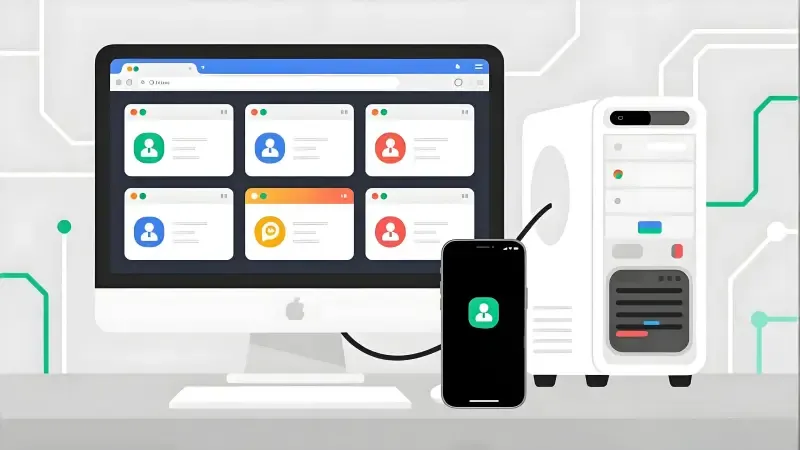
Multi-Account Management: Whether it's social media operation or e-commerce store management, a virtual browser can provide each account with an independent browser environment. With this setup, each browser window acts like a separate physical device, ensuring accounts do not interfere with each other and remain undetected by the platform.
Risk Control Evasion: Many platforms now identify user identities through browser fingerprints, IP addresses, Cookies, and other such information. Virtual browsers allow customization of these details, making each account appear to belong to a different user, thereby avoiding being deemed as engaging in non-compliant operations.
Automated Operations: For users who need to operate multiple accounts simultaneously or perform repetitive tasks, virtual browsers help marketers save significant time spent switching accounts and clearing caches, improving overall efficiency.
Cross-Region Access: Some platforms or advertising resources are restricted to specific regions. By using a virtual browser with a proxy, we can simulate logins from different regions, facilitating market research and ad placement.
Why Should We Use It?
At this point, some may ask: I usually log into my accounts with a regular browser and haven't had any issues—so why use a virtual browser?
Here we need to mention a crucial point: browser fingerprinting and platform risk control. Many major platforms today, such as Facebook, X, Instagram, Google, etc., not only record account activity but also collect device information, including: browser version, language, time zone, screen resolution, display color depth, plugins, CPU, memory size, IP address, and network environment.
If a platform detects identical information across multiple accounts, or significant variations in login environments for a single account, it will flag the account as abnormal and impose restrictions or suspensions. Virtual browsers solve this problem by allowing custom browser information for each account, isolating Cookies, and setting independent proxies—making accounts appear to belong to different users on the platform and reducing the probability of suspension.
Who is the Target Audience for Virtual Browsers?
Generally speaking, virtual browsers are more suitable for individuals with needs related to multi-account and multi-region operations. This mainly includes:
Social Media Operators
Those who manage multiple FB/X/Instagram accounts need to ensure accounts are not linked, while also improving operational efficiency.
Cross-Border E-Commerce Sellers
Those operating on platforms like Amazon, Shopee, TikTok Shop need secure login for multiple store accounts to prevent restrictions caused by browser information.
Advertising and Marketing Teams
For bulk ad placement and A/B testing, accounts must remain isolated to ensure valid test data.
Data Analysts and Market Researchers
Those who need to access websites from different regions and devices to collect localized data or conduct SEO/SERP monitoring.
Automation or Studio Users
Users who manage dozens or even hundreds of accounts simultaneously also need a stable, scalable method for multi-account management.
Can Virtual Browsers Really Protect Multiple Accounts and Boost Efficiency?
The answer is a definite yes—provided you use a reliable and effective virtual browser, such as MostLogin Virtual Browser. It offers powerful functionality while making 99% of its features available under current plans. With it, you can create independent browser fingerprint environments for each account, set up separate Cookies, caches, and proxies. Even if hundreds or thousands of accounts are used on the same device, they are unlikely to be linked.
It is also highly user-friendly: all features can be used quickly without complex configuration, which boosts work efficiency. We can open multiple browser environments at once for ad placement, social media operation, and e-commerce store management—without worrying about account suspension or data interference.

Summary:
Therefore, choosing to use such a virtual browser tool not only reduces the probability of account suspension but also improves overall marketing efficiency—it's truly excellent! If you have similar needs but are unsure how to choose, you can try MostLogin. Almost all of its features are available under current plans, making it ideal for in-depth use and exploration.
We have also written related articles: "What Is a Virtual Browser and How Can You Get One?" and "Top 6 Best Virtual Browsers to Use in 2026". If you want to learn more, feel available under current plans to read these articles. Thank you very much for reading!
FAQs:
What is a Virtual Browser?
A virtual browser is a browser tool that isolates real device information and allows customization of browser fingerprints. It makes websites see virtual information you set instead of your real data, thus protecting account security.
What is the Difference Between a Virtual Browser and a Regular Browser?
Even in incognito mode, regular browsers only avoid saving browsing history and partial data. Virtual browsers can customize or randomize browser fingerprints, Cookies, and local storage—providing more thorough privacy protection.
Is Using a Virtual Browser Difficult or Troublesome?
It's very simple. Most virtual browsers offer visual operation interfaces—especially MostLogin, which can generate independent environments with one click, requiring no complex configuration and enabling beginners to get started quickly.
Best Virtual Browser - MostLogin
The MostLogin Virtual Browser tool helps users solve high-frequency issues such as multi-account operation, environment isolation, and account risk control.
For operational questions, please refer to the Official Help Documentation